
A partner directory works in multiple directions at once. It captures buyer demand, gives partners a reason to stay, and signals channel health to prospects. Most fail because they’re static logo walls with no filters, no contact path, and no attribution. This guide covers how to build one that produces pipeline instead, from scoping your data and letting partners maintain their own listings to publishing a live public page, capturing attributed leads, and testing the full path end-to-end.
Channel partners account for roughly 75% of B2B revenue. That revenue passes through partners every day, and buyers who want help finding the right one are already searching for vendor partner pages by name. If you sell through partners, you probably have a page listing them. But is that page capturing demand and turning it into attributed pipeline? Or is it just sitting live, doing nothing?
The partner program isn’t what determines the outcome. The setup of the directory page does. A well-built directory turns a wall of logos into partner data that captures buyer demand, attributes every lead to the right partner, and feeds pipeline back into your CRM. A poorly built one just sits there.
This guide covers how to build a partner directory that does the first thing, not the second. Whether starting from scratch or rebuilding an existing partner directory page, the steps cover everything from scoping and data quality to publishing and lead capture.
Buyers are already searching for partner directories
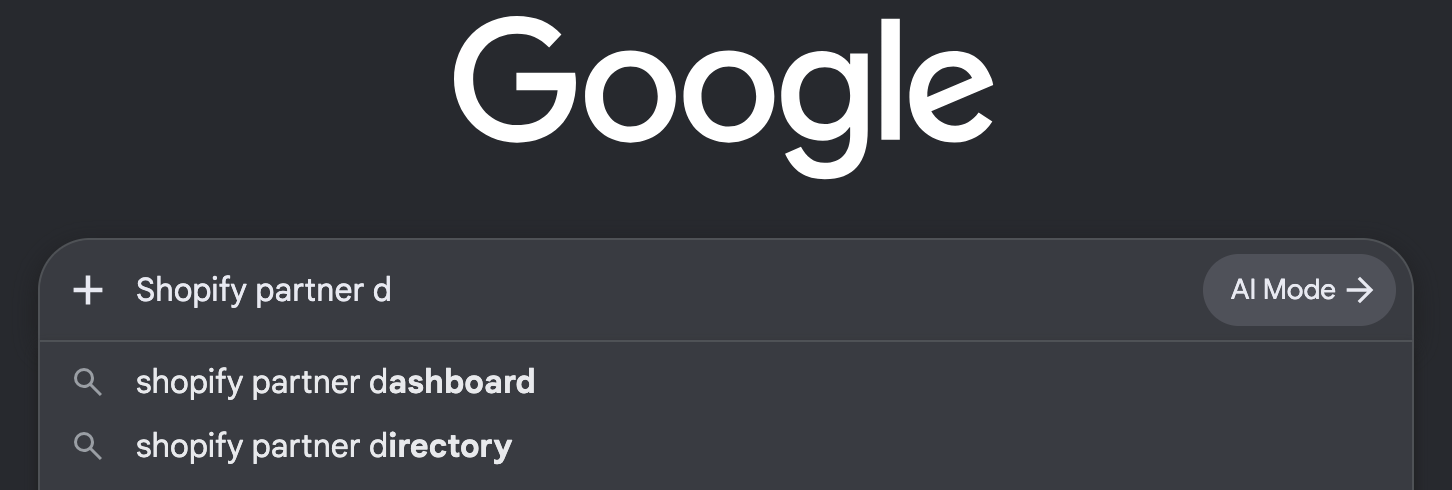
Buyers don’t generally search for a partner finder or partner locator. They search for a specific vendor’s directory by name. Shopify’s partner directory receives around 1,000 US searches, Cisco 880, and HubSpot 590. That means someone typing “Shopify partner directory” has already decided on a platform and is now looking for someone to help them use it. Type in “Shopify partner d-” and the second autofill suggestion is “directory.”
That intent is valuable. Agencies and implementation partners bid on these branded directory terms in paid search because the customers behind those clicks are close to purchasing. If partners are willing to pay for visibility alongside these listings, that should tell you how much commercial weight those listings carry themselves.
If your vendor directory is a list of logos with no filtering, no contact path, and no way to narrow by specialization or region, you’re wasting that demand. And because partners want to be listed, the page also gives you leverage. That leverage comes from the fact that a partner directory works in three directions at once, and it’s one of the highest-ROI pieces of a channel partner marketing strategy:
- It captures buyer demand that already exists.
- It gives partners a reason to stay in the program, because being listed means being findable.
- It signals to prospective partners that the vendor has a channel worth joining.

Why most partner directories produce nothing
Despite the clear benefits, many partner directories produce nothing. There are a few common reasons:
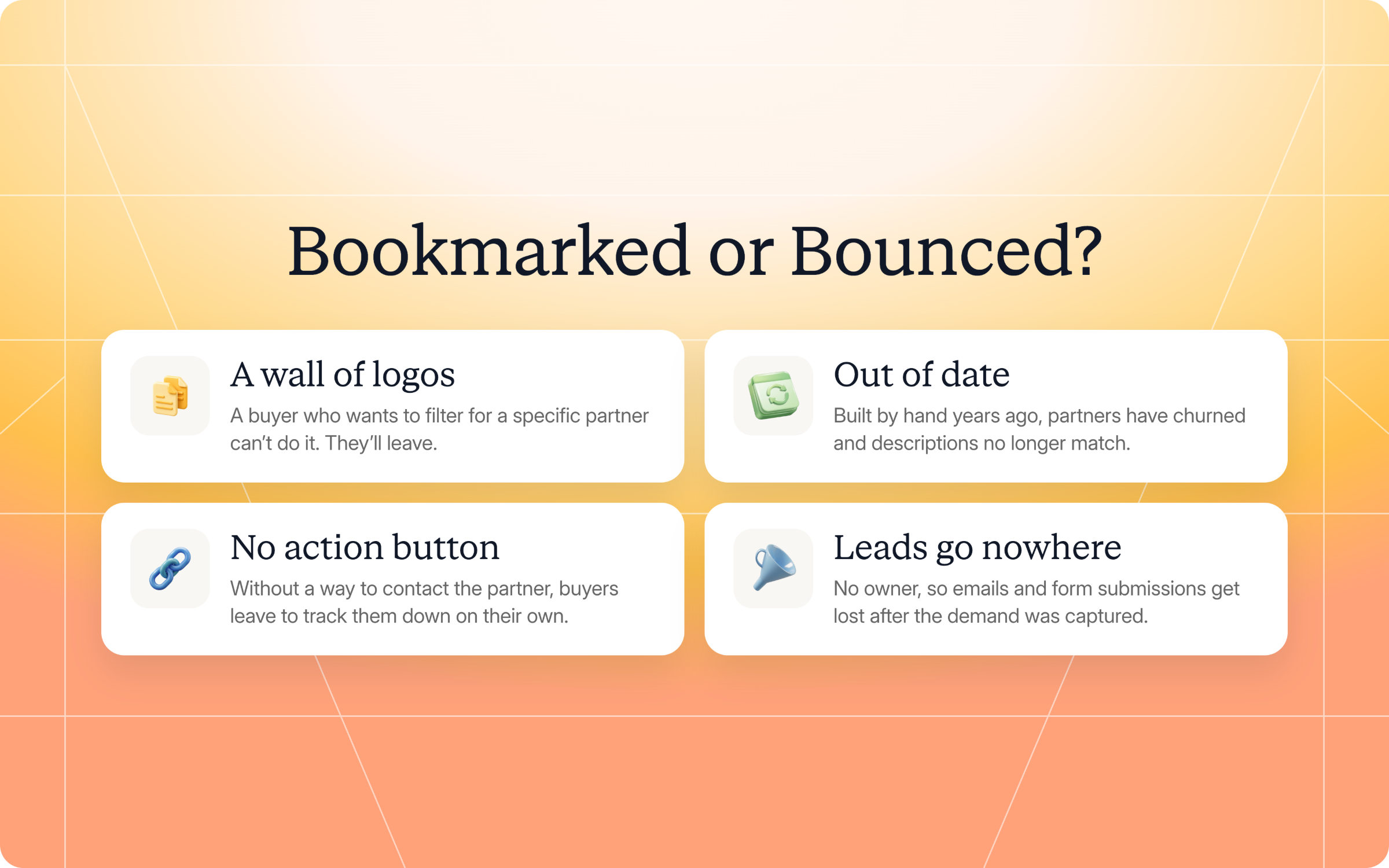
- It’s a wall of logos: A buyer who wants to filter for a specific partner can’t do it. They’ll leave.
- It’s out of date: If you built your partner directory by hand years ago, partners have likely churned and descriptions no longer match.
- It doesn’t have an action button: If a buyer lands on a partner's listing, they should be able to contact that partner directly. Without that option, they have to leave the site and track the partner down on their own.
- Leads go nowhere: If you’re not taking your partner directory seriously, there’s probably not an owner. That means any emails or contact form submissions get lost, even though you did initially capture the demand.
Do you want your page to get bookmarked or bounced?
The two shapes a partner directory can take
An in-portal directory and a public directory are different things. You should run both, because they serve very different purposes.
| In-portal directory | Public directory | |
|---|---|---|
| Who sees it | Logged-in partners and your internal team | Anyone, including prospective buyers and partners |
| Main job | Let each partner see and maintain their own listing | Help buyers find and contact the right partner |
| Lives where | A section inside the partner portal experience | A page on your own website, rendered from the partners API |
| Content source | The partner record, edited by the partner through a form | The same partner records, served through the API |
| SEO value | None, it’s behind a login | This is the page people search for by name |
| Lead capture | Not its purpose | An intake form on the directory or each listing |
Think of both as a half of a system. The in-portal directory keeps the data current because partners edit their own listings. The public directory earns you leads because buyers can locate partners and take action. If you try to run the public directory without the in-portal half you’ll have to maintain everything yourself. And those listings will fall behind.

How to build a partner directory that generates leads
A brochure pitches and explains. A directory gives buyers a structured, comprehensive list of businesses and a way to contact them. The difference matters because a directory can generate leads, and a brochure can’t.
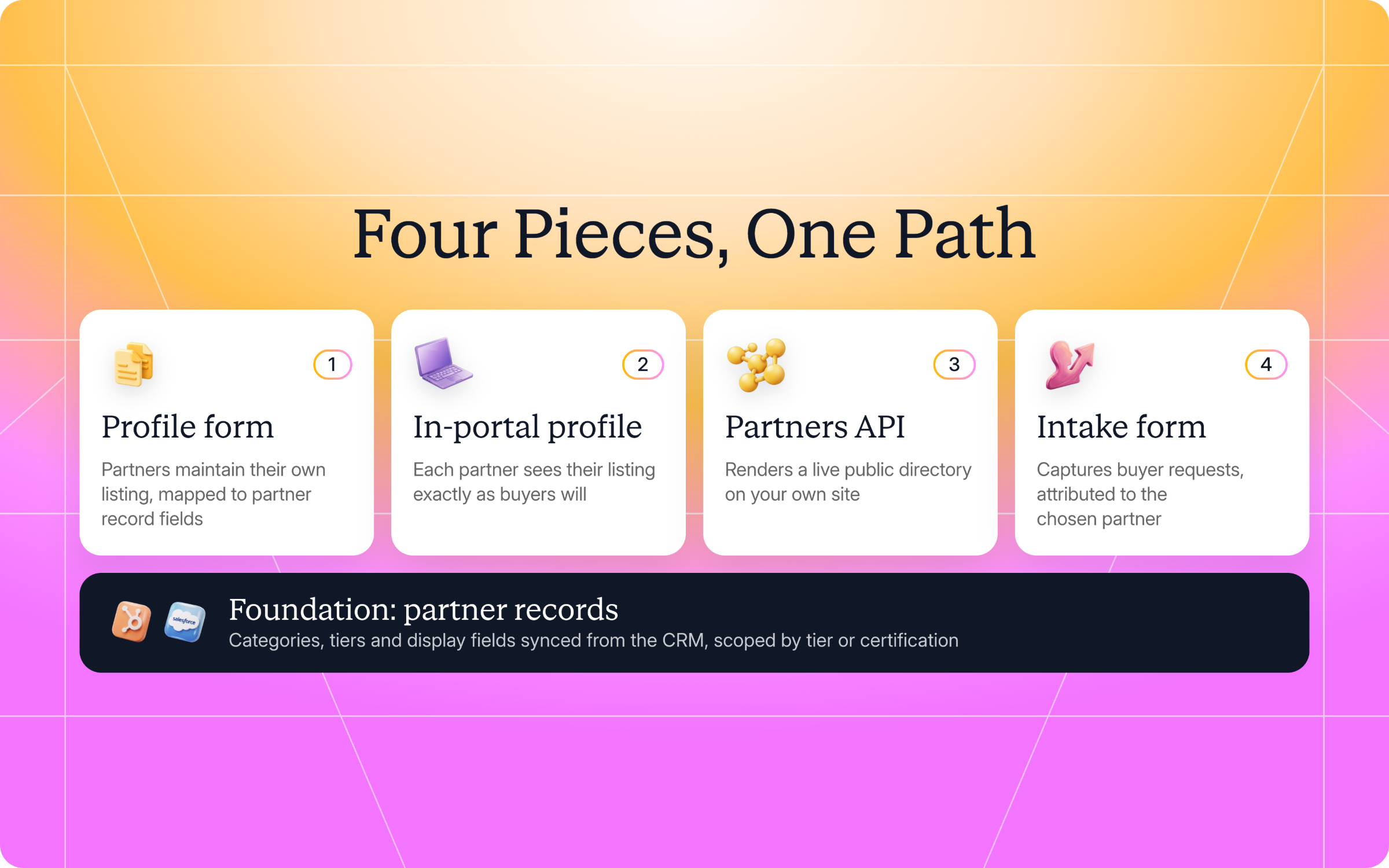
Building a partner directory takes four specific pieces: a partner-maintained profile form, an in-portal profile section, a public partners API, and a buyer intake form. Each one does a job the others can’t, and together they form a complete path from data to demand.
Set the foundation: Decide who appears and get the data right
You don't need to promote every partner in your directory. Scoping by tier or certification makes partners earn their listing, which helps with recruitment, retention, and buyer acquisition all at once.
If you list too few partners you risk your directory looking thin, which signals a small channel to prospective partners. List too many and the directory loses signal, because buyers can’t tell which partners are actually good at what they do. The right scope is usually your top two tiers, or partners with a certification that maps to a buyer’s need.
Common partner types include value-added resellers, system integrators, referral partners, and implementation partners. Each addresses different buyer requirements. The scoping logic is the same whether you’re listing a boutique consultancy, a regional distributor, or a global integrator. Only feature partners who clear a certain bar. Microsoft, for example, awards a Solutions Partner designation to partners who have demonstrated proven competency in specific solution areas through audited assessments. That gives buyers confidence that listed partners have the technical expertise and deep expertise to deliver.
The data underneath the directory has to be right before anything goes live. The following fields should sync from the CRM:
- Categories
- Tiers
- Display fields (logo, description, location, specialization)
Most CRMs weren’t built with a public directory in mind. That means there might be missing logos, outdated descriptions written years ago, or categories that reflect how the vendor organizes partners internally rather than how a buyer searches for them. Audit these fields before turning the directory on.
Filters should match how a buyer describes their need: industry, region, specialization, product or service type, company size. They shouldn't mirror your internal taxonomy. You might internally sort partners by “gold, silver, bronze,” but no buyer searches for a “gold partner.” They search for a "healthcare implementation partner in Texas.”

Shopify allows customers to filter by price, location, services, tier, industry, and language spoken.

Partner categories live on the partner record, which is what makes them filterable and lets buyers identify partners with the right expertise for their business needs, whether that’s cloud migration, consulting services, or implementation support. The most useful directories also surface current geographic coverage data, so buyers can confirm a partner actually serves their region before reaching out.
Piece 1: Let partners maintain their own listing
The easiest way to prevent your directory from going stale is to let partners manage their own listing. This way, one person on your team isn’t tasked with updates and chasing partner answers.
Build a form whose fields map to the partner record fields the directory displays. The design of the form matters. Not every CRM field belongs on it. Internal fields like deal registration status, MDF allocation, or tier requirements should stay behind the login. The form should surface only the fields a buyer will see: logo, description, location, specialization, and categories. The fewer fields a partner has to fill out, the more likely they are to do it. Give partners guidance on which fields buyers filter by, so they know what to prioritize.
Getting partners to actually fill the form out is the harder problem. Two ways you can gently persuade participation are making the form the only way to update their listing (no email workaround), and sending a notification when a partner’s listing is missing fields a buyer would filter by. If a partner knows buyers are filtering for “implementation” and their listing doesn't have that category, they'll add it.
You can add a layer of approval before edits go live, whether human or agentic. That protects brand consistency, but it also adds friction. The more steps between a partner and their update, the less likely they are to make one. Settle on a practical middle ground. Maybe you auto-approve text changes like descriptions and specializations, but gate visual changes like logos. Partners provide their updates and keep their listing current without every edit waiting in a queue.
Piece 2: Show each partner their profile in the portal
Once partners can edit their listing, they need to see what buyers will see. Add a partner profile page inside the partner portal so each logged-in partner views their own listing just how it’ll appear on the public directory. It’ll allow partners with incomplete listings to see their half-empty one next to peers, and convince them to fill out theirs as well.
Place the profile form next to the preview, so the partner profile page doubles as a find a partner page for the partner themselves. Don’t hide it three clicks deep in the settings menu. Partners learn what's missing when the preview is right in front of them. If your form lives on a separate page, or a profile preview requires navigating away, it’s easy for partners to stop checking.
The preview should show the buyer-facing view, not the internal record. Partners don’t need to see their tier or deal registration status on this page. If the preview shows internal fields, partners can't tell which gaps actually matter to buyers. A missing specialization field matters. A missing MDF allocation does not.
Piece 3: Publish the public directory
The public directory is where buyer demand meets your partner data. Render it from an API that returns each partner and their categories, so the page is always a live view of your partner program. In Introw, that's the GET /api/v1/partners endpoint, with an API key scoped to partners:read.
Provision a read-only key and keep it server-side, never in client-side code. That's a basic security practice that also keeps your data scoped. The key returns only the partners you choose, so the public listing never exposes more than you intend. A buyer browsing your directory can’t pull partners you haven't approved for public display. Your application renders the response, and the power of a live API is that partners who make quick changes see their profiles updated right away. Static exports require manual work, which results in delayed updates.
A live, current page is only useful if buyers can find it. Buyers search for directories by name, as covered earlier, and the public directory is the page that ranks for those searches. Give it a URL structure that reflects that: /partners or /partner-directory, not /resources/partner-list. Make sure each listing has its own indexable URL, so a partner’s name can surface in search results independently. That’ll allow buyers who are searching for a specific partner by name to land on your site and discover you as well.
Piece 4: Capture and route buyer demand
Going through the steps of creating a navigable, informative directory is a waste if you don’t also let buyers act on the same page. Put a dynamic form on the directory, or on each listing. A buyer who finds the right partner should be able to start a conversation right there. Don’t make them navigate to a contact page or fill out a generic form.
The submission must auto-attribute to the partner the buyer picked, at the moment they submit. That means the lead is tied to the right partner before anyone on your team touches it. In Introw, a partner referral form on each listing auto-attributes the lead and kicks off partner lead routing: routing, notifications, CRM sync, and deal or lead registration behind the submission. The buyer’s request reaches the right partner, and your CRM records it, without anyone forwarding an email. That referral path is what lets partners deliver for buyers without friction on your end.
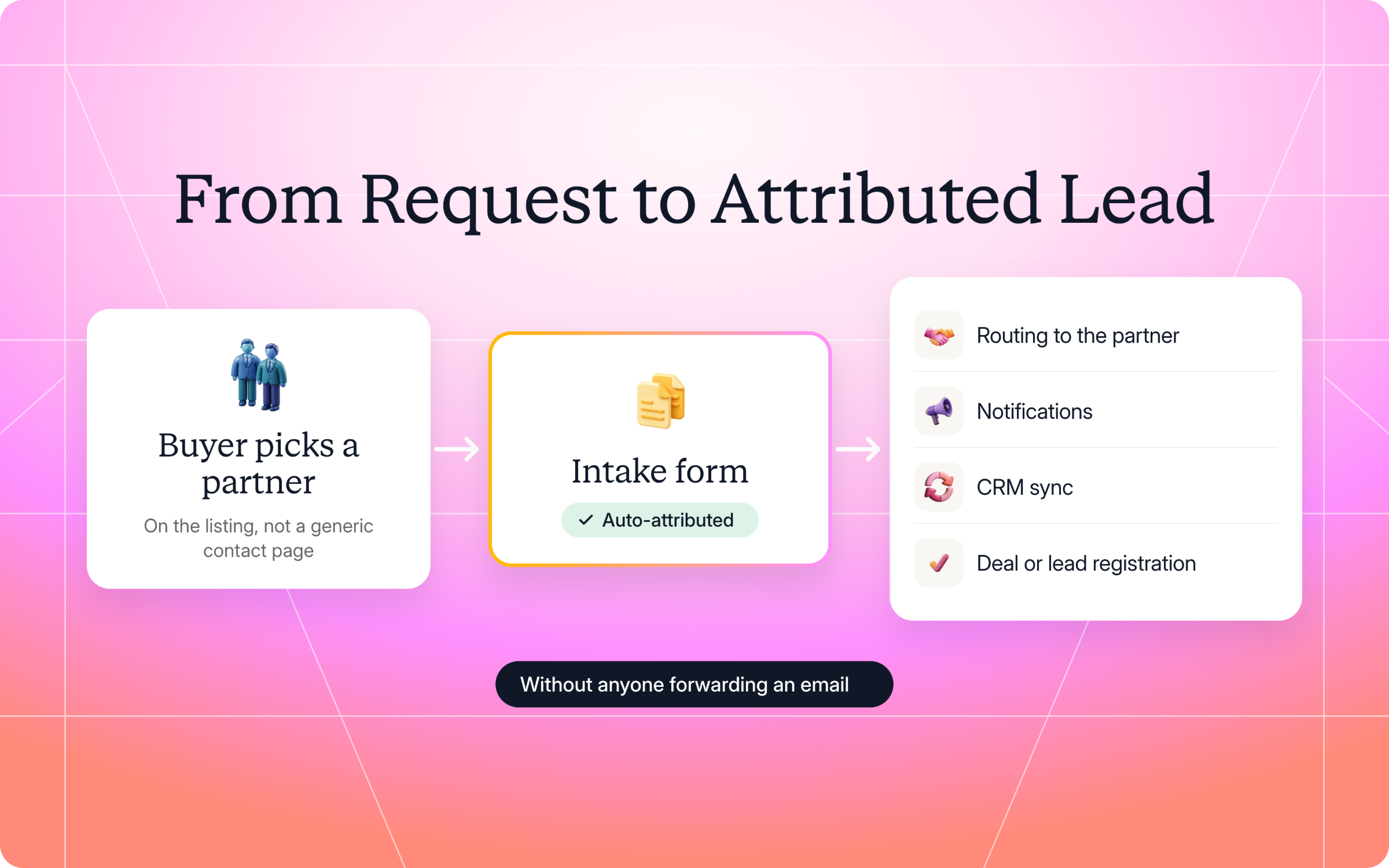
A directory that auto-attributes and auto-routes produces pipeline you can measure. You can count how many leads the directory generated, which partners received them, and which ones converted. You can report on partner-sourced pipeline by quarter, and even compare partners against each other.
Test the whole path
Each piece depends on the one before it:
- A partner who can’t see their profile won’t update their listing.
- A listing with missing categories won’t surface in filters.
- A filter that returns nothing sends the buyer somewhere else.
- A form that captures a lead without attributing it to the right partner loses the opportunity.
You won’t hear about any of these failures, so you have to test the full path yourself before launch.
Start on the partner’s side. A partner opens the portal, sees their profile, edits it through the form, and confirms the change appears in their listing. If approval is enabled, check that the edit waits in the queue and only publishes after it's approved.
Then switch to the buyer's side. On the public directory, confirm the API returns only the scoped partners with their categories, and that buyers can filter by those categories. Submit a test request on the intake form and follow it all the way through: the lead attributes to the chosen partner, the partner gets notified, and the lead lands in your CRM with the correct source tag.

Don’t think of testing as a one-time launch activity. Any change to your segment scope, partner fields, or automation processes can break the path without warning. Re-run the full path test after any change to the data model. The directory is a live system, and live systems need ongoing checks.
Keeping it current without chasing partners
Directories usually fall in similar ways. Someone builds them as a one-off project, checks it off the to-do-list, and doesn’t assign ownership to anyone. Within a few quarters the descriptions are outdated and some listings are for companies that have left the program.
Building the directory in such a way that partners maintain their own listings already solves most of your problems. But mechanics alone don’t explain why a partner would bother keeping their listing current.
That’s why if you tie directory presence to tier or certification, listing becomes something partners earn rather than something they’re entitled to. That gives partners a reason to maintain their tier and keep their listing accurate, because losing the listing means losing visibility with buyers. Partners not only update it for you now, but the page also becomes a retention lever. Customer success teams can point partners to their listing as a tangible benefit, and partner solutions stay visible to the buyers who need them.
Here’s an example of how Shopify tiers their partners.

How Introw builds partner directories
Introw is a CRM-first partner relationship management platform, which means it builds on top of your existing CRM rather than replacing it. That architecture shapes how it approaches directories. Introw doesn’t ship a single directory feature. It assembles one from the four pieces above, each already in the platform. Partner records sync from your HubSpot or Salesforce CRM, a profile section lives in the portal, it contains the partners API for your website, and there’s a dynamic intake form that captures and attributes buyer demand.
Because the intake form auto-attributes to the chosen partner and writes to the CRM, every lead the directory produces is measurable. You can answer what the directory generated last quarter, which partners converted it, and whether the page deserves more investment. Forrester calls partner attribution broken in most B2B organizations, which is why auto-attribution matters more than any other piece. That’s the difference between a marketing page and a channel.
See how Introw turns a partner directory into attributed pipeline. Book a demo or explore the partner portal.
Still curious? Here are some quick answers to help clear things up
It’s mostly just naming convention. A partner directory and partner marketplace are common in software, while a partner locator is more common in hardware and enterprise IT. They describe the same thing: A searchable page where buyers find the right partner.
Use a partner referral form on each listing that auto-attributes the lead to the chosen partner at submission. That feeds into partner lead routing, which sends the lead to the right partner and records it in your CRM with the correct source tag. No manual forwarding required.
Through filters that match how buyers describe their needs: industry, region, specialization, and partner categories. The right filters let buyers identify partners with proven expertise in their specific area, rather than scrolling through an unfiltered partner list.
You can, but you’ll maintain everything by hand. Without a form for partners to update their own listings and an API to render them live, the directory goes outdated quickly. Introw handles both, plus auto-attribution on lead capture, so the directory grows with the channel instead of falling behind.





See AI-Native PRM in Action
Book a demo with one of our partner program experts, or explore Introw on your own time.