
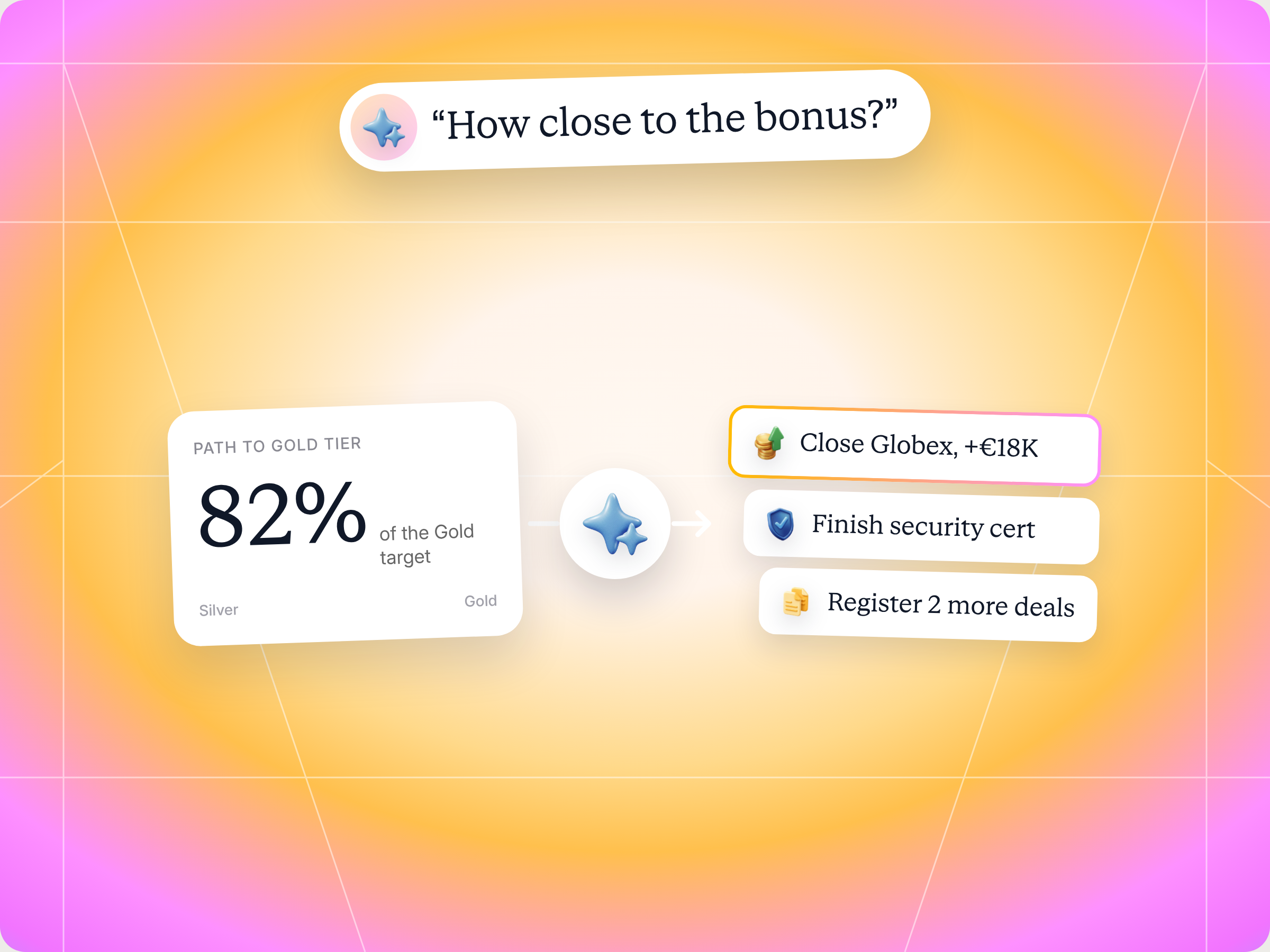
If you sell for a vendor that runs its partner program on Introw, the Incentive Maximizer Claude skill does the incentive math you never have time for. It pulls your live tier, goals, commissions and open deals from your vendor's portal, scores every move you could make this quarter by earnings impact, probability and effort, and hands you the top three to five moves with what each one is worth and what you need to unblock it. You decide what to act on, and nothing is logged without your approval. The full SKILL.md is below, free to copy, with install steps, prompts to try and an example of what you'll get back.
Here's a number vendors don't like to say out loud. Introw's commissions and incentives playbook estimates that routine commission questions eat 20 to 40% of channel finance team capacity in mid to large programs. Every one of those questions is a partner like you asking some version of "where am I, and what's left?" and then waiting days for the answer.
Picture the last two weeks of a quarter. You know there's a Gold tier with better margin. You know there's a SPIFF on healthcare deals. You've got six open deals, three other vendors pinging you, and a commission statement that doesn't quite add up. Which deal should you push first? Is Gold even reachable this quarter, or is it a next quarter play?
Most partners guess. Then they find out at the QBR that one more closed deal would have unlocked five points of margin on everything they sell next year. So what if you could ask one question and get the math back in seconds?
This guide covers how partner incentives actually pay out, which incentives deserve your attention, the Claude skill that finds your fastest path to the next bonus tier, the full SKILL.md you can copy, how to install and run it, and how you stay in control.
How partner incentives and channel incentives work for partners
Vendors design partner incentive programs to motivate partners toward specific behavior: more registered deals, bigger deals, new markets, certified teams. From where you sit, though, partner incentives are just money and access that you either capture or leave on the table.
Most channel partner incentives fall into a handful of types. Here's what each one means for your earnings:
| Incentive type | What it rewards | What it means for you |
|---|---|---|
| Commissions and margin | Every closed deal or resold license | Your base earnings, set by your tier and the vendor's commission structure |
| Partner tiers | Cumulative revenue, certifications and activity | Higher reseller margin, deal protection and perks on all future business |
| SPIFFs (sales performance incentive funds) | A specific product, segment or deadline | Short term cash on top of commission, often tied to a launch or quarter end |
| Accelerators and bonuses | Crossing a revenue or goal threshold | A higher rate on every deal after the threshold, so timing matters |
| Deal registration incentives | Registering opportunities early | Protected margin and less channel conflict on deals you sourced |
| Market development funds and co op funds | Joint marketing and demand generation | Budget to run campaigns, events and marketing initiatives you couldn't fund alone |
| Training incentives | Completing training programs and certifications | Access to higher margin products and the next tier |
If you're new to the vendor side of this, our guide to channel partner incentive programs explains how vendors build them, the SPIFF glossary entry covers the basics of sales performance incentive funds, and the glossary entries on commission structure and reseller margin explain how your base earnings are set.
Why vendors run channel incentive programs
It helps to know why the vendor pays these channel incentives in the first place. Channel partner incentive programs exist to motivate partners, boost partner engagement and steer sales performance toward the vendor's business objectives: market expansion into new markets, a bigger market share in a segment, or more deals on a new product. Channel incentives that reward partners for specific sales targets, rather than generic monetary rewards, tend to increase sales and strengthen relationships, which is why most incentive programs mix cash, tier perks and marketing support.
So when a vendor launches a SPIFF or adds a tier, it's telling you what it values right now. Eligible partners who read those signals early earn more than other partners in the partner network, and they build the kind of partner loyalty that turns into better deal support, more leads and a stronger long term relationship.
The flip side is that partners expect clarity. Effective incentive programs are simple enough that partners earn rewards without a spreadsheet, and rewarding partners quickly keeps partner participation high. When the rules are opaque, partner satisfaction drops, brand loyalty fades and partner relationships cool, even in large partner networks. For business partnerships to drive business growth on both sides, external partners need the same partner insights into partner performance that the vendor's own team sees in its dashboards.
Why partners leave money on the table
Most incentive programs publish their rules and assume partners will optimize around them. In practice, they don't, and it's rarely laziness:
- You represent multiple vendors: each one has its own partner tiers, SPIFFs and thresholds, and nobody has time to model all of them.
- The rules are scattered: the tier guide lives in one PDF, the SPIFF in an email, and your commission statement in the portal.
- Tier upgrades compound: reaching Gold might add five points of margin to every deal for the next year, but it rarely shows up that way in a dashboard.
- Timing is invisible: an accelerator that kicks in at €500K changes which deal you should close first, but only if you know you're €40K away.
- Answers are slow: when you have to ask your channel manager where you stand, the quarter is often over by the time you hear back.
The result: you earn less than you could, and the vendor's channel incentive program underperforms.
Which channel partner incentives are worth your time
Not every channel partner incentive deserves equal effort. From the vendor's side, a successful partner incentive program is one that changes partner behavior. From your side, the test is simpler: does it pay enough, soon enough, for the effort it takes? Here's how to read the most common channel partner incentive programs:
- Cash incentives: commissions, SPIFFs and accelerators drive sales right now, and they're the easiest to value because the math is direct. A short SPIFF is designed to boost sales of one product within one sales cycle, so it only pays off if you already have a matching deal in pipeline.
- Tiered incentives: moving up partner tiers rarely pays much this quarter, but it lifts margin, deal protection and exclusive perks on every deal after. Vendors use tiers to improve partner engagement and partner retention, which is why the jump is often worth more than it looks.
- Co op funds and MDF: market development funds are financial support for demand generation, worth claiming when you'd actively promote the vendor anyway.
- Exclusive events and access: advisory boards, exclusive events and early access are softer rewards, but they build business relationships with the vendor's leadership that pay off when you need help on a big deal.
- Loyalty programs and referral rewards: some vendors run points based loyalty programs, or pay when channel partners refer leads instead of reselling. Vendors use them to encourage partners and keep partners active between big deals, which matters most for referral and agency partners whose revenue growth depends on volume. Motivating partners this way works best when the rewards are easy to track.
What a smart partner incentive strategy looks like
The best partners don't chase every incentive. They treat partner incentives like a portfolio and put effort where the payoff is real. A good approach usually comes down to four habits:
- Know your distance to every threshold: revenue gap to the next tier, certifications still missing, deals left to the next bonus, and days left in the period.
- Rank moves by expected value, not size: a €60K deal at stage four with 30 days left is worth more to you than a €200K deal at stage one.
- Count multi quarter unlocks: a tier upgrade or a certification that opens a higher margin product pays out long after this quarter ends.
- Check more often near the line: monthly in the back half of the quarter, and weekly in the final 30 days if you're close to a threshold.
Here's the difference between guessing and doing the math:
| Without a plan | With an incentive plan |
|---|---|
| Push the biggest deal, hope it closes | Push the deal with the best mix of value, probability and commission impact |
| Find out about the SPIFF after it ends | See active SPIFFs you're eligible for, with requirements, today |
| Learn you missed Gold at the QBR | Know you're one closed deal or one certification away, with weeks to spare |
| Register deals in a rush at quarter end | Register early to protect margin and hit volume bonuses on time |
On the vendor side, this is what incentive visibility is meant to deliver: partners who can see the math invest effort exactly where the program wants them to, which drives sales growth for both sides and builds partner loyalty. The skill below gives you that view yourself, from your own AI assistant.
The skill to use: Incentive Maximizer
The Incentive Maximizer is a partner side skill from Introw's free Claude skill library. It connects to your vendor's Introw portal through Introw Partner Connect, reads your own incentive data, and tells you exactly which actions to take this quarter to maximize commission earnings, hit the next bonus tier or unlock the next accelerator.
| Detail | Description |
|---|---|
| Built for | Partner sellers and partner finance at resellers, agencies and other channel partners |
| Use it when | You want to know what to focus on this quarter, how close you are to a bonus, or where the easiest commission is |
| What it reads | Your tier and every tier definition, goals and progress, paid, accrued and pending commissions, open deals and recent deal registrations |
| What it writes | Optional comments on the relevant deal record when you act on a recommendation, after you approve |
| What you get | An earnings dashboard, your top three recommendations with impact and unblock paths, eligible SPIFFs and accelerators, and certification gaps |
| Skill ID | partner-incentive-maximizer |
It's the partner side companion to the vendor's partner incentives and commission and SPIFF tools. Your vendor sets the rules. The skill helps you play them well.
Trigger phrases include "how do I maximize my earnings", "what should I focus on this quarter", "how close to the bonus", "next tier unlock", "incentive plan for me" and "where's the easiest commission left".
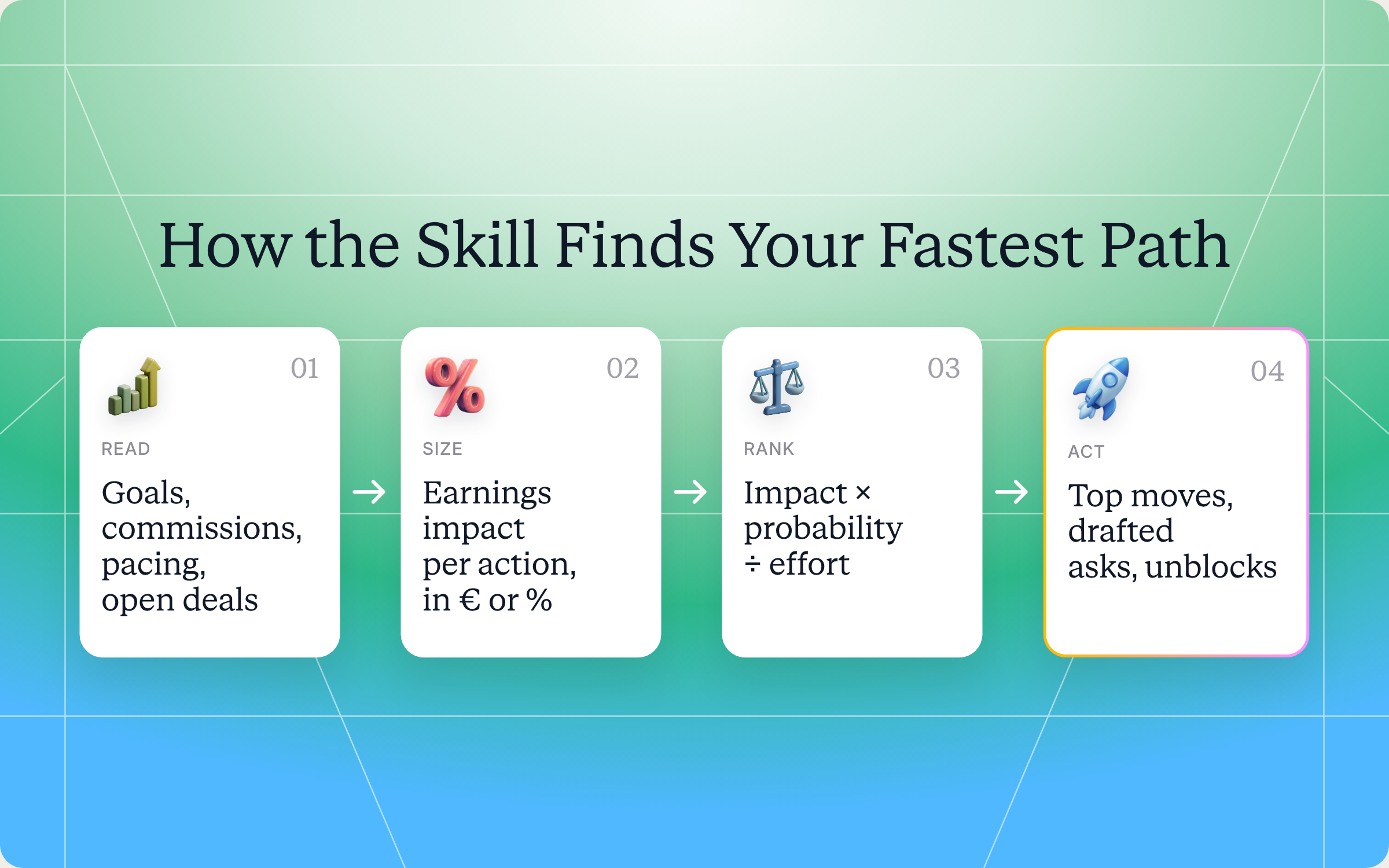
How the skill works, step by step
The skill follows six steps. You don't need to run them yourself, but knowing what happens makes the output easier to trust.
Step 1: Pick the vendor portal
If you work with several vendors on Introw, the skill first lists the portals you can access and confirms which one you mean. Ask about one vendor at a time, so the math stays clean.
Step 2: Pull your full incentive context
Next, it reads everything that decides what you earn: your tier and what every tier unlocks (margin, MDF, deal protection, accelerator multipliers), your goals and progress, paid, accrued and pending commissions, your open deals by stage and close date, and how often you've registered deals lately.
Step 3: Price every possible move
For each thing you could realistically do, the skill estimates the extra earnings:
- Close a deal in pipeline: value times commission rate times any tier multiplier, sorted by expected value.
- Register more deals or hit a goal: when a volume bonus or goal threshold is within reach.
- Reach the next tier: valued by what that tier unlocks on all future business, not just this quarter.
- Activate a SPIFF or accelerator: for example, a bonus on healthcare deals over €50K closed before quarter end.
- Complete a certification: when a missing cert blocks a higher margin product.
Step 4: Rank by impact, probability and effort
Big numbers alone don't make a good recommendation. The skill scores each move as impact times probability divided by effort. A late stage deal with 30 days left scores high. A brand new logo you'd have to recruit from scratch scores low, however large it looks. The top three to five moves become your recommendation.
Step 5: Turn each move into an action
Every recommendation comes with four parts:
- The action: "Close Globex by 30 March, currently at stage four, around €120K."
- The impact: "Adds €18K to your Q3 commission and pushes you past the €500K line for Gold eligibility at the next review."
- Why it's realistic: for example, your win rate in that segment, or a similar deal you closed last quarter.
- What unblocks it: a deal coaching session, a deal registration, or a call with your channel account manager.
Step 6: Show the dashboard
Finally, you get a single view of where you stand, from projected earnings to distance from the next tier and bonus.
Get the skill: the full SKILL.md
Here's the complete skill file. Copy it as is, or adjust the scoring and refresh cadence to match how you sell.
---
name: partner-incentive-maximizer
description: Use when a partner user wants to know exactly which actions to take this quarter to maximize commission earnings, hit the next bonus tier, or unlock the next accelerator. Pulls live goals, commissions, and pacing data, then prescribes specific high-leverage moves. Trigger phrases include "how do I maximize my earnings", "what should I focus on this quarter", "how close to the bonus", "next tier unlock", "incentive plan for me", "where's the easiest commission left".
---

# Incentive Maximizer (Partner)

**Audience**: Partner user, uses **Introw Partner Connect** MCP.
**Use case**: 13, Commissions & Incentives.

## When to use this skill

Use when a partner user wants to know exactly which actions to take this quarter to maximize commission earnings, hit the next bonus tier, or unlock the next accelerator. Pulls live goals, commissions, and pacing data, then prescribes specific high-leverage moves.

**Sample prompts that fire this skill:**
- "how do I maximize my earnings"
- "what should I focus on this quarter"
- "how close to the bonus"
- "next tier unlock"
- "incentive plan for me"
- "where's the easiest commission left"

## Why this matters
Most partner programs publish their commission and tier rules and assume partners optimize behavior accordingly. They don't, partners are running their own businesses, juggling multiple vendors, and often don't have time to model "what would maximize my earnings with Vendor X this quarter." The result: partners leave money on the table, and the vendor's incentive design under-performs.

This skill closes the gap by doing the math the partner would do if they had time: where's the closest threshold, what activity moves the needle, and what specific deals or plays would unlock the next chunk of earnings. **Transparency multiplied by prescription**: the partner-side companion to the vendor's commission analytics.

## Process

### Step 1: Resolve the portal
If the partner has access to multiple vendor portals, call `Introw_Partner_Connect:partners` first to get available portals. Confirm which `roomId` to use.

### Step 2: Pull the partner's full incentive context
- `Introw_Partner_Connect:get_tier_information`: current tier, all tier definitions, what each unlocks (margin %, MDF, deal protection, accelerator multipliers).
- `Introw_Partner_Connect:get_goals`: committed goals, targets, progress, time remaining in the period.
- `Introw_Partner_Connect:search_commissions`: paid, accrued, pending; commission rate currently in effect.
- `Introw_Partner_Connect:search_crm_objects`: open deals (stage, value, close date, products): these are the candidates for moving the needle.
- `Introw_Partner_Connect:search_form_submissions`: recent registration cadence.

### Step 3: Compute earnings-impact per next-step action
For each plausible action the partner could take, estimate the marginal earnings impact:

- **Close deal X already in pipeline**: value × commission rate × tier multiplier. Sort open deals by EV (probability × value × marginal commission impact).
- **Register N more deals before period end**: for partners with a registration-volume bonus.
- **Hit the next tier threshold**: gap to next tier × what the next tier unlocks (if Gold gives 5 pts more margin on all subsequent business, that's a multi-quarter unlock, not just this quarter).
- **Hit a goal threshold**: for partners pacing close to a goal that triggers a bonus.
- **Activate a SPIF / accelerator**: currently active SPIFs and what they require (e.g., "+10% on healthcare deals over €50K closed before quarter-end").
- **Complete a certification that gates a higher-margin product**: for partners blocked from a higher-margin SKU by a missing cert.

### Step 4: Identify the highest-leverage moves
Rank the actions by:
- **Earnings impact**: actual € or % uplift.
- **Probability**: how achievable in the time remaining? (A deal at Stage 4 with 30 days left is high; a deal at Stage 1 is wishful.)
- **Effort**: relative effort vs. the partner's normal motion. (Closing a deal already in late stages is low-effort; recruiting a new logo from scratch is high.)

Score each action: impact × probability ÷ effort. Top 3 to 5 surface as the recommendation.

### Step 5: Frame for action
Each recommendation includes:
- **The action** in concrete terms ("Close deal Globex by 30 March, currently at Stage 4, est. €120K").
- **The earnings impact** ("Adds €18K to your Q3 commission at your current rate; pushes you across the €500K threshold for Gold-tier eligibility next review").
- **Why it's leverageable** ("This deal is in the segment where your historical win rate is 65%; same partner closed a similar one last quarter").
- **What you need to unblock it** (link to deal-coaching skill if stuck, link to register-deal skill if not yet registered, link to CAM if executive engagement needed).

### Step 6: Surface the dashboard view
Provide a single-glance summary:
- **Current period earnings**: paid / accrued / projected.
- **Distance to next tier**: revenue gap, certs gap, time remaining.
- **Distance to next bonus / accelerator threshold**.
- **Active SPIFs you're eligible for**: list with requirements.
- **Top 3 next moves** ranked.

## Output format
- **Earnings dashboard** (current + projected + thresholds).
- **Top 3 recommendations** with concrete actions, impact, and unblock paths.
- **Active SPIFs / accelerators** the partner is eligible for, with requirements.
- **Certification gaps** that gate higher-margin products.
- **Direct links** to the relevant follow-up actions (deal coaching, registration, CAM call).

## Guardrails & PRM best practice
- **Strict scope.** Only this partner's data, never reference other partners' commissions, deals, or rates.
- **Don't promise outcomes.** Projections are estimates based on current pacing and stated probabilities. Always frame as "if you close deal X by date Y, this is the impact", not "you will earn €Z."
- **Vendor rules are vendor rules.** Don't speculate about commission rate changes or tier eligibility being lowered. Refer rate questions to the partner's CAM.
- **Surface, don't pressure.** The skill prescribes; the partner decides their priorities. Vendor-side incentives shouldn't override the partner's strategic considerations.
- **Be honest about probability.** Suggesting a partner can close 5 stage-1 deals in 14 days to hit a threshold isn't realistic, flag low-probability paths as low-probability.
- **Multi-vendor reality.** The partner has other vendors competing for their attention. Recommendations should be honest about effort, high-effort recommendations need real impact to be worth it.
- **No self-dealing.** Don't recommend actions that benefit only the vendor (e.g., "register deals you're not really pursuing to hit volume thresholds"). Recommendations should be in the partner's actual interest.
- **Capture the conversation.** If the partner takes one of the recommended actions (close X, register Y), use `Introw_Partner_Connect:add_comment` on the relevant record to log the connection, gives the vendor's team context for the next QBR.
- **Refresh frequency.** Quarterly is too slow, monthly check-ins are more useful in the back half of a quarter when small moves still matter. Weekly in the final 30 days of a quarter for partners close to a threshold.
- **Cross-skill handoff.** Stuck deals → `partner-coach-my-deal`. Net-new registrations → `partner-register-deal`. Tier/goal status check-in → `partner-my-tier-and-goals` (if installed). Commission status → `partner-my-commissions` (if installed).
How to install and run the skill
You've got two ways to use it, depending on how you work.
Option 1: Claude Code
Create a folder called partner-incentive-maximizer inside .claude/skills/ in your repo, and save the file above as SKILL.md inside it. The path is .claude/skills/partner-incentive-maximizer/SKILL.md. Claude Code runs the skill whenever your prompt matches one of the trigger phrases in the description.
Option 2: Claude (or any MCP client) with the Introw connector
Most partner sellers won't touch a repo, and they don't need to. If your vendor runs its program on Introw, connect Claude to your Introw partner account once through the partner connector in your portal, with a one time sign in. Then you can ask about your tier, commissions and deals in plain language for every vendor portal you can access. Here's how connecting looks:
The Connect Claude guide walks through the setup, the partner version of the steps lives in the partner Connect Claude guide, and the Claude integration page covers what else you can do once connected.
Prompts to try
Once Claude is connected or the skill is installed, try any of these:
- "How close am I to the bonus with Acme this quarter?" Shows your distance to the next bonus and accelerator thresholds.
- "What should I focus on this quarter?" Returns the full earnings dashboard and your top three moves.
- "What's my next tier unlock, and what would it be worth?" Values the next tier across future business, not just this quarter.
- "Where's the easiest commission left?" Ranks your open deals by expected value and effort.
- "Which SPIFFs am I eligible for right now?" Lists active SPIFFs with their requirements and deadlines.
What you'll get back
A typical run returns five things:
- Earnings dashboard: paid, accrued and projected earnings, plus your distance to the next tier and bonus thresholds.
- Top three recommendations: each with the concrete action, the earnings impact, why it's realistic and what unblocks it.
- Active SPIFFs and accelerators: the ones you qualify for, with requirements and deadlines.
- Certification gaps: missing certs that block higher margin products or the next tier.
- Direct next steps: links to deal coaching, deal registration or a call with your channel account manager.
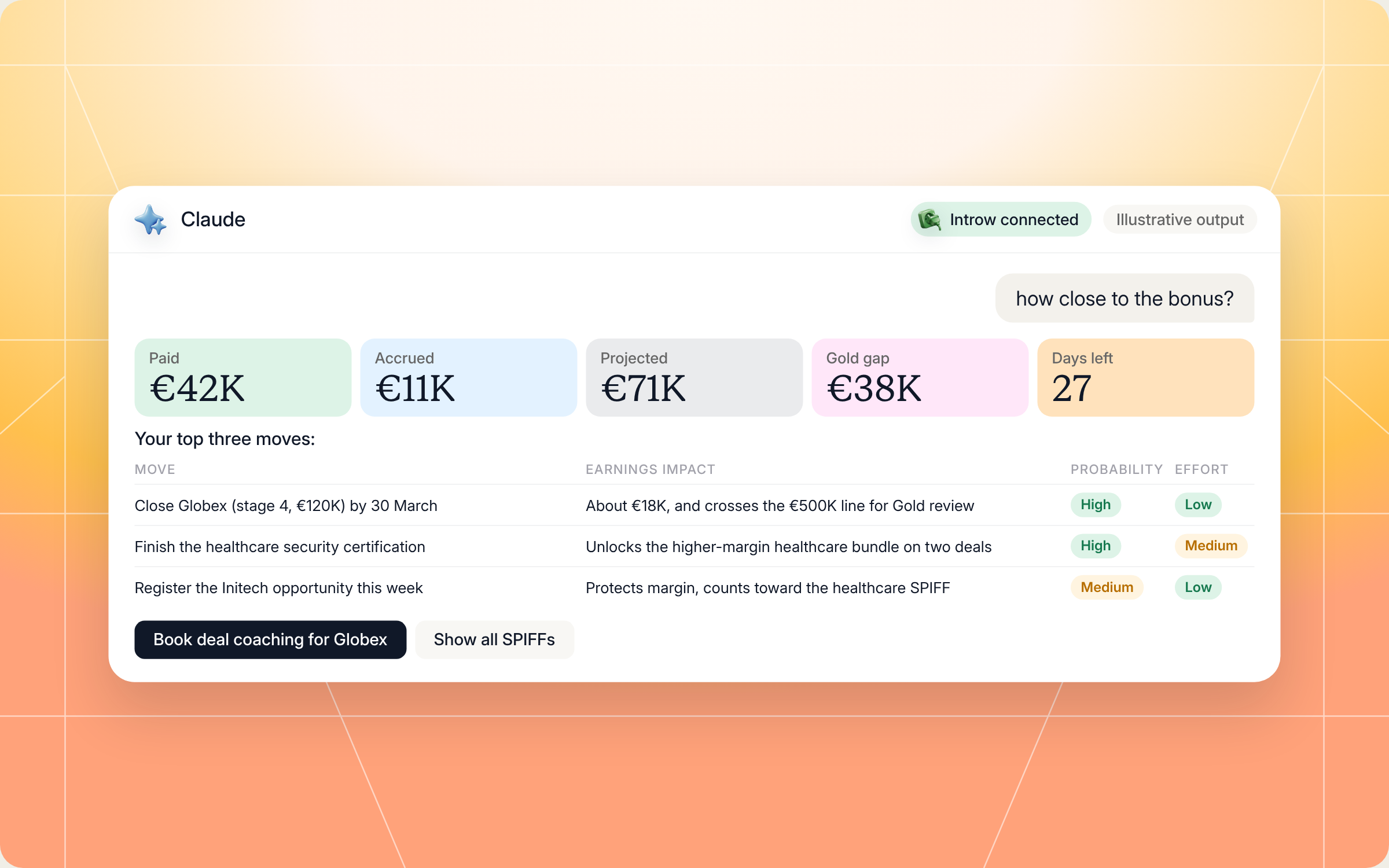
Here's an illustrative example of the top three moves for a Silver reseller 30 days before quarter end:
| Move | Earnings impact | Probability | Effort | What unblocks it |
|---|---|---|---|---|
| Close Globex (stage four, €120K) by 30 March | About €18K commission, and crosses the €500K line for Gold review | High | Low | A deal coaching session on the final security objection |
| Finish the healthcare security certification | Unlocks the higher margin healthcare bundle on two open deals | High | Medium | Two remaining modules, about four hours |
| Register the Initech opportunity this week | Protects margin and counts toward the healthcare SPIFF | Medium | Low | Register through the vendor's deal registration form |
The skill would also flag what's not worth chasing, like trying to close four stage one deals in two weeks to hit a volume bonus. Here's how a run looks in Claude, from the question to the dashboard and the top three moves:
Staying in control: what Claude can and can't do
Your commission data is sensitive, and you're the one running your business. The skill is built around that:
- You approve the writes: the only thing it writes is an optional comment on a deal record when you act on a recommendation, and only after you say yes.
- It acts as you: Claude connects to your vendor's Introw portal over OAuth as you, so it only sees what your partner account can see.
- It only looks at your data: it never references other partners' commissions, deals or rates.
- It doesn't promise outcomes: projections are framed as "if you close deal X by date Y, this is the impact", never "you will earn this".
- It doesn't guess at vendor rules: questions about rate changes or tier eligibility go to your channel account manager.
- It won't recommend gaming the program: no registering deals you're not really pursuing just to hit a volume threshold.
Prefer to see your earnings in the portal?
Not every partner wants to start in Claude. Many vendors on Introw also add a Commissions tab to the partner portal, built with Introw's portal tools, where you can see forecasted, expected, upcoming and paid totals, open each payout, and download your statement yourself. This is what that looks like from the vendor's setup side:
If you're on the vendor side reading this, our guides to partner tiering, tiered commission structures and channel margin and discount structure show how to design effective channel incentives that partners can actually act on.
Pair it with other Claude skills
The Incentive Maximizer tells you which moves matter. These partner side skills help you make them:
- Deal War Room: builds a coaching packet for a specific deal, with vendor playbooks, past wins and objection handling, when a high value deal is stuck.
- Register a Deal from Your AI Assistant: registers a deal or shares a lead with your vendor from Claude, so new opportunities count toward your goals and deal registration protection.
- Cross Vendor Certification Tracker: shows every required and expiring certification across your vendors, and which ones gate higher margin products or the next tier.
- Pre QBR Self Prep: builds your own view of deals sourced, goal progress and asks before your next vendor QBR.
You'll find all of them in Introw's skill library, and our roundup of Claude skills for partner teams explains how they fit together.
Run your partnerships from Claude with Introw
Introw is a CRM first partner relationship management platform, which means it builds on top of your existing HubSpot or Salesforce setup rather than replacing it. It's also headless by design: the portal is one surface, but vendors and partners can run the same program in plain language from Claude, ChatGPT, Slack or Teams through Introw's MCP server, with every action written back to the CRM.
That's what makes a skill like this work on the partner side. Your tier, goals, commissions and deals all live in one place your vendor keeps current, so the math is based on live data, not last month's statement. For vendors, it means partners finally see the incentives they're paid to chase, which is the whole point of partner incentives in the first place.
Ask your vendor if their program runs on Introw, or bring it to your own partner program. Connect Claude or book a demo.
Still curious? Here are some quick answers to help clear things up
Partner incentives are the rewards a vendor offers channel partners for specific behavior, like commissions and margin on deals, tier upgrades, SPIFFs, accelerators, deal registration incentives, market development funds and training incentives. Together they make up a partner incentive program.
No. Claude Code users can drop the SKILL.md into their skills folder. Everyone else can connect Claude to their vendor's Introw portal with the partner connector and ask the same questions in plain language.
No. It only reads your tier, goals, commissions and deals. The one thing it can write is a comment on a deal record when you act on a recommendation, and it asks you first. It never changes commission rates, tiers or payouts.
The skill only reads data your partner account already has access to, and it never shows you anything about other partners. If you act on a recommendation and approve a comment, that comment is visible to your vendor's team on the deal record.
Yes. The full file is in this article and in Introw's skill library. You can copy and adapt it, but it reads your incentive data through Introw Partner Connect, so your vendor needs to run its partner program on Introw.






See AI-Native PRM in Action
Book a demo with one of our partner program experts, or explore Introw on your own time.

