

If you're a reseller, agency, SI or MSP being onboarded by several vendors at once, two partner side Claude skills give you the partner onboarding tracker you never had. The Cross Vendor Onboarding Tracker pulls every open onboarding from every vendor portal you can access into one scoreboard: progress, open tasks, first deal status, blockers and what unlocks next. The Onboarding Prioritizer then answers the harder question, which onboarding to move forward today, by ranking each one on the return of your next hour. Nothing gets logged back to a vendor until you say so. Both full SKILL.md files are below, free to copy, with install steps, prompts to try and an example of what you'll get back.
Here's the partner side of onboarding that vendor playbooks rarely mention. Introw's onboarding playbook points out that a typical reseller, SI or MSP is being onboarded by 3 to 10 vendors at any given moment, each with its own portal, its own checklist and its own idea of "what's next". The same page notes that without structured onboarding, a channel partner takes 6 to 12 months to become productive, while structured programs get there in 60 to 90 days.
Picture your Monday. Vendor A wants a certification finished by Friday. Vendor B's channel manager emailed about a kickoff you never booked. Vendor C quietly expects a first deal registration before day 90, and you're on day 71. Every portal shows its own slice, and none of them shows you the whole picture.
So which one do you work on first? Most partners answer by gut, and the onboarding that quietly stalls is often the one worth the most. Many partners only notice when a vendor's channel manager asks why sales performance is flat.
This guide covers what a good partner onboarding tracker looks like when you work with multiple vendors, the two Claude skills that build and prioritize it for you, both full SKILL.md files, how to install and run them, and what you'll get back.
Why multi vendor onboarding stalls on the partner side
Vendor onboarding advice is almost always written for the vendor. It assumes one vendor, one partner and one partner onboarding process. That's not how it looks from your desk.
On the partner side, every vendor runs its own partner program with its own partner portal, its own training materials and its own channel managers chasing you. Each one plans its onboarding experience as if it were your only partnership. The kick off call, the welcome email, the welcome package and the marketing materials all arrive on that vendor's timeline, through that vendor's communication channels. Each vendor sees a partner who is "a bit slow". You see a pile of logins, half finished checklists and welcome emails you meant to read.
That leads to a few predictable problems:
- No single view: progress lives in five portals, so nobody, including you, knows the real state of your onboarding portfolio. Introw calls this portal fatigue.
- Attention goes to the loudest vendor: the channel manager who emails most gets your time, not the vendor with the biggest upside.
- Sunk effort gets wasted: an onboarding that's 60% done slips, the window closes, and the work you already did never pays off.
- The first deal deadline sneaks up: the 90 day window for a first deal is where the relationship economics flip, and it passes quietly when you're juggling.
- Repetitive tasks eat the week: logging in, checking tasks and writing status updates for each vendor is administrative overhead that doesn't sell anything.
None of this means you don't care about the partnership. It means attention is finite and no one told you where to spend it. And the cost is real on both sides: a stalled partner journey hurts your revenue growth and the vendor's partner performance numbers, and it delays the long term customers a successful partnership should bring you both.
A partner onboarding tracker fixes the visibility problem, and a prioritizer fixes the attention problem. Together they turn five separate partner onboarding process checklists into one plan for your business.
What a good partner onboarding tracker looks like
A partner onboarding tracker is one view of every onboarding you're in, across every vendor, with enough context to decide what to do next. It's not a vendor's onboarding checklist. It's your scoreboard.
Here's what a useful onboarding tracker shows for each vendor:
- Progress: percent complete, measured as tasks done out of tasks total, so you have a clear starting point.
- Days in and days left: how long since onboarding started, and how many days remain before the 90 day first deal window closes.
- First deal status: not yet, in pipeline, registered or closed. This is the onboarding milestone that matters most.
- Top blocker: overdue tasks, missing certifications, missing creative assets or a contact you still need.
- Next unlock: what finishing the next step gets you, like deal protection, MDF eligibility, tier benefits or a dedicated channel manager.
- Risk flag: on track, near activation, at risk or stalled, always with the days since last activity.
The difference between a status list and a useful tracker is the last step: a recommendation. Here's how the common options compare:
| Approach | What you see | What you miss |
|---|---|---|
| Checking each portal | Accurate detail for one vendor at a time | Any comparison, and the hours lost logging in |
| A spreadsheet you update | Everything in one place, on the day you update it | Live data, and it's stale by Wednesday |
| A vendor's onboarding checklist | That vendor's key milestones and training modules | Every other vendor competing for your week |
| Two Claude skills on live portal data | One scoreboard plus a ranked "do this next" list | Nothing you haven't approved gets logged back |
Partner onboarding best practices when you work with multiple vendors
A few habits make any onboarding program easier to get through from the partner side, whether you use a skill or not:
- Treat onboarding as a portfolio: rank onboardings by upside, not by who emailed last. Some deserve your best rep's week. Some deserve a polite pause.
- Protect the first deal window: past day 60, first deal motion beats more training. A registered opportunity does more for the working relationship than another module.
- Finish what's nearly finished: one task from a tier promotion is a better use of an hour than eight tasks from nothing.
- Tell vendors your constraints once: if you're slow this quarter, say so, so the vendor's team stops flagging you as at risk.
- Ask for help early: if a missing asset or answer blocks you, ping the channel manager with a specific ask, not "any update?".
- Review weekly: a quick weekly check is how partners stay focused. A quarterly look comes too late to save a window.
What vendors can do to make the onboarding process easy for new partners
These partner onboarding best practices mirror what vendors are told to do on their side. Vendors who run a great partner onboarding process make a partner onboarding tracker far more useful, because the data underneath is clean. From the partner's chair, effective onboarding usually looks like this:
- A needs assessment up front: a short needs assessment at the start, so the vendor knows what your business already sells and which partner training you can skip.
- Clear expectations from the kick off call: onboarding milestones, owners and due dates written down, not buried in a slide.
- Easy access to the right resources: vendors who provide access to a dedicated partner portal on day one, with training materials, content templates, brand guidelines and marketing collateral in one place.
- Short training modules: initial onboarding in a learning management system or learning platform, with in app tutorials, so partners learn product knowledge in small pieces. Training completion rates show progress, not readiness.
- A clear path to a first deal: incentive programs and tier unlocks spelled out, so new channel partners know why to start selling early.
- A structured process, not a one time event: regular check ins and a named contact, so partners stay engaged after the welcome package arrives.
Vendors that provide partners with this structure turn the onboarding process into a shared plan instead of a guessing game, and new partners start selling sooner. The common mistakes are the opposite: everything sent on day one, tasks with no owner, and no follow up. For the vendor view of building a partner onboarding program, see our partner onboarding guide and partner onboarding checklist.
The skills to use: Cross Vendor Onboarding Tracker and Onboarding Prioritizer
Both are partner side skills from Introw's free Claude skill library. They run through Introw Partner Connect, the Introw MCP server for partners, and read only the vendor portals your own account can access. One gives you status. The other gives you a decision.
| Detail | Cross Vendor Onboarding Tracker | Onboarding Prioritizer |
|---|---|---|
| Mode | Status: where am I with each vendor? | Decision: what do I work on today? |
| Built for | Partnerships leads, partner operations and partner sellers | Partnerships leads and partner operations |
| What it reads | Tasks, goals, engagement, deal registrations, pipeline and tier rules per vendor portal | The same signals, filtered to onboardings still in flight |
| What it writes | A comment on the relevant portal when you act on a recommendation, after you approve | A comment logging the focus you picked, after you approve |
| What you get | A cross vendor scoreboard, today's top 3 moves, at risk callouts and drafted channel manager messages | A focus list of 1 to 3 moves with effort and payoff, stall recovery moves and an honest skip list |
| Skill ID | partner-cross-vendor-onboarding-tracker | partner-onboarding-prioritizer |
Trigger phrases for the tracker include "onboarding status across vendors", "where am I with each vendor", "what do I owe each vendor" and "vendor onboarding scoreboard". For the prioritizer, try "which onboarding should I focus on", "prioritize my onboardings" or "what's highest ROI today".
The skills work best together. Run the tracker when you want the full picture, and the prioritizer when you have 90 minutes and need to pick one thing.
How the skills work, step by step
You don't have to run these steps yourself, but knowing what happens under the hood helps you trust the output.
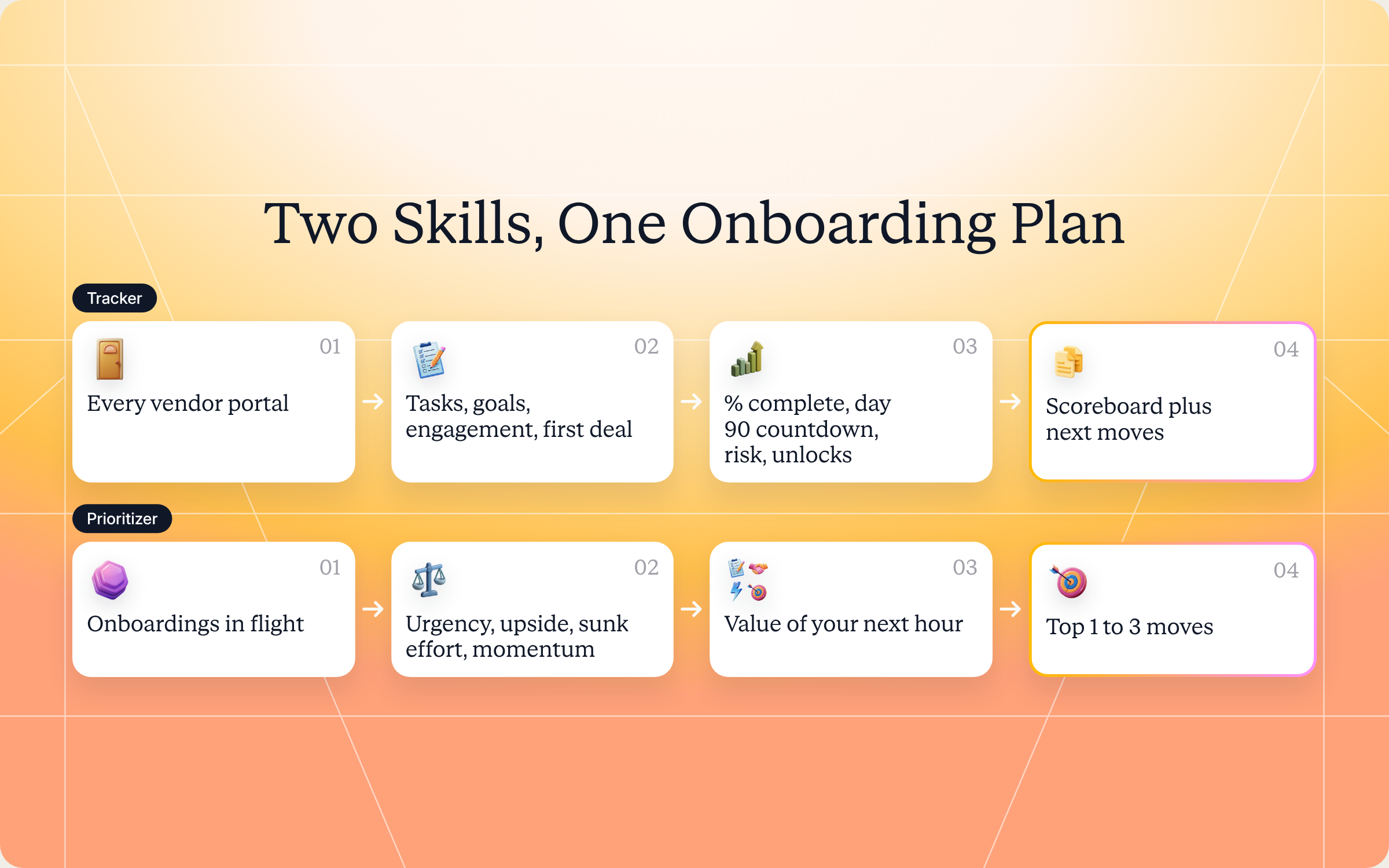
Step 1 (tracker): Find every vendor portal you can access
The tracker starts by listing every vendor portal on your account, with the vendor name and your partner record in each. It still works with one vendor, but the value grows with two or more.
Step 2 (tracker): Pull onboarding state from each portal
For each vendor, it reads open and recently completed onboarding tasks, onboarding goals and pacing, your recent activity compared with your usual rhythm with that vendor, any first deal registration or deal in pipeline, and what finishing onboarding unlocks in that vendor's tier rules. Each portal is read separately, with that portal's own access, so nothing leaks between vendors.
Step 3 (tracker): Score each onboarding
Every vendor gets a percent complete, days since start, days left before day 90, first deal status, top blockers, the next unlock and a risk flag: stalled, at risk, on track or near activation. Every "stalled" label comes with the number of days since your last activity, so it means something.
Step 4 (tracker): Rank for your attention
The tracker ranks vendors on urgency (closeness to day 90), economic upside (margin uplift, MDF, tier benefits), sunk effort (how far in you already are) and effort to the next unlock. You get a clear "do this next, then this, then this" across the whole portfolio.
Steps 1 to 2 (prioritizer): Filter to onboardings in flight
The prioritizer skips onboardings that are already activated or aged out, and pulls the decision inputs for the rest: open tasks and due dates, goals, engagement, tier unlocks and first deal status.
Step 3 (prioritizer): Score on six axes
Each onboarding is scored on urgency, economic upside at activation, sunk effort, effort to next unlock, momentum and strategic weight. That last one matters. A vendor with smaller margins but a big overlap with your existing customers can outrank a high margin vendor with no customer fit.
Step 4 (prioritizer): Work out the value of your next hour
The core question is simple: if you spend one hour on this onboarding today, what's it worth? The skill estimates upside times the chance the action moves activation forward, divided by the effort it takes. The top 1 to 3 become your focus list.
Steps 5 to 6 (prioritizer): Recommend the move, or the honest skip
For each focus onboarding, you get one concrete action, anything that gates it, an effort estimate (10 minutes, an hour or a day) and what it unlocks. Stalled onboardings get a restart move, like a drafted message to the channel manager or a small first deal. And if the math says an onboarding isn't worth your time this quarter, the skill says so plainly.
Get the skills: the full SKILL.md files
Here are both complete skill files. Copy them as is, or adjust the scoring axes and guardrails to match how you run your vendor relationships.
Status skill: Cross Vendor Onboarding Tracker
---
name: partner-cross-vendor-onboarding-tracker
description: Use when a partner user is being onboarded by multiple vendors and wants a single aggregated view of progress, open tasks, milestones, and time-to-first-deal across every vendor portal they have access to. Trigger phrases include "onboarding status across vendors", "where am I with each vendor", "all my onboardings", "cross-vendor onboarding progress", "what do I owe each vendor", "vendor onboarding scoreboard".
---

# Cross-Vendor Onboarding Tracker (Partner)

**Audience**: Partner user, uses **Introw Partner Connect** MCP across **all portals** the user has access to.
**Use case**: 03, Onboarding (partner-side, multi-vendor aggregation).

## When to use this skill

Use when a partner user is being onboarded by multiple vendors and wants a single aggregated view of progress, open tasks, milestones, and time-to-first-deal across every vendor portal they have access to.

**Sample prompts that fire this skill:**
- "onboarding status across vendors"
- "where am I with each vendor"
- "all my onboardings"
- "cross-vendor onboarding progress"
- "what do I owe each vendor"
- "vendor onboarding scoreboard"

## Why this matters
A typical reseller / SI / MSP is being onboarded by 3 to 10 vendors at any given time. Each vendor has its own portal, its own checklist, its own CAM, its own "what's next" framing. The partner has zero unified view, and the natural result is that *some* of those onboardings stall (often the most economically valuable one), because the partner just runs out of attention. This skill solves that by aggregating across portals: one screen, all open onboardings, ranked by what to do next.

Partners who close their first deal within 90 days are **3 to 4× more likely** to remain active (Unifyr Channel Atlas): applying that benchmark across multiple vendors compounds the cost of attention drift.

## Process

### Step 1: Enumerate portals
- Call `Introw_Partner_Connect:partners` to get the full list of portals this user has access to. Capture `roomId`, vendor name, partner record ID per portal.
- If the user is in just one portal, this skill still works, but the value is highest with 2+.

### Step 2: Pull onboarding state per portal
For each `roomId`, in parallel where possible:
- `Introw_Partner_Connect:search_tasks` (with that `roomId`): open and recently completed onboarding tasks.
- `Introw_Partner_Connect:get_goals`: onboarding-stage goals and progress.
- `Introw_Partner_Connect:search_partner_engagement`: recent activity + the cadence vs. the partner's baseline with that vendor.
- `Introw_Partner_Connect:search_form_submissions`: first-deal registration if any.
- `Introw_Partner_Connect:search_crm_objects`: first deal in pipeline if any.
- `Introw_Partner_Connect:get_tier_information`: what onboarding completion unlocks for this vendor.

### Step 3: Compute per-vendor onboarding state
For each vendor:
- **% complete** (tasks done / tasks total).
- **Days since onboarding start.**
- **Days to 90-day cliff** (the activation window).
- **First deal status**: not yet, in pipeline, registered, closed.
- **Top blockers**: tasks overdue, missing certifications, missing assets/contacts.
- **What unlocks next**: deal protection, MDF eligibility, tier benefits, dedicated PDM access.
- **Risk flag**: stalled (engagement decay + missed milestones), at-risk (slipping), on track, near activation.

### Step 4: Rank for partner attention
Surface vendors in priority order based on:
- **Urgency**: closeness to the 90-day cliff (first-deal window).
- **Economic upside**: tier benefits at completion (margin uplift, MDF access).
- **Sunk effort**: how far in already (don't waste 60% complete onboardings).
- **Effort to next unlock**: a vendor 1 task from a tier promotion is high-ROI vs. one with 8 tasks remaining.

The partner sees a clear "do this next, then this, then this" recommendation across the whole onboarding portfolio.

## Output format
- **Cross-vendor onboarding scoreboard**: table with vendor, % complete, days-in, first-deal status, top blocker, next unlock, risk flag.
- **Today's recommended actions**: top 3 highest-ROI moves, each tagged with which vendor and which `roomId`.
- **At-risk callouts**: any vendor onboarding where the 90-day cliff is approaching without first-deal traction.
- **Stalled escalation suggestions**: where to ping the CAM (with drafted message) to unstick.

## Guardrails & PRM best practice
- **Strictly scoped per portal.** Each portal's data is fetched only with that portal's `roomId`: no cross-portal data leakage.
- **Don't compare vendors competitively to each other in the output.** It's the partner's view; it's fine to rank for attention. But framing like "Vendor X is treating you better than Vendor Y" is messy and risks leaking into vendor-facing comms.
- **Time-bound every signal.** "Stalled" without a window is meaningless; always state the days since last activity.
- **Honor stated constraints.** If the partner has already told a specific vendor they're slow this quarter, don't re-flag the same delay as "at risk", capture context once via `add_comment` to that portal.
- **Action over commentary.** Every flag carries a next-best move. Don't list problems without prescriptions.
- **First-deal gravity.** Across all vendors, prioritize first-deal motion in vendors past day 60, that's where the economics flip.
- **Capture the loop.** When the partner takes a recommended action, log via `Introw_Partner_Connect:add_comment` on the relevant portal so the next run sees the progression.
- **Cross-skill handoff.** Decision-style "where do I focus today?" → `partner-onboarding-prioritizer`. Stuck onboarding → `partner-helpdesk` to find the answer or escalate. First-deal motion → `partner-register-deal` (if installed) or `partner-deal-war-room`.
Decision skill: Onboarding Prioritizer
---
name: partner-onboarding-prioritizer
description: Use when a partner is being onboarded by multiple vendors and wants a focused decision on *which onboarding to advance today / this week*, based on commitment dates, economic upside, sunk effort, and current bottleneck. Companion to the cross-vendor onboarding tracker, this one is decision-mode, not status-mode. Trigger phrases include "which onboarding should I focus on", "where should I spend my time", "prioritize my onboardings", "what's highest ROI today", "next move across all my onboardings".
---

# Onboarding Prioritizer (Partner)

**Audience**: Partner user, uses **Introw Partner Connect** MCP across **all portals** with active onboardings.
**Use case**: 03, Onboarding (partner-side, multi-vendor decision support).

## When to use this skill

Use when a partner is being onboarded by multiple vendors and wants a focused decision on *which onboarding to advance today / this week*, based on commitment dates, economic upside, sunk effort, and current bottleneck. Companion to the cross-vendor onboarding tracker, this one is decision-mode, not status-mode.

**Sample prompts that fire this skill:**
- "which onboarding should I focus on"
- "where should I spend my time"
- "prioritize my onboardings"
- "what's highest ROI today"
- "next move across all my onboardings"

## Why this matters
The cross-vendor onboarding tracker (`partner-cross-vendor-onboarding-tracker`) gives the *status*, what's where with each vendor. This skill answers the harder question: **given that I have 90 minutes today and three open onboardings, which one do I touch first?** Most partners answer by gut. The wrong choice silently kills the most valuable onboarding.

The cost of attention drift on the highest-economic-upside onboarding is non-recoverable: the 90-day first-deal window closes, the partner-side enthusiasm wears off, the relationship drifts into the dormant 80%. This skill prevents that by ranking onboardings by **return-on-next-action**, not by completion percentage.

## Process

### Step 1: Enumerate active onboardings
- `Introw_Partner_Connect:partners`: get all portals.
- For each portal, determine if onboarding is active (lifecycle stage = onboarding, or first-deal not yet registered, or onboarding tasks still open).
- Filter to onboardings actively in flight; skip ones already activated or aged out.

### Step 2: Pull decision inputs per portal
Per active onboarding:
- `Introw_Partner_Connect:search_tasks`: open tasks + their due dates + the next milestone.
- `Introw_Partner_Connect:get_goals`: any onboarding-stage goals + pacing.
- `Introw_Partner_Connect:search_partner_engagement`: recent activity (signal of momentum vs. drift).
- `Introw_Partner_Connect:get_tier_information`: what completing onboarding unlocks (margin, MDF, deal protection, dedicated PDM).
- `Introw_Partner_Connect:search_crm_objects`: first deal status (in pipeline / not yet).

### Step 3: Score each onboarding on the prioritization axes

- **Urgency**: days remaining to the 90-day cliff. Closer = higher priority.
- **Economic upside at activation**: tier benefits unlock value (margin uplift × expected pipeline volume in this vendor's segment for the partner).
- **Sunk effort**: how far in already (don't waste 60% complete onboardings, but don't keep pushing dead ones).
- **Effort to next unlock**: an onboarding 1 task from a tier benefit is high-ROI vs. 8 tasks from anything.
- **Momentum**: recent engagement vs. drift. Onboardings that have stalled need a momentum-restart move (a CAM ping, a first registration), not more tasks.
- **Relationship strategic weight**: vendors more central to the partner's portfolio (more pipeline / more existing customers) earn higher weighting.

### Step 4: Compute Return-on-Next-Action
For each onboarding, the question is: *if I spend 1 hour on this today, what's the marginal value?* That's:
- **(Economic upside at activation × probability the action moves activation forward) ÷ (effort of the action)**

Rank by ROI of next action. Top 1 to 3 are the focus list.

### Step 5: Recommend the specific next action per top-ranked onboarding
For each:
- **The action** in concrete terms ("Register your first deal, Account X is closest in your pipeline. Vendor Y's first-deal protection unlocks ~€8K margin").
- **The unblock**: if the action is gated by a missing task / cert / asset, surface that.
- **Effort estimate** (10 min / 1 hr / 1 day).
- **What it unlocks immediately**.

### Step 6: Surface stall-recovery moves
Some onboardings are stalled, engagement decay, no recent activity. For those:
- Recommend a momentum-restart move (CAM ping with drafted message; small first deal to unlock first-deal status).
- Or recommend honest abandonment if the math doesn't justify continuing (some vendor relationships aren't going to be productive, surface that conclusion).

## Output format
- **Today's focus list**: top 1 to 3 onboardings, each with the specific next action + effort + payoff.
- **Stall-recovery moves**: onboardings that need a momentum reset.
- **Honest skip list**: onboardings where ROI doesn't justify continuing (with rationale).
- **Aggregate context**: total onboardings active, total ARR potential at full activation, weeks of attention "owed" given current pacing.

## Guardrails & PRM best practice
- **Strictly scoped per portal.** Each onboarding's data is fetched with its own `roomId`. No cross-portal data leakage.
- **Don't shame.** If the partner has 5 stalled onboardings, the framing isn't "you've been failing at this." It's "here's the highest-ROI single move you could make today." Action-bias, not judgment.
- **Honest about diminishing returns.** Some onboardings should be deprioritized, and saying that explicitly is more useful than implying it. If the math says "skip Vendor Z this quarter," surface it cleanly.
- **Effort honesty.** A 10-minute action ranks higher than a 4-hour action with similar payoff. Surface effort estimates honestly.
- **Don't ignore strategic weight.** A vendor with smaller per-deal margin but huge customer-base overlap may rank higher than a high-margin vendor with no customer fit.
- **Capture the decision.** When the partner picks a focus, log via `add_comment` so future runs see the trail.
- **Update on cadence.** This skill is meant to run weekly (or daily during high-onboarding load). Once-a-quarter usage misses the point.
- **Cross-skill handoff.** Once the partner commits to a focus and starts the action: status-mode → `partner-cross-vendor-onboarding-tracker`. Stuck-in-cert-gating → `partner-cross-vendor-cert-tracker`. First-deal motion → `partner-deal-war-room` to coach the deal forward.
How to install and run the skills
There are two ways to use them, depending on how you work.
Option 1: Claude Code
Create two folders inside .claude/skills/ in your repo: partner-cross-vendor-onboarding-tracker and partner-onboarding-prioritizer. Save each file above as SKILL.md in its own folder. Claude Code picks them up automatically and runs the right one whenever your prompt matches a trigger phrase in its description.
Option 2: Claude (or any MCP client) with the Introw connector
Most partner teams won't touch Claude Code, and they don't need to. As a partner, you connect Claude to your own Introw account once, through the Introw Partner Connect connector, with an OAuth sign in using your portal email and no API key. That one connection covers every vendor portal your account can reach, which is exactly what a cross vendor tracker needs. Here's what connecting looks like:
The Connect Claude guide walks through the setup, the partner version of the steps lives in the partner Connect Claude guide, and the Claude integration page covers what else you can do once you're connected.
If you're a vendor: there's nothing to switch on. Partner Connect is available to your partners by default, and they connect it themselves. Point them to it, and your portal becomes one row on their scoreboard instead of one more login.
Prompts to try
- "Where am I with each vendor?" Builds the full cross vendor scoreboard with risk flags and today's top 3 moves.
- "What do I owe each vendor this week?" Lists open onboarding tasks by vendor, with due dates and blockers.
- "I have 90 minutes today. Which onboarding should I focus on?" Runs the prioritizer and returns one to three moves with effort and payoff.
- "Prioritize my onboardings, and tell me honestly if one isn't worth it this quarter." Adds the honest skip list to the focus list.
- "Draft a message to the Northwind channel manager to unstick our onboarding, but don't send it." Gives you a stall recovery draft to review.
What you'll get back
A tracker run returns four things:
- Cross vendor scoreboard: one row per vendor with percent complete, days in, first deal status, top blocker, next unlock and risk flag.
- Today's recommended actions: the top 3 moves, each tagged with the vendor it belongs to.
- At risk callouts: any onboarding nearing day 90 without first deal traction.
- Stalled escalation suggestions: where to ping a channel manager, with a drafted message.
A prioritizer run adds a focus list of 1 to 3 moves with effort and payoff, stall recovery moves, an honest skip list and aggregate context: how many onboardings are active, the total potential at full activation, and how many weeks of attention you "owe" at your current pace.
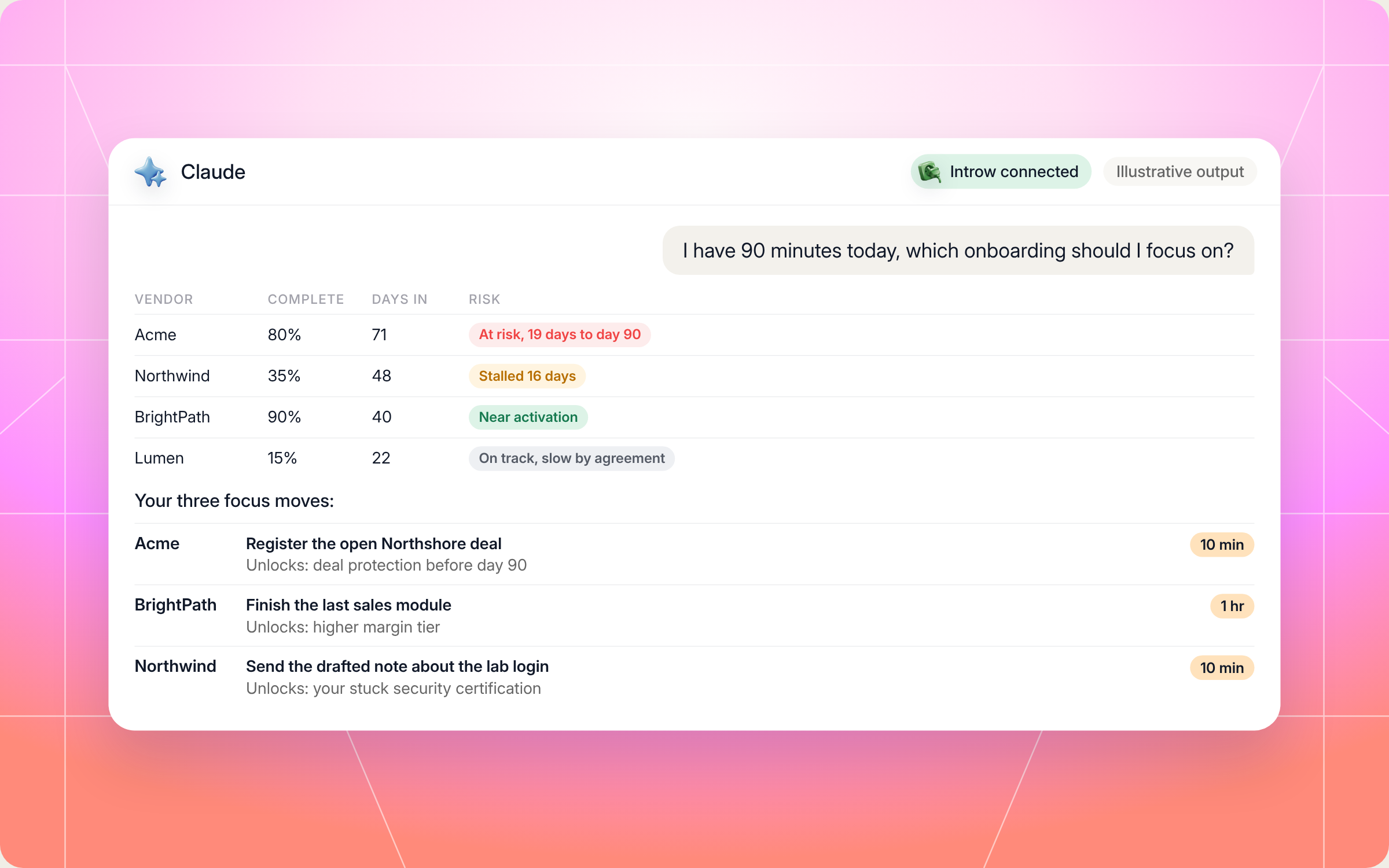
The scoreboard gives you valuable insights in one glance: the key details from every portal, side by side. Here's an illustrative scoreboard for a reseller onboarding with four vendors:
| Vendor | Complete | Days in | First deal | Top blocker | Next unlock | Risk |
|---|---|---|---|---|---|---|
| Acme | 80% | 71 | In pipeline | Deal not yet registered | Deal protection and Silver tier | At risk, 19 days to day 90 |
| Northwind | 35% | 48 | Not yet | Security certification overdue by 9 days | Access to MDF | Stalled, no activity for 16 days |
| BrightPath | 90% | 40 | Registered | One sales module left | Higher margin tier | Near activation |
| Lumen | 15% | 22 | Not yet | No kickoff booked | Portal content library | On track, slow by agreement |
And the prioritizer's focus list for the same week might read:
- Acme, register the open deal (10 minutes): your Northshore opportunity is ready, and registering it before day 90 unlocks deal protection.
- BrightPath, finish the last sales module (1 hour): one task from the higher margin tier, so it's the best payoff per hour on the board.
- Northwind, send the drafted note to your channel manager (10 minutes): the certification is stuck on a missing lab login, so ask for it before doing more training.
- Lumen, skip this week: you told them you're slow this quarter, so the skill logs the context once and leaves it alone.
Here's how that looks in Claude when you ask for today's focus:
Staying in control: what Claude can and can't do
These skills work on your vendor relationships, so they're careful about what they touch:
- It acts as you: Claude signs in with OAuth as you, and only sees the vendor portals and data your own account can access.
- Strictly scoped per portal: each vendor's data is fetched with that vendor's own access. Nothing from one vendor leaks into another.
- You approve what gets logged: when you act on a recommendation, the skills log a comment on that vendor's portal so the next run sees progress. Ask Claude to show you anything before it's written.
- Drafts, not sends: stall recovery messages to a channel manager come back as drafts for you to review.
- No vendor comparisons in the output: it ranks vendors for your attention, but it won't frame one vendor as treating you better than another, since that could leak into vendor facing comms.
- Every signal is time bound: "stalled" always comes with the number of days since your last activity.
- Your constraints are respected: if you've told a vendor you're slow this quarter, it won't keep flagging the same delay.
- No shaming: five stalled onboardings become "here's the best single move today", not a lecture.
Prefer to do this in the Introw app?
As a partner, your own Introw account at partners.introw.io already gives you a home screen with one card per vendor portal, showing your tier, your colleagues on that relationship and the last thing that happened. The get started guide for partners explains the setup.
If you're the vendor, the best way to make your onboarding easy to track is to give partners clear tasks with owners and due dates, right in their partner portal. Here's how to create partner tasks and show them in the portal:
Tasks set up this way are exactly what the tracker reads, so a clean task list on your side becomes a clean row on your partner's scoreboard. Partner onboarding and partner enablement in Introw cover the journeys, content and training around it, and our roundup of partner onboarding software compares the options.
Pair it with other Claude skills
The skills hand off to each other and to a few others in Introw's skill library:
- Cross Vendor Certification Tracker: when an onboarding is stuck on certifications, it tracks required, optional and expiring certifications across every vendor. See what a partner certification program usually covers.
- Partner Helpdesk: when you're blocked on a question, it finds the vendor's official answer or routes it to the right person.
- Deal War Room: once the first deal is your focus, it builds a coaching packet with the vendor's playbooks and battle cards.
- Personalized Onboarding Orchestrator from Transcripts: the vendor side skill that builds a 90 day partner onboarding plan from a kickoff call, so the tasks you track start out clear.
Our overview of Claude skills for partner teams shows how they fit together.
Track every vendor onboarding from Claude with Introw
Introw is a CRM first partner relationship management platform, which means it builds on top of your existing HubSpot or Salesforce setup rather than replacing it. It's headless by design, so vendors and partners can run the partnership from the portal or in plain language from Claude, ChatGPT, Slack or Teams through Introw's MCP server, with every action written back to the CRM.
That's why these skills work. Every vendor that runs its program on Introw exposes onboarding tasks, goals, tiers and deals in the same shape, so one partner account can see all of them at once. For partners, that means one scoreboard instead of five logins. For vendors, it means a better partner experience, healthier partner engagement and partners who reach a first deal sooner, which is what partner success looks like in the numbers.
Using artificial intelligence this way doesn't replace channel managers. It gives channel partners and vendors the same picture of each onboarding process, so success is easier to see on both sides of every partner program.
Get your onboarding portfolio onto one screen. Connect Claude or book a demo.
Still curious? Here are some quick answers to help clear things up
A partner onboarding tracker is a single view of every onboarding you're in across multiple vendors, showing progress, open tasks, first deal status, blockers, what unlocks next and a risk flag for each. The Cross Vendor Onboarding Tracker skill builds it from live data in every vendor portal you can access.
Rank onboardings by the value of your next hour, not by who emailed last. Weigh urgency before day 90, the upside at activation, how far in you are, how close the next unlock is and how central the vendor is to your business. The Onboarding Prioritizer does this for you and returns one to three moves.
No. Claude Code is one option for developers. Most partners connect Claude to their Introw account through the Introw Partner Connect connector and run the same skills in plain language.
No. Messages to channel managers come back as drafts for you to review, and the only thing the skills write is a comment on a vendor's portal logging an action or a focus you picked. You can ask Claude to show you anything before it's written.
Yes. Both files are in this article and in Introw's skill library, free to copy and adapt. They read your vendor portals through Introw Partner Connect, so the vendors you want to track need to run their programs on Introw.





See AI-Native PRM in Action
Book a demo with one of our partner program experts, or explore Introw on your own time.

