
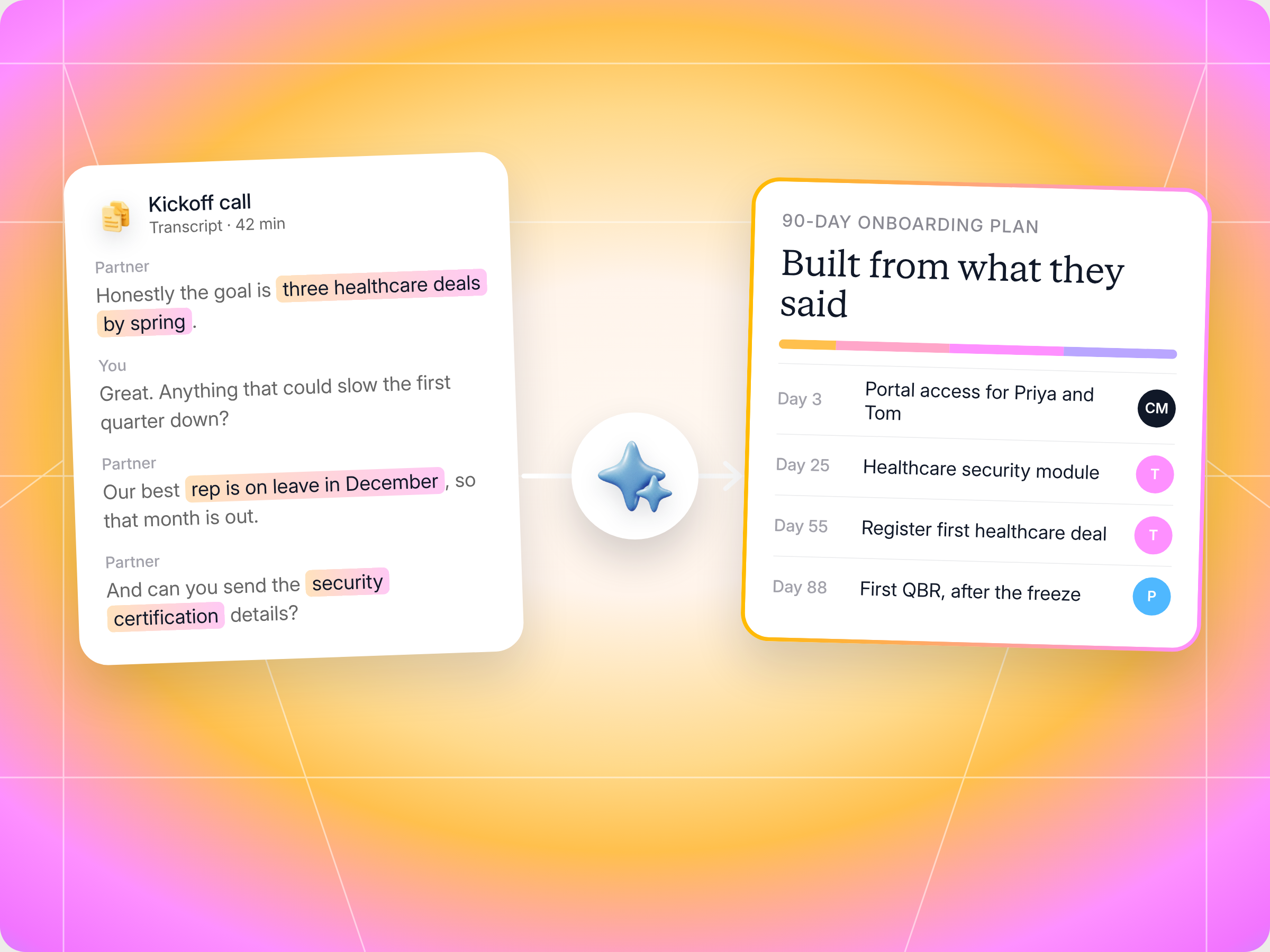
Your kickoff call already holds everything a good partner onboarding plan needs: what the partner committed to, what they sell, who's involved and what could get in the way. The Personalized Onboarding Orchestrator from Transcripts skill reads those call transcripts, builds a 90 day plan around them with named owners and due dates, pushes the tasks into Introw after you approve, and keeps checking progress at set checkpoints. The full SKILL.md is below, free to copy, with install steps, prompts to try and an example of what you'll get back.
Think about your last partner kickoff call. The partner told you they want to land three healthcare deals by spring. They mentioned their best rep is going on leave in December. They asked twice about your security certification. Then the call ended, and they got the same 40 step onboarding checklist as every other partner.
Sound familiar? Most onboarding plans are built from a template, not from what the partner actually said. And it costs you. Introw's onboarding playbook notes that without structured onboarding, it typically takes a channel partner 6 to 12 months to become productive, while structured programs get there in 60 to 90 days.
This guide shows you how to close that gap without writing every plan by hand. It covers what a partner onboarding plan built from transcripts looks like, the Claude skill that builds it, the full SKILL.md you can copy, how to install and run it, and what you'll get back.
Why template onboarding plans fail
A template plan has one big advantage: it's fast. Copy the checklist, change the partner name, send it. The problem is that partners can tell.
When a partner who already holds three certifications gets told to "complete product training," they stop reading. When a critical milestone lands in the middle of a freeze period they told you about, it slips, and nobody's surprised. When tasks have no named owner, they just sit there.
Meanwhile, your channel managers spend their week chasing. Introw's playbook estimates that a channel manager looking after 30 partners spends 6 to 8 hours a week on routine onboarding follow ups. That's time that should go into relationships, not reminders.
A good partner onboarding plan does three things a template can't:
- It reflects what the partner said: their commitments, target verticals, existing skills and constraints.
- It gives every task a real owner and date: on your side or theirs, never "TBD".
- It points at a first deal: onboarding that doesn't lead to a registered deal by day 75 to 90 is just enrollment.
For the wider playbook on getting onboarding right, see our partner onboarding guide. This article focuses on one thing: turning your kickoff call into that plan, automatically.
What a great partner onboarding process includes
Whether you build the plan by hand or with a skill, the same partner onboarding best practices apply. A strong onboarding program gives new channel partners a clear path from signed agreement to first sale, and it starts well before the first training module.
Here's what most great partner onboarding processes have in common:
- A needs assessment up front: the kickoff call is where you learn what each partner already knows, who they sell to and what they need from you. Treat it as a needs assessment, not a welcome speech.
- Clear expectations and key milestones: partners should know exactly what's expected in the first 30, 60 and 90 days, and what each onboarding milestone unlocks.
- Easy access to the right resources: provide access to your partner portal on day one, with training materials, marketing collateral and sales content in one place, not scattered across email threads.
- Focused partner training: short training modules in a learning platform or learning management system beat a two day bootcamp. Track training completion rates, but don't confuse completion with readiness.
- A first deal target: the onboarding experience should point at a registered opportunity, because partners who start selling early tend to stay engaged.
- Ongoing support and check ins: a named owner on your internal team, and a regular rhythm of check ins, so partners never wonder who to ask.
A partner onboarding checklist is useful for making sure nothing gets missed. The common mistake is sending every partner the same onboarding checklist and calling it a plan. First impressions count, and a generic checklist tells a partner you weren't listening on the call.
Remember that onboarding isn't only for the partner. Your internal teams, from sales to support and marketing, need to know the partnership exists and who owns what. A smooth partner onboarding process sets up the whole partner journey, from partner enablement and partner engagement to how partner performance gets reviewed later. Treat the onboarding process the way you'd treat onboarding new hires: structured, supportive and focused on getting them productive, with the right training and support at each step.
That's the gap the skill closes. It keeps the structured process and the onboarding milestones, but fills them with what each partner actually told you, and it takes the repetitive tasks, like creating tasks, assigning owners and chasing due dates, off your channel managers' plates.
The skill to use: Personalized Onboarding Orchestrator from Transcripts
The Personalized Onboarding Orchestrator from Transcripts is a vendor side skill from Introw's free Claude skill library. It reads your call transcripts plus what Introw already knows about the partner, builds a personalized onboarding plan, and runs it as a project through Introw's MCP server, with every update written back to your CRM.
| At a glance | Personalized Onboarding Orchestrator from Transcripts |
|---|---|
| Built for | Channel account managers, partner development managers and channel ops managers |
| Use it when | A new partner has signed and you've had a kickoff, intro or fit call |
| What it reads | Call transcripts (pasted, or from Otter, Fathom, Gong, Read.ai or Granola), the partner record, existing pipeline, tier rules and goals |
| What it writes | Onboarding tasks with owners and due dates, updates to the partner record and a comment explaining the plan, after you approve |
| What you get | A personalization summary, a 90 day plan, checkpoint and escalation rules, and a partner facing journey summary |
| Skill ID | vendor-personalized-onboarding-from-transcripts |
How the skill turns a kickoff call into a plan
The skill works in six steps. Here's what happens at each one.

Step 1: Pull the partner's context
Before it reads a single transcript, the skill pulls what Introw already knows: the partner's tier, categories, region and lifecycle stage, any existing deals or pipeline, what their tier requires, and any goals you've already set.
Step 2: Mine the transcripts
This is where the personalization comes from. The skill reads your kickoff call, intro meeting or technical scoping call and pulls out:
| What it looks for | Example from a kickoff call |
|---|---|
| Stated commitments | "We want our first healthcare deal by March" |
| Capabilities | "We already hold the AWS security specialization" |
| Target customers | "Mostly mid market hospitals in the Midwest" |
| Tech stack | "We implement on Salesforce, never HubSpot" |
| Constraints | "December is a freeze for us, and our lead rep is out" |
| Stakeholders | "Priya runs marketing, Tom closes deals" |
| Risks | "Last vendor's deal registration took weeks to approve" |
If there's no transcript, the skill doesn't guess. It asks you for the most recent meeting notes instead of making up context.
Step 3: Build the 90 day plan
The plan is built around milestones, not a flat checklist:
- Days 0 to 7: Orientation, portal access and a first 90 days kickoff.
- Days 7 to 30: A certification path that targets the gaps the partner mentioned, and skips what they already have.
- Days 30 to 60: Enablement, a first co selling motion and a first deal registration target.
- Days 60 to 90: A first closed deal and the start of a regular QBR rhythm.
Every task gets a specific title, a named owner, a due date that respects the partner's constraints, a short note on why it matters (linked back to something they said), and what it unlocks, like deal protection, MDF eligibility or a tier upgrade.
The difference shows in the task titles. Instead of "complete training," you get "complete the security competency module, required for the healthcare deals you mentioned."
Step 4: Push the tasks into Introw
Once you approve, the skill creates each task in Introw with its owner, due date and description, updates the partner record with the onboarding start date and target time to first deal, and leaves a comment explaining why the plan looks the way it does. The next channel manager who picks up the account can see the reasoning, not just the list.
Step 5: Manage the project headlessly
The plan doesn't stop at day one. The skill sets checkpoints at days 14, 30, 45, 60, 75 and 90, and escalation rules such as:
- A task more than 7 days overdue: ping the channel manager.
- Engagement drops: flag the partner as at risk.
- Day 75 with no first deal: hand off to the activation skill.
Step 6: Share the plan with the partner
Finally, the skill writes a partner facing summary of the journey: what they'll do, and what unlocks at each milestone. You can paste it into a welcome email or the portal. If the partner later asks their own AI assistant "what's next?", they get the same plan.
Get the skill: the full SKILL.md
Here's the complete skill file. Copy it as is, or adjust the milestones, checkpoints and escalation rules to match your program.
---
name: vendor-personalized-onboarding-from-transcripts
description: Use when a CAM, PDM, or Channel Ops user wants to spin up a personalized onboarding plan for a new partner, using meeting transcripts (kickoff calls, intro meetings, partnership-fit conversations) plus existing partner context, then assigning every task with owner + due date in Introw and managing the project headlessly. Trigger phrases include "set up onboarding for [partner]", "personalized onboarding plan", "build onboarding from this transcript", "onboard [partner] based on our kickoff call", "headless onboarding project".
---

# Personalized Onboarding Orchestrator from Transcripts (Vendor)

**Audience**: Vendor, **claude.ai Introw** MCP (+ optional transcript MCP: Otter, Fathom, Gong, Read.ai, Granola, or transcript pasted into the conversation).
**Use case**: 03, Onboarding.

## When to use this skill

Use when a CAM, PDM, or Channel Ops user wants to spin up a personalized onboarding plan for a new partner, using meeting transcripts (kickoff calls, intro meetings, partnership-fit conversations) plus existing partner context, then assigning every task with owner + due date in Introw and managing the project headlessly.

**Sample prompts that fire this skill:**
- "set up onboarding for [partner]"
- "personalized onboarding plan"
- "build onboarding from this transcript"
- "onboard [partner] based on our kickoff call"
- "headless onboarding project"

## Why this matters
Without structured onboarding, average channel partner time-to-productivity is **6 to 12 months** (Magentrix); structured programs compress this to **60 to 90 days**. Partners who close their first deal within 90 days are **3 to 4× more likely** to remain active at one year (Unifyr Channel Atlas). The first 90 days set the partner's belief about what working with this vendor *feels like*. A CAM responsible for 30 partners typically spends **6 to 8 hours/week** on routine onboarding chasing, **300 to 400 hours/year** that should be redirected to relationship work, not reminder-bot duty.

The differentiator of this skill: most onboarding plans are template-driven and ignore what the partner actually said in the kickoff call. This one starts from the transcript and personalizes the journey to the partner's stated commitments, capabilities, target verticals, tech stack, and constraints.

## Inputs to gather first
- **Partner identity** + portal/CRM record.
- **Source transcripts**: kickoff call, partnership-fit conversation, technical scoping call. Pasted text or transcript-MCP reference.
- **Partner type**: reseller, SI, referral, MSP, ISV, marketplace, drives default journey shape.
- **Target time-to-first-deal**: default 60 to 90 days.
- **Owner assignment defaults**: who's the CAM, who's the technical lead, who's the marketing buddy.

## Process

### Step 1: Pull partner context
- `Introw:search_partners`: partner record (tier, categories, region, lifecycle stage).
- `Introw:search_crm_objects`: any pre-existing deals or pipeline.
- `Introw:get_tier_information`: what tier eligibility looks like; what onboarding completion unlocks.
- `Introw:get_goals`: any pre-set goals for this partner / cohort.

### Step 2: Mine the transcripts
Extract structured signal from the meeting transcripts:
- **Stated commitments**: what the partner promised (cert by X date, first deal in Y verticals, attend Z webinar).
- **Capabilities**: current product knowledge, sales motion, tooling, certifications already held.
- **Target customer profile**: verticals, segments, regions they sell into.
- **Tech stack**: what they integrate, what they resell, what they avoid.
- **Constraints**: bandwidth, competing priorities, holiday windows, hiring plans.
- **Stakeholders**: who attends QBRs, who runs marketing, who closes deals.
- **Risks raised**: anything the partner flagged as friction-likely.

If transcripts are absent, surface that and ask the user for the most recent meeting notes, *don't fabricate context*.

### Step 3: Generate the personalized onboarding plan
Build a journey with milestones, not just a task checklist:
- **Day 0 to 7**: orientation + portal access + first-90-days-orientation call.
- **Day 7 to 30**: product certification path (tailored to partner's stated capability gaps from transcripts).
- **Day 30 to 60**: enablement + first co-sell motion + first deal registration target.
- **Day 60 to 90**: first-deal close + first QBR rhythm established.

For each milestone, generate concrete tasks with:
- **Title** (specific to this partner, not "complete training", but "complete the security competency module, required for the healthcare deals you mentioned").
- **Owner** (vendor-side CAM/technical/marketing OR partner-side stakeholder named in the transcript).
- **Due date** (relative to onboarding start, with respect for stated constraints, don't due-date through Q4 freeze if the partner mentioned it).
- **Why-it-matters note** linking back to the partner's stated commitment from the transcript.
- **Unlock**: what completing it enables (deal protection, MDF eligibility, tier eligibility).

### Step 4: Push tasks into Introw
For every task in the plan:
- `Introw:add_task`: create the task with owner, due date, partner association, description (including the why-it-matters note).
- `Introw:update_crm_object`: update the partner record with onboarding-start date, target time-to-first-deal, stage = onboarding.
- `Introw:add_comment`: log the personalization rationale on the partner record so future CAMs can see *why* the journey was shaped this way.

### Step 5: Set up headless project management
The skill manages this onboarding project headlessly going forward:
- Define **status checkpoints** at day 14, 30, 45, 60, 75, 90, these become standing prompts for the user / agent to re-run a progress audit (`vendor-onboarding-progress-audit`).
- Define **escalation triggers**: task > 7 days overdue → ping CAM; engagement decay → flip to at-risk; day 75 with no first deal → activate the activation campaign skill.
- Capture all of this as comments on the partner record so the project state is queryable later.

### Step 6: Surface the plan to the partner
- Generate a partner-facing summary of the journey (what they'll experience, what unlocks at each milestone).
- This feeds the conversational `partner-my-onboarding-progress` skill on the partner side, when the partner asks "what's next?", they get the same plan.

## Output format
- **Personalization summary**: what was extracted from transcripts and how it shaped the plan.
- **The plan**: milestone-by-milestone, with all tasks, owners, due dates, and unlock notes.
- **Confirmations**: every Introw write recorded (task IDs, comment IDs).
- **Headless management config**: checkpoint dates and escalation triggers.
- **Partner-facing journey summary**: copy-pasteable for the welcome email or portal.

## Guardrails & PRM best practice
- **Personalization > template fidelity.** A 60-task generic plan ignored is worse than a 20-task plan the partner committed to. Cut tasks the transcripts suggest are noise for this partner type.
- **Respect stated constraints.** If the partner said Q4 is a freeze for them, don't due-date critical milestones into it.
- **Don't auto-execute irreversible actions.** Confirm with the user before pushing 20+ tasks to the partner, once tasks are visible to the partner, the relationship reads them as commitments.
- **Capture the "why" trail.** Every task should be traceable back to either a transcript quote or a program-rule rationale. If you can't articulate why this task exists for this partner, drop it.
- **Single source of truth.** The plan lives in Introw, not in a separate doc. All status, progress, and changes route through Introw tools so the partner-facing agent can answer "what's next?" with current state.
- **Owner clarity is non-negotiable.** Every task has a named owner, either vendor-side or partner-side. "TBD" owners create dropped balls. If you don't know, ask.
- **Channel preference.** If the transcripts surfaced a preference (Slack > email, weekly check-in > daily), encode it as the chasing-cadence default.
- **First-deal gravity.** Every plan must include a credible path to first deal by day 75 to 90. Onboarding without first-deal gravity is just enrollment.
How to install and run the skill
Option 1: Claude Code
Create a folder called vendor-personalized-onboarding-from-transcripts inside .claude/skills/ in your repo and save the file above as SKILL.md inside it. Claude Code runs the skill whenever your prompt matches one of the trigger phrases.
Option 2: Claude with the Introw connector
If you'd rather stay in Claude, connect it to Introw once. Introw is listed in Claude's connector directory, so it's one click and a sign in. Then you can paste a transcript, or connect your call recorder, and run the same play in plain language. Here's what connecting looks like:
The Connect Claude guide walks through it step by step, and the Claude integration page covers what else you can do once connected.
Prompts to try
- "Set up onboarding for Northwind based on our kickoff call." Paste the transcript underneath, or point it at the recording.
- "Build onboarding from this transcript." The fastest way in when you've just finished a call.
- "Personalized onboarding plan for BrightPath, target first deal in 75 days." Sets a tighter time to first deal.
- "Show me the plan before you create any tasks." Reviews everything before it reaches the partner.
What you'll get back
A run returns five things:
- Personalization summary: what the skill pulled from the transcripts, and how it shaped the plan.
- The plan: milestone by milestone, with every task, owner, due date and unlock.
- Confirmations: a record of each task and comment written to Introw.
- Checkpoints and escalations: when progress gets reviewed and what triggers a nudge.
- Partner facing summary: ready to paste into a welcome email or the portal.
Here's an illustrative slice of a plan for a reseller that mentioned a December freeze:
| Milestone | Task | Owner | Due | Why it matters |
|---|---|---|---|---|
| Days 0 to 7 | Give Priya and Tom portal access and book the 90 day kickoff | Channel manager | Day 3 | Tom closes deals and needs deal registration access from day one |
| Days 7 to 30 | Complete the healthcare security module | Tom (partner) | Day 25 | Required for the hospital deals mentioned on the kickoff call |
| Days 30 to 60 | Register the first healthcare opportunity | Tom (partner) | Day 55 | Their stated goal is a first healthcare deal by March |
| Days 60 to 90 | Run the first QBR | Channel manager and Priya | Day 88, after the December freeze | Sets the quarterly rhythm without clashing with their freeze |
And here's how the start of that run looks in Claude:

Staying in control
Onboarding tasks are visible to your partners, so they read them as commitments. The skill is built with that in mind:
- Nothing is pushed without you: it shows you the plan and asks before creating tasks, especially when there are 20 or more.
- No invented context: if a transcript is missing, it asks for notes instead of guessing.
- Every task has an owner: if it doesn't know who should own something, it asks.
- One source of truth: the plan lives in Introw, not a separate doc, so everyone sees the current state.
- Shorter beats longer: the skill cuts tasks the transcript suggests are noise. A 20 task plan the partner commits to beats a 60 task plan they ignore.
Prefer to build onboarding paths in the Introw app?
The skill is the fast route from a call to a tailored plan. For the repeatable backbone underneath it, you can build progressive onboarding paths in Introw that unlock content and steps as partners complete them:
And to give partners a clear list of what's on them, Introw's partner tasks show up right in the partner experience:
If you're still choosing tools for this stage, our roundup of partner onboarding software compares the options, and the glossary entries on onboarding workflows and onboarding automation cover the basics.
Pair it with other Claude skills
Onboarding is the first step in a longer journey. Two skills pick up where this one leaves off:
- Activate the Network with Personalized Campaigns: for partners who still haven't registered a deal by day 75, it diagnoses why and drafts a campaign tied to their goals.
- Cross Vendor Onboarding Tracker: a partner side skill that gives your partners one view of their onboarding across every vendor they work with.
All of them live in Introw's skill library, and our overview of Claude skills for partner teams shows how they fit together. Once partners are moving, keep an eye on partner activation and your partner activation rate.
Run partner onboarding from Claude with Introw
Introw is a CRM first partner relationship management platform, which means it builds on top of your existing HubSpot or Salesforce setup rather than replacing it. It's headless by design, so you can run your program from the portal or in plain language from Claude, ChatGPT, Slack or Teams, with every action written back to your CRM.
That's why a skill like this works. The partner record, tiers, goals and tasks all live in one place, and partner onboarding in Introw gives you the journeys, tasks and progress tracking to keep the plan moving after the kickoff call ends.
Turn your next kickoff call into a plan your partner will actually follow. Connect Claude or book a demo.
Still curious? Here are some quick answers to help clear things up
A clear set of milestones over the first 90 days, from orientation and portal access to certification, enablement, a first registered deal and a first QBR. Every task should have a named owner, a due date and a reason that ties back to the partner's goals.
Pull out what the partner committed to, what they already know, who they sell to, who's involved and what could slow them down. Then build milestones and tasks around those details. The Personalized Onboarding Orchestrator skill does this automatically from a pasted transcript or a connected call recorder.
The skill works with transcripts pasted into the conversation, or pulled from a transcript tool you've connected to Claude, such as Otter, Fathom, Gong, Read.ai or Granola.
Only after you approve them. The skill shows you the plan first and confirms before pushing tasks, because once partners can see them, they read them as commitments.
Yes. The full file is in this article and in Introw's skill library. You can copy and adapt it, but it reads and writes partner data through Introw's MCP server, so you'll need Introw connected to run it.





See AI-Native PRM in Action
Book a demo with one of our partner program experts, or explore Introw on your own time.

