
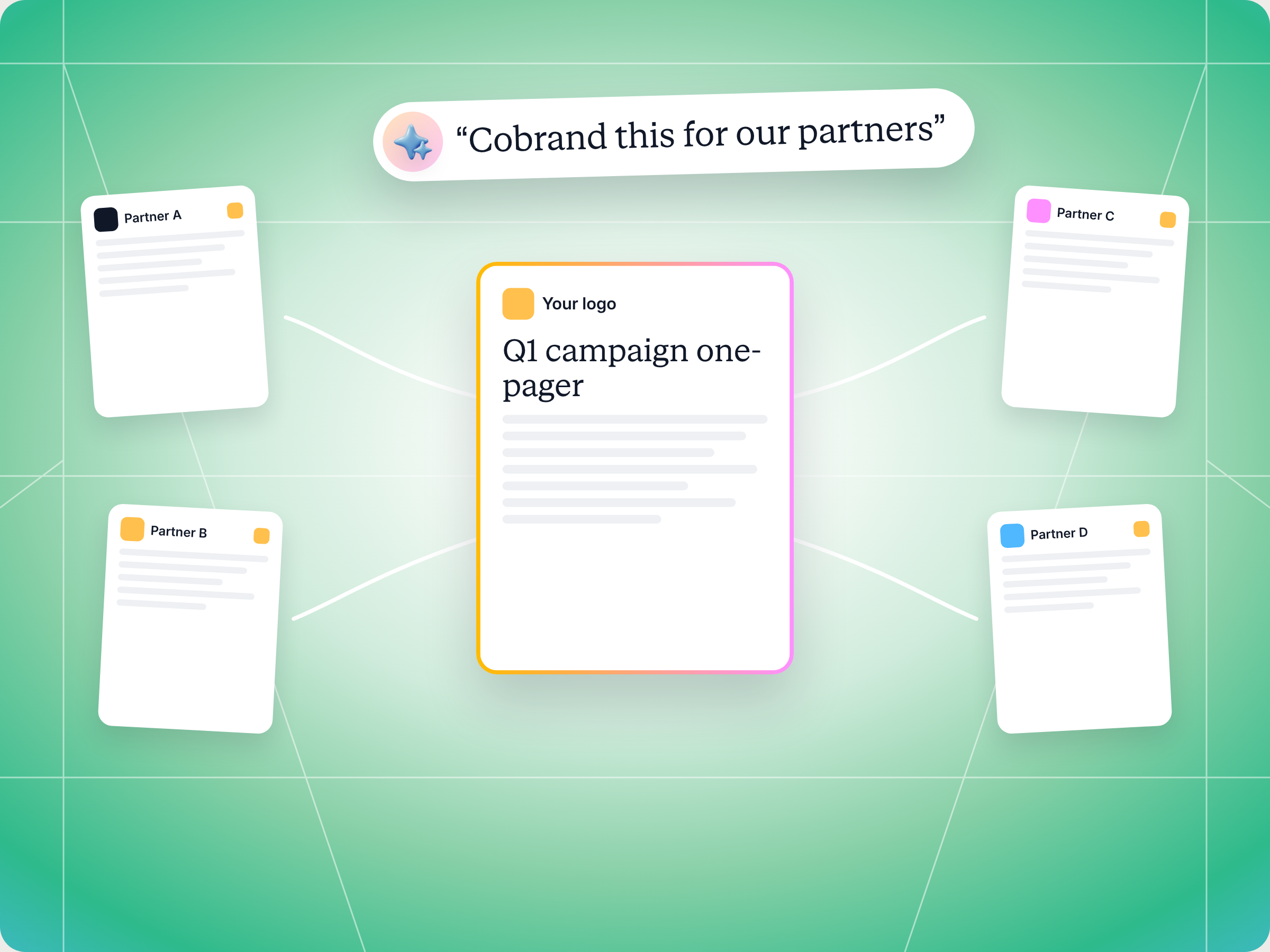
If your partners keep asking for "a version with our logo on it," you need a better way to produce co branded collateral. Two Claude skills handle it. On the vendor side, Cobranded Collateral Generator checks a PDF template, confirms which partners have their branding on file, gets a co branded copy ready for each one in Introw and logs what went out. On the partner side, Cobrand My Collateral finds every co brandable template across all the vendor portals a partner works with and points them to their own branded copy. You make the one click that generates the copies yourself, and nothing reaches a partner without you. Both full SKILL.md files are below, free to copy, along with install steps, prompts to try and what you'll get back.
Here's the problem in one line from Introw's through channel marketing playbook: most channel partners have little or no marketing staff. No designer, no copywriter, no one whose job is to put a logo on a one pager. So when your partner marketing team ships a great new datasheet, most partners never use it, because it still only carries your brand.
You've seen how this plays out. A reseller asks for a co branded version of the campaign one pager. Your designer makes one. Then thirty more partners ask, and by the time the queue clears, the campaign is over.
What if every partner could open your template and get their own branded copy on the spot, and you could set the whole thing up from one prompt?
This guide covers what good co branded collateral looks like, the two Claude skills that produce it at scale, both full SKILL.md files you can copy, how to install and run them, and how you stay in control of your brand.
What co branded collateral is, and why it stalls
Co branded collateral is marketing material that carries both the vendor's brand and the partner's brand: a datasheet, a one pager, a solution brief or a case study a partner can put in front of their own customers. It's the most practical form of co branded content in partner marketing, and it sits at the center of through channel marketing, where you supply syndicated content and partners take it to market. Common examples include product datasheets, solution briefs, customer stories, event handouts for trade shows and the PDF you attach to email campaigns.
The value is simple, and it's a win win for both parties involved. Buyers trust the local partner they already work with, so when the partner's logo sits next to yours, the right message lands as a recommendation, not a vendor blast. You reach customers and potential customers you'd never reach alone, and the partner gets lead generation material without paying for design. The benefits stack up for both companies: partners get sales support and resources they couldn't build themselves, and you create demand in industry niches where the partner's expertise and services carry weight. That's how co marketing extends your marketing reach to new audiences.
The trouble is production. Even an effective partner marketing strategy breaks down in the same three places:
- Every version is a design request: one partner, one logo, one ticket for your design team. That's fine for five partners. It falls apart with multiple partners asking at once, and it lands on someone's to do list for weeks.
- Brand control slips: partners who can't wait for you edit the file themselves. Communication breaks down, fonts change, claims get rewritten and an old logo creeps back in.
- Nobody knows what's out there: which partner has which version, or whether they still use last year's pricing.
Joint webinars and co written ebooks are co branded content you plan with one partner at a time. Collateral is different, because it has to work for every partner at once. For the bigger picture on joint campaigns, read our guide to co branding and co marketing. This article focuses on one job inside it: getting a co branded copy of each asset into every partner's hands, without a design queue.
Partner marketing strategies that make co branded collateral work
Strong partner marketing efforts set clear expectations on what partners get and how they get it. Effective co branded collateral usually has five things in common:
- One governed template: you develop the asset once, and every partner version comes from that same source. That takes content creation off the partner's plate and helps enhance consistency across all your partnerships.
- Locked branding, two editable fields: your layout, claims and visuals stay fixed. Only the partner's name and logo change per copy. That's the line between brand governance and chaos.
- Real partner branding: a clean, current logo from the partner's record, not a blurry screenshot someone pulled from their website.
- Self serve access: partners find their copy in the portal instead of emailing their channel manager, so they spend more time selling. Every new partner gets business access to the same library on day one, which is how you engage partners early in the partner journey.
- A record of what went out: which template, which partners and when, so you can connect collateral to engagement and partner performance.
Here's how the common approaches compare:
| Approach | Speed | Brand control | Scales to many partners |
|---|---|---|---|
| Design team makes each version | Slow, days per request | High | No |
| Partner edits an editable file | Fast | Low, edits drift | Yes, but off brand |
| Logo dropped onto a slide by hand | Medium | Medium | No |
| Governed PDF template filled per partner | Instant, on open | High, only two fields change | Yes |
The last row is how Introw handles co branded content at scale, and it's what drives partner success with collateral. You upload a PDF form with a partner name field and a partner logo field, publish it like any other asset, and each partner gets their own filled in copy when they open it. The two skills below make that faster to set up and safer to roll out, and they fit into a wider channel partner marketing strategy alongside campaign kits, email campaigns and social media posts.
The skills to use: Cobranded Collateral Generator and Cobrand My Collateral
This is a two sided play, so there are two skills from Introw's free Claude skill library. Both run through Introw's MCP server, so they read live data from your partner program instead of a spreadsheet.
| Detail | Cobranded Collateral Generator | Cobrand My Collateral |
|---|---|---|
| Side | Vendor | Partner |
| Built for | Partner marketing managers and vendor marketing | Partner sales, partner marketing and partner operations |
| Use it when | You want one template turned into a copy for every partner or a segment | A partner wants branded collateral from any vendor, without a design request |
| What it reads | The template's co branding fields, your partner roster and each partner's branding | Every vendor portal the partner can access and the co brandable templates in each |
| What it writes | A comment on the partner or campaign record logging what was generated, after you approve | Nothing, it returns links to each copy in the vendor's portal |
| What you get | A generation summary, per partner status and a fix list | Co brandable assets across vendors, portal links and a fix list |
| Skill ID | vendor-cobranded-collateral-generator | partner-cobrand-my-collateral |
The vendor skill fires on prompts like "co brand this for our partners," "generate cobranded collateral," "roll out co branded assets to Gold partners" or "generate branded PDFs for all partners." The partner skill fires on prompts like "put my branding on this," "get a branded version of the deck," "co brand across my vendors" or "make this my own."
If you're a partner marketing manager, the vendor skill is yours, whether you're serving one partner or hundreds of resellers and affiliates. If you're a reseller, agency or MSP collaborating with several vendors, the partner skill is the one to give your team. Either way, the right partners get the right assets, without advertising budgets or design hours.
How the skills work, step by step
The vendor skill runs five steps and the partner skill runs four. You don't run them yourself, but knowing what happens helps you trust the output.
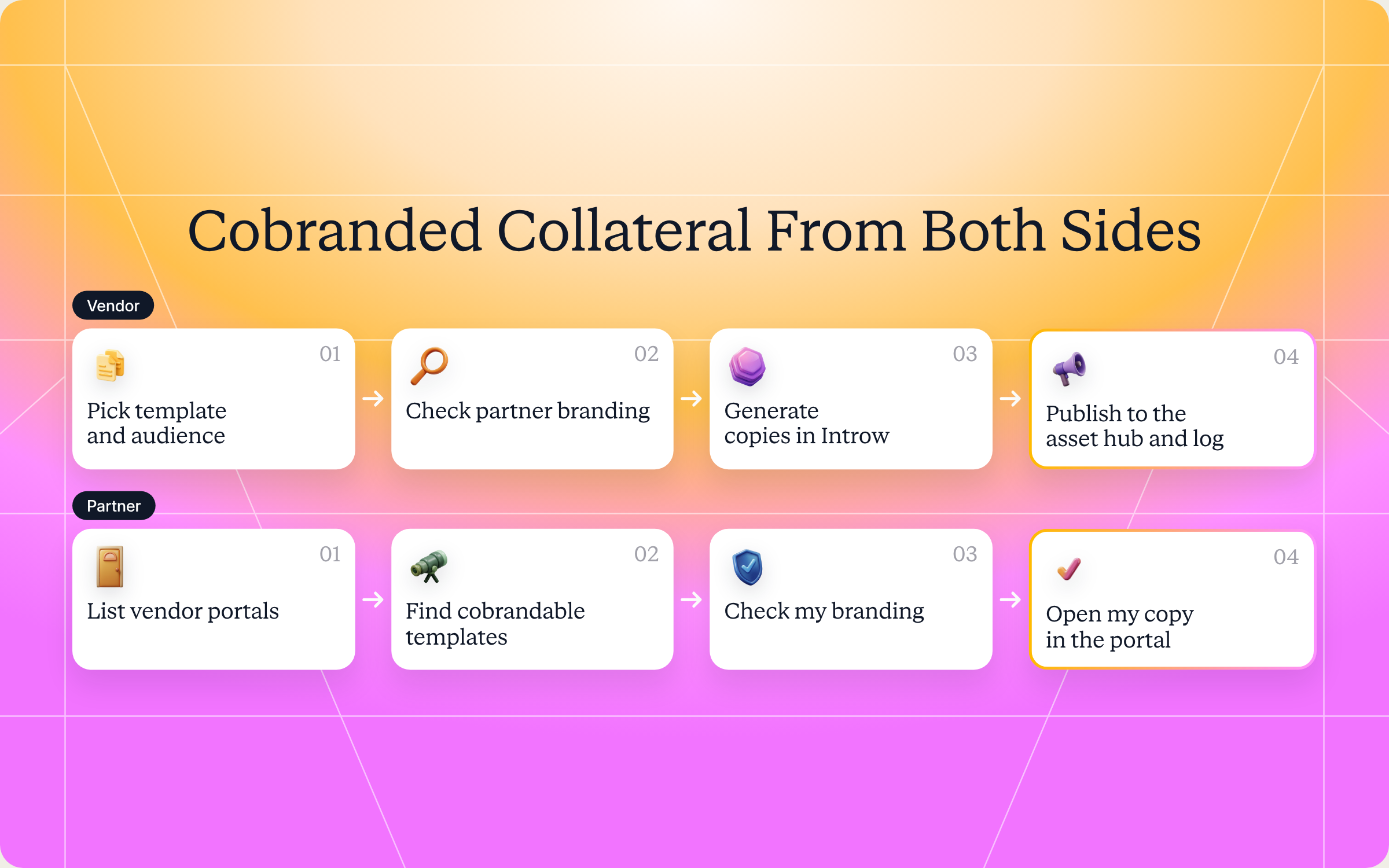
Step 1 (vendor): Confirm the template and its editable areas
Introw co brands PDFs only, and the template needs two form fields whose names contain partner.name and partner.logo. The skill confirms which parts stay locked as your branding and which two fields change per partner.
Step 2 (vendor): Resolve the audience and check branding
Next, it pulls your partner roster with tier, region and vertical, and narrows it to the audience you asked for: all partners, one segment or a named list. Partners without a logo on file get flagged before anything is generated, so you can fix the record first.
Step 3 (vendor): Generate the per partner copies
Generating the copies is a click in Introw, not an MCP call, so the skill hands that click to you. On the asset, Generate for your partners creates one co branded PDF per partner, for everyone or a selection, and saves each copy under Partner assets.
You can also skip this step. When a partner opens the template in the portal, Introw generates their copy on the spot and saves it. Pre generating only matters when copies need to exist upfront, like for a task. Regenerating adds new copies instead of replacing old ones, so the skill reminds you to archive stale versions.
Step 4 (vendor): Publish, surface and log
Each partner's copy is surfaced through the asset hub in their portal, so they only ever see their own version. The skill then logs a comment on the partner or campaign record with what was generated, which gives you an audit trail for the next campaign review.
Steps 1 to 4 (partner): From every vendor portal to your own copy
On the partner side, the flow is shorter. The skill lists every vendor portal the partner can access through Introw Partner Connect, then searches each vendor's asset hub for templates marked co brandable and filters them to what the partner needs, like one campaign, product or vertical. Each vendor's assets are fetched only with that vendor's own portal access, so nothing leaks between vendors.
Next, it checks that the partner's logo and details are on file with each vendor and flags any gaps. Finally, it returns the portal link for each copy. Co branding happens in the vendor's portal, not over MCP, so the partner opens the link and gets their copy with their name and logo filled in. If they want another format, Claude can write its own version from the content and says clearly that it's not a vendor approved export.
Get the skills: the full SKILL.md files
Here are both complete skill files. Copy them as is, or adjust the audience rules and guardrails to match your program.
Vendor skill: Cobranded Collateral Generator
---
name: vendor-cobranded-collateral-generator
description: Use when a Partner Marketing Manager wants to turn a vendor template into fully co-branded collateral for every partner, preparing a PDF template whose partner name and logo fields Introw fills per partner, and surfacing the copies in the portal and asset hub. Trigger phrases include "co-brand this for our partners", "generate co-branded collateral", "make a partner-branded version", "co-brand the campaign one-pager", "roll out co-branded assets", "generate branded PDFs for all partners".
---

# Co-branded Collateral Generator (Vendor)

**Audience**: Vendor (**claude.ai Introw** MCP).
**Use case**: Through-Channel Marketing (TCMA).

## When to use this skill

Use when a Partner Marketing Manager wants to produce fully co-branded collateral (not a logo stitched onto a deck, but on-brand documents carrying both the vendor's and the partner's branding) for one partner, a segment, or the whole partner base, and publish them where partners can self-serve.

**Sample prompts that fire this skill:**
- "co-brand this for our partners"
- "generate co-branded collateral"
- "make a partner-branded version of the campaign one-pager"
- "roll out co-branded assets to Gold partners"
- "generate branded PDFs for all partners"

## Why this matters
Co-marketing stalls when every co-branded asset is a one-off design request. Most channel partners have **zero dedicated marketing or design staff**, so collateral that isn't ready-to-use simply never ships. Generating a co-branded PDF per partner from one governed template removes the design bottleneck and lets co-marketing scale to hundreds of partners while staying on-brand for both sides.

## Inputs to gather
- **Source template**: a PDF with vendor branding and two form fields whose names contain `partner.name` and `partner.logo`. Introw co-brands PDFs only.
- **Target audience**: all partners, a segment (tier / region / vertical), or a named list.
- **Distribution target**: which portal experience / asset hub the copies should surface in.

## Process

### Step 1: Confirm the template and its editable areas
- Confirm which parts of the template are locked (stay as vendor branding) and which are co-branding fields (partner name and partner logo, the only two Introw fills). Locked areas protect brand consistency; only the co-branding fields change per partner.

### Step 2: Resolve the audience
- `Introw:search_partners`: pull the target roster with tier / region / vertical.
- Confirm each partner has branding captured (logo + details). Flag partners missing a logo: they will get a copy generated **without** their brand unless fixed first.

### Step 3: Generate per-partner copies
- Generation is a click in Introw, not an MCP call: on the asset, **Generate for your partners** creates one co-branded PDF per partner (all partners or a selection), saved as a partner-specific asset under **Partner assets**. Hand that click to a human.
- Regenerating adds new copies rather than replacing the old ones, so archive the stale ones afterwards.
- You can skip this step entirely: a partner opening the template in the portal gets their copy generated on the spot.
- Report any partner whose copy could not be produced (missing branding, template error) so the source can be fixed and re-run.

### Step 4: Publish and surface
- Surface each partner's copy through a partner-specific asset hub in a portal experience, so each partner finds only their own co-branded version.

### Step 5: Log
- `Introw:add_comment` on the relevant partner or campaign record to log which collateral was generated and distributed, for audit trail.

## Output format
- **Generation summary**: template used, audience size.
- **Per-partner result**: partner, distribution target, status (done / skipped-missing-branding / error).
- **Fix list**: partners missing branding that need attention before a re-run.
- **Distribution note**: where each partner will find their copy.

## Guardrails & PRM best practice
- **Lock the brand.** Anything that must stay on-brand is locked in the template, not left editable.
- **No brand, no fake brand.** A partner missing a logo gets a vendor-only copy or is skipped; never fabricate partner branding.
- **Partner-scoped assets.** Each generated copy belongs to one partner; never expose one partner's co-branded asset to another.
- **Field fidelity.** Confirm the name and logo land cleanly in their fields (an unreadable logo prints an Invalid Logo placeholder) before broad rollout: generate one sample and review.
- **Human review on new templates.** For a template's first run, review one generated copy before generating for the whole base.
- **Cross-skill handoff.**
  - Bundle the generated collateral into a campaign via `vendor-campaign-kit-builder`.
  - Partners can self-generate their own versions via `partner-cobrand-my-collateral`.
Partner skill: Cobrand My Collateral
---
name: partner-cobrand-my-collateral
description: Use when a partner wants to self-serve fully co-branded collateral from any vendor they work with, finding the co-branded PDF templates each vendor shares, which the portal fills with the partner's name and logo. Trigger phrases include "co-brand this vendor asset", "put my branding on this", "get a branded version of the deck", "co-brand across my vendors", "download a branded one-pager", "make this my own".
---

# Co-brand My Collateral (Partner)

**Audience**: Partner user, uses **Introw Partner Connect** MCP across **all portals** the partner has access to.
**Use case**: Through-Channel Marketing (TCMA), partner-side, multi-vendor.

## When to use this skill

Use when a partner wants ready-to-use, fully co-branded collateral from their vendors, carrying both the vendor's and the partner's branding, without waiting on the vendor's design team or logging into each portal separately.

**Sample prompts that fire this skill:**
- "co-brand this vendor asset"
- "put my branding on this"
- "get a branded version of the deck"
- "co-brand across my vendors"
- "download a branded one-pager for the campaign"
- "make this my own"

## Why this matters
Partners rarely have design staff, so vendor collateral that needs branding work usually never gets used. Self-serving co-branded PDFs means the partner can put on-brand, dual-branded material in front of their customers in minutes, across every vendor they represent, from one assistant.

## Process

### Step 1: Enumerate vendor portals
- `Introw_Partner_Connect:partners`: get all portals the partner has access to.

### Step 2: Find co-brandable templates
For each `roomId`:
- Search the vendor's content / asset hub for templates marked co-brandable (those with partner-branding placeholders).
- Filter to what the partner actually needs (a specific campaign, product, or vertical).

### Step 3: Confirm the partner's branding
- Confirm the partner's own logo and details are on file with each vendor so the merge produces a fully branded result. Flag any vendor where branding is missing.

### Step 4: Point the partner to their copy
- Co-branding happens in the vendor's portal, not over MCP: when the partner opens the PDF template there, they get their own copy with their name and logo filled in.
- Introw co-brands PDFs only, and no MCP tool downloads or co-brands a file, so return the asset links and tell the partner to open them in the portal.
- If the partner wants other formats, the assistant can write its own version from the content; say clearly that this is the assistant's work, not a vendor-approved Introw export.

## Output format
- **Available co-brandable assets** across vendors: vendor, asset, portal link.
- **Where to open each copy**: vendor, asset, portal link.
- **Fix list**: vendors where the partner's branding is missing and needs to be captured first.

## Guardrails & PRM best practice
- **Strictly scoped per portal.** Each vendor's assets are only fetched with its own `roomId`. No cross-portal leakage.
- **Respect locked areas.** Only the partner-branding fields change; never alter the vendor's locked branding or claims.
- **No fabricated branding.** If the partner's branding isn't captured with a vendor, capture it first; don't invent it.
- **Use current versions.** Always co-brand the latest template version the vendor published; don't reuse a stale local copy.
- **Cross-skill handoff.** Turn co-branded collateral into a live campaign via `partner-drip-campaign-from-assets`; plan which campaigns to run via `partner-cross-vendor-content-calendar`.
How to install and run the skills
You've got two ways to use them, depending on where you work.
Option 1: Claude Code
Create a folder for each skill inside .claude/skills/ in your repo: vendor-cobranded-collateral-generator for the vendor file and partner-cobrand-my-collateral for the partner file. Save each one as SKILL.md inside its folder. Claude Code picks them up automatically and runs the right one whenever your prompt matches its trigger phrases.
Option 2: Claude (or any MCP client) with the Introw connector
Connect Claude to Introw once, and you can run the same play in plain language from Claude, ChatGPT, Slack, Teams or your CRM. Introw is in Claude's connector directory, so it's one click plus a sign in:
The step by step version lives in the Connect Claude guide, and the Claude integration page covers what you can do once you're connected.
If you're a partner, you connect Claude to Introw Partner Connect with your own portal login, and the skill sees every vendor portal you already have access to, and nothing more.
Prompts to try
Once a skill is installed or Claude is connected, try any of these:
- "Co brand the Q1 campaign one pager for our partners." Runs the vendor skill across your whole partner base and returns the fix list first.
- "Roll out co branded assets to Gold partners in DACH." Scopes the run to one tier and region.
- "Which partners are missing a logo before we generate the new datasheet?" Gives you the branding check on its own, so you can clean up records before a launch.
- "Co brand across my vendors and show me what's available for healthcare." Runs the partner skill across every vendor portal, filtered to one vertical.
- "Get me a branded version of the security deck from each vendor." Returns the portal link for each copy, plus any vendor where your branding still needs to be captured.
What you'll get back
A vendor run returns four things:
- Generation summary: the template used and how many partners are in the audience.
- Per partner result: each partner, where their copy will surface, and a status of done, skipped for missing branding, or error.
- Fix list: partners whose logo or details need attention before a re run.
- Distribution note: where each partner will find their copy in the portal.
A partner run returns the co brandable assets across every vendor, a portal link to open each copy, and a fix list of vendors where your branding isn't on file yet.
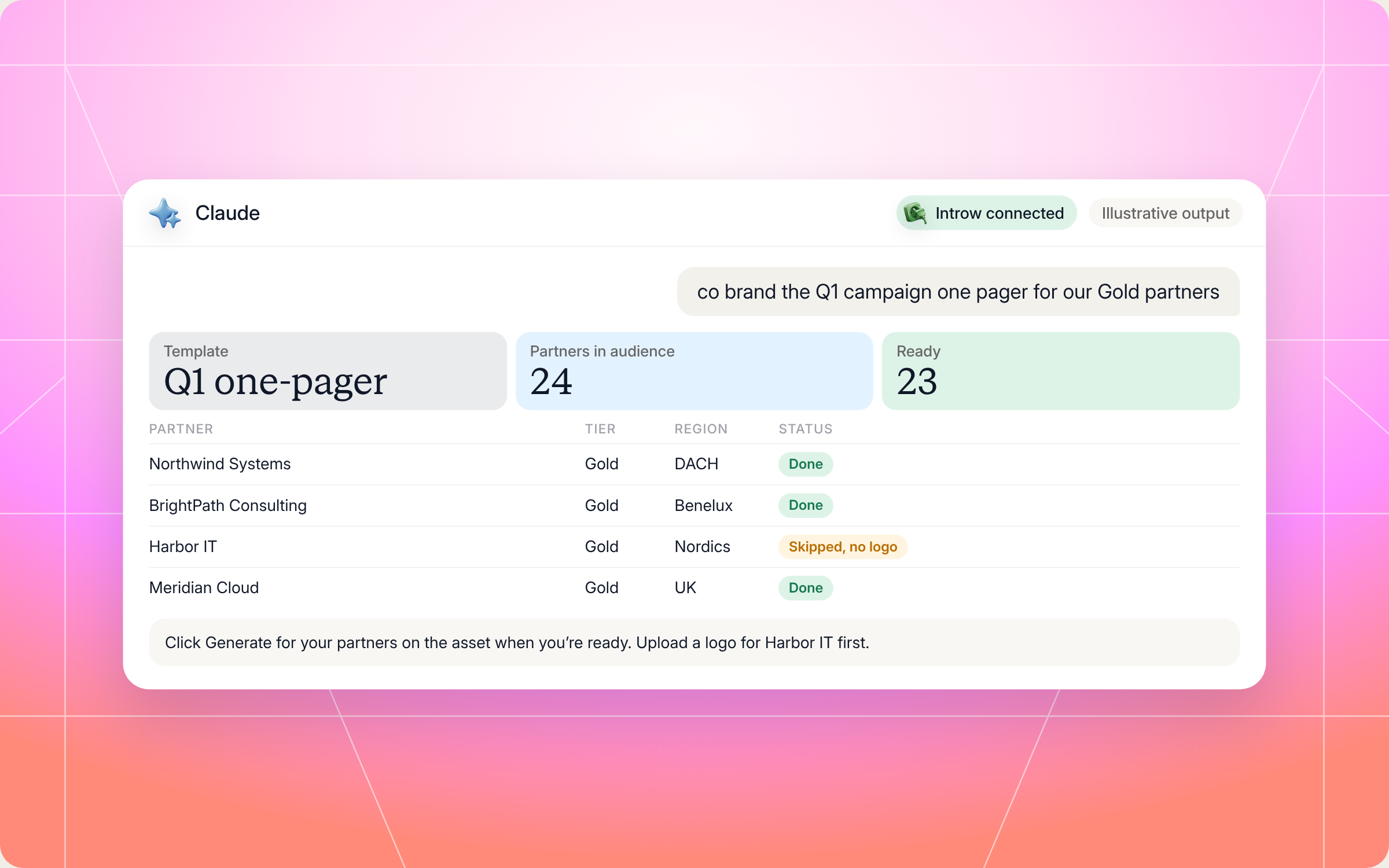
Here's an illustrative slice of a vendor run for a new campaign one pager sent to Gold partners:
| Partner | Tier | Region | Distribution target | Status |
|---|---|---|---|---|
| Northwind Systems | Gold | DACH | Gold partner asset hub | Done |
| BrightPath Consulting | Gold | Benelux | Gold partner asset hub | Done |
| Harbor IT | Gold | Nordics | Gold partner asset hub | Skipped, no logo on record |
| Meridian Cloud | Gold | UK | Gold partner asset hub | Done |
The fix list underneath would tell you to upload a logo for Harbor IT and to review one sample copy before the full rollout, since this is the template's first run.
Staying in control: what Claude can and can't do
Your brand is on every one of these files, so a few controls are built in:
- You approve the writes: the vendor skill only writes a comment to your CRM after you approve it, and generating the copies is a click you make in Introw yourself.
- It stays inside your access: Claude connects to Introw over OAuth as you, so it can only see and do what you can.
- Only two fields ever change: your layout, visuals and claims stay locked in the template. The skills never touch them.
- No fake branding: if a partner's logo isn't on record, the skill flags it instead of inventing one.
- Test before you roll out: on a new template, review one sample copy first. An unreadable logo prints an "Invalid Logo" marker instead of the logo, and you want to catch that on one file, not three hundred.
Prefer to do this in the Introw app?
In the Introw app, you upload the PDF template to the asset library, confirm the partner name and logo fields in the Co Branding fields panel, and add it to an asset hub. For the cleanest result, add a square logo, around 200 by 200 pixels, to each partner record. Co branded collateral works best inside a campaign kit, which bundles it with your narrative and email templates:
The step by step guide to creating and sharing co branded assets covers the setup in detail. You can also see how partner campaigns and content enablement work in Introw, or read the glossary entries on co branded content and campaigns in a box.
Pair it with other Claude skills
These skills pick up where the two above leave off:
- Campaign Kit Builder: a vendor skill that packages positioning, messaging, email templates and your co branded collateral into one kit partners and their AI assistants can launch from.
- Drip Campaign from Assets: a partner skill that turns a vendor campaign kit into a scheduled drip in the partner's own email tool, with attribution links applied.
- Cross Vendor Content and Activity Calendar: a partner skill that puts every vendor launch, webinar and campaign window in one calendar, so partners know which collateral to pull and when.
You'll find all of them in Introw's skill library, and our roundup of Claude skills for partner teams explains how they fit together.
Run partner marketing from Claude with Introw
Introw is a CRM first partner relationship management platform, which means it builds on top of your existing HubSpot or Salesforce setup rather than replacing it. It's also headless by design: the partner portal is one surface, but you can run the same program in plain language from Claude, ChatGPT, Slack or Teams through Introw's MCP server, with every action written back to your CRM.
That's why these skills work. Your partner roster, branding, assets and portal experiences live in one place, so the vendor skill knows who's missing a logo, the partner skill finds every co brandable template in one pass, and your whole organization works from the same data.
Give every partner their own branded copy of your next campaign, without a single design ticket. Connect Claude or book a demo.
Still curious? Here are some quick answers to help clear things up
Co branded collateral is marketing material, like a datasheet, one pager or solution brief, that carries both the vendor's and the partner's branding. It's the most common type of co branded content in partner programs. Partners use it to promote your product to their own customers under a brand those customers already trust.
No. Claude Code users can drop each SKILL.md into its own folder under .claude/skills/. Everyone else can connect Claude to Introw through the connector directory and run the same play in plain language.
No. The vendor skill drafts a comment for your CRM and only writes it after you approve, and generating the copies is a click you make in Introw. The partner skill only returns links. Neither one changes your template's locked branding.
Introw co brands PDF templates only. A partner's Claude can write its own version of the content in another format, but it will say clearly that this is its own work, not a vendor approved export.
Yes. Both full files are in this article and in Introw's skill library. You can copy them as is or adapt them to your program, but they read partner data through Introw's MCP server, so you'll need Introw connected to run them.






See AI-Native PRM in Action
Book a demo with one of our partner program experts, or explore Introw on your own time.

