

If your partner team's Monday update keeps getting written late, or not at all, the Claude skill to use is Weekly Channel Slack Digest. It pulls the last seven days of partner data from your CRM and Introw, builds a weekly sales report for your channel team (wins, new registrations, movers, at risk partners, pending approvals, KPI deltas, anomalies and action items with owners) and posts it to the Slack channel you choose. On the first run, you review and approve the draft before anything goes out. The full SKILL.md is below, free to copy, along with install steps, prompts to try, and what you'll get back.
Here's a number most channel leaders will recognize. Introw's ecosystem performance playbook puts ad hoc analytics requests at 30 to 50% of channel RevOps capacity in mid to large programs. A big chunk of that time goes to the same questions every week: what closed, what got registered, who's slipping, what's stuck in the queue.
So someone on your team writes the Monday update. They open five tabs (CRM, PRM, finance, a few Slack threads, the task tracker), copy numbers, write a few paragraphs and post it to the channel team. It takes 60 to 90 minutes. When the week gets busy, it gets skipped. And by Tuesday, the numbers are already stale.
What if the weekly sales report for your partner channel just showed up in Slack every Monday, accurate, with names and owners attached?
This guide covers what a good weekly sales report looks like for a partner team, the Claude skill that builds and posts it, how it works step by step, the full SKILL.md you can copy, how to install and run it, and how to stay in control of what gets posted.
What a weekly sales report is, and why partner teams struggle to keep one going
A weekly sales report is a short summary of what happened in your pipeline over the last seven days: deals won and lost, new opportunities, movement against sales targets, and the few things the team should focus on next. It sits between daily sales reports, which track activity, and monthly sales reports, which look at the bigger picture for business leaders and the leadership team.
In a direct sales department, it covers sales activities, sales calls, conversion rates and individual and team performance. Sales managers use it to review individual sales reps performance, coach each sales representative, identify trends early and forecast future revenue with sales forecasts they can trust.
A partner team needs something slightly different. Your revenue runs through other companies, so the questions change:
- Which partners closed business this week: not just total revenue, but which partner was attached to each win.
- What got registered: new deal registrations, their total value, and the biggest deals in the batch.
- Who's moving: partners pacing up or down on engagement, registration cadence or deal velocity.
- Who's slipping: partners who went quiet, missed a milestone or look dormant.
- What's stuck: approvals, MDF requests and deal registration conflicts that are aging in the queue.
That data lives in your customer relationship management system, your partner portal, finance and Slack threads, and accurate sales reporting depends on all of them. Pulling relevant data from five systems by hand every Monday is a chore, and chores lose to deals.
When the report is skipped, sales leaders make calls on gut feel, approvals sit for days, and a partner who went dark in week two isn't noticed until the quarterly review in week twelve.
Weekly vs daily vs monthly sales reports
Different types of sales reports answer different questions. Here's how the weekly one fits:
| Report | Main question | Typical audience | Best for |
|---|---|---|---|
| Daily sales reports | What did we do today? | Sales rep, sales managers | Sales activities, sales calls, quick fixes |
| Weekly sales report | What changed this week, and what do we do next? | Channel team, sales operations, sales leaders | Wins, pipeline movement, at risk accounts, action items |
| Monthly sales reports | Are we on track for the quarter? | Leadership team, business leaders | Sales performance, revenue growth, sales forecasts |
| Sales pipeline report | What's in the funnel and where is it stuck? | Sales managers, RevOps | Sales pipeline health, sales cycle length, conversion rates |
| Sales call report | What came out of this week's calls? | Sales rep, sales managers | Call outcomes and next steps |
| Sales performance report | Who's hitting target? | Sales leaders | Sales rep performance against quota |
The weekly sales report is the one that drives action. Monthly reports help decision making and track sales growth at the program level, but a weekly cadence is short enough to fix things and long enough to see real sales trends.
What makes an effective sales report for a partner channel team
An effective sales report is short, specific and honest. It turns sales records into valuable insights and actionable insights for its target audience, not a data dump.
Here's what a strong weekly report format includes for a channel team:
- A clear time window: the trailing seven days, with the date range in the header, so nobody has to guess what period the numbers cover.
- Wins with attribution: every closed won deal this week, with the partner who sourced or influenced it. This is where partner revenue attribution stops being a quarterly debate and becomes a weekly habit.
- New registrations: count, total value and the top deals, so the team sees the sales volume coming into the funnel.
- Movers: partners whose engagement or deal velocity changed notably versus last week, up or down.
- At risk partners: the top three who slipped, each with a suggested next step.
- The queue: pending approvals, MDF requests and conflicts, with anything past its SLA flagged.
- A KPI snapshot: key performance indicators like partner activation rate, partner influenced pipeline, tier movement and week over week deltas.
- Action items with owners: three to five things the team should do this week, each with a name next to it.
Key sales metrics to include
The best weekly metrics change week to week and point to a decision. Good candidates for a partner team:
- Partner attached pipeline: new pipeline created with a partner involved, compared to last week.
- Registrations and average deal size: how many deals partners registered, and whether deal sizes are holding.
- Win rate and conversion rates: how registered deals are converting through the sales funnel.
- Activation rate: the share of new partners who reached a first deal.
- Aging items: approvals older than 24 hours, conflicts older than 48 hours.
Leave slower metrics like customer lifetime value, tier distribution and full sales cycle analysis for a monthly sales report template or your QBRs. Those performance metrics matter, but they don't move enough in seven days to drive weekly decisions.
A good weekly sales report template solves some of this, but templates still need someone to fill them in, and creating sales reports by hand eats into real sales efforts. That's the part a Claude skill takes off your plate.
The skill to use: Weekly Channel Slack Digest
Weekly Channel Slack Digest is a vendor side skill from Introw's free Claude skill library. It combines Introw's MCP server with Claude's Slack connector to generate your partner team's weekly sales report from live data and post it to your channel team's Slack channel.
| What | Details |
|---|---|
| Built for | Partner program managers, channel ops managers and channel RevOps |
| Use it when | You want the Monday partner update written and posted without opening five tabs |
| What it reads | Closed won deals and new opportunities, registrations, partner engagement, partner roster, tasks, commissions and goals |
| What it writes | A Slack post to the channel you choose, plus a comment that logs the message link in Introw |
| What you get | A Slack formatted digest, a confirmation with the channel, link and timestamp, and optional shorter versions for other audiences |
| Skill ID | vendor-slack-weekly-channel-digest |
The skill fires on prompts like:
- "weekly channel digest"
- "Monday partner update"
- "post the partner digest"
- "weekly Slack update"
- "channel team digest"
- "what happened with partners this week"
Think of it as sales reporting software that lives inside Claude: no dashboard to build, no spreadsheet to maintain, and no need to build sales reports by hand.
How the skill works, step by step
The skill follows four steps. You don't have to run them yourself, but knowing what happens under the hood makes it easier to trust the output.

Step 1: Set the window, channel and sections
By default, the report covers the trailing seven days, ending when you run it. The first time, the skill asks which Slack channel to post to and remembers your answer. It also asks if you want to skip any sections. Maybe your team only cares about wins and at risk partners. That's fine.
Step 2: Pull the data
Next, the skill does the sales analysis groundwork your team would otherwise do by hand, reading the sales data it needs from Introw, which sits on top of your CRM:
- Wins and new opportunities: closed won deals and new partner attached opportunities in the window.
- Registrations: new deal registrations and lead shares submitted by partners.
- Engagement: how each partner's engagement changed compared with the prior period.
- Partner roster: every partner with their lifecycle stage.
- Tasks: overdue and aging tasks across the team.
- Commissions: commission events, for context.
- Goals: pacing against quarterly goals, using your partner goals.
If you've also run the Ecosystem Anomaly Detector skill, the digest can reuse its findings in the anomalies section.
Step 3: Compose the digest
The skill builds a Slack friendly message with a header (your brand and the week's date range), then one section per enabled topic. It uses bullets with bold labels, links partner names back to their record in Introw where it can, and keeps the whole post under about 3,000 characters so Slack doesn't cut it off. Longer sections get summarized in the post with a link out to a comprehensive sales report. Just as a good sales pipeline report shows where deals are stuck, the digest shows which partners and approvals are stuck.
Step 4: Preview, post and log
On the first run, the skill never posts on its own. It shows you the draft, asks you to confirm the channel and the tone, and only posts after you approve. Once you're happy with the format, you can switch on auto posting for recurring runs, such as every Monday morning.
After posting, the skill logs the message link as a comment on a designated "weekly digest log" record in Introw, so there's an audit trail you can look back on at your next QBR.
Get the skill: the full SKILL.md
Here's the complete skill file. Copy it as is, or adjust the sections, time window and guardrails to fit your team.
---
name: vendor-slack-weekly-channel-digest
description: Use when a Channel Chief, Channel Ops, or RevOps user wants to generate the weekly partner-team Slack digest, wins, registrations, at-risk partners, pending approvals, KPI deltas, action items, and post it directly to the channel-team Slack channel. Trigger phrases include "weekly channel digest", "Monday partner update", "post the partner digest", "weekly Slack update", "channel team digest", "what happened with partners this week".
---

# Weekly Channel Slack Digest (Vendor)

**Audience**: Vendor, uses **claude.ai Introw** MCP + **claude.ai Slack** MCP.
**Use case**: 14, Ecosystem Performance.

## When to use this skill

Use when a Channel Chief, Channel Ops, or RevOps user wants to generate the weekly partner-team Slack digest, wins, registrations, at-risk partners, pending approvals, KPI deltas, action items, and post it directly to the channel-team Slack channel.

**Sample prompts that fire this skill:**
- "weekly channel digest"
- "Monday partner update"
- "post the partner digest"
- "weekly Slack update"
- "channel team digest"
- "what happened with partners this week"

## Why this matters
Most channel teams write their Monday digest by hand: someone opens 5 tabs (CRM, PRM, finance, Slack threads, Linear), copies numbers, paragraphs them up, posts to `#channel-team`. It takes 60 to 90 minutes and gets skipped half the time. The information ages by Tuesday.

Agentic generation collapses prep to seconds. The digest stops being a chore (and stops getting skipped). The leadership team gets a consistent, current weekly heartbeat. Pair it with `vendor-anomaly-detector` to make the digest predictive, not just retrospective.

## What the digest contains (default sections)

1. **Wins**: closed-won partner-attached deals this week, with partner attribution.
2. **New registrations**: count, total ARR value, top deals.
3. **Movers**: partners pacing up or down notably vs. prior week (engagement, registration cadence, deal velocity).
4. **At risk**: partners who slipped this week (engagement decay, missed milestones, dormant). Top 3 with suggested intervention.
5. **In the queue**: pending approvals, MDF requests, deal-reg conflicts awaiting resolution. Aging items flagged.
6. **KPI snapshot**: activation rate, partner-attached pipeline, tier movement, week-over-week deltas.
7. **Anomalies**: anything unusual surfaced by `vendor-anomaly-detector` worth a human eye.
8. **Action items**: top 3 to 5 things the team should focus on this week, with owners.

User can configure which sections appear, the time window (default trailing 7 days), and which Slack channel to post to.

## Process

### Step 1: Resolve config
- Default time window: trailing 7 days, ending at run time.
- Default Slack channel: ask the user the first time, then capture.
- Section toggles: ask for any sections to skip (e.g., user only wants Wins + At risk).

### Step 2: Pull data
- `Introw:search_crm_objects`: closed-won deals + new opps in window (partner-attached).
- `Introw:search_form_submissions`: new registrations in window.
- `Introw:search_partner_engagement`: engagement deltas vs. prior period.
- `Introw:search_partners`: partner roster + lifecycle states.
- `Introw:search_tasks`: overdue / aging tasks across the team.
- `Introw:search_commissions`: commission events for context.
- `Introw:get_goals`: pacing vs. quarterly goals.
- Optionally: re-use output from `vendor-anomaly-detector` if it ran.

### Step 3: Compose the digest
Build a Slack-friendly message using Slack's block kit (or simple markdown if user prefers):
- Header block with brand + week-of date range.
- Section blocks for each enabled section.
- Use bullet lists with bold labels.
- Include partner names with hyperlinks back to the partner record in Introw where possible.
- Keep total length under ~3,000 characters, Slack truncates long messages.
- For long sections, summarize in the post + link to a full report.

### Step 4: Post (or surface for approval)
- **First run**: surface the drafted digest to the user for review. Confirm channel + tone. Don't auto-post.
- **After approval**: post via `Slack:*` to the configured channel.
- For recurring runs (e.g., weekly cron), the user can enable auto-post once the format is dialed in.
- Capture the posted message URL via `Introw:add_comment` on a designated "weekly digest log" record (or a custom CRM object) so the audit trail exists.

## Output format
- **The digest itself**: Slack-formatted message (block kit JSON or markdown).
- **Confirmation**: posted-to channel, message link, timestamp.
- **Variants** for different audiences if requested (e.g., a shorter exec version for CRO Slack).

## Guardrails & PRM best practice
- **Don't auto-post on first run.** Always preview + approve. Tone calibration matters, a digest that misreads sentiment ("celebrating" a partner who just churned) burns trust faster than no digest.
- **Be honest about losses.** If the week was bad, the digest should say so. Sugarcoated digests train the team to ignore them.
- **Names matter.** Cite partners and team members by name (with proper Slack mentions where relevant): generic "the team" digests get skimmed.
- **Action items must have owners.** "Need to follow up on X" with no name attached doesn't drive action; either assign or remove.
- **Aging is the alarm bell.** Items aging past SLA (approvals > 24h, conflicts unresolved > 48h) get flagged in red, this is the single most useful section for ops.
- **Respect channel volume.** If the channel is high-traffic, default to a shorter format and link out for detail. If it's quiet, the digest is the headline.
- **No partner-confidential data in public channels.** Commission specifics, strategic-account discussions, tier moves, none of those go in `#channel-team` if it's broadly accessible. Use a private channel for those if needed.
- **Don't post during incidents.** If the team is mid-fire (outage, major customer escalation), defer the digest. The skill should ask before posting if the user wants to skip this week.
- **Cross-skill handoff.** Anomaly section feeds from `vendor-anomaly-detector`; KPI snapshot is essentially the standing health check from `vendor-ecosystem-health-check` if installed; at-risk section can hand off to `vendor-activate-network-with-personalized-campaigns` for follow-up.
- **Iterate the format.** After 4 weeks, ask the team what they actually read. Cut the sections that don't get traction. The best digest is the one people open.
How to install and run the skill
You've got two ways to use it, depending on where you work. Either way, the skill needs two connections: Introw for the partner and CRM data, and Slack to post the message.
Option 1: Claude Code
Create a folder called vendor-slack-weekly-channel-digest inside .claude/skills/ in your repo, and save the file above as SKILL.md inside it. Claude Code picks it up automatically and runs it whenever your prompt matches the trigger phrases in the description. Make sure your Introw and Slack connectors are available in that environment.
Option 2: Claude (or any MCP client) with the Introw connector
You don't need to be technical for this one. Connect Claude to Introw and Slack from Claude's connector directory, one click plus a sign in each, and run the same play in plain language. Here's how connecting Introw looks:
The step by step version lives in the Connect Claude guide, and the Claude integration page covers what you can do once you're connected. If your partners already chat with you in Slack, the Introw Slack integration is worth a look too.
Prompts to try
Once the skill is installed or Claude is connected, try any of these:
- "Weekly channel digest." Builds the full digest for the last seven days and shows you a draft.
- "What happened with partners this week?" Same digest, framed as a quick catch up before your Monday meeting.
- "Post the partner digest to our channel team channel, but only wins and at risk." Narrows the sections and sets the channel.
- "Monday partner update, plus a shorter exec version for the CRO channel." Gives you two variants for two audiences.
- "Draft this week's digest but don't post it yet." Lets you review and edit before anything reaches Slack.
What you'll get back
A typical run returns three things:
- The digest itself: a Slack formatted message, in block kit or simple markdown, ready to post.
- A confirmation: the channel it was posted to, the message link and the timestamp, once you approve.
- Variants on request: for example a shorter exec version for leadership.
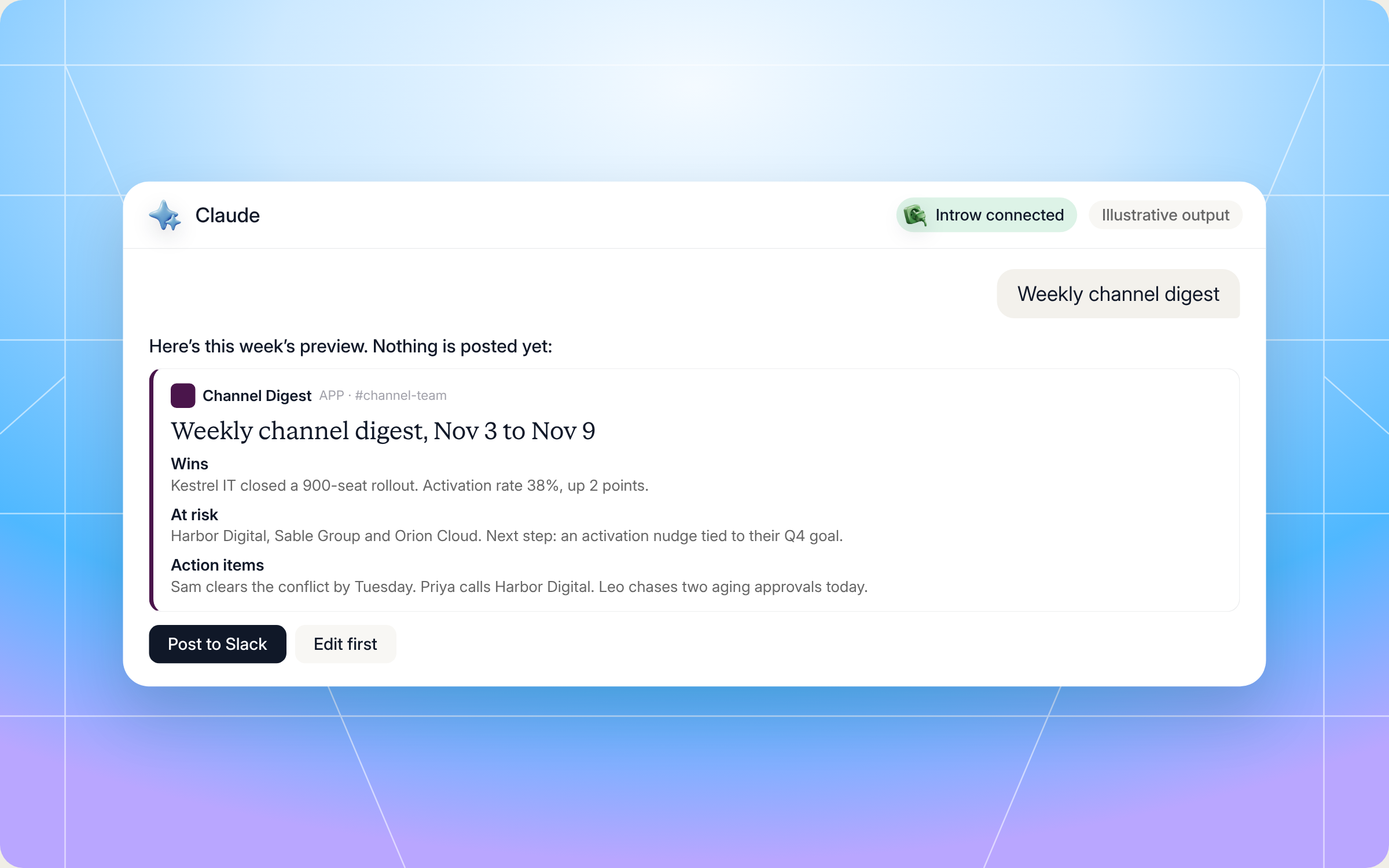
Here's an illustrative sales report example of what one week's digest might look like for a mid sized channel team:
- Header: Weekly channel digest, Nov 3 to Nov 9.
- Wins: 4 partner attached deals closed won, €212K total. Biggest: Northwind Health (€96K) via Brightpath Consulting.
- New registrations: 11 deals registered, €640K total value. Top deal: a 900 seat rollout registered by Alder Systems.
- Movers: Kestrel IT up (3 registrations after a quiet month). Bluefin Partners down (engagement off 40% week over week).
- At risk: Harbor Digital, Sable Group and Orion Cloud. Suggested next step for each: an activation nudge tied to their Q4 goal.
- In the queue: 6 approvals pending, 2 older than 24 hours (flagged). 1 registration conflict open for 3 days, owner Sam.
- KPI snapshot: activation rate 38% (up 2 points), partner attached pipeline €1.9M (up 6%), one partner moved to Gold.
- Anomalies: a dormant partner registered two deals in one day. Worth a quick check.
- Action items: Sam clears the conflict by Tuesday. Priya calls Harbor Digital. Leo chases the two aging approvals today.
Staying in control: what Claude can and can't do
An automated post to a team channel only works if you trust what it says. A few things are built in:
- You approve the first post. The skill always previews the first digest and waits for your sign off on the channel and the tone. Auto posting is something you switch on later, once the format is right.
- It stays inside your access. Claude connects to Introw over OAuth as you, so it can only see and post what you can.
- It's honest about bad weeks. The guardrails tell it not to sugarcoat. If deals slipped, the digest says so.
- It keeps sensitive data out of public channels. Commission specifics, strategic account discussions and tier moves stay out of a broadly visible channel. Use a private channel if you need them.
- It holds off during incidents. Mid outage or escalation, it asks before posting so you can skip a week.
- It leaves a trail. Each posted message link is logged in Introw, so you can trace what the team saw and when.
The key benefits: your team can track progress every week, identify areas that need attention early, and make data driven decisions instead of guesses. One more tip from the skill itself: after four weeks, ask your team which sections they actually read, and cut the rest. The best weekly report is the one people open.
Prefer to do this in the Introw app?
Not every team wants its reporting to start in Claude. If you'd rather have a live view people can check any time, you can build the same metrics as reports in Introw and pin them to a dashboard. The report builder guide walks you through choosing a data source, shaping the metric and grouping, filtering and picking a chart. Here's how it looks:
Saved reports can go on partner reports and dashboards for your team, or into partner portals so partners can track performance themselves. For ideas on what to include, read our guide on how to build a partner dashboard. Many teams use both: a dashboard for anytime questions, and the Slack digest as the weekly heartbeat.
Pair it with other Claude skills
The digest gets more useful when it's connected to the skills around it:
- Ecosystem Anomaly Detector: scans for activity drops, unusual deal patterns and dormant partners waking up, and feeds the anomalies section. See the skill page.
- Activate the Network with Personalized Campaigns: picks up the partners flagged as at risk and drafts a personal activation campaign for each one.
- QBR Prep: when the quarter ends, turns the same data into a full partner QBR packet instead of a weekly snapshot.
- Pipeline Partner Influence Scout: finds where partners touched deals your team is working, so the wins section gets the attribution right.
You'll find all of them in Introw's skill library, and our roundup of Claude skills for partner teams explains how they fit together. For the bigger picture on what to measure across a program, read our guide to channel partner performance management.
Run your weekly partner reporting from Claude with Introw
Introw is a CRM first partner relationship management platform, which means it builds on top of your existing HubSpot or Salesforce setup rather than replacing it. It's also headless by design: the partner portal is one surface, but you can run the same program in plain language from Claude, ChatGPT, Slack or Teams through Introw's MCP server, with every action written back to your CRM.
That's what makes a skill like this work. Deals, registrations, engagement, goals, tasks and commissions all live in one place, so the weekly sales report reflects your company's sales activities across the entire sales process, from registration to sales revenue. It's built from the same data your partner performance tracking uses, not a spreadsheet someone exported last month. That gives sales professionals and partner managers a shared view to shape sales strategies, tighten the sales process and drive business growth. And when the digest flags a stuck registration, the deal and lead registration workflow is right there to clear it.
Stop writing the Monday update by hand and let your team spend that hour on partners instead. Connect Claude or book a demo.
Still curious? Here are some quick answers to help clear things up
A weekly sales report should cover the last seven days: deals won and lost, new pipeline, progress against sales targets, anything at risk or stuck, a few key metrics with week over week changes, and three to five action items with owners. For partner teams, add partner attribution on wins and a view of pending approvals and registrations.
No. Claude Code users can drop the SKILL.md into their skills folder. Everyone else can connect Claude to Introw and Slack through the connector directory and run the same play in plain language.
Not on the first run. It always shows you a draft and waits for you to confirm the channel and tone. After that, you can choose to turn on auto posting for a weekly schedule, and it will still ask before posting if your team is in the middle of an incident.
Yes. You can skip any of the eight default sections, change the time window from the default seven days, and pick which Slack channel it posts to. You can also ask for a shorter version for leadership.
Yes. The full file is in this article and in Introw's skill library. You can copy it as is or adapt it to your own program, but it reads live partner data through Introw's MCP server and posts through Slack, so you'll need both connected to run it.





See AI-Native PRM in Action
Book a demo with one of our partner program experts, or explore Introw on your own time.

