
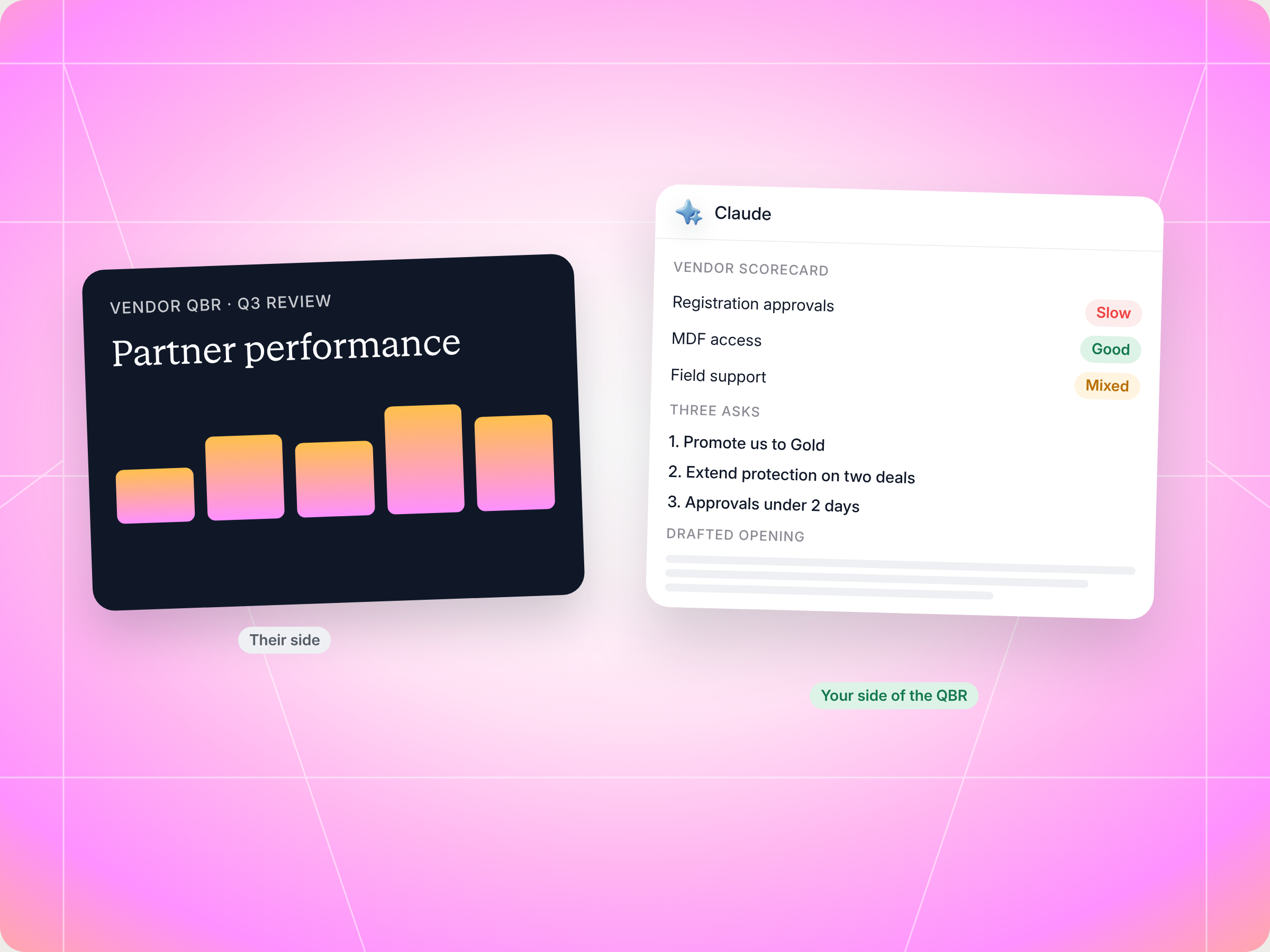
Most vendor QBRs are run to the partner, not with them. The Pre QBR Self Prep Claude skill flips that. It pulls your own numbers from your vendor's Introw portal (deals sourced and closed, registrations, training, goals, commissions and tier progress), scores how the vendor has performed as a partner to you, picks the two or three asks worth making, and drafts a short opening you can use in the room. You review everything, and nothing gets logged without your OK. The full SKILL.md is below, free to copy, with install steps, prompts to try and an example of what you'll get back.
If you're a partner heading into a vendor QBR, this guide shows you how to walk in with your own data, your own scorecard and a short list of asks, prepared in minutes. It matters because the vendor QBR is where your tier, MDF and lead share for the next quarter get decided.
Here's the math behind most vendor QBRs. Introw's QBR playbook estimates that a vendor's QBR prep time is 2 to 4 hours for each quarterly business review with a partner. That's 2 to 4 hours of slides, pipeline charts and talking points, built from the vendor's point of view.
Now think about your side of the table. You run partnerships for a reseller or an agency. The QBR invite lands on Tuesday for Thursday. You skim your CRM, try to remember which deals the vendor helped with and which ones they slowed down, and walk in with a few notes. Then the vendor shares their screen, owns the agenda, and you spend an hour answering questions about your pipeline.
Sound familiar? What if the vendor wasn't the only one in the room with prepared numbers at the next QBR?
This guide covers what good vendor QBR prep looks like from the partner side, a sample QBR agenda, the Claude skill that does the data collection for you, the full SKILL.md you can copy, how to install and run it, and how to stay in control of what it does.
Why a vendor QBR usually feels one sided
A vendor quarterly business review (QBR) is a structured meeting, held every three months, between a vendor and a partner. It's supposed to be a two way review of the partnership. Some vendors call it an executive business review when senior leadership joins, and it borrows a lot from how customer success teams run a customer QBR. Either way, the goal is the same: what worked last quarter, what didn't, and the strategic priorities for the next quarter. In practice, the vendor's partner manager, account manager or sometimes a customer success manager from their account teams arrives with QBR decks, and the partner arrives with whatever they could pull together the night before.
That gap has real costs for you as the partner:
- The vendor frames the story: if they lead with your slipped deals, you spend the meeting defending past performance instead of discussing future growth.
- Your wins go unmentioned: the deal you closed with almost no vendor help, or the certification your team pushed through, never comes up unless you raise it.
- Your asks sound like complaints: "approvals feel slow" is easy to brush off. "Deal registration approvals took 5 days on average this quarter" is not.
- Friction stays invisible: late commission payments, missing pre sales support and lead share that dried up don't show up on the vendor's slides.
- The QBR becomes a status update: both sides leave with key takeaways that are really just the vendor's agenda, and the next QBR repeats it.
Business reviews with a vendor are one of the few formal meetings where you get time with the vendor's partner team, and sometimes their senior leadership or department heads. It's the place to ask for a tier promotion, more market development funds, an extension on deal protection or better lead share. Regular business reviews also catch misalignments early, before they turn into lost deals, strained customer relationships or a partner who quietly stops selling. If you walk in without data, you leave without those things.
What good vendor QBR prep looks like for a partner
Successful QBR prep from the partner side isn't about building a rival deck. It's about knowing your own numbers, having an honest view of the vendor, and arriving with a clear agenda of your own. Think of it as your own QBR plan. Here's a simple QBR checklist to work from:
- Know your own performance: deals sourced, closed won, in flight, slipped and stalled over the past quarter, with ARR and a breakdown by product, vertical or region. Your partner sourced pipeline is your strongest card.
- Have the stories behind the wins: one or two named customers you can talk about, with customer feedback, the customer's goals and the outcome for the customer's business.
- Own your misses before they do: if three deals stalled, explain why in your own words before the vendor raises them.
- Show your investment: certifications earned, training completed, events attended and registrations submitted. Vendors notice partners who invest in them.
- Check goal pacing: are you ahead, on track or behind on the goals you committed to? Bring the honest answer.
- Score the vendor: how fast were approvals, how generous was lead share, how often did you get field support when you asked, and were commissions paid on time? This is your vendor scorecard.
- Pick two or three asks: not twelve. A QBR meeting is a focused strategic discussion, not a wishlist.
- Prepare for their questions: what will the vendor raise? Stalled deals, low engagement and missed training are the usual suspects.
- Write a short executive summary: three lines on the quarter, so key stakeholders from your side, from day to day sellers to a senior stakeholder, are on the same page.
- Send your QBR agenda items early: ideally two weeks before the meeting. A clear agenda shared in advance means your topics get time, not just the vendor's.
- Agree on action items: every ask should end with an owner and a deadline, and both sides should document decisions before the next QBR meeting.
Preparing for their questions matters most. One of the common QBR mistakes partners make is assuming the vendor will only bring good news. Pre empting concerns honestly builds more trust than waiting to be asked.
It also helps to know how the vendor scores you. Many vendors track partners the way customer success teams track strategic accounts, with something like a customer health index built on usage data, portal logins and customer engagement. Review product usage and engagement on your side before the meeting, so nothing in their numbers surprises you.
A sample QBR agenda for a partner prepared vendor QBR
Most QBR meetings run 60 to 90 minutes. A standard quarterly business review covers performance, the financial picture, issue resolution and strategic alignment. A successful QBR ends with action items, not just slides. Here's a QBR agenda that gives both sides time:
| Time | Agenda item | Who leads |
|---|---|---|
| 10 min | Executive summary and wins from the past quarter | Partner |
| 20 min | Performance review: pipeline, registrations, goals and key metrics | Vendor and partner |
| 10 min | Financial review: commissions, MDF and payment status | Vendor |
| 15 min | Issue resolution: friction from the vendor scorecard | Partner |
| 15 min | Next quarter priorities and the partner's asks | Both |
| 10 min | Action items with owners and deadlines | Both |
Use the same QBR template every quarter, so you can evaluate progress against the prior QBR and spot strategic risks early.
Vendor led QBR vs. partner prepared QBR
| Topic | Vendor led QBR | Partner prepared QBR |
|---|---|---|
| Who owns the agenda | The vendor's partner manager | Both you and the vendor |
| Data in the room | Vendor slides, vendor framing | Your own dashboard plus the vendor's |
| Your wins | Mentioned if the vendor remembers | Named, with numbers |
| Friction | Vague, easy to dismiss | Specific, with data behind it |
| Asks | Reactive, or none | Two or three, prioritized and backed |
| Outcome | A status update | A real two way business review |
What a vendor scorecard should cover
Most vendors keep a partner scorecard on you. Very few partners keep one on the vendor. A simple vendor scorecard for a QBR covers seven things:
| Area | What to measure | Example of a useful ask |
|---|---|---|
| Approval responsiveness | Average days to approve deal registrations, MDF and conflicts | "Approvals averaged 5 days, could we get under 2?" |
| Lead share | Leads passed to you and how many converted | "We converted 4 of 6 leads, we have room for more in healthcare" |
| Pricing flexibility | Deal exceptions granted versus requested | "Two deals stalled on pricing, can we agree a process?" |
| Field support | Pre sales or SE availability when you asked | "We need an SE on the two enterprise deals in Q1" |
| Payment timeliness | Commissions paid on time versus aged | "Three payments were over 30 days late" |
| Communication | Partner manager responsiveness, launch updates | "We heard about the new SKU from a customer first" |
| Support | Resolution time on support tickets you raised for joint customers | "Our urgent tickets took 4 days, can we get an escalation path?" |
The point isn't to attack the vendor. It's to turn vague frustration into specific, fixable asks, framed as investments in the partnership. That's how QBR best practices work on both sides of the table. A scorecard also adds accountability: when both sides track a clear set of performance metrics, the vendor relationship moves from transactional to strategic. Faster approvals and on time payments also improve operational efficiency on your side. Keep the scorecard every quarter, and your next QBR meeting will show continuous improvement, or show clearly where it stalled. The best QBR conversations become a strategic conversation about strategic value for both sides, not a status update.
Internal QBRs vs. vendor QBRs
Your internal QBRs are where you review performance with your own leadership and cross functional teams, from sales to delivery. A vendor QBR is different: it's an external review of one relationship. Keep them separate. Your vendor doesn't need to see your margins across every vendor, and you shouldn't blend another vendor's numbers into this conversation. Do the internal review first, decide what you want from this vendor, then build the vendor QBR prep around it. Many partners run internal QBRs with department heads and customer facing teams first, to align teams on business priorities and business objectives before the vendor meeting. Good internal QBRs make vendor business reviews much easier, because you already know your key metrics and business goals before the vendor shows theirs.
The skill to use: Pre QBR Self Prep
Pre QBR Self Prep is a partner side skill from Introw's free Claude skill library. It's built for you if you work at a reseller, agency or other partner whose vendor runs its program on Introw. It reads your own data from that vendor's portal through Introw's MCP server and turns it into your side of the quarterly business review, much like customer success teams prepare for a customer QBR, but from the partner's seat.
| Detail | Summary |
|---|---|
| Built for | Partnerships leads and partner operations at reseller partners and agency partners |
| Use it when | You have a QBR or MBR coming up with one vendor |
| What it reads | Your deals, registrations, engagement, tasks, goals, commissions and tier from that vendor's portal |
| What it writes | Optionally, a comment logging your takeaways after the QBR, only when you ask |
| What you get | A performance dashboard, a vendor scorecard, a prioritized asks list, a drafted opening, agenda talking points and watch outs |
| Skill ID | partner-pre-qbr-self-prep |
It fires on prompts like "prep my QBR", "I have a QBR with Acme", "what should I bring up in the QBR", "my QBR data" and "partner side QBR prep". It works on one vendor at a time, because each QBR is with one vendor. If you're a vendor, the reseller partners and agency partner pages show who this skill is built for.
If you sit on the vendor side, the sibling skill is QBR Preparation, which builds the vendor's review of a partner. This one is the partner's answer to it.
How the skill works, step by step
The skill runs six steps. You don't need to run them yourself, but knowing what happens helps you trust the output.

Step 1: Pick the vendor
If you have access to several vendor portals in Introw, the skill asks which vendor this QBR is with. Everything after that stays inside that one portal, so no other vendor's data leaks into your prep.
Step 2: Pull your own numbers
The skill reads your performance with this vendor over the review period: deals by status (closed won, in flight, slipped, stalled), deal registrations with their status (approved, pending, rejected or in conflict), engagement, open and completed tasks like training and mutual action plan commitments, your goals and progress, commissions earned, paid, pending or disputed, and your current tier plus the distance to the next one.
Step 3: Build your view of the quarter
It turns that relevant data into your narrative, a bit like the executive summary of a quarterly business review template: what you sourced, what you closed and the stories behind it, including each customer's goals, what stalled or was lost and why, what's in the pipeline for the upcoming quarter, upcoming developments like launches or new hires, your next quarter priorities, how much you've invested in the vendor, how you're pacing on goals, and your financial picture with them.
Step 4: Score the vendor as a partner
This is the honest part. The skill scores the vendor on approval responsiveness, lead share, pricing flexibility, field support, payment timeliness and communication. It turns each pain point into something specific, like "approvals took 5 days on average this quarter, it would help to get under 2".
Step 5: Surface the asks
Based on the data, it suggests what to bring up: a tier promotion if you're pacing well, deal protection extensions for slipping deals, MDF for campaigns you want to run, lead share in segments where you have capacity, pricing help on specific deals, field support on strategic deals, process fixes from the scorecard, or interest in a new product or vertical. Then it narrows the list to two or three.
Step 6: Draft your opening
Finally, it writes a three to five minute opening for the quarterly business review (QBR) meeting that you can say in the room, or use as structured notes: one or two wins to celebrate, your investment in numbers, what stalled and why, what you're asking for in priority order, and what's coming next quarter. The tone is collaborative and grounded in data. Not a complaint list, not a victory lap.
Get the skill: the full SKILL.md
Here's the complete skill file. Copy it as is, or adjust the scorecard areas and asks to match how you work with your vendors.
---
name: partner-pre-qbr-self-prep
description: Use before a partner heads into a QBR / MBR with a vendor, generates the partner's *own* data view (deals sourced, engagement, training, goals progress, asks to bring up, the partner's own scorecard of how the vendor has been performing as a partner) so the partner walks in with their own narrative, not just the vendor's slides. Trigger phrases include "prep my QBR", "I have a QBR with [vendor]", "what should I bring up in the QBR", "my QBR data", "pre-meeting prep with vendor", "partner-side QBR prep".
---

# Pre-QBR Self-Prep (Partner)

**Audience**: Partner user, uses **Introw Partner Connect** MCP. Single-vendor scope per invocation (the QBR is with one vendor).
**Use case**: 12, QBRs / Meeting Prep.

## When to use this skill

Use before a partner heads into a QBR / MBR with a vendor, generates the partner's *own* data view (deals sourced, engagement, training, goals progress, asks to bring up, the partner's own scorecard of how the vendor has been performing as a partner) so the partner walks in with their own narrative, not just the vendor's slides.

**Sample prompts that fire this skill:**
- "prep my QBR"
- "I have a QBR with [vendor]"
- "what should I bring up in the QBR"
- "my QBR data"
- "pre-meeting prep with vendor"
- "partner-side QBR prep"

## Why this matters
QBRs are usually run *to* the partner, not *with* them. The vendor's PDM walks in with prepared slides, owns the agenda, and frames the conversation. The partner shows up reactively, answering questions about pipeline, hearing concerns, taking notes. The result is QBRs that miss the partner's perspective entirely: their constraints, their wins with this vendor's product they want to celebrate, their asks (more MDF, deal-protection extension, tier promotion, lead share, regional support), and their honest read on how the vendor is treating them as a partner.

This skill flips that. Before the QBR, the partner gets their own data view + drafted talking points. They walk in with their own narrative and asks. The QBR becomes a real two-way review instead of a vendor-led report-out.

## Process

### Step 1: Resolve the portal
- If the partner has access to multiple vendor portals, call `Introw_Partner_Connect:partners` and confirm which vendor's QBR this is for. **Single vendor per invocation.**

### Step 2: Pull the partner's own performance with this vendor
- `Introw_Partner_Connect:search_crm_objects`: partner-attached deals (closed-won, in-flight, slipped, stalled) over the review period.
- `Introw_Partner_Connect:search_form_submissions`: registrations submitted, with status (approved, pending, rejected, conflict).
- `Introw_Partner_Connect:search_partner_engagement`: engagement intensity over the period.
- `Introw_Partner_Connect:search_tasks`: open + completed tasks (training, MAP commitments).
- `Introw_Partner_Connect:get_goals`: committed goals + progress.
- `Introw_Partner_Connect:search_commissions`: commissions earned, paid, accrued, pending, and any disputes.
- `Introw_Partner_Connect:get_tier_information`: current tier + distance to next tier.

### Step 3: Compute partner's-eye-view metrics
Build the partner's narrative:

- **What we sourced this quarter**: count, ARR, breakdown by product / vertical / region.
- **What we closed**: wins, with the case studies behind them (so the partner can name-drop in the QBR).
- **What stalled / lost**: and a partner-side read on why (vendor's pricing? competitor? lack of vendor support?).
- **Our pipeline trajectory**: what's coming, when, deal-protection coverage, support needs.
- **Our investment in the vendor**: training completed, certs earned, events attended.
- **Goal pacing**: on track / behind / ahead of committed goals.
- **Our financial picture with this vendor**: commissions earned, payment timeliness, disputes.

### Step 4: Compute the partner's "vendor scorecard"
The honest part, how is this vendor performing as a *partner* to me? Score:

- **Approval responsiveness**: avg days to deal-reg approval, MDF approval, conflict resolution.
- **Lead share generosity**: leads passed to me + their conversion rate.
- **Pricing flexibility**: deal exceptions granted vs. requested.
- **Field support quality**: SE / pre-sales availability when I asked.
- **Payment timeliness**: on-time vs. aged payable.
- **Communication quality**: PDM responsiveness, info flow on launches.

This isn't to attack the vendor, it's to give the partner data to bring up specific friction with concrete asks ("approvals took avg 5 days this quarter, would help to get under 2 days").

### Step 5: Surface the asks
Based on the data, identify what the partner should bring up:

- **Tier promotion ask**: if pacing strong but tier not yet moved.
- **Deal protection extensions**: for slipping deals where the protection window is closing.
- **MDF asks**: campaigns the partner wants to fund.
- **Lead share asks**: segments where the partner has capacity.
- **Pricing flexibility**: for specific in-flight deals where pricing is the blocker.
- **Field support**: vendor SE engagement on strategic deals.
- **Process improvements**: based on the scorecard's pain points.
- **New product / vertical interest**: if the partner sees an opportunity to expand the partnership.

### Step 6: Draft the partner's narrative
Generate a 3 to 5 minute opening the partner can use in the QBR (or just structure their notes):

- **What worked** (1 to 2 wins to celebrate, named).
- **Our investment** (concrete numbers, registrations, certs, events).
- **What stalled and why** (honest, blame-shared where appropriate).
- **What we're asking for** (the specific list, in priority order).
- **What's coming** (pipeline framing, with numbers).

Tone: collaborative, data-grounded, asks specific things. Not a complaint list, not a victory lap.

## Output format
- **Partner performance dashboard**: sourced/closed/in-flight, cert/training, engagement, goal pacing.
- **Partner's vendor scorecard**: how the vendor performed for this partner this quarter.
- **Asks list**: prioritized, with data backing each.
- **Drafted QBR opening**: copy-pasteable, 3 to 5 minutes spoken.
- **Talking points for the agenda**: bullet-pointed, in case the vendor leads with their slides.
- **Watch-outs**: anything the partner should be ready to be asked about that the vendor will likely raise.

## Guardrails & PRM best practice
- **Single-vendor scope.** The QBR is with one vendor; the data view is scoped to that portal. Don't blend in other vendors' data.
- **Honest, not adversarial.** The vendor scorecard is for the partner's planning. Bring up specific friction with specific data, but frame asks as *partnership investments*, not complaints.
- **Don't surface other partners' data.** Even when the partner can see vendor-aggregate stats, don't quote other partners' numbers in the QBR, destroys the vendor's trust.
- **Strategic > comprehensive.** Pick 2 to 3 asks, not 12. A QBR isn't a wishlist; it's a focused conversation.
- **Pre-empt vendor concerns honestly.** If you have stalled deals the vendor will flag, address them in your own opening, don't make the vendor raise it first.
- **Tier-trajectory transparency.** If the partner is far from a tier promotion, don't manufacture a request that won't land. Use the data.
- **Capture commitments made.** After the QBR, the vendor may run `vendor-qbr-recording-to-portal-followup` (if installed). The partner should also log their own takeaways via `Introw_Partner_Connect:add_comment`: gives the partner-side audit trail.
- **Don't draft the vendor's responses.** The partner's prep is the partner's prep. Speculating on what the vendor will say is unhelpful.
- **Cross-skill handoff.** Stalled deals identified during prep → `partner-deal-war-room`. Cert-ask asks → cross-check via `partner-cross-vendor-cert-tracker`. Renewal/expansion deals to surface → `partner-renewal-and-expansion-coordinator` (if installed).
How to install and run the skill
You've got two ways to use it, depending on how your team works.
Option 1: Claude Code
Create a folder called partner-pre-qbr-self-prep inside .claude/skills/ in your repo, and save the file above as SKILL.md inside it. Claude Code picks it up and runs it whenever your prompt matches one of the trigger phrases in the description.
Option 2: Claude (or any MCP client) with the Introw connector
Most partnerships leads won't touch a repo, and they don't need to. If your vendor runs its partner program on Introw, connect Claude to your free Introw partner account once. That one connection covers every vendor portal you can access, and Claude only sees what your partner account is allowed to see. Here's how connecting looks:
The Connect Claude guide walks through the setup, the partner version of the steps lives in the partner Connect Claude guide, and the Claude integration page covers what else you can do once connected. If you're a vendor reading this, the guide to giving partners their own AI assistant is the one to share with your partners.
Prompts to try
Once Claude is connected or the skill is installed, try any of these:
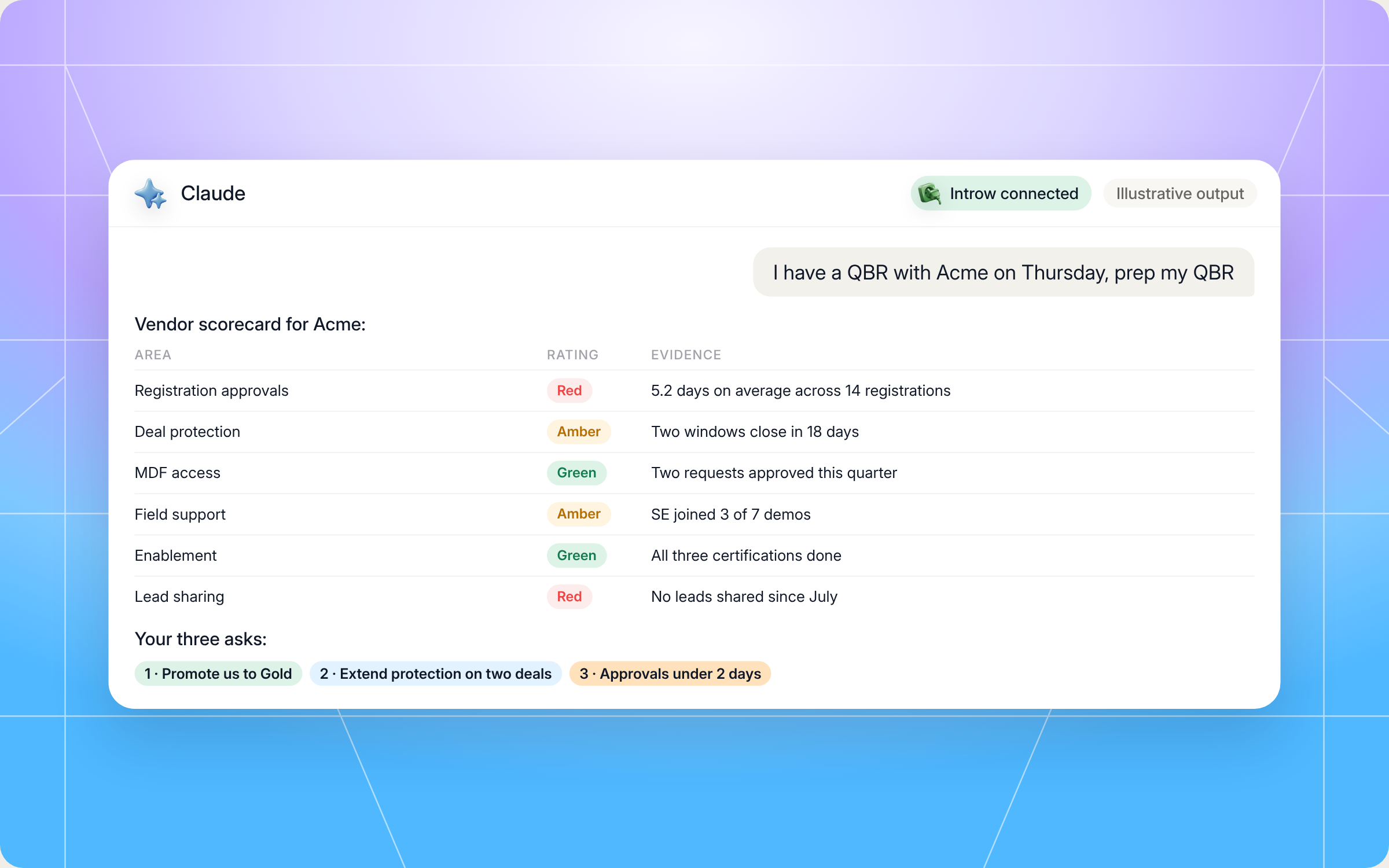
- "I have a QBR with Acme on Thursday, prep my QBR." Builds the full prep pack for one vendor.
- "What should I bring up in the QBR with Acme?" Jumps straight to the prioritized asks list with the data behind each one.
- "Score Acme as a partner for the last quarter." Gives you the vendor scorecard on its own.
- "Draft a four minute opening for my Acme QBR, collaborative tone." Writes the spoken opening you can rehearse.
- "What will Acme likely ask me about?" Lists the watch outs so you're ready for the hard questions.
What you'll get back
A typical run returns six things:
- Partner performance dashboard: sourced, closed and in flight deals, training and certifications, engagement and goal pacing.
- Vendor scorecard: how the vendor performed for you this quarter, area by area.
- Asks list: two or three asks, prioritized, each with the data that backs it.
- Drafted QBR opening: three to five minutes spoken, ready to copy.
- Agenda talking points: short bullets for your side of the QBR agenda, to steer the QBR meeting if the vendor leads with their QBR presentation.
- Watch outs: what the vendor will probably raise, so you can address it first.
Here's an illustrative example of the asks list for an agency partner heading into a QBR with a software vendor:
| Priority | Ask | Data behind it |
|---|---|---|
| 1 | Promote us to Gold this quarter | 112% of the sourced ARR goal, all three required certifications done |
| 2 | Extend deal protection on two slipping deals | Both registered in August, protection windows close in 18 days, buyers delayed by budget freeze |
| 3 | Cut registration approval time to under 2 days | Approvals averaged 5.2 days across 14 registrations, one deal lost to a direct rep during the wait |
And a slice of the drafted opening, as bullets:
- What worked: "We closed Northwind Health and Brightpath, both sourced by us, and Northwind went live in five weeks."
- Our investment: "We submitted 14 registrations, our team earned three certifications and we hosted two joint webinars."
- What stalled: "Two deals slipped to Q1 because of budget freezes on the buyer side, and one stalled on pricing."
- What we're asking for: "A Gold review, protection extensions on the two slipping deals, and faster approvals."
- What's coming: "We have about 400K of pipeline for next quarter, mostly in healthcare."
Here's how that run looks in Claude, from the prompt to the vendor scorecard and the asks:
Staying in control: what Claude can and can't do
A quarterly business review is about trust, so the prep has to be trustworthy too. A few things are built in:
- It's read only by default. The skill reads your data to build the prep. The only write it suggests is a comment logging your own takeaways after the QBR, and that only happens when you approve it.
- It stays inside your access. Claude connects to Introw over OAuth as you, so it only sees what your partner account can see in that vendor's portal.
- One vendor at a time. It never blends another vendor's data into this QBR.
- No other partners' data. Even if you can see aggregate program stats, it won't quote other partners' numbers, because that would damage the vendor's trust in you.
- Honest, not adversarial. The scorecard turns friction into specific asks framed as investments in the partnership, not a complaint list.
- No made up asks. If you're far from a tier promotion, it won't invent a request that won't land.
- It won't script the vendor. The prep is yours. It doesn't guess what the vendor will say back.
Prefer to do this in the Introw app?
If you're a vendor, the easiest way to help your partners prepare is to let them see their own numbers all quarter, not just before the QBR. You can surface a dashboard in the partner portal, scoped to each partner's own data, so they get ongoing visibility without asking your team:
Pair that with partner goals that both sides can track, and the QBR starts from the same page instead of two different spreadsheets. A shared quarterly business review template keeps every quarterly business review comparable from one quarter to the next. For a structure both sides can reuse, see our partner QBR template and the glossary entry on the quarterly business review.
Pair it with other Claude skills
QBR prep usually surfaces work that another skill handles better. These partner side skills pick up where this one leaves off:
- Deal War Room: for the stalled deals you flagged in prep, it builds a coaching packet with vendor playbooks, past wins and battle cards.
- Cross Vendor Certification Tracker: before you ask for a tier promotion, it checks which certifications you hold, which are expiring and what unlocks the next tier.
- Incentive Maximizer: shows exactly which actions this quarter get you to the next bonus tier or accelerator, useful when you plan the asks.
- Renewal and Expansion Coordinator: surfaces renewal dates and expansion windows you may want to raise in the QBR.
You'll find all of them in Introw's skill library, and our roundup of Claude skills for partner teams explains how they fit together.
Make every vendor QBR a two way review with Introw
Introw is a CRM first partner relationship management platform, which means it builds on top of your existing HubSpot or Salesforce setup rather than replacing it. It's headless by design, so vendors and partners can work the program from the partner portal or in plain language from Claude, ChatGPT, Slack or Teams through Introw's MCP server, with every action written back to the CRM.
That's why a skill like this works for partners. Your deals, registrations, goals, tiers and commissions live in one place your vendor already keeps up to date, so your QBR prep is built on the same data the vendor sees. And for vendors, partner performance and partner tiering in Introw make it easy to answer the asks your partners bring.
Walk into your next QBR with your own numbers and a clear agenda. Connect Claude or book a demo.
Still curious? Here are some quick answers to help clear things up
A vendor QBR is a quarterly business review (QBR) between a vendor and one of its partners, like a reseller or agency, held every three months. It's a performance review of the partnership in both directions. Both sides review last quarter's results, pipeline, goals, support and commissions, then agree on priorities for the next quarter. It works best when the partner brings their own data and asks, not just the vendor.
Your own performance numbers, one or two named wins, an honest read on what stalled, a simple scorecard of how the vendor has supported you, and two or three asks backed by data. The Pre QBR Self Prep skill builds all of this from your vendor's Introw portal, so your quarterly business review prep takes minutes, not an evening.
No. Claude Code users can drop the SKILL.md into their skills folder. Everyone else can connect Claude to their Introw partner account and run the same prep in plain language.
No. It reads your data and drafts your prep for you only. The one write it can make, a comment logging your QBR takeaways, happens only when you approve it.
Yes. The full file is in this article and in Introw's skill library. You can copy and adapt it, but it reads your data through Introw's MCP server, so your vendor needs to run its program on Introw and you need to connect your partner account.






See AI-Native PRM in Action
Book a demo with one of our partner program experts, or explore Introw on your own time.

