
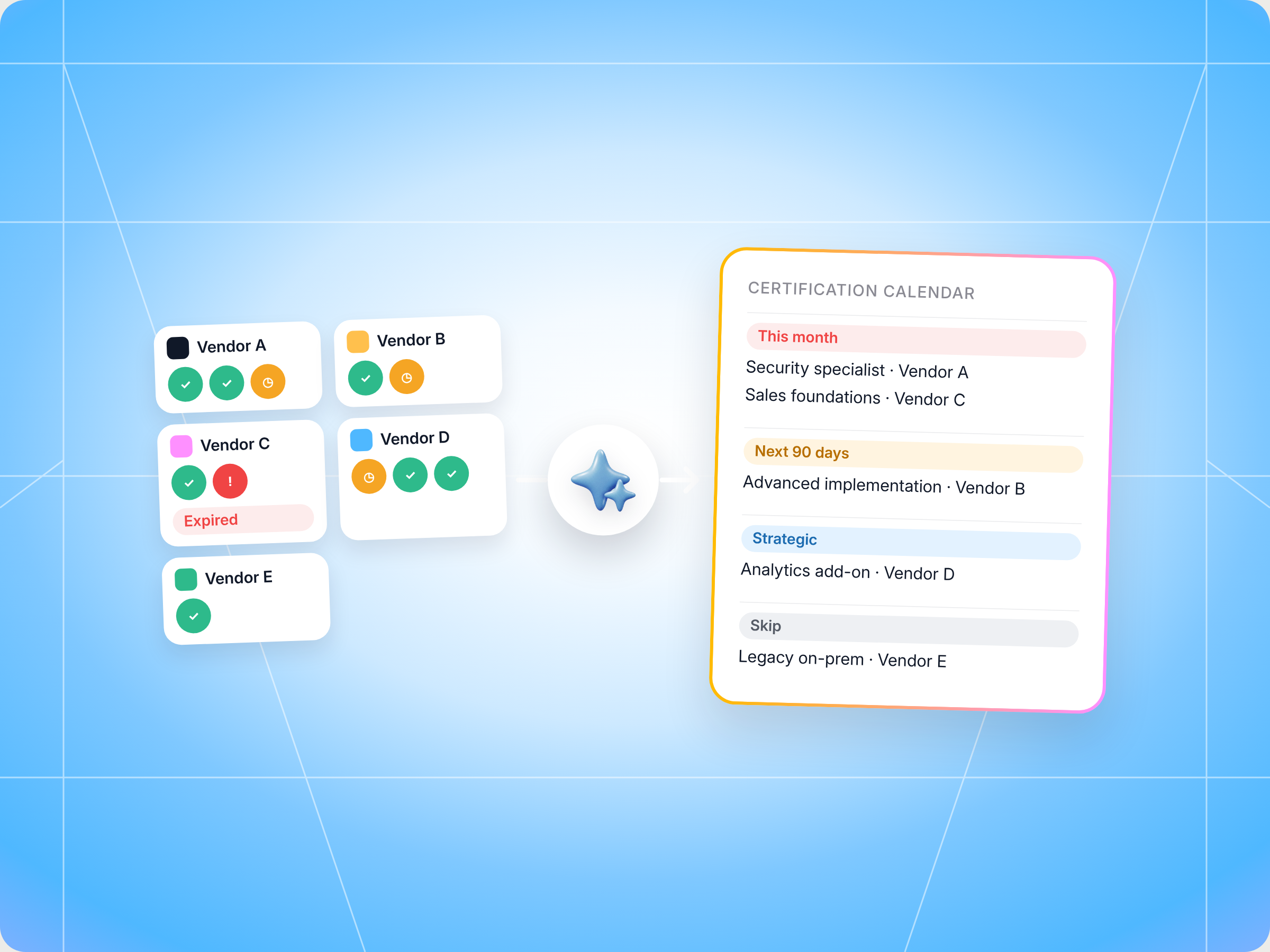
If you resell, implement or refer for several vendors, the Cross Vendor Certification Tracker skill gives you one view of every certification you hold, need or are about to lose. It reads each vendor's Introw portal, classifies every certification by status, expiry date and what it unlocks, ranks them by what's actually at stake (lost margin, a blocked tier promotion, a deal that needs it), and builds a calendar and study plan. It recommends, it never enrolls you, and you approve anything it logs. The full SKILL.md is below, free to copy, with install steps, prompts to try and an example of what you'll get back.
Here's a number most partner leaders recognize the moment they hear it. Introw's training playbook notes that a typical reseller carries 20 to 50 active certifications across their vendor portfolio. Each vendor sends its own renewal reminders. Nobody sends a unified view.
Now picture the moment it bites. Your best engineer is about to close a six figure deal, and the vendor's deal desk tells you the specialist designation that qualifies you for deal protection lapsed three weeks ago. The renewal email went to someone who left in the spring. The exam takes a week to schedule. The margin on that deal just shrank.
How many of your certifications could you name, with expiry dates, right now?
This guide covers what good partner certification tracking looks like, why spreadsheets and vendor emails fall short, the Claude skill that builds one cross vendor calendar for you, the full SKILL.md you can copy, how to install and run it, and how you stay in control of what it does.
What partner certification tracking is, and why it's harder on the partner side
Partner certification tracking is how a partner organization keeps a live record of every vendor certification its people hold: who's certified, in what, at which level, when each credential expires, and what it unlocks. Think of it as a certification tracking system built around the partner, not the vendor. Vendors track certifications too, but they only see their own program. You see all of them, and you're the one who pays when one lapses.
A vendor certification is rarely just a learning reward. Vendors reward certified partners with better terms, because certification gives them confidence that your team can sell and deliver. In most programs, certified staff are what qualify you for things that matter commercially:
- Tier benefits: most partner certification programs set a minimum number of certified people per tier, so losing one credential can drop you below the threshold.
- Higher margin SKUs: advanced certifications or advanced credentials often gate the products with the best margin.
- Deal protection: some vendors only protect registered deals on specific products if you hold the matching designation.
- Market development funds: MDF eligibility is often tied to a competency or specialization.
- Customer trust: buyers in enterprise and regulated industries ask for proof of technical validation before they purchase.
- Pre sales credibility: vendors often expect certified partners to run pre sales demos and technical scoping without help from the vendor's own engineer.
Look at how the big cloud programs work. Google Cloud combines partner tiers with competencies and specializations, and Microsoft's model scores partners on a capability score that includes skilling. Most programs also split credentials by solution areas, so one engineer might hold technical certifications in security while another covers data and analytics. The result for you is the same everywhere: certifications are economic gates, and each vendor sets its own certification requirements, renewal cycle and exam format.
The bar is often higher than a quiz. To earn a Google Cloud specialization, for example, a partner typically needs certified individuals plus documented customer success, and the vendor will verify both. That's hands on proof, and it takes months to rebuild if you let it lapse.
That's why tracking is harder on the partner side. You aren't managing one partner certification program. You're managing five or ten, each with its own learning platforms, renewal dates and fine print.
Why spreadsheets, vendor reminders and certification tracking software fall short
Most partner teams start with a spreadsheet. It works for a quarter, then someone leaves and nobody updates it. Here's what usually goes wrong:
- Renewal reminders go to the wrong person: each vendor emails whoever registered for the exam, not whoever owns partner operations.
- Expiration dates hide in five portals: to check them, someone has to log in to each vendor's portal and dig.
- Everything looks equally urgent: a sheet lists 40 certifications in a row, with no sense of which one protects a live deal and which one nobody needs.
- Credential hoarding: engineers collect optional badges that look good on LinkedIn while the one certification that gates your next tier sits unfinished.
- Hiring and departures break the count: when a certified engineer leaves, your certified people count drops, and you often find out at tier review.
Dedicated certification tracking software helps on the vendor side, and an LMS helps you complete learning modules and hands on labs. Certification tracking software built for HR teams tracks partner employees like any other staff, but it doesn't know a vendor's tier rules or which certification protects which deal. For small teams, the problem is sharper, because one person often owns partner operations, pre sales support and the certification tracker at once. None of these tools give a partner one ranked view across every vendor. Here's how the usual options compare:
| What you need | Spreadsheet | Vendor portal emails | Cross Vendor Certification Tracker skill |
|---|---|---|---|
| Every vendor in one view | Only if someone keeps it updated | No, one vendor per email | Yes, pulled live from each portal |
| Expiration dates | Typed in by hand | Scattered across inboxes | Pulled from each vendor's records |
| What each certification unlocks | Rarely captured | Buried in tier documents | Tier gates, SKU access, deal protection, MDF |
| Ranking by economic stakes | No | No | Yes, by cost of expiry and tier leverage |
| Link to live deals | No | No | Flags certifications a live deal needs |
| Renewal effort | No | Sometimes | Estimated hours, exam or refresher |
What good certification management looks like
Whether you track by hand or let a skill do it, good certification management for a partner comes down to a few habits:
- One calendar across vendors: every certification, with status, owner, expiry date and the vendor it belongs to.
- A clear reason for each one: is it table stakes for your current tier, a gate to the next tier, access to a higher margin product, or nice to have?
- Ranking by what's at stake: a certification that protects a live deal beats one that would look nice on a profile.
- Honest renewal effort: a 15 minute refresher and a three hour proctored exam aren't the same task, and your team plans differently for each.
- Enough lead time: most programs need at least a few weeks to schedule an exam, so "expiring soon" should always come with a date.
- Coverage per vendor: know how many certified people each vendor expects at your tier, so a departure or a new hiring plan never catches your managers out.
- Clear criteria for what counts: agree which certifications your company tracks, so you can identify gaps fast and verify coverage before a tier review.
- A link to performance: compare certification coverage with win rate and deal size, so you know which credentials actually pay back.
- A skip list: some certifications don't pay back for your motion. Saying no to them frees time for the ones that do.
Do this well and certification becomes a lever for margin and tier progress, and your certified staff spend their time on the credentials that drive customer results. For a deeper look at the vendor side of the same equation, see Introw's guide to how certification programs improve partner engagement, or the glossary entry on the partner certification program.
The skill to use: Cross Vendor Certification Tracker
The Cross Vendor Certification Tracker is a partner side skill from Introw's free Claude skill library, part of a growing set of Claude skills for partner teams. It's built for the people at a reseller, agency, systems integrator or MSP who look after vendor relationships. It reads every vendor portal you can access through Introw's MCP server, one portal at a time, and turns what it finds into a single certification tracker ranked by economic stakes.
| Detail | What it means |
|---|---|
| Built for | Partner enablement, partner operations and partner sellers |
| Use it when | You want to see every required, optional and expiring certification across your vendors |
| What it reads | Your vendor portals, each vendor's tier requirements, completed training and certification records, open tasks, goals and live deals |
| What it writes | Tasks on a vendor portal when you commit to a certification path, after you approve |
| What you get | A cross vendor calendar, an action queue, tier promotion bridges, an expiring and at risk list and a skip list |
| Skill ID | partner-cross-vendor-cert-tracker |
You don't need to remember a command. Phrases like "all my certifications", "what's expiring", "certs across vendors", "unified cert calendar", "what training is overdue" or "what unlocks higher margins" trigger it.
How the skill works, step by step
The skill follows six steps. Knowing them helps you trust the output.
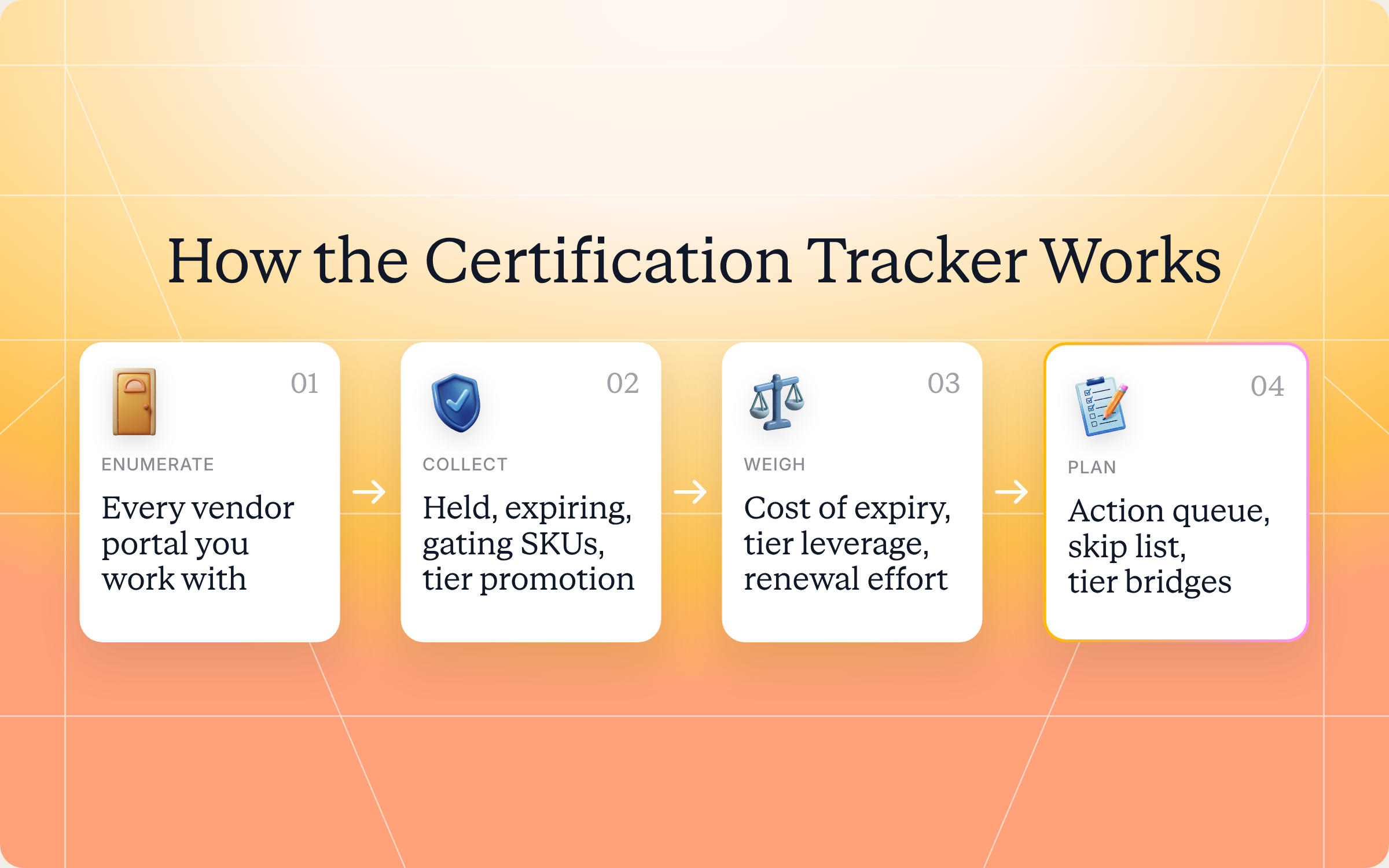
Step 1: List your vendor portals
First, the skill checks which vendor portals your Introw partner account can access. If you work with six vendors that run their programs on Introw, it finds all six.
Step 2: Pull certification data from each portal
For each vendor, separately, it reads what each tier requires, your completed training and certification records, any open certification tasks and any goals that mention certifications. Each vendor's data is fetched only through that vendor's portal, so nothing leaks between vendors.
Step 3: Classify every certification
Each certification gets a status: held and current, held and expiring soon, expired, in progress or not started. The skill also notes whether it's required or optional at your current tier, what it unlocks (a tier promotion, higher margin SKUs, deal protection on specific products, MDF), the expiry date, the vendor and the typical renewal effort, like a short refresher, a full course or a retake of the exam.
Step 4: Score what's at stake
This is the step that makes the list useful. Every certification is ranked on four things:
| Factor | What it asks |
|---|---|
| Cost of expiry | What revenue do you lose if it lapses, through deal protection, SKU access or a tier demotion? |
| Tier promotion leverage | Does finishing it close the gap to the next tier with a vendor where you're already close? |
| Renewal urgency | How many days until it expires, weighed against how much work renewal takes? |
| Strategic vendor weight | How much of your revenue comes from this vendor? |
Close to expiry and cheap to renew beats far off and effortful. A certification with a vendor that drives 40% of your revenue outranks one with a vendor you sold twice last year.
Step 5: Build the calendar
The skill sorts everything into four buckets:
- This week or month: expiring soon, blocking a live deal or close to a tier promotion.
- Next 90 days: scheduled renewals and new certifications to start.
- Strategic: no urgency, but a real margin upside.
- Optional: certifications the vendor promotes that don't pay back for your motion.
Step 6: Recommend a study plan
For the top priorities, the skill estimates the time investment, suggests an order (renew what's expiring before starting anything new), says whether each one can be done at your own pace or needs a scheduled event, and links to where you start in the vendor's portal. It also cross checks your live deals, so a certification that looks optional on paper gets flagged if a deal in flight needs it.
Get the skill: the full SKILL.md
Here's the complete skill file. Copy it as is, or adjust the scoring weights and buckets to match how your team works.
---
name: partner-cross-vendor-cert-tracker
description: Use when a partner user wants to see all required, optional, and expiring certifications across every vendor they work with, flagging what's table-stakes, what gates higher-margin SKUs, and what unlocks the next tier per vendor. Trigger phrases include "all my certifications", "what's expiring", "certs across vendors", "unified cert calendar", "what training is overdue", "cert obligations", "what unlocks higher margins".
---

# Cross-Vendor Certification Tracker (Partner)

**Audience**: Partner user, uses **Introw Partner Connect** MCP across **all portals** the partner has access to.
**Use case**: 05, Training (partner-side, multi-vendor).

## When to use this skill

Use when a partner user wants to see all required, optional, and expiring certifications across every vendor they work with, flagging what's table-stakes, what gates higher-margin SKUs, and what unlocks the next tier per vendor.

**Sample prompts that fire this skill:**
- "all my certifications"
- "what's expiring"
- "certs across vendors"
- "unified cert calendar"
- "what training is overdue"
- "cert obligations"
- "what unlocks higher margins"

## Why this matters
Partners working with 5 to 10 vendors are juggling 20 to 50 active certifications: table-stakes ones, expiring ones, optional-but-margin-unlocking ones, and the ones that gate the next tier promotion. Each vendor sends its own renewal nudges; nobody sends a unified view. The result is silent expirations that strip the partner of deal-protection eligibility on the next big deal, discovered exactly when it matters most.

This skill closes the gap: one calendar across every vendor, ranked by economic stakes (margin lost on expiry > tier promotion blocker > nice-to-have), with renewal effort estimates so the partner can plan.

## Process

### Step 1: Enumerate vendor portals
- `Introw_Partner_Connect:partners`: get all portals the partner has access to.

### Step 2: Pull cert state per portal
For each `roomId`:
- `Introw_Partner_Connect:get_tier_information`: what certifications each tier requires (held / required / optional).
- `Introw_Partner_Connect:search_partner_engagement`: completed training events, cert achievement records.
- `Introw_Partner_Connect:search_tasks`: any open cert-related tasks.
- `Introw_Partner_Connect:get_goals`: cert-related goals.

### Step 3: Classify per certification
For each cert across all vendors, capture:
- **Status**: held (current), held (expiring soon), expired, in progress, not yet started.
- **Required vs. optional** at the partner's current tier.
- **What it unlocks**: tier-promotion gate, higher-margin SKU access, deal-protection eligibility on specific products, MDF eligibility.
- **Expiration date** if applicable.
- **Renewal effort** (typical hours / re-test / refresher course).
- **Vendor** + portal + relative tier.

### Step 4: Score economic stakes per cert
Rank what's at stake for each cert by:
- **Cost of expiry**: revenue loss if it expires (deal protection lost on in-flight deals, SKU access removed, tier demotion risk).
- **Tier-promotion leverage**: does completing this cert close the gap to the next tier with a vendor where promotion is otherwise close?
- **Renewal urgency**: days to expiry × renewal effort, prioritize close-to-expiry-and-cheap-to-renew over far-off-and-effortful.
- **Strategic vendor weight**: certs with vendors who represent a larger share of partner revenue rank higher.

### Step 5: Generate the calendar
- **This week / month**: certs to act on now (expiring, blocking active deals, near tier promotion).
- **Next 90 days**: scheduled renewals + new certs to start.
- **Strategic (no urgency, high upside)**: certs that would unlock notably higher margins.
- **Optional (skip-eligible)**: certs the vendor surfaces but with low ROI for this partner's motion.

### Step 6: Recommend a study plan
For top-priority certs:
- Estimated time investment.
- Suggested order (renew expiring before starting new).
- Whether the cert can be earned async (course + assessment) or requires a scheduled event.
- Link to start in the relevant vendor portal.

## Output format
- **Cross-vendor cert calendar**: table with vendor, cert name, status, expiration, what-it-unlocks, urgency.
- **Action queue**: top 3 to 5 certs to tackle this month.
- **Tier-promotion bridges**: certs that would close a tier gap with a specific vendor.
- **Expiring-and-at-risk**: certs expiring in < 30 days with their economic exposure.
- **Skip list**: certs flagged as low-ROI for this partner's actual motion.

## Guardrails & PRM best practice
- **Strictly scoped per portal.** Each vendor's cert data only fetched with that vendor's `roomId`. No cross-portal data leakage.
- **Time-bound everything.** "Expiring soon" without a window is meaningless, always state the date.
- **Don't compare vendors competitively.** It's the partner's view; rank for the partner's attention. But don't frame as "Vendor X has worse training than Vendor Y" in any output that could leak vendor-side.
- **Renewal effort honesty.** If a vendor's renewal is a 3-hour deep cert vs. a 15-min refresher, surface the difference. Partners optimize on time-per-margin-unlocked.
- **Strategic priority over completeness.** Don't push the partner to chase every optional cert; surface the ones with real economic stakes for *their* motion. Cert completion isn't the goal, margin and deal eligibility are.
- **Pair with deal context.** A cert that's "optional" abstractly may be critical if the partner has an in-flight deal that needs it. Cross-check `search_crm_objects` to flag this.
- **Don't auto-enroll.** Recommend, don't enroll. The partner schedules learning around their own bandwidth.
- **Capture intent.** When the partner commits to a cert path, use `add_task` on the relevant vendor portal, feeds the vendor's tier-promotion-batch-review next cycle.
- **Cross-skill handoff.** Cert that gates a tier promotion → flag for `partner-onboarding-prioritizer` (if onboarding) or watch for vendor-side tier review. Cert blocking an in-flight deal → urgent intervention via `partner-helpdesk` or CAM ping.
How to install and run the skill
You've got two ways to use it, depending on how your team works.
Option 1: Claude Code
Create a folder called partner-cross-vendor-cert-tracker inside .claude/skills/ in your repo, and save the file above as SKILL.md inside it. Claude Code picks it up and runs it whenever your prompt matches one of the trigger phrases in the description.
Option 2: Claude (or any MCP client) with the Introw connector
Most partner teams won't touch a repo, and they don't need to. If your vendors run their programs on Introw, connect Claude to your Introw partner account once, and you can check every vendor portal you have access to in plain language. Here's how connecting looks:
The Connect Claude guide walks through the setup, the partner version of the steps lives in the partner Connect Claude guide, and the Claude integration page covers what else you can do once you're connected.
Prompts to try
Once Claude is connected or the skill is installed, try any of these:
- "Show me all my certifications across vendors." Builds the full cross vendor calendar.
- "What's expiring in the next 60 days?" Focuses on the expiring and at risk list, with dates and what you'd lose.
- "What unlocks higher margins with our top two vendors?" Surfaces the strategic certifications that open higher margin SKUs.
- "Which certification gets us to the next tier fastest?" Shows tier promotion bridges, ranked by effort.
- "Build a study plan for this month, but don't create any tasks yet." Gets you a plan to review first.
What you'll get back
A typical run returns five things:
- Cross vendor certification calendar: a table with vendor, certification, status, expiry date, what it unlocks and urgency.
- Action queue: the top 3 to 5 certifications to tackle this month.
- Tier promotion bridges: certifications that would close a tier gap with a specific vendor.
- Expiring and at risk: certifications expiring in under 30 days, with the economic exposure of each.
- Skip list: certifications that don't pay back for your motion, so your team can stop worrying about them.
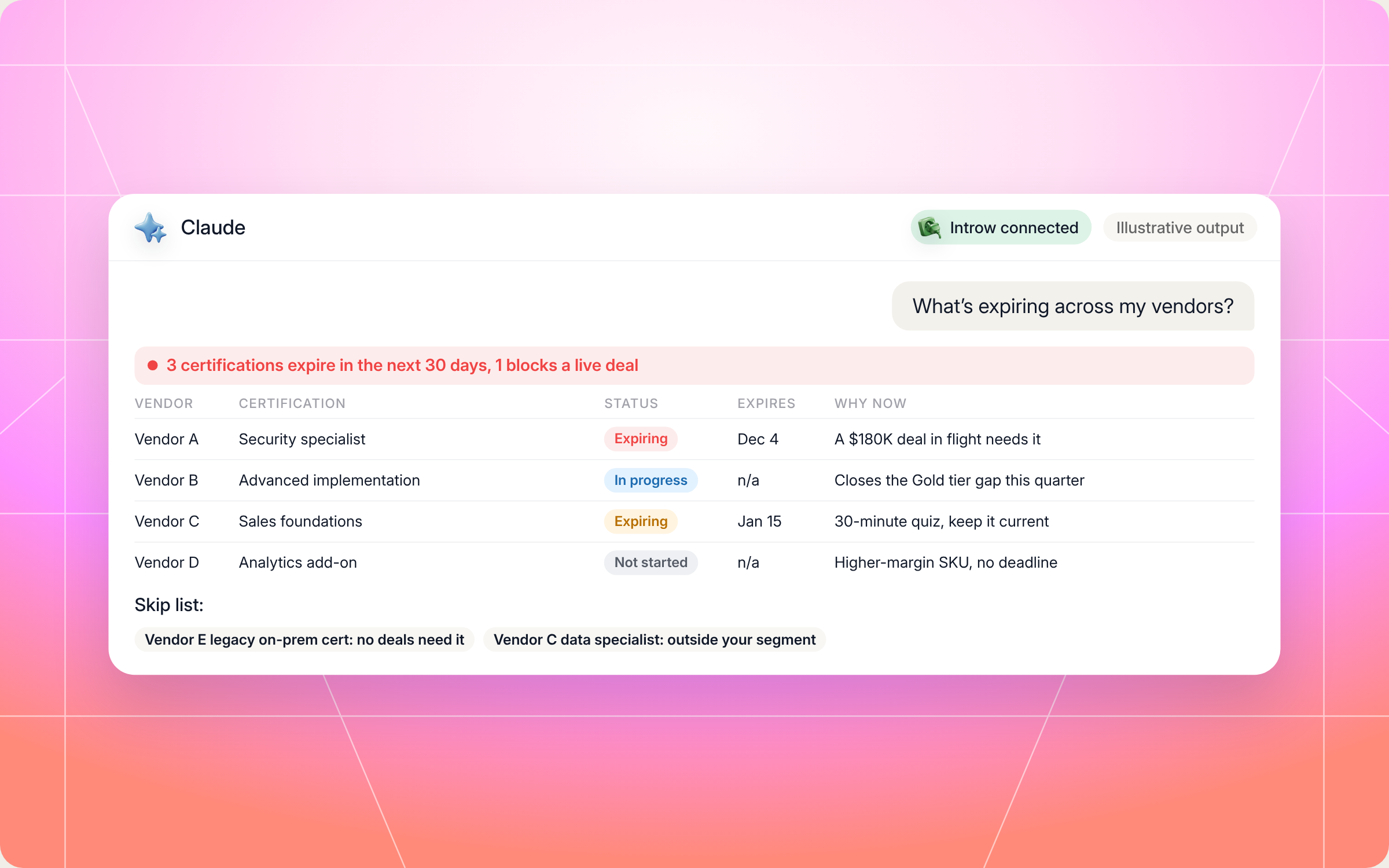
Here's an illustrative example of an action queue for a mid sized reseller working with five vendors:
| Vendor | Certification | Status | Expires | What it unlocks | Effort | Why now |
|---|---|---|---|---|---|---|
| Vendor A | Security specialist | Held, expiring | Dec 4 | Deal protection on the security bundle | 2 hour refresher | A $180K deal in flight needs it |
| Vendor B | Advanced implementation | In progress | Not applicable | Gold tier (one certified person short) | 6 hours plus exam | Closes the tier gap this quarter |
| Vendor C | Sales foundations | Held, expiring | Jan 15 | Table stakes for current tier | 30 minute quiz | Cheap to renew, keep it current |
| Vendor D | Analytics add on | Not started | Not applicable | Higher margin add on SKU | 4 hours, self paced | Strong upside, no deadline |
And here's how that run looks in Claude, from the prompt to the summary line, the action queue and a short skip list:
Staying in control: what Claude can and can't do
A certification tracker is only useful if you trust it. A few rules are built into the skill:
- You approve the writes: when you commit to a certification path, the skill drafts a task on that vendor's portal, and nothing is created until you confirm.
- It works as you: Claude connects to Introw over OAuth with your partner account, so it only sees the portals and records you can.
- One vendor at a time: each vendor's certification data is fetched only through that vendor's portal. No data crosses between vendors.
- It won't enroll you: it recommends a plan, and your team schedules learning around its own bandwidth.
- It's honest about effort: a short refresher and a long exam are labelled as such, so you can plan by time per margin unlocked.
- It won't rank vendors against each other: the view is about your priorities, not about which vendor runs better training.
- It won't push every badge: completion isn't the goal. Margin and deal eligibility are.
Prefer to do this in the Introw app?
Certifications in Introw are time bound by design. When a vendor creates a certificate, they set a validity period, and the credential expires on schedule so partners recertify as the product changes. Every issued certificate has a verifiable page that shows the validity dates, so customers can check a credential with confidence, and certification status syncs to the vendor's CRM, where it can gate tiers and margins. Here's how vendors set one up:
If you run a partner program yourself, Introw's partner LMS and partner tiering tools tie courses, certificates and tier rules together, and our roundup of the best partner training software compares the options.
Pair it with other Claude skills
Certification tracking connects to the rest of your vendor relationships. These partner side skills fit around it:
- Cross Vendor Onboarding Tracker: one view of onboarding progress, open tasks and milestones across every vendor portal at once.
- Onboarding Prioritizer: decides which vendor onboarding to advance this week, and picks up certifications that gate a tier promotion.
- Incentive Maximizer: shows which actions this quarter earn the most commission and unlock the next bonus tier.
- Partner Helpdesk: when a certification blocks a live deal, ask the vendor directly without opening the portal.
You'll find all of them in Introw's skill library, and our overview of Claude skills for partner teams shows how they fit together.
Keep every certification current with Introw
Introw is a CRM first partner relationship management platform, which means it builds on top of your existing HubSpot or Salesforce setup rather than replacing it. It's also headless by design: the partner portal is one surface, but vendors and partners can run the same program in plain language from Claude, ChatGPT, Slack or Teams through Introw's MCP server, with every action written back to the CRM.
That's what makes this skill work. Thanks to that CRM integration, tier rules, course completions, certificates and live deals sit in one connected place, so your tracker reflects each vendor's records today, not a spreadsheet from last quarter. Vendors use partner enablement in Introw to keep training current, and reseller partners get one clear view of what to renew, what to skip and what unlocks the next tier.
Stop finding out about expired certifications at the worst possible moment. Connect Claude or book a demo.
Still curious? Here are some quick answers to help clear things up
Partner certification tracking is keeping a live record of every vendor certification your team holds, with status, owner, expiry date and what each one unlocks, like tier benefits, higher margin SKUs or deal protection. For partners working with several vendors, it means one view across every program instead of one per portal.
Vendor certifications are credentials a technology vendor awards to individuals at partner companies once they pass its training and exam. They prove knowledge and technical skills on the vendor's product, often through a hands on exam, and most partner programs use them to decide tier, margin and which products a partner can sell.
No. Claude Code users can drop the SKILL.md into their skills folder. Everyone else can connect Claude to their Introw partner account and run the same play in plain language.
No. It recommends a calendar and study plan, and it never enrolls anyone. When you commit to a certification path, it asks before creating a task on that vendor's portal.
Yes. The full file is in this article and in Introw's skill library. You can copy and adapt it, but it reads certification data through Introw's MCP server, so your vendors need to run their programs on Introw and you need Claude connected.





See AI-Native PRM in Action
Book a demo with one of our partner program experts, or explore Introw on your own time.

