
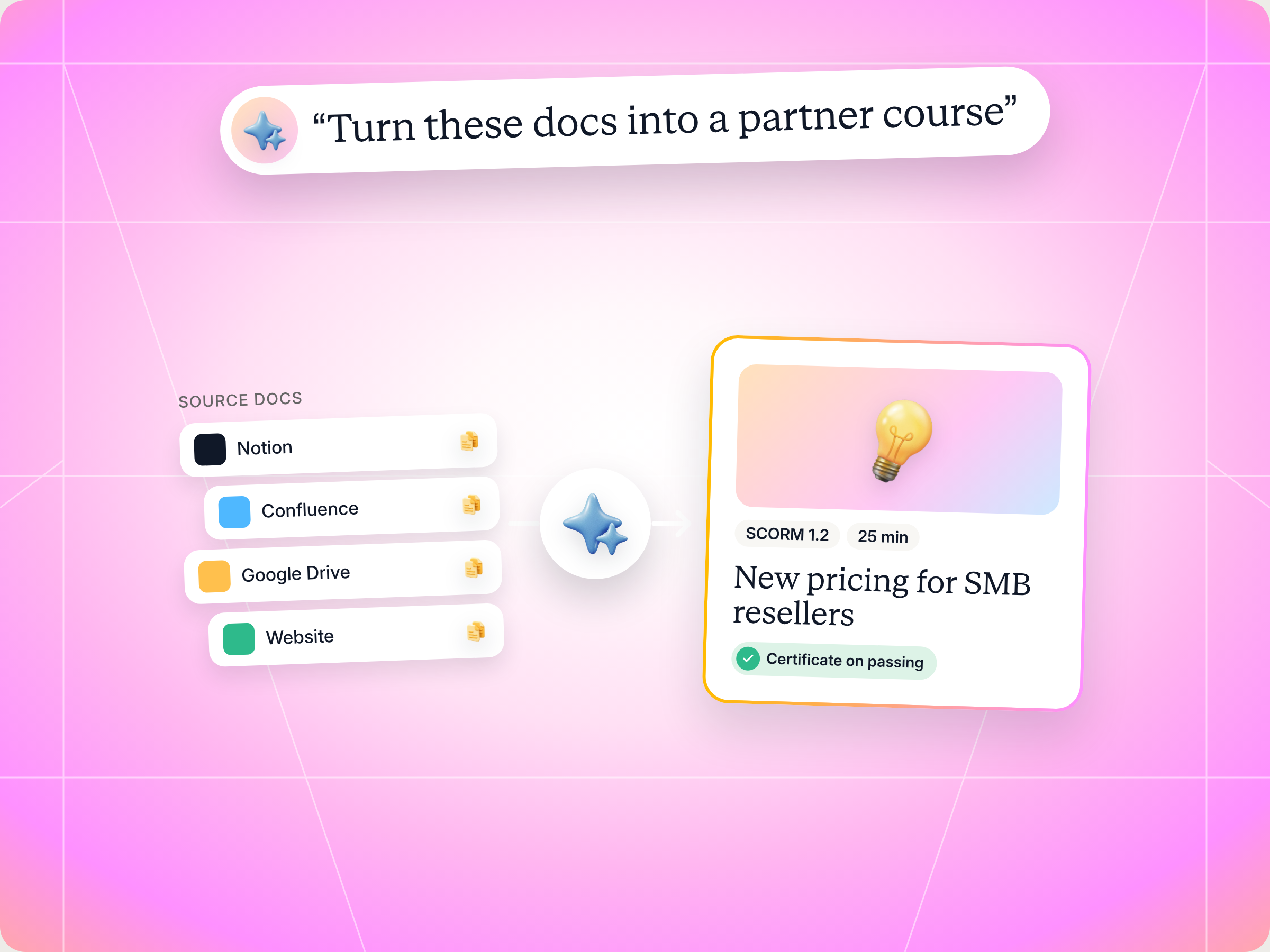
You don't need a heavy SCORM authoring tool to ship a partner course anymore. The Agentic SCORM Course Builder is a free Claude skill that writes a course from your own docs, applies your branding, wires up the SCORM API, packages a SCORM 1.2 zip and publishes it to Introw over MCP, with a certificate, due date, passing score and auto enrollment. You approve the outline, every course setting and any package replacement before anything goes live. The full SKILL.md is below, free to copy, along with install steps, prompts to try and what you'll get back.
Here's the problem with most partner courses. Introw's AI partner training playbook notes that up to 70% of training content is forgotten within 24 hours without reinforcement, and that a traditional course still takes weeks to produce once you add instructional design, video and LMS authoring. By the time the course ships, the product has moved on.
You've probably lived this. Product launches new pricing on Monday. Your enablement lead rebuilds the slides by hand in an authoring tool, exports a SCORM package, uploads it, finds the manifest in the wrong folder, and tries again. Two weeks later the course goes live, and half your partners have already pitched the old pricing.
What if the course could be ready the same day the docs are, in your branding, tracked in the LMS your partners already use?
If you run partner enablement, a partner program or channel ops, this one's for you. This guide covers what a SCORM authoring tool actually does, what a good SCORM course for partners looks like, the Claude skill that builds and publishes one end to end, the full SKILL.md you can copy, how to install and run it, and how to stay in control of what goes live. By the end, you'll have a working skill and know exactly what it will and won't do.
What a SCORM authoring tool does, and why partner teams need one
SCORM stands for Sharable Content Object Reference Model. It grew out of the US Department of Defense's Advanced Distributed Learning initiative, as training moved from computer based training on CDs to online learning in the browser, and it's still the industry standard that lets elearning content talk to learning management systems. The name comes from sharable content objects, or SCOs: small, modular units of learning content that can be reused across courses and platforms. A SCORM authoring tool is the software you use to build that content and export it as a SCORM package, so any SCORM compliant LMS can play it, track it and report on it.
How SCORM works: content packaging, completion status and learner data
Under the hood, the SCORM standard covers two things:
- Content packaging: every SCORM course ships as a zip file with a manifest file called imsmanifest.xml at the root. That XML file lists the course structure and every asset inside the package, so the LMS knows what to launch.
- Run time communication: while a learner takes the course, the content talks to the LMS through the SCORM API. It reports completion status, a score and the learner's current location through a shared data model, so progress survives an early exit and the LMS can issue a certificate when someone passes.
That data exchange is the whole point. Any LMS built to support SCORM can play any package that passes SCORM conformance, which is why SCORM is still widely adopted even though newer elearning standards exist. Build your SCORM courses once and deliver them anywhere. If you want more detail on the spec, Rustici Software, the team behind scorm.com, keeps a thorough explainer.
For partner teams, that portability matters more than it does for internal training. Your partners don't work for you. They won't log into a separate LMS for every vendor they sell. You want the course to live where they already work, inside your partner portal, with learner data flowing back to your CRM. A SCORM compliant LMS built into your partner program makes that possible. Introw's partner LMS runs SCORM packages in a built in player, so a course you author anywhere can still be tracked per partner and per learner.
SCORM 1.2 vs SCORM 2004 vs other elearning standards
You'll see several versions of SCORM, plus a couple of other elearning standards, in any SCORM knowledge base. Here's how SCORM compares to the alternatives you're most likely to hear about:
| Standard | What it tracks | When to use it for partner courses |
|---|---|---|
| SCORM 1.2 | One lesson status (passed, failed, completed, incomplete) and a raw score. No sequencing, and suspend data (the bookmark a course saves) is capped at 4,096 characters | The safest default. It's the first version most LMS platforms supported, and almost every platform still does |
| SCORM 2004 3rd edition and 2004 4th edition | Completion status and success status tracked separately, sequencing rules, non linear navigation between SCOs and suspend data up to 64,000 characters | Useful when you need branching or strict module order inside one package |
| xAPI (the Experience API, also called the Tin Can API) | A wider range of learning experiences than SCORM, including learning activities outside a browser course | Useful for tracking learning outside the LMS, but needs a learning record store |
| cmi5 | Combines SCORM style packaging with xAPI tracking | The next generation option, with less platform support today |
| AICC | An older standard from the aviation industry | Rarely worth it now, since it's less flexible and harder to implement than SCORM |
For most partner programs, SCORM 1.2 is the right call. It's simple, it reports exactly what you need (did they finish, did they pass, what did they score), and the data model is small enough that an AI can wire it correctly every time. The Introw player reads both SCORM 1.2 and SCORM 2004 manifests, so you're not locked in either way.
SCORM has limits, and some people consider it outdated. It doesn't track engagement signals like clicks or hovers, and it was designed for courses that run inside learning management systems. But for the question partner programs actually ask, "did this partner finish and pass?", it's still the most widely supported answer.
What good learning content looks like in a partner SCORM course
A SCORM file that imports cleanly is the bare minimum. Elearning courses partners actually finish take more. Before you build anything, with a traditional authoring tool or with Claude, check your plan against these:
- One audience per course: a reseller's seller and a systems integrator's consultant need different courses. If your audience spans partner types, build variants instead of one generic course.
- Short and focused: two to six modules, 10 to 30 minutes in total, one learning objective per module. Partners are busy, and long courses are where completion rates go to die.
- Sourced from your real knowledge: every module should trace back to your own docs, product pages or enablement content. Partner training is customer facing content, so invented features or pricing do real damage.
- Visual, then checked: show the idea with diagrams, screenshots and examples, then ask a knowledge check. Walls of text don't stick.
- Scenario assessments: if you want a passing score, end with scenario questions, not trivia. "Your prospect asks about HIPAA, what do you say?" beats "Which tier includes SSO?"
- Branded like you: your logo, colors and fonts, so the course feels like part of your program, not something an AI tool spat out.
- Wired to report: the package must call the SCORM API and set a completion status. A beautiful course that never reports looks, in your LMS, like every partner quit halfway.
- Works on any device: responsive design, so a partner can finish a module on a phone between customer calls.
- Self contained: every image, font and script bundled in the zip. No external requests and no trackers, because partners download and run this content.
Reporting and packaging are where most first attempts break. Here's what usually goes wrong when packaging content into a SCORM package, and how to avoid it:
| Problem | What it looks like | Fix |
|---|---|---|
| Manifest in a subfolder | Import fails, "Couldn't import this SCORM package" | Zip from inside the course folder so imsmanifest.xml sits at the root |
| Missing launch file | The course imports but won't open | Make sure the href in the manifest points to a file that exists in the zip |
| No API calls | Every learner shows as in progress forever | Call LMSInitialize, set cmi.core.lesson_status, then LMSCommit and LMSFinish |
| Score mismatch | Partners pass the quiz but get no certificate | Keep the pass threshold in the package equal to the passing score on the course |
| External assets | Broken images or blocked fonts inside the player | Bundle everything inside the zip |
| Untested package | Works in your browser, breaks in the LMS | Test the SCORM package in a sandbox or a draft course before partners see it, and check the communication between course and LMS end to end |
If you already have a polished SCORM course built in another authoring tool, you don't need to rebuild it. You can import it into Introw as is. But if you're building a new course from scratch, especially a short one that has to ship fast, this is the job a Claude skill does well. For the wider picture on building a full program, read our guide to partner training software.
The skill to use: Agentic SCORM Course Builder
The Agentic SCORM Course Builder is a vendor side skill from Introw's free Claude skill library. It turns Claude into a SCORM course builder: it authors the course from your own knowledge sources, brands it, packages a SCORM 1.2 zip and publishes it to Introw through Introw's MCP server. It can also update an existing course's settings or replace its package in place later.
The idea is a clean split of responsibilities. Claude owns content generation, which is fast, flexible and easy to redo. Introw owns everything that has to stay centralized: partners take the course from the hub they already use with no separate login, enrollment and scoring are tracked per learner, certificates are issued automatically on passing, and completion syncs to your CRM.
| Detail | What it means |
|---|---|
| Built for | Partner enablement managers, partner program managers and channel ops |
| Use it when | You want to build a partner course end to end with AI, or update or replace one that already exists |
| What it reads | Your knowledge sources (docs sites, Notion, Confluence, Google Drive, your website), your brand assets, existing courses, certificates and enrollments in Introw |
| What it writes | A SCORM zip, then a new or updated course in Introw, after you approve |
| What you get | A course outline, the SCORM package, a publish receipt with the course ID and settings, and a note on how to iterate |
| Skill ID | vendor-scorm-course-builder |
It fires on prompts like "build a course for our partners", "create a partner training course", "make a SCORM course", "turn these docs into a course", "publish this course to Introw", "update the course content" and "replace the SCORM package".
How the skill works, step by step
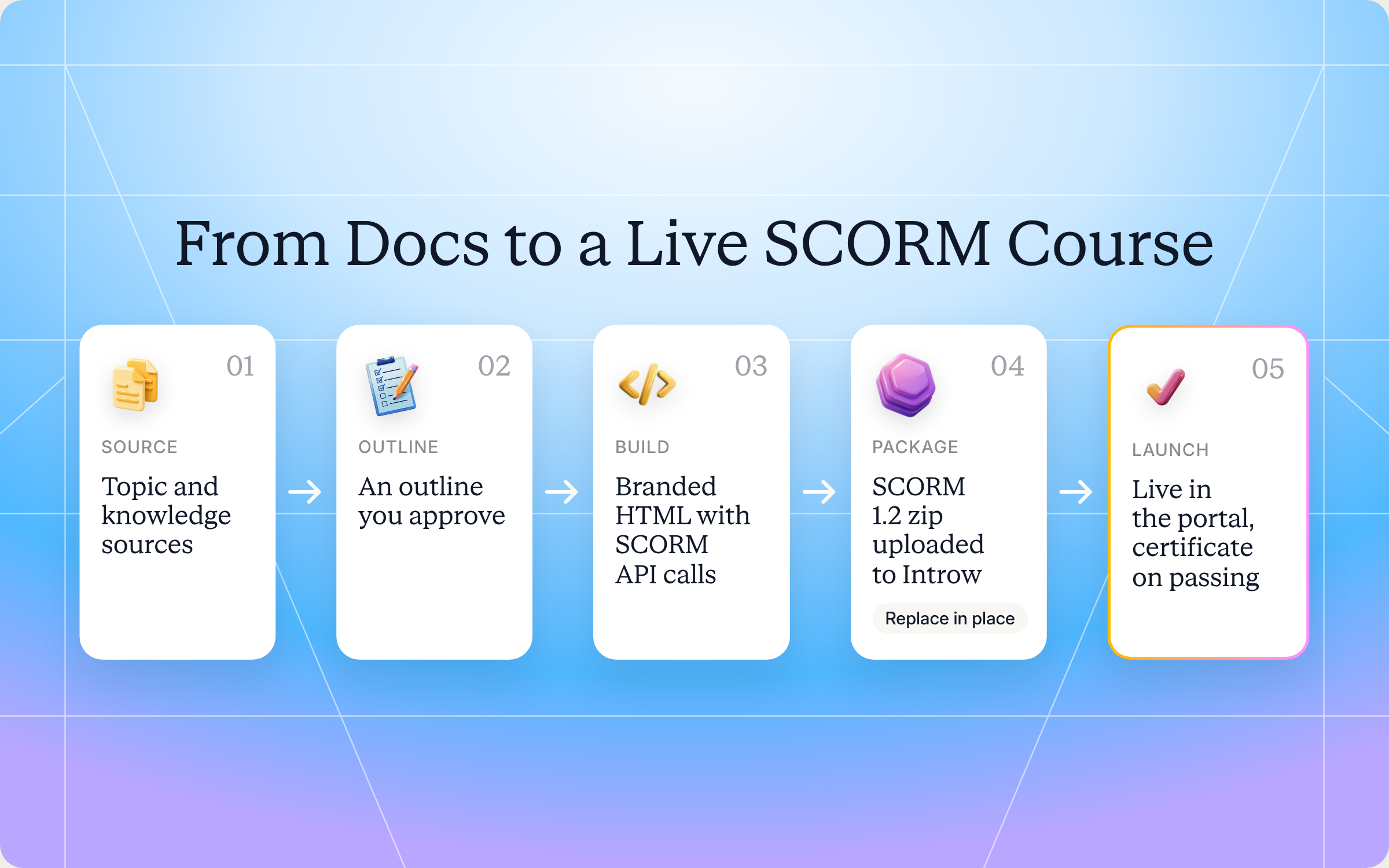
The skill follows eight steps. You don't have to run them yourself, but knowing what happens helps you trust the output.
Step 1: Scope the course
Claude confirms four things before it builds anything: who the course is for, the topic and depth (an overview or a certification grade course), which knowledge sources to draw from, and the course settings (certificate, passing score, due date, auto enrollment). If you don't have a topic yet, it proposes two or three based on your sources and current gaps.
Then it shows you a module by module outline, two to six modules with one learning objective each, and waits for your sign off.
Step 2: Gather your branding
Claude pulls your logo, colors and typography from your website or brand assets, and asks if it can't find them. It reuses your real product screenshots, diagrams and terminology from the sources, so the course looks and sounds like you.
Step 3: Author the course
The course is one self contained HTML app with bundled assets that works offline. It has styled sections, a progress indicator, inline diagrams, expandable examples and knowledge checks between modules. If you set a passing score, it ends with a scored assessment built on scenarios. It's also accessible: proper headings, alt text, keyboard navigation and readable contrast.
Step 4: Wire the SCORM API
This is the step a lot of hand built courses skip. Claude adds the run time calls that let the course talk to Introw's player: it finds the SCORM API, initializes the session, commits progress after each module, sets the completion status (or a score and a passed or failed status if there's an assessment) and closes the session on exit. It keeps the pass threshold inside the package equal to the passing score on the course, so certificates are issued correctly.
Step 5: Package the SCORM zip
Claude writes a minimal SCORM 1.2 manifest, lists every file in it, and zips the course from inside the folder so the manifest lands at the root. It then checks the zip: manifest at the root, launch file present, size under 2 GB. That one check prevents the most common import failure.
Step 6: Hand the zip to Introw
The skill asks Introw for a secure upload slot and sends the zip straight there, with no hosting needed. If you're in a chat assistant that can't upload files, it gives you a drag and drop upload page instead, and you just say "done" when the upload finishes.
Step 7: Create the course
If you want a certificate, Claude lists the certificates you've already designed in Introw and confirms the pick with you. Then it recaps every setting (name, description, thumbnail, due date, passing score, certificate, auto enrollment, mode) and waits for your explicit approval before it creates the course. Once it's live, it confirms the import finished and reports the course ID.
Step 8: Iterate in place
Need to fix chapter 3 or move a due date? Settings changes only touch the fields you name. Content changes go through a fresh upload that replaces the package in place: same course, same link, enrollments kept, completions and certificates intact. Learners who were halfway through restart on the new version, so Claude always confirms before replacing.
Get the skill: the full SKILL.md
Here's the complete skill file. Copy it as is, or adapt the module limits, assessment rules and defaults to match your program.
---
name: vendor-scorm-course-builder
description: Use when a Partner Enablement lead, Partner Manager, or Channel Ops user wants to build a partner training course end to end with AI - author the content from the vendor's own knowledge sources (docs, Notion, Confluence, Drive, website), apply the vendor's branding, package it as SCORM, and publish it to Introw over MCP for partners to take, with a certificate, due date, passing score, and auto-enrollment - or update an existing course's settings or replace its package in place. Trigger phrases include "build a course for our partners", "create a partner training course", "make a SCORM course", "turn these docs into a course", "publish this course to Introw", "update the course content", "replace the SCORM package".
---

# Agentic SCORM Course Builder (Vendor)

**Audience**: Vendor, **claude.ai Introw** MCP.
**Use case**: 05, Training.

## When to use this skill

Use when the user wants to create partner training in Introw without authoring inside Introw: build the course content here (from their knowledge sources, in their branding), produce a SCORM package, and create or update the course in Introw over MCP so partners take it from their partner hub - enrollment, scoring, certificates, and CRM sync handled by Introw.

**Sample prompts that fire this skill:**
- "help me build a course for our b2b partners"
- "turn our onboarding docs into a partner course"
- "make a SCORM course on our new pricing and publish it to Introw"
- "create a certification course for resellers"
- "update the course - I fixed chapter 3"
- "replace the SCORM package on the enablement course"

## Why this matters

The split of responsibilities is the point: the AI tool owns content generation (fast, flexible, disposable), Introw owns what must stay centralized - partners take the course from the hub they already use with no separate LMS login, enrollment and scoring are tracked per learner, certificates are issued automatically on passing, and completion syncs to the CRM. One `upsert_course` call bridges the two. Iteration is cheap: re-export and replace the package in place - same course, same link, enrollments and completions intact.

## MCP tools

| Tool | Kind | What it does |
| --- | --- | --- |
| `Introw:list_courses` | read-only | List courses with settings, SCORM import status, and enrollment/completion counts (learners and distinct partners). Source of `courseId`. `scormStatus` is "processing" until the package is live, then "ready". `scormPackageVersion` changes on every successful import/replacement - watch it to confirm a replacement went live. |
| `Introw:list_certificates` | read-only | List the org's certificates (id, name, validity, active partner/learner counts, linked courses) - pick a `certificateId` to link. Certificates are designed in the Introw UI; this skill only links them. |
| `Introw:list_course_enrollments` | read-only | Roster of who is enrolled, in progress, or has completed a course. Filter by `courseId`, `partnerId`, `status`, or a name/email query. |
| `Introw:list_issued_certificates` | read-only | Roster of who currently holds a certificate. Filter by `certificateId`, the `courseId` that grants it, `partnerId`, or a name/email query. Expired awards are omitted unless `includeExpired` is true. |
| `Introw:create_scorm_upload` | mutation | Returns a presigned `uploadUrl` (30-minute expiry, writes exactly one org-scoped object), an `uploadPageUrl` (drag-and-drop page for the same slot, for environments that cannot PUT a file), and the `scormFileKey` to pass to `upsert_course`. Nothing imports until `upsert_course` is called with the key. |
| `Introw:upsert_course` | mutation | Omit `courseId` = create (requires `name` + the zip as `scormFileKey` or `scormFileUrl`). Provide `courseId` = update; only the fields you pass change. Fields: `name`, `description`, `thumbnailUrl` (3:1 banner, any hosted https image URL, stored as-is), `dueDate` (`{isRelative: true, amount, unit}` or `{isRelative: false, date}`), `minimumPassingScore` (0-100), `autoEnrollmentEnabled`, `certificateId` (null unlinks), `lmsMode` (create-only; `SCORM_RUNTIME` default runs the package as-is, `NATIVE` converts it into editable Introw modules), `scormFileKey` (from `create_scorm_upload`) or `scormFileUrl` (publicly downloadable https URL) - on update either one REPLACES the package. |

## Process

### Step 1: Scope the course
Confirm with the user before building:
- **Audience**: which partner type / persona (a reseller's seller vs. an SI's consultant need different courses).
- **Topic and depth**: entry-level overview vs. certification-grade. If the user has no topic, propose 2-3 grounded in their knowledge sources and current gaps.
- **Sources**: which connected knowledge to draw from - docs sites, Notion, Confluence, Drive, the vendor's website, product docs over MCP. Never fabricate content; every module traces to a source.
- **Settings**: certificate? passing score? due date? auto-enroll?

Present a module-by-module outline (2-6 modules, 10-30 min total, one learning objective each) and get sign-off before authoring.

### Step 2: Gather branding
Pull logo, colors, and typography from the vendor's website or brand assets; ask if unavailable. The course must look like the vendor, not like an AI tool. Reuse their real product screenshots, diagrams, and terminology from the sources.

### Step 3: Author the course as a self-contained HTML app
One `index.html` (plus bundled assets) that works offline:
- **Visual and interactive**: styled sections or slides, progress indicator, inline SVG diagrams, expandable examples, knowledge checks between modules. No walls of text - show, then check.
- **Self-contained**: bundle every image, font, and script in the zip. No CDN links, no external requests, no trackers.
- **Assessment**: if the course has a passing score, end with a scored assessment (prefer scenario questions over trivia). No assessment → the course reports completion only.
- **Accessible**: semantic headings, alt text, keyboard-navigable, readable contrast.

### Step 4: Wire the SCORM runtime calls
Introw runs the package in its SCORM runtime player; the SCORM API is exposed by the parent frame. Author against **SCORM 1.2** (default; Introw also detects SCORM 2004 from the manifest). The package MUST report status - a beautiful course that never calls the API shows every partner as never finishing.

```js
function findAPI(win) {
  let tries = 0;
  while (win && !win.API && tries < 10) {
    win = win.parent && win.parent !== win ? win.parent : win.opener;
    tries++;
  }
  return win && win.API ? win.API : null;
}
const api = findAPI(window);
api?.LMSInitialize("");

// After each completed module (so progress survives an early exit):
api?.LMSCommit("");

// No assessment - on the final module:
api?.LMSSetValue("cmi.core.lesson_status", "completed");

// With an assessment - on submit (score 0-100):
api?.LMSSetValue("cmi.core.score.raw", String(score));
api?.LMSSetValue("cmi.core.lesson_status", score >= PASS_SCORE ? "passed" : "failed");

api?.LMSCommit("");
// On unload:
api?.LMSFinish("");
```

Introw evaluates the pass from the reported score against the course's `minimumPassingScore` (or an explicit "passed" status) and issues the linked certificate automatically. Keep `PASS_SCORE` in the package equal to the `minimumPassingScore` you set on the course.

### Step 5: Package as a SCORM zip
- `imsmanifest.xml` at the **zip root** - not inside a subfolder (the #1 import failure).
- The `<resource href>` launch file must exist in the zip.
- List every file in the manifest's `<resource>`; keep the zip under 2 GB.

Minimal SCORM 1.2 manifest:

```xml
<?xml version="1.0" encoding="UTF-8"?>
<manifest identifier="com.vendor.course-slug" version="1.0"
  xmlns="http://www.imsproject.org/xsd/imscp_rootv1p1p2"
  xmlns:adlcp="http://www.adlnet.org/xsd/adlcp_rootv1p2">
  <metadata><schema>ADL SCORM</schema><schemaversion>1.2</schemaversion></metadata>
  <organizations default="org">
    <organization identifier="org">
      <title>Course title</title>
      <item identifier="item1" identifierref="res1"><title>Course title</title></item>
    </organization>
  </organizations>
  <resources>
    <resource identifier="res1" type="webcontent" adlcp:scormtype="sco" href="index.html">
      <file href="index.html"/>
      <file href="assets/styles.css"/>
      <!-- every bundled asset -->
    </resource>
  </resources>
</manifest>
```

Zip from inside the course folder (`zip -X -r ../course.zip .`) so the manifest lands at the archive root. Verify before shipping: list the zip contents, confirm `imsmanifest.xml` is at the root and the launch href exists.

### Step 6: Hand Introw the zip
Preferred - upload it directly, no hosting needed:
1. `Introw:create_scorm_upload` (pass the zip's `fileName`) → returns `uploadUrl` + `scormFileKey`.
2. HTTP PUT the raw zip bytes to `uploadUrl` with header `Content-Type: application/zip` (e.g. `curl --fail -T course.zip -H "Content-Type: application/zip" "<uploadUrl>"`). The URL expires after 30 minutes - if it lapses, just request a new one.
3. Pass `scormFileKey` to `upsert_course` in the next step.

Fallback - if this environment cannot make HTTP requests with a file body (chat assistants): the same tool response includes `uploadPageUrl`. Give the user that link with the downloadable zip - it is a drag-and-drop page that uploads into the same slot, and requires them to be signed in to Introw in this organisation (they will be redirected to log in if needed). Ask them to say "done", then continue with `scormFileKey`; if `upsert_course` reports no file yet, wait and retry. As a last resort, a publicly downloadable https URL of the zip works as `scormFileUrl` (Introw copies it server-side, so it only needs to live until the call). Never pass local paths or base64. The 3:1 thumbnail is always a hosted https URL (stored as-is, so that one must stay live).

### Step 7: Create the course
1. If a certificate is wanted: `Introw:list_certificates`, confirm the pick with the user (certificate design/branding itself lives in the Introw UI).
2. Recap every setting (name, description, thumbnail, due date, passing score, certificate, auto-enroll, mode) and get explicit approval - this is a write.
3. `Introw:upsert_course` with no `courseId`, passing the zip as `scormFileKey` (or `scormFileUrl`). Default `lmsMode: SCORM_RUNTIME`; use `NATIVE` only if the user wants to continue editing inside Introw afterwards.
4. Import runs in the background: poll `Introw:list_courses` (name filter) until `scormStatus` is "ready", then report the `courseId`. With auto-enroll on, Introw holds the course back from partners until it is actually launchable - safe to enable at create.

### Step 8: Iterate - update settings or replace the package
- **Settings-only change** (due date, certificate, thumbnail, description...): `upsert_course` with `courseId` + just those fields. `null` clears a field.
- **Content change**: re-export, upload again (`create_scorm_upload` → PUT → new `scormFileKey`), then `upsert_course` with `courseId` + the new `scormFileKey` (or a `scormFileUrl`). This replaces the package **in place**: same course, same link, enrollments kept, completions and issued certificates stand - but in-progress learners restart on the new version. **Always confirm with the user before replacing.** The old package keeps serving until the new one is live; confirm the swap by watching `scormPackageVersion` change in `list_courses` (`scormStatus` stays "ready" throughout).

## Output format
- **Course outline** (pre-build, for sign-off): modules, objectives, sources per module, assessment plan.
- **The SCORM zip** + a one-paragraph content summary and where each module's content came from.
- **Publish receipt**: `courseId`, settings applied, import status, certificate linked, what partners will see and when.
- **Iteration note**: what to say to update or replace it later ("replace the package on course X with this new zip").

## Guardrails & PRM best practice
- **Knowledge-sourced, never fabricated.** Every module traces to the vendor's real docs/data over MCP; cite the source. No invented features, pricing, or claims - partner-facing training is customer-facing content.
- **Confirm before every write.** Outline before authoring; full settings recap before `upsert_course`; explicit confirmation before any package replacement (it resets in-progress learners - the tool's own warning says so; relay it).
- **The API wiring is non-negotiable.** Ship no package that doesn't report `lesson_status` (and `score.raw` when a passing score is set). Test the completion path mentally: which user action triggers "completed"/"passed"?
- **Score consistency.** The in-package pass threshold and the course's `minimumPassingScore` must match. Don't set a passing score on a course with no assessment.
- **Self-contained packages.** No external requests, no trackers, no secrets or internal-only data in the zip - partners download and run this content.
- **Audience segments live in the Introw UI.** `autoEnrollmentEnabled` only toggles auto-enrollment; remind the user to review the audience segments in Introw if targeting matters.
- **Plan limits.** Creating a course counts against the org's course limit; if the tool returns a limit error, surface it plainly rather than retrying.
- **Partner-type awareness.** Offer variants when the audience spans partner types (reseller vs. SI vs. referral) rather than one generic course.
- **Cross-skill handoff.** Topic should come from real gaps → `vendor-microcourse-from-closed-lost` (closed-lost patterns) or `vendor-support-content-gap-detector` (support questions). Distribution nudges per partner → `Introw:add_task`.
How to install and run the skill
You've got two ways to use it, depending on where you work.
Option 1: Claude Code
Create a folder called vendor-scorm-course-builder inside .claude/skills/ in your repo, and save the file above as SKILL.md inside it. Claude Code picks it up automatically whenever your prompt matches the trigger phrases in the description. Claude Code is the smoothest option for this skill, because it can write the course files, zip them and upload the package to Introw directly.
Option 2: Claude (or any MCP client) with the Introw connector
You don't need to be technical for this one. Connect Claude to Introw once, and you can run the same play in plain language from Claude, or from ChatGPT, Slack, Teams or your CRM. Introw is listed in Claude's connector directory, so it's one click plus a sign in, with no server URL to paste. If your chat client can't upload the zip on its own, the skill hands you a drag and drop upload page, so you still never need to host the file anywhere. Here's how connecting looks:
The step by step version lives in the Connect Claude guide, and the Claude integration page covers what you can do once you're connected.
Prompts to try
Once the skill is installed or Claude is connected, try any of these:
- "Turn our onboarding docs into a partner course." Scopes a course from your onboarding docs and shows you an outline first.
- "Make a SCORM course on our new pricing and publish it to Introw." Builds the full course, packages it and creates it in Introw after you approve the settings.
- "Create a certification course for resellers with an 80% passing score and our Certified Seller certificate." Adds a scenario assessment and links an existing certificate.
- "Update the course, I fixed chapter 3." Rebuilds the package and replaces it in place, after warning you that learners in progress will restart.
- "Move the due date on the pricing course to 30 days after enrollment." A settings only change, with no new package.
What you'll get back
A typical run returns four things:
- Course outline: modules, objectives, the sources behind each module and the assessment plan, for your sign off before Claude writes a word.
- The SCORM zip: a branded, self contained SCORM 1.2 package, plus a short summary of where each module's content came from.
- Publish receipt: the course ID, every setting applied, the import status, the linked certificate, and what partners will see and when.
- Iteration note: exactly what to say to update or replace the course later.
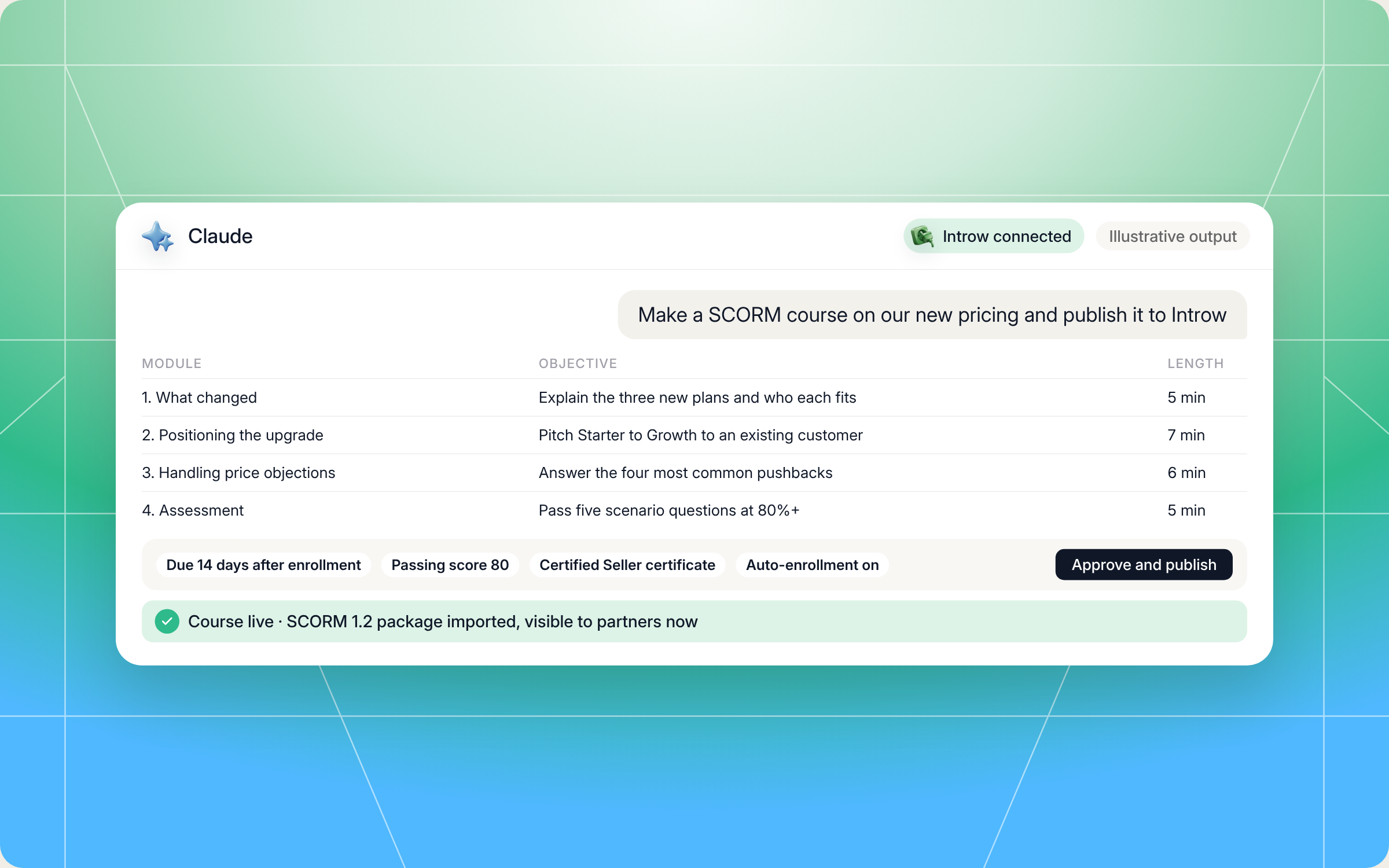
Here's an illustrative example of an outline for a course on new pricing for SMB resellers:
| Module | Learning objective | Source | Time |
|---|---|---|---|
| 1. What changed | Explain the three new plans and who each one fits | Pricing page, launch notes in Notion | 5 min |
| 2. Positioning the upgrade | Pitch the move from Starter to Growth to an existing customer | Sales playbook in Google Drive | 7 min |
| 3. Handling price objections | Answer the four most common pushbacks | Battlecard, support FAQ | 6 min |
| 4. Assessment | Pass five scenario questions at 80% or higher | Modules 1 to 3 | 5 min |
And the publish receipt that follows might look like this:
- Course: New pricing for SMB resellers, course ID returned by Introw
- Settings: due 14 days after enrollment, passing score 80, Certified Seller certificate linked, auto enrollment on
- Status: SCORM 1.2 package imported and ready, visible to partners in the hub now
Here's how that run looks in Claude, from the prompt to the live course:
Staying in control: what Claude can and can't do
Handing a partner course to an AI assistant only works if you trust what goes live. A few things are built in:
- You approve every write. Claude shows you the outline before it authors anything, recaps every setting before it creates the course, and asks again before it replaces a package.
- It stays inside your access. Claude connects to Introw over OAuth as you, so it can only see and do what you can.
- It doesn't make things up. Every module traces to your own sources, with no invented features, pricing or claims, because partner training is customer facing content.
- It won't ship a broken package. The SCORM API wiring is non negotiable, and the pass threshold in the package always matches the passing score on the course.
- It keeps packages clean. No external requests, no trackers, and no secrets or internal only data in the zip.
- Targeting stays with you. Auto enrollment is just a toggle. Claude reminds you to check audience segments in Introw, and if you hit your plan's course limit, it tells you plainly instead of retrying.
Prefer to do this in the Introw app?
Already have courses built in another SCORM authoring tool, like Articulate Rise or a Google Slides export? You don't need to rebuild them. Introw imports SCORM 1.2 and SCORM 2004 packages up to 2 GB, plays them in its built in player exactly as authored, and tracks progress back to your CRM. When you update the course, you replace the package in place, and partners keep the same link.
The full walkthrough lives in the import a SCORM course guide. If you're comparing platforms, our roundup of the best partner LMS software and our guide on how to build a partner course portal are good next reads.
Pair it with other Claude skills
The best course topics come from real gaps, not a content calendar. These skills from the library work well alongside the course builder:
- Micro Courses from Closed Lost Patterns: finds patterns in lost partner deals and drafts targeted micro courses, which this skill can then package and publish.
- Support Content Gap Detector: clusters the questions partners keep asking support and flags the enablement content you're missing.
- Personalized Onboarding Orchestrator from Transcripts: builds a tailored onboarding plan for a new partner, so the right course lands at the right time.
- Agentic Asset Publisher: drafts one pagers, battlecards and FAQs from your sources and publishes them to your asset library, ready to use as course material.
You'll find all of them in Introw's skill library, and our roundup of Claude skills for partner teams explains how they fit together.
Build partner courses from Claude with Introw
Introw is a CRM first partner relationship management platform, which means it builds on top of your existing HubSpot or Salesforce setup rather than replacing it. It's also headless by design: the partner portal is one surface, but you can run the same program in plain language from Claude, ChatGPT, Slack or Teams through Introw's MCP server, with every action written back to your CRM.
That's what makes a skill like this work. Claude handles the authoring, and Introw handles everything that has to stay in one place: the partner LMS that plays your SCORM courses, enrollment and scoring per learner, a partner certification program that issues certificates automatically, and completion data your sales team can see in the CRM. Pair it with the rest of your partner enablement tools, and a course can go from idea to live in an afternoon.
Connect Claude to your partner program and publish your first course today. Connect Claude or book a demo.
Still curious? Here are some quick answers to help clear things up
A SCORM authoring tool is software that builds elearning courses and exports them as a SCORM package, a zip with a manifest file and content that reports progress to any SCORM compliant LMS. With this skill, Claude does the authoring and packaging for you, from your own docs.
No. Claude Code users can drop the SKILL.md into their skills folder and get a fully automatic upload. Everyone else can connect Claude to Introw through the connector directory, and the skill hands you a drag and drop page to upload the zip.
Not without you. Claude asks you to approve the outline, then every course setting before it creates the course, and again before it replaces a package. Audience targeting stays in your hands in the Introw app.
SCORM 1.2 is the safer default because almost every LMS supports it and it tracks what partner programs need: completion, score and pass or fail. Introw also plays SCORM 2004 packages if you already have them.
Yes. The full file is in this article and in Introw's skill library. You can copy it as is or adapt it, but it publishes courses through Introw's MCP server, so you'll need Introw connected, with Courses on your plan, to run it end to end.





See AI-Native PRM in Action
Book a demo with one of our partner program experts, or explore Introw on your own time.

