
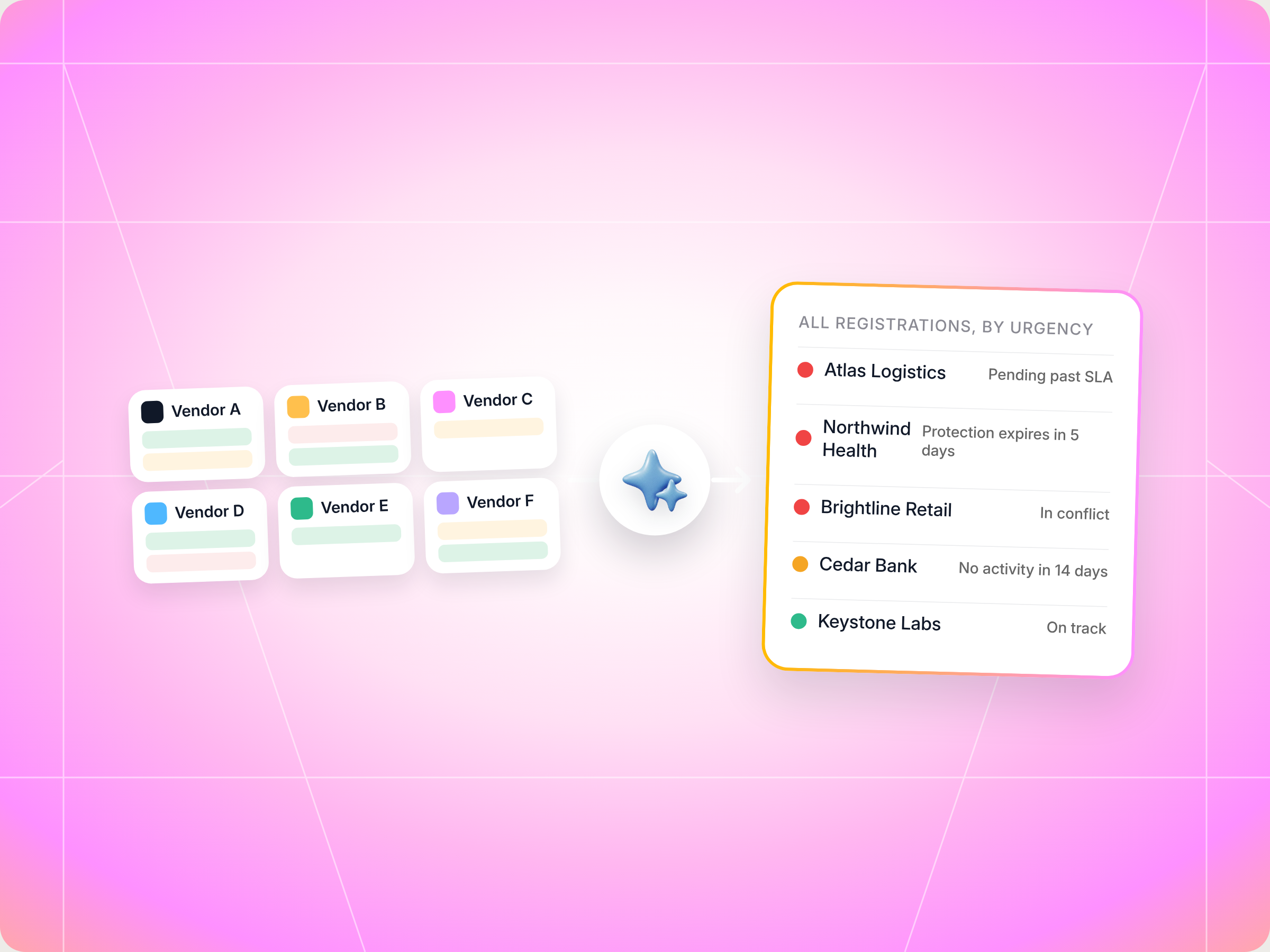
If you sell for five or more vendors, nobody shows you every deal registration status in one place. The Cross Vendor Registration Status Tracker skill does. It pulls every registration from every vendor portal you can reach through Introw, sorts them into pending, approved, expiring, in conflict and rejected, ranks them red, yellow or green, and drafts the follow up messages for anything that needs action. You review and send everything yourself, nothing goes out automatically. The full SKILL.md is below, free to copy, with install steps, prompts to try and an example of what you'll get back.
Here's a number worth knowing. Introw's deal registration playbook notes that registered deals typically carry 10 to 15 points of additional margin, plus access to MDF and presales help. That margin only holds while the deal protection window is open.
Now picture your week. You've got 30 registrations in flight across six vendors. Two are still waiting on approval. One vendor flagged a conflict on Tuesday and you missed the email. And a protection window on your biggest deal expires on Friday, three weeks before the expected close date. Each vendor's partner portal shows you its own slice. None of them shows you the whole queue.
So how do you know which registration needs you today? This guide covers what good deal registration status tracking looks like from the partner side, the Claude skill that does it across every vendor at once, the full SKILL.md you can copy, how to install and run it, and what you'll get back.
Why is deal registration important for channel partners?
Deal registration is how channel partners claim credit for the work they put into a deal. Without it, multiple partners can chase the same customer, the vendor's own sales team can quote against you, and nobody's sure who should get paid.
For partners, registered deals bring four things:
- Protection: exclusive rights for a set window, so other partners can't undercut you on price.
- Better margin: registered deals typically carry 10 to 15 extra points, often with price protection on the quote.
- Vendor help: co selling support, presales resources and sometimes MDF, especially on high value deals.
- Clean attribution: the vendor knows the deal is yours when the commission gets calculated.
For vendors, a deal registration program is how they reward partners for bringing in new business, avoid channel conflict and feed partner deals into sales forecasting. The best programs offer meaningful incentives, keep the deal registration form short and give channel sales teams clear rules on who owns what. Some also use registration history for lead distribution, sending new leads to the partners with the strongest track record.
Every partner program handles registration a little differently, and most run it through deal registration software or a partner portal. That's exactly why tracking gets hard once you sell for more than a couple of vendors.
Why deal registration status gets lost across vendors
Deal registration is a formal process. When a partner identifies a potential sales opportunity, the partner submits a deal registration form to tell the vendor they're actively pursuing that customer. If the vendor approves it, the partner receives exclusive rights to the deal for a set window, usually 30 to 90 days. Those are the certain benefits that make the registration process worth the effort: deal protection, better margin and sales support from the vendor's team.
That's the theory. In practice, the registration process is only half the job. The other half is tracking what happens next, and that's where partner deals slip.
Here's why tracking breaks down when you work with multiple vendors:
- Every vendor has its own portal: six vendors means six logins, six status pages and six different ways of saying "pending".
- Approval notifications get buried: approval and rejection emails land in a shared inbox, or with the rep who submitted the form and then went on holiday.
- Protection windows expire quietly: a deal that's still open when the expiration date passes loses its exclusive access, and often its margin, with no warning.
- Conflicts sit unanswered: when a vendor flags that another partner or their own sales team claimed the same deal, every day without a response costs you partner trust.
- Closed won doesn't mean paid: if attribution is wrong, the commission is wrong, and nobody notices until the quarter closes.
What each deal registration status means
Most programs use the same handful of statuses, even if every partner portal labels them a little differently. Here's what each one means for you, and what to do about it.
| Status | What it means | What to do next |
|---|---|---|
| Pending approval | The vendor has your registration and the review clock is running | Wait, then chase the channel manager if it passes the vendor's SLA |
| Approved, in protection window | You have exclusive access to the deal for a set number of days | Keep the deal moving and log activity |
| Approved, nearing expiry | Fewer than 30 days of protection left, deal still open | Ask for an extension or push to close sooner |
| Approved, expired | Protection closed while the deal is still open | Ask for an extension or exception, or accept the loss |
| In conflict | Another partner or the vendor's direct team claimed the same customer | Respond with evidence, or accept the resolution |
| Rejected | The vendor declined the registration | Appeal, resubmit correctly or move on |
| Closed won | The deal closed | Check that the commission matches the deal value |
| Closed lost | The deal is gone | Log what you learned and close it cleanly |
For the vendor view of the same queue, see Introw's glossary entries on deal registration and deal approval time.
What good deal registration tracking looks like for partners
A successful deal registration program needs work from both the partner and the vendor. Vendors owe partners clear rules, fast approval and meaningful incentives. Partners owe vendors clean data and honest updates. When both sides do their part, registered deals close faster and channel conflict drops.
From the partner side, good deal reg tracking comes down to a few habits:
- One view across every vendor: you shouldn't need six tabs to know your own sales pipeline. Track every registration in one platform, with vendor, account, deal size, status and close date side by side.
- Sort by urgency, not by vendor: a protection window that ends in five days matters more than a clean approval from last month. Rank the queue by what costs you money first.
- Chase on a schedule: if a vendor promised approval in 48 hours and it's been five days, ping your channel manager. Polite, specific, with the deal details attached.
- Answer conflicts with evidence: when two partners claim the same customer, the one with the clearer proof usually wins. That means existing relationships, prior wins and meeting history, not volume.
- Keep an audit trail: log every follow up on the registration record, so anyone on your team can see what was asked and when.
- Check attribution after the win: compare the commission you received with what you expected. Flag gaps with the deal ID and numbers ready.
- Learn from the data: over time, your deal registration data shows which vendors approve fast, which ones have frequent conflicts and where your approval rates are highest. That's useful for deciding where to put your sales efforts.
Vendors care about this too. Clean tracking on the partner side helps their sales forecasting, cuts back and forth for their channel manager and lifts partner satisfaction. Programs that provide visibility back to partners tend to see better partner adoption, because partners register more when they trust the process. The key performance indicators most vendors watch, like approval time, conflict rate and registered versus unregistered win rate, all improve when partners keep their side tidy.
If you're on the vendor side reading this, the deal and lead registration product page and our guide to channel conflict cover how to set up clear communication and fair rules for program partners.
The skill to use: Cross Vendor Registration Status Tracker
The Cross Vendor Registration Status Tracker is a partner side skill from Introw's free Claude skill library. It connects to every vendor portal you can reach through Introw Partner Connect, pulls each registration and its deal record, and turns them into one sorted action queue. It's built for resellers, agencies, MSPs and other reseller partners who sell for several vendors at once.
| Field | Details |
|---|---|
| Built for | Partner operations and partnerships leads at resellers, agencies and service partners |
| Use it when | You want one view of every registration across vendors, sorted by what needs action |
| What it reads | Registrations from every vendor portal, the matching deal records and each vendor's tier rules for protection windows |
| What it writes | A comment on the relevant registration record for each follow up you send, so there's a trail |
| What you get | A status dashboard, a red to yellow action queue, drafted messages to channel managers, drafted conflict responses and vendor by vendor insights |
| Skill ID | partner-registration-status-tracker |
It fires on prompts like "all my registrations", "what's pending approval", "deal regs across vendors", "protection windows expiring", "registrations in conflict" and "registration status".
How the skill works, step by step
The skill runs in six steps. You don't need to run them yourself, but it helps to know what's happening so you can trust the output.
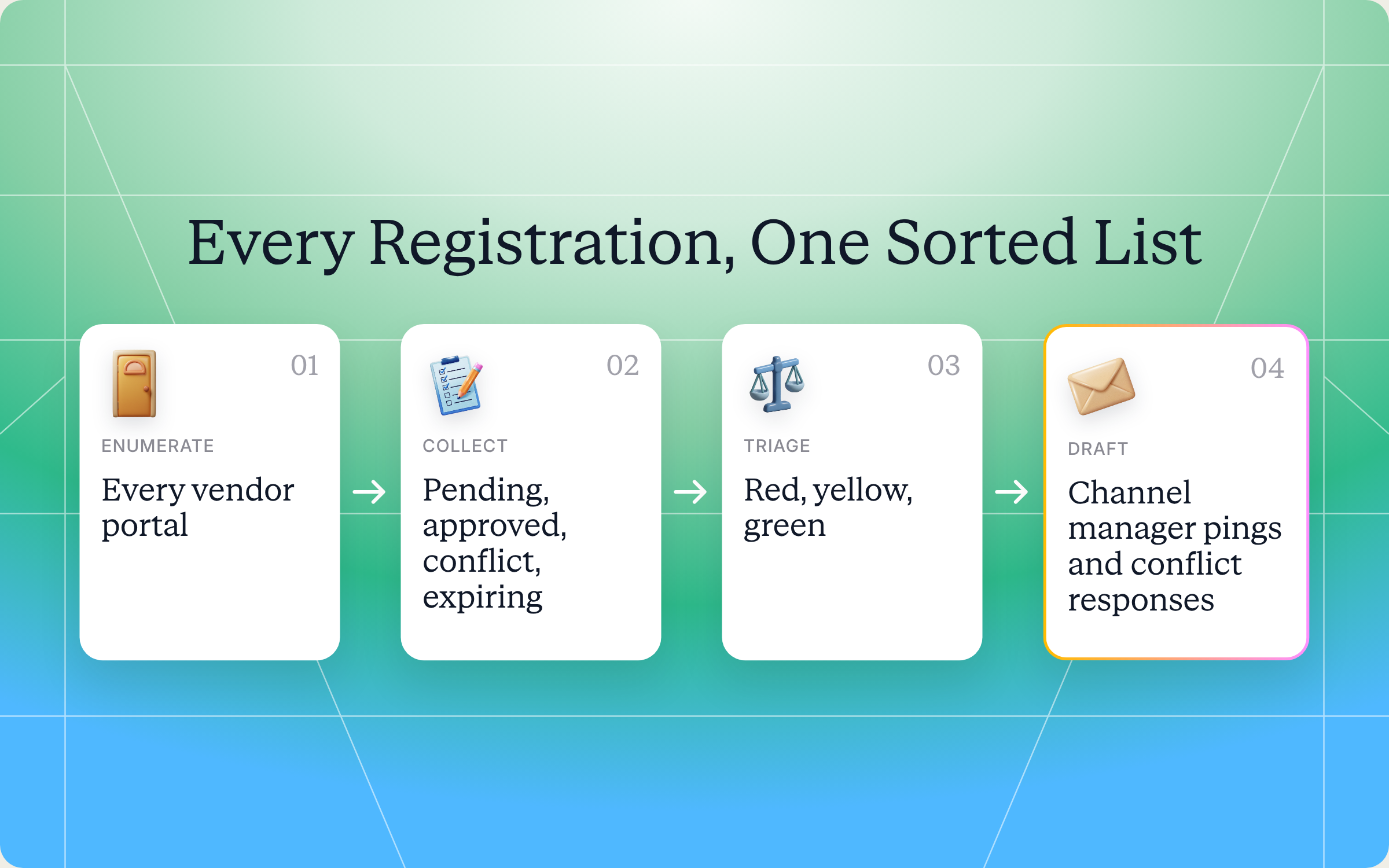
Step 1: Find every vendor portal
The skill starts by listing every vendor portal your Introw partner account can reach. Connect once, and every vendor you work with is in scope.
Step 2: Pull registration status from each vendor
For each vendor, it pulls every registration from the last 6 to 12 months with its approval status. It also reads the matching deal record, with stage, value, last activity and close date, and checks the vendor's tier rules to see how long your protection window lasts. Each vendor's data is fetched separately, through that vendor's portal only.
Step 3: Sort each registration into a bucket
Every registration lands in one of eight buckets: pending approval, approved and in protection, approved and nearing expiry, approved and expired, in conflict, rejected, closed won or closed lost. For closed won deals, it also checks your commissions to confirm the attribution looks right.
Step 4: Rank by urgency
Next, the whole list gets sorted across vendors:
- Red: protection expiring in less than 7 days on an active deal, conflicts sitting for more than 48 hours, or approvals past the vendor's SLA.
- Yellow: protection expiring in 7 to 30 days, approvals getting close to SLA, or approved deals with no recent activity.
- Green: clean and on track.
Step 5: Recommend an action for each item
For everything that isn't green, the skill suggests a next move:
- Pending past SLA: a drafted ping to the vendor's channel manager.
- Protection expiring, deal still open: the trade off between asking for an extension, speeding up the close or accepting the loss of protection.
- In conflict: an evidence outline and a drafted response.
- Rejected but recoverable: a corrected resubmission draft.
- Closed won with attribution issues: a drafted note to the vendor's finance team or channel manager with the deal ID and expected versus actual commission.
Step 6: Show patterns across vendors
Finally, the skill summarizes how each vendor behaves: approval speed, how often conflicts happen and which registrations actually close. That's for your own planning, like deciding which vendor to bring into a new business opportunity, not something to throw at a vendor in a QBR.
Get the skill: the full SKILL.md
Here's the complete skill file. Copy it as is, or adjust the urgency thresholds to match your vendors' SLAs.
---
name: partner-registration-status-tracker
description: Use when a partner wants a single view of every deal/lead registration they have outstanding across all vendors, pending approval, approved, in conflict, approaching protection-window expiry, sorted by urgency and recommended action. Trigger phrases include "all my registrations", "what's pending approval", "deal regs across vendors", "protection windows expiring", "registrations in conflict", "registration status".
---

# Cross-Vendor Registration Status Tracker (Partner)

**Audience**: Partner user, uses **Introw Partner Connect** MCP across **all portals** the partner has access to.
**Use case**: 08, Deal Registration (partner-side, multi-vendor).

## When to use this skill

Use when a partner wants a single view of every deal/lead registration they have outstanding across all vendors, pending approval, approved, in conflict, approaching protection-window expiry, sorted by urgency and recommended action.

**Sample prompts that fire this skill:**
- "all my registrations"
- "what's pending approval"
- "deal regs across vendors"
- "protection windows expiring"
- "registrations in conflict"
- "registration status"

## Why this matters
Partners with active pipelines across 5+ vendors often have 20 to 50 registrations in flight at any given moment, pending approvals, approved-but-aging, in-conflict, sitting on the edge of protection-window expiry. Each vendor's portal shows you *its* slice. Nobody shows you the unified view.

The cost of missing one is significant: a protection window expiring on a deal-in-flight strips 10 to 15 points of margin off the eventual close. A conflict left unresolved for two weeks degrades vendor trust on every future registration. This skill makes the whole queue visible in one place, sorted by urgency, with recommended action per item.

## Process

### Step 1: Enumerate vendor portals
- `Introw_Partner_Connect:partners`: get all portals.

### Step 2: Pull registration state per portal
For each `roomId`:
- `Introw_Partner_Connect:search_form_submissions`: all registrations in trailing 6 to 12 months, with status.
- `Introw_Partner_Connect:search_crm_objects`: corresponding deal records (stage, value, last-activity, close-date).
- `Introw_Partner_Connect:get_tier_information`: protection-window length per tier (typically 30/60/90 days).

### Step 3: Classify each registration
Bucket each registration:

- **Pending approval** (and aging): submitted, vendor SLA running. Flag if past stated SLA.
- **Approved & in protection window**: clean, on track. Show days remaining in window.
- **Approved & nearing window expiry**: < 30 days left in protection. The most urgent class.
- **Approved & expired**: protection window closed; deal still open. Flag for re-registration request or extension ask.
- **In conflict**: vendor flagged as conflicting with another partner or direct sales. Action: respond to vendor with evidence, or accept resolution.
- **Rejected**: partner needs to either appeal, register correctly, or move on.
- **Closed-won**: confirm commission attribution is correct (cross-check `search_commissions`).
- **Closed-lost**: opportunity to log lessons; close cleanly.

### Step 4: Surface urgency
Sort across all portals by urgency:
- **Red**: protection expiring < 7 days on an active deal; in-conflict registrations sitting > 48 hours; pending approvals past SLA.
- **Yellow**: protection expiring 7 to 30 days; approvals approaching SLA; aging post-approval with no deal activity.
- **Green**: clean, on track.

### Step 5: Recommend action per item
For each non-green item:

- **Pending past SLA** → CAM ping, drafted message included.
- **Protection expiring soon, deal still open** → choose: (a) register protection extension, (b) accelerate close, (c) accept loss of protection. Surface the trade-off.
- **In conflict** → review the conflict, gather evidence (existing customer relationship, prior similar wins), draft response.
- **Rejected, recoverable** → draft the corrected resubmission.
- **Closed-won with attribution issues** → flag for finance/CAM follow-up.

### Step 6: Surface aggregate insight
- **Approval velocity by vendor**: which vendors are slow vs. fast (informs future routing).
- **Conflict frequency by vendor**: which vendors have RoE issues.
- **Win rate by vendor**: which registrations actually close.

These are partner-internal insights, not for the QBR adversarially, just for the partner's own routing decisions.

## Output format
- **Status dashboard across vendors**: table with vendor, account, value, status, urgency, action.
- **Action queue**: sorted red → yellow, with recommended next move per item.
- **Drafted CAM pings** for SLA-breached approvals, copy-pasteable per vendor.
- **Drafted conflict responses** with evidence outline.
- **Aggregate insight**: vendor-by-vendor approval velocity, conflict rate, win rate.

## Guardrails & PRM best practice
- **Strictly scoped per portal.** Each registration's data is fetched only with that vendor's `roomId`. No cross-portal data leakage in the responses sent back to vendors.
- **Don't submit vendor-confidential data into another vendor's portal.** Cross-vendor analysis happens locally; the partner's CAM pings to Vendor X never reference Vendor Y's data.
- **Conflict responses must be evidence-grounded.** Don't draft a conflict appeal that overclaims partner equity in an account. Surface the evidence honestly; let the partner decide what to argue.
- **Protection-window honesty.** Some vendors don't extend protection windows beyond the original term. Surface the policy if known; don't promise an extension that isn't policy.
- **Re-registration is rare.** If a deal already had protection that expired, re-registering is generally not allowed. Surface the right ask, extension, exception, or accept loss of protection.
- **Closed-won attribution.** When attribution looks off, draft the inquiry to vendor finance/CAM with the specifics (deal ID, expected commission, actual commission). Don't escalate before checking the data.
- **Don't auto-act.** Surface action; partner submits.
- **Capture every CAM ping** via `Introw_Partner_Connect:add_comment` on the relevant registration record so the trail exists for future audits.
- **Run on cadence.** Weekly default; daily during heavy-pipeline quarters. Daily-discovered issues are 10× cheaper to resolve than QBR-discovered ones.
- **Cross-skill handoff.** Stalled approved registrations → `partner-deal-war-room` to coach the deal forward. Conflicts that can't be resolved → escalate to vendor channel ops via `partner-helpdesk` or direct CAM.
How to install and run the skill
Option 1: Claude Code
Create a folder called partner-registration-status-tracker inside .claude/skills/ in your repo, and save the file above as SKILL.md inside it. Claude Code runs the skill whenever your prompt matches one of the trigger phrases.
Option 2: Claude (or any MCP client) with the Introw connector
If you'd rather stay in Claude, connect it to Introw once. As a partner, you set this up from your own free Introw partner account, not from any single vendor's portal, and the connection covers every vendor portal you can reach. It signs in with OAuth as you, so Claude only sees what your account can see. Here's what connecting looks like:
The Connect Claude guide walks through it step by step, the partner version lives in the partner Connect Claude guide, and the Claude integration page covers what else you can do once connected.
Prompts to try
- "Show me all my registrations across vendors." The full status dashboard, sorted red to green.
- "What's pending approval past SLA?" Just the overdue approvals, with a drafted ping for each channel manager.
- "Which protection windows are expiring this month?" Every approved registration with fewer than 30 days of protection left, plus the trade off for each.
- "Help me respond to the registrations in conflict." An evidence outline and draft response for each conflict, for you to edit and send.
- "Which vendors approve fastest?" Approval speed, conflict rate and win rate by vendor.
What you'll get back
A run returns five things:
- Status dashboard: one table across every vendor, with account, deal value, status, urgency and recommended action.
- Action queue: every red and yellow item, in order, with the next move for each.
- Drafted channel manager pings: for approvals past SLA, ready to copy and paste per vendor.
- Drafted conflict responses: with an evidence outline you can check before sending.
- Vendor insights: approval speed, conflict rate and win rate for each vendor.
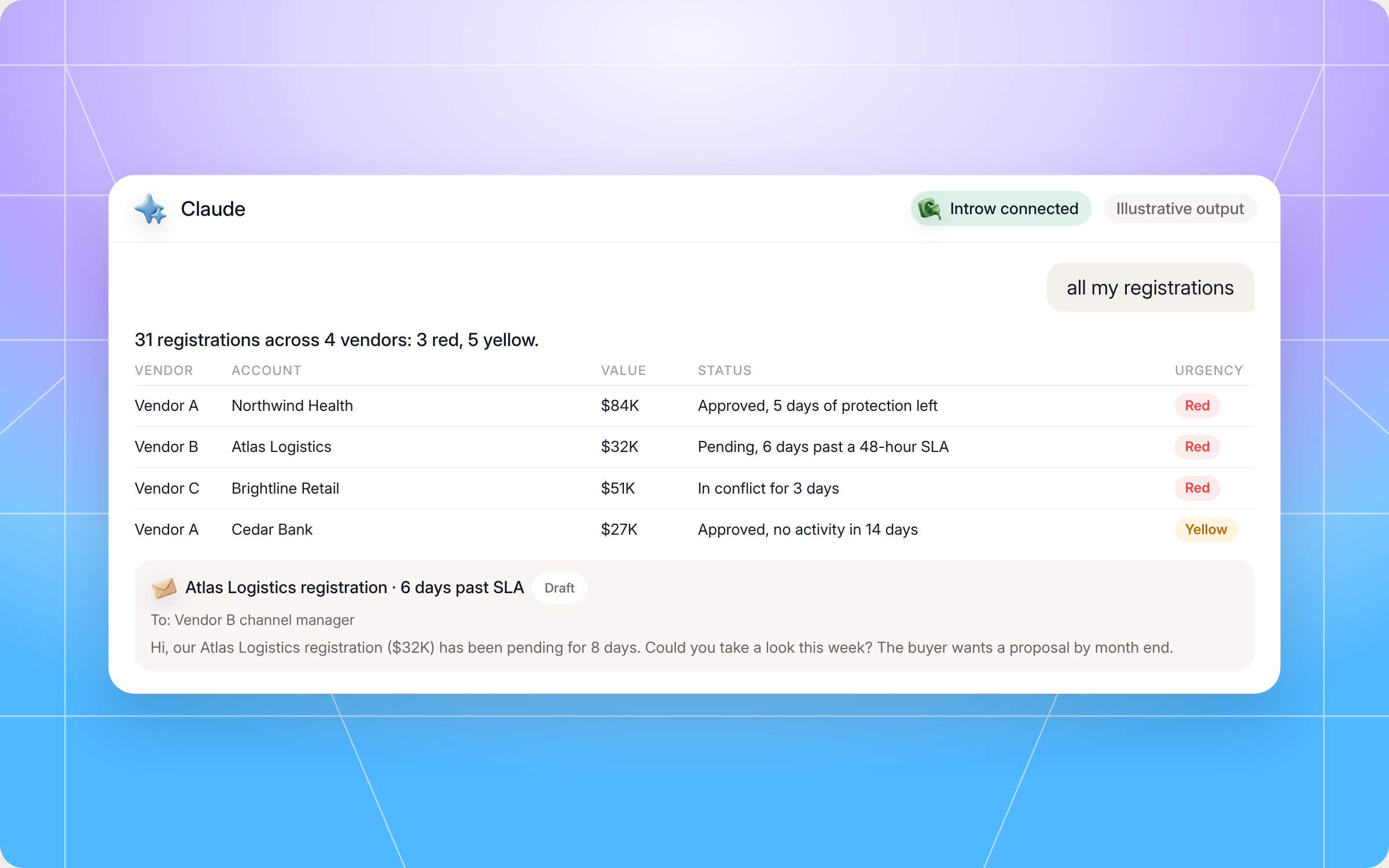
Here's an illustrative slice of a status dashboard for a reseller working with four vendors:
| Vendor | Account | Value | Status | Urgency | Recommended action |
|---|---|---|---|---|---|
| Vendor A | Northwind Health | $84,000 | Approved, 5 days of protection left | Red | Ask for a 30 day extension, close date is in 3 weeks |
| Vendor B | Atlas Logistics | $32,000 | Pending, 6 days past a 48 hour SLA | Red | Send the drafted ping to the channel manager |
| Vendor C | Brightline Retail | $51,000 | In conflict for 3 days | Red | Review the evidence outline and send the response |
| Vendor A | Cedar Bank | $27,000 | Approved, 22 days of protection left | Yellow | No activity in 14 days, book the next meeting |
| Vendor D | Orbit Media | $18,000 | Closed won | Yellow | Commission is $1,200 lower than expected, send the drafted inquiry |
| Vendor B | Keystone Labs | $40,000 | Approved, 61 days left | Green | On track |
And here's how that run looks in Claude, from the prompt to the summary line, the status table and a drafted message to a channel manager:
Staying in control: what Claude can and can't do
Registration follow ups go to your vendors, so they carry your name and your relationship. The skill is built with that in mind:
- Nothing gets sent for you: the skill drafts pings, conflict responses and resubmissions. You review them and send them yourself.
- It works as you: the connection uses OAuth with your own login, so Claude only sees the vendor portals and records your account can see.
- No data crosses between vendors: each vendor's data is pulled only through that vendor's portal, and a message to one vendor never mentions another vendor's deals.
- Honest conflict responses: drafts stick to the evidence, like existing customer relationships and prior wins, and never overclaim your position on an account.
- No promises the vendor won't keep: if a vendor doesn't extend protection windows, the skill says so instead of suggesting an extension that isn't policy.
- Checks before escalating: attribution questions come with the deal ID and expected versus actual commission, so you never escalate on a hunch.
- A trail for every follow up: when you send a ping, it's logged as a comment on the registration record, so the history is there for the next audit.
Prefer to do this in the Introw app?
If your team works in HubSpot, the Introw Partner Connect card shows each deal's registration status right in the deal sidebar, with one tile per vendor. You can see whether a deal is registered, linked to the vendor's deal or still waiting, and add a comment without opening a portal. The work deals from the Introw card guide shows what a rep sees day to day, and sync deal updates to your vendor keeps the vendor's deal status current without extra emails.
Pair it with other Claude skills
Tracking status is one step in the life of a registered deal. These partner side skills pick up from there:
- Register a Deal from Your AI Assistant: registers a deal or shares a lead with any vendor from Claude, using facts from your own CRM, notes or inbox.
- Deal War Room: for approved registrations that have stalled, it builds a coaching packet with vendor playbooks, past wins and next moves.
- Partner Helpdesk: for conflicts you can't resolve on your own, it gets your question to the vendor's team without the portal.
- Incentive Maximizer: once deals close, it shows which actions get you to the next bonus tier.
All of them live in Introw's skill library, and our overview of Claude skills for partner teams shows how they fit together. For the basics behind the skill, see the glossary entries on channel conflict and lead registration.
Track every registration from Claude with Introw
Introw is a CRM first partner relationship management platform, which means it builds on top of your existing HubSpot or Salesforce setup rather than replacing it. It's headless by design, so partners and vendors can work from the partner portal or in plain language from Claude, ChatGPT, Slack or Teams, through Introw's MCP server, with every action written back to the CRM.
That's why a skill like this works for partners. Registrations, deal records, tiers and commissions from every vendor on Introw sit behind one connection, so Claude can show you the whole queue instead of one slice at a time. It's good for vendors too: partners who can see their deal status clearly register more, chase less and trust the program more.
Stop checking six portals to find the one deal that needs you today. Connect Claude or book a demo.
Still curious? Here are some quick answers to help clear things up
Most vendors show status in their own partner portal, which means one login per vendor. If your vendors run on Introw, the Cross Vendor Registration Status Tracker skill pulls every registration into one view in Claude, sorted by urgency, with a recommended next step for each.
The deal loses its exclusive protection, so other partners or the vendor's direct team can compete for it, and you can lose the extra margin. Re registering is usually not allowed, so the skill flags windows early and helps you ask for an extension or exception while there's still time.
No. Claude Code is one option. You can also run the skill in Claude, or any MCP client, with the Introw connector, and use the trigger phrases in plain language.
No. It drafts channel manager pings, conflict responses and resubmissions for you to review and send. When you send a ping, it logs a comment on the registration record so there's a trail.
Yes. The full file is in this article and in Introw's skill library. You can copy and adapt it, but it reads registration data through Introw Partner Connect, so you'll need an Introw partner account connected to your vendors' portals to run it.





See AI-Native PRM in Action
Book a demo with one of our partner program experts, or explore Introw on your own time.

