

If your tier review keeps getting rushed, skipped or decided by gut feel, the Claude skill to use is Tier Promotion Batch Review. It audits every partner against your tier criteria (revenue, certifications, engagement and goal attainment), checks whether performance held for at least two quarters, sorts each partner into promote, hold, demote or watch, and drafts the partner facing message for every move. Nothing changes and nothing gets sent until you and your channel lead approve it. The full SKILL.md is below, free to copy, with install steps, prompts to try and an example of what you'll get back.
If you run a partner program as a channel chief, partner manager or RevOps lead, here's a number you probably know by heart. Introw's partner segmentation playbook points out that in typical programs, the top 20% of partners drive 80% of revenue. Your partner program tiers are supposed to reflect that. They decide who gets the margin, the MDF, the deal protection and the partner manager's time.
Now think about your last tier review. Maybe it happened in a rush at year end. Somebody exported a spreadsheet, a few favorites got a tier promotion, and nobody got demoted because nobody wanted that call. Three partners who'd earned a move up never heard a word.
Sound familiar? Then the problem isn't your tier structure. It's the review. This guide covers what a fair tier promotion process looks like, the Claude skill that runs it for you, the full SKILL.md you can copy, how to install and run it, and how to stay in control of every tier move.
Why most tier reviews weaken your partner tier structure
Tiers are the most economically important decision in a partner program. A tier level sets margin, MDF eligibility, priority support, deal protection and how much access a partner gets to your sales team. For SaaS companies, they also decide where you invest resources, training and co marketing campaigns across the partner ecosystem. Yet in most programs, the tier review is the ritual that gets skipped or squeezed.
Here's how it usually breaks down:
- It happens once a year, in a hurry: decisions lean on memory instead of data.
- One big deal decides everything: a partner lands a single mega deal with one big customer, gets bumped to the gold tier, then can't repeat it and sits in a tier they can't sustain.
- Nobody gets demoted: the conversation is uncomfortable, so it doesn't happen. Over time, your higher tiers fill up with partners who no longer meet the bar.
- Moves happen silently: a partner finds out about a tier change in the portal six months later. The skill's own guardrails call that the number one cause of churn for mid tier partners.
- The criteria never get checked: if almost every partner qualifies for the next tier, the bar is too low. If nobody ever does, it's too high. Most programs never look.
The result is tier inflation. When half your partners sit in the top tier, the badge stops meaning anything, and your most strategic tiers stop being a reward worth chasing.
Still designing your ladder? Start with our guide on how to structure partner tiers. This article focuses on running the review well.
What a fair tier promotion process looks like across program tiers
A good tier review isn't generous or strict. It's consistent: every partner gets measured against the same partner tier criteria, over the same window, with the same rules. Whether your tier structure has two tiers or four tiers, here's what the strongest partner tier programs have in common:
- Clear expectations per tier: partners know exactly what it takes to reach the next tier, whether that's closed revenue, certified people, engagement or goal attainment. If you use a points system or a partner scorecard, the scoring is written down.
- A review window that fits your motion: trailing four quarters is the common default. Trailing two quarters is more reactive, and suits programs where partners grow fast.
- A sustained performance bar: a tier promotion needs at least two quarters of performance at the new level, not one lucky quarter.
- A runway for demotions: partners get 60 to 90 days of notice and a clear path back, so the demotion turns into a constructive conversation instead of a surprise.
- Adjacent moves by default: most programs move partners one tier at a time. Jumping from the bottom tier to the top tier should be a policy decision, not an accident.
- A message for every move: promotions get celebrated, demotions get explained, and partners on the edge get a heads up.
- Criteria beyond revenue: customer success and customer satisfaction signals, like renewals or monthly recurring revenue retained, show whether a partner deserves the rewards of a higher tier.
Most partner programs run three or four tiers, often some mix of Silver, Gold and Platinum, and new partners usually enter at the base tier. Some blend tiers with competencies: Google Cloud, for example, uses tiers for breadth and competencies for depth. Whatever your model, partners should requalify for their tier status at every review, so tiers create accountability for both partners and your team.
The table below shows the difference between a typical review and a rigorous one.
| Review element | Typical tier review | Rigorous tier review |
|---|---|---|
| Frequency | Once a year, often late | Quarterly or on demand |
| Evidence | Revenue only, from a spreadsheet | Revenue, certifications, engagement and goals from live data |
| Promotion bar | One strong quarter | At least two sustained quarters |
| Demotions | Rare or skipped | Applied after two quarters below the bar, with notice |
| Partner comms | Silent, or a generic email | Personal message for every move, including holds |
| Rules check | Never | Flags criteria that are too loose or too tight |
That last row matters. Your tier review is the best data you'll get on whether your partner tiering rules still make sense. If 80% of partners qualify for a promotion, the criteria are wrong. If only one partner per cycle moves up, they're wrong too.
Make sure each of your partner levels is worth reaching
A tier promotion only changes behavior if the benefits at each level are real. Before your review, check that your partner levels are clearly different, so a move up is worth chasing. Here's a simple example of how benefits and rewards often stack across program levels:
| Tier level | Typical benefits and rewards | Support levels |
|---|---|---|
| Registered | Portal access, training and sales resources for new partners | Shared support |
| Silver tier | Higher margin, deal registration protection, co marketing resources | Shared partner manager |
| Gold tier | MDF, lead sharing and more automated benefits like faster commission payouts | Dedicated partner manager and priority support |
| Platinum | Joint business planning, early product access and an executive sponsor | Dedicated partner team |
The point isn't more money for its own sake. Top tier partners should get the support that helps them win more sales with your customers, because that's strategic growth for both companies. If the benefits between different tiers barely differ, a promotion won't change anything, and your sales reps won't know which partners to spend time with.
The catch is the workload. Scoring every partner and writing a personal message to each is days of work, which is why teams skip it, and exactly the job a Claude skill handles well.
The skill to use: Tier Promotion Batch Review
Tier Promotion Batch Review is a vendor side skill from Introw's free Claude skill library. It audits your entire partner base for promotion or demotion eligibility through Introw's MCP server, reading live data from your CRM, then drafts the partner facing comms for every recommended move.
| Detail | What it covers |
|---|---|
| Built for | Channel chiefs, partner program managers, partner development managers and channel RevOps |
| Use it when | It's time for your quarterly or annual tier review, or you want to know who's ready for a tier promotion right now |
| What it reads | Partner roster, tier rules, closed won revenue, commissions, certifications, engagement and goals |
| What it writes | Tier updates on partner records, comments with the rationale and follow up tasks, only after sign off |
| What you get | A tier review summary, a per partner detail table, override candidates, comms drafts and a rules diagnostic |
| Skill ID | vendor-tier-promotion-batch-review |
You trigger it in plain language. Phrases like "tier review", "who's ready for promotion", "tier promotion batch", "who should we demote", "annual tier audit" or "Gold/Silver/Bronze review" all fire it.
How the skill works, step by step
The skill follows seven steps. Knowing what happens under the hood makes the output easier to trust.

Step 1: Gather your rules and pull the partner base
First, the skill confirms your tier definitions, review window, move policy (demotions allowed? tier jumps allowed?) and demotion notice period. If your tier rules live in Introw, it reads them directly. Then it pulls every active partner with their current tier, partner type, region and time in tier.
Step 2: Score every partner against every criterion
For each partner, the skill checks every tier's requirements: closed won, partner attached revenue and commissions over the review window, required certifications, minimum engagement, pacing against committed goals, and whether that performance held for enough consecutive quarters.
Each criterion gets a simple rating: meets, exceeds, approaches or below. That makes it easy to see exactly why a partner is or isn't moving.
Step 3: Recommend a move for each partner
Every partner lands in one of five buckets:
| Bucket | What it means |
|---|---|
| Promote | Meets or exceeds every next tier criterion, sustained |
| Hold (target next quarter) | Close to the next tier, with one criterion lagging |
| Hold (stable) | Squarely meets the current tier, nothing to change |
| Demote | Below current tier criteria for two or more quarters, and not recoverable with a quick intervention |
| Watch | Below the current tier this quarter only, so they get runway and support before any demotion |
Step 4: Apply the guardrails
The skill then checks its own recommendations. No tier jumps unless your policy allows them, no demotion after one bad quarter, and every demotion gets your notice period. A partner with a major strategic deal in flight gets flagged for a human to decide.
Step 5: Draft the partner comms
This is where most reviews stall, so the skill writes three kinds of message:
- Promotion: celebrates, lists exactly what unlocks (margin uplift, deal protection, MDF, a dedicated partner manager) and offers a 30 minute call.
- Demotion: opens with appreciation, states the criteria missed with numbers, lays out a path back and gives the effective date.
- Hold and watch: shows where the partner stands, what's at risk and what to focus on this quarter.
Most programs skip the hold and watch message, yet it's the highest leverage of the three. It's how you set expectations before a demotion is on the table.
Step 6: Package it for executive review
The skill bundles everything into a review packet: promotions with the revenue they represent, demotions with revenue at risk, the watch list and override candidates. Your channel chief signs off, and comms are scheduled only after approval.
Step 7: Execute and log the trail
For approved moves, the skill updates the tier on the partner record in your CRM, adds a comment with the scoring and rationale, and creates a follow up task for the partner manager. Human overrides get logged with the reason, so your rules can evolve next cycle.
Get the skill: the full SKILL.md
Here's the complete skill file. Copy it as is, or adjust the buckets, review window and notice period to match your partner program.
---
name: vendor-tier-promotion-batch-review
description: Use quarterly (or on demand) when a Channel Chief, RevOps, or PDM wants to audit the entire partner base for tier promotion or demotion eligibility, combining revenue, certifications, engagement, and goal attainment, and draft the partner-facing comms for each move. Trigger phrases include "tier review", "who's ready for promotion", "tier promotion batch", "who should we demote", "annual tier audit", "Gold/Silver/Bronze review".
---

# Tier Promotion Batch Review (Vendor)

**Audience**: Vendor, uses **claude.ai Introw** MCP.
**Use case**: 02, Partner Segmentation.

## When to use this skill

Use quarterly (or on demand) when a Channel Chief, RevOps, or PDM wants to audit the entire partner base for tier promotion or demotion eligibility, combining revenue, certifications, engagement, and goal attainment, and draft the partner-facing comms for each move.

**Sample prompts that fire this skill:**
- "tier review"
- "who's ready for promotion"
- "tier promotion batch"
- "who should we demote"
- "annual tier audit"
- "Gold/Silver/Bronze review"

## Why this matters
Tier reviews are the most economically consequential ritual in a partner program, they determine margin, MDF eligibility, deal protection priority, and PDM access, and they're also the most commonly **arbitrary or skipped** ritual. Most programs run them once a year, rush the analysis, promote a few favorites, and demote nobody (because nobody wants the conversation). The result: tier inflation that makes the whole tier system meaningless, and partners who *should* have been promoted feeling overlooked.

This skill makes tier reviews **rigorous, consistent, and complete**: every partner gets reviewed against the same criteria; promotions and demotions are evidence-grounded; the comms are drafted so the actual conversation gets had instead of deferred.

## Inputs to gather first
- **Tier definitions**: revenue thresholds, certification requirements, sustained-quarter requirements per tier. Pull from `Introw:get_tier_information` if encoded; else ask.
- **Review window**: trailing 4 quarters (default), trailing 2 quarters (more reactive), trailing year-to-date, custom.
- **Move policy**: do you allow demotion? Do you allow tier-jumps (Bronze → Gold) or only adjacent moves (Bronze → Silver)?
- **Notification policy**: how much advance notice do partners get on demotion (default 60 to 90 days)?

## Process

### Step 1: Pull the partner base
- `Introw:search_partners`: full active partner roster with tier, lifecycle stage, categories, region.
- `Introw:get_tier_information`: current tier rules and requirements.
- For each partner, capture current tier and tenure-in-tier.

### Step 2: Compute eligibility per partner per tier
For each partner, against each tier's requirements:
- **Revenue criteria**: closed-won partner-attached ARR over the review window. Use `Introw:search_crm_objects` filtered to closed-won and `Introw:search_commissions`.
- **Certification criteria**: required certs present? Use `Introw:search_partner_engagement` for completion records.
- **Engagement criteria**: minimum activity thresholds? Use `Introw:search_partner_engagement`.
- **Goal attainment**: pacing on committed goals? Use `Introw:get_goals`.
- **Sustained-quarter criteria**: were they at this performance level for ≥ N consecutive quarters? Critical to avoid promoting on a single mega-deal.

Score: meets / exceeds / approaches / below for each criterion.

### Step 3: Generate move recommendations
Bucket each partner:
- **Promote**: meets or exceeds all next-tier criteria, sustained.
- **Hold (target review next quarter)**: approaching next tier, but one criterion lagging.
- **Hold (stable)**: meets current tier squarely; nothing to change.
- **Demote**: falls below current tier criteria, sustained ≥ 2 quarters, not recoverable through near-term intervention.
- **Watch (demotion candidate)**: falls below current tier this quarter only; needs runway + intervention before demotion.

### Step 4: Apply tier-move guardrails
- No tier-jumps unless policy allows (most programs limit to adjacent moves).
- Demotions require ≥ 2 quarters of underperformance, single-bad-quarter demotions destroy partner trust.
- Notice period applied: demotions get the configured advance notice (e.g., effective in 90 days).
- Any partner with a major in-flight strategic deal gets flagged for human override consideration before demotion.

### Step 5: Draft per-partner comms
Three templates to generate:

**Promotion comms** (celebratory + concrete unlocks):
- Subject: "Welcome to [Tier], [Partner Name], and what unlocks for you"
- Lead with the celebration.
- Concretely list new benefits (margin uplift, deal protection upgrades, MDF access, dedicated PDM, etc.).
- Soft close with an invitation to a 30-min call to walk through what changes.

**Demotion comms** (empathetic + path-forward):
- Subject: "[Partner Name], a heads-up about your tier status and how we get back on track"
- Lead with appreciation for the partnership.
- State the move and the why (specific criteria not met, with numbers).
- Offer a clear path back (what would qualify them for promotion next review).
- Invitation to a CAM call to plan the recovery.
- Effective date with the configured runway.

**Hold-watch comms** (proactive heads-up):
- Subject: "[Partner Name], staying at [Tier], with one thing to watch"
- Where they stand, what's strong, what's at risk.
- What to focus on this quarter.
- This is the most-skipped category and the highest-leverage one.

### Step 6: Surface for executive review
- Bundle the recommendations into a reviewable packet:
  - Promotion list (count, ARR represented).
  - Demotion list (count, ARR at risk).
  - Hold-watch list.
  - Override candidates flagged.
- Channel Chief signs off.
- Once approved: schedule comms send (don't auto-send unless explicitly authorized).

### Step 7: Capture and execute
- For approved moves: `Introw:update_crm_object` to update tier on each partner record.
- `Introw:add_comment` on each partner with the rationale + the criteria scoring.
- `Introw:add_task` for the relevant CAM/PDM to follow up post-comms with a call.
- For any partner where the agent's recommendation was overridden by a human, log the override + reason, feeds rule evolution next cycle.

## Output format
- **Tier review summary**: bucket counts, ARR represented, comparison to last review.
- **Per-partner detail table**: name, current tier, recommended move, criteria scoring, evidence references, drafted comms.
- **Override candidates** with full context.
- **Comms drafts** ready for review.
- **Rule-tightness diagnostic**: criteria that almost nobody meets (probably set too high) or almost everybody meets (probably set too low).

## Guardrails & PRM best practice
- **Sustained performance, not single-quarter.** Promoting on a mega-deal sets the partner up to be demoted next quarter. Use ≥ 2-quarter sustained performance as the bar.
- **Demotions need runway.** Surprise demotions destroy partner trust. Configured notice period (default 60 to 90 days) with a clear path-back is non-negotiable.
- **No silent moves.** Every promotion and demotion is communicated to the partner with reasoning. Tier moves the partner discovers in the portal six months later are the #1 cause of churn for mid-tier partners.
- **Override transparency.** When channel leadership overrides the agent's recommendation, capture the rationale via `Introw:add_comment`. Pattern overrides should evolve the rules.
- **Tier rules audit.** If the criteria are so loose that 80% of partners are eligible for promotion, the criteria are wrong. If only 1 partner per cycle ever promotes, also wrong. Use this skill's output to surface that diagnostic.
- **No tier inflation.** Resist the temptation to promote across the board to avoid hard conversations. Inflation makes the entire tier system meaningless.
- **Strategic deal protection.** Partners with a major in-flight deal don't get demoted mid-cycle even if the criteria say so, surface for human override.
- **Don't auto-execute.** Surface recommendations + comms drafts; require executive sign-off before any tier change is written or any comms are sent.
- **Capture the audit trail.** Every move must have a comment trail showing the criteria evaluated and the decision rationale. Auditors and disputing partners will ask.
- **Cross-skill handoff.** Promotion candidates who look strong but lag on certifications → `vendor-microcourse-from-closed-lost` or `vendor-training-gap-analysis` to close the gap before next review. Demotion-candidates with recoverable engagement issues → `vendor-activate-network-with-personalized-campaigns` for intervention.
How to install and run the skill
You've got two ways to use it, depending on where you work.
Option 1: Claude Code
Create a folder called vendor-tier-promotion-batch-review inside .claude/skills/ in your repo, and save the file above as SKILL.md inside it. Claude Code picks it up automatically and runs it whenever your prompt matches one of the trigger phrases in the description.
Option 2: Claude (or any MCP client) with the Introw connector
You don't need to be technical for this one. Connect Claude to Introw once, and you can run your tier review in plain language from Claude, or from ChatGPT, Slack, Teams or your CRM. Introw is listed in Claude's connector directory, so it's one click plus a sign in, with no server URL to paste. Here's how connecting looks:
The step by step version lives in the Connect Claude guide, and the Claude integration page covers what you can do once you're connected.
Prompts to try
Once the skill is installed or Claude is connected, try any of these:
- "Run our Q4 tier review." Audits every active partner against your tier rules over the default four quarter window.
- "Who's ready for promotion?" Focuses on the promote and hold (target next quarter) buckets, so you see your top performers first.
- "Who should we demote, and who just needs a warning?" Separates sustained underperformers from partners who had one weak quarter.
- "Run a Gold/Silver/Bronze review for our consulting partners in EMEA, trailing two quarters." Scopes the review to one partner type, region and window.
- "Draft the tier review comms, but don't update any records or send anything yet." Gives you every message to review before sign off.
What you'll get back
A typical run returns five things:
- Tier review summary: how many partners land in each bucket, the revenue represented, and how it compares to your last review.
- Per partner detail table: name, current tier, recommended move, criteria scoring, evidence and the drafted message.
- Override candidates: partners the skill thinks a human should decide on, such as a demotion candidate with a big strategic deal in flight.
- Comms drafts: promotion, demotion and hold and watch messages, ready to review and copy.
- Rules diagnostic: criteria that almost nobody meets or almost everybody meets, so you can tune your tier structure.
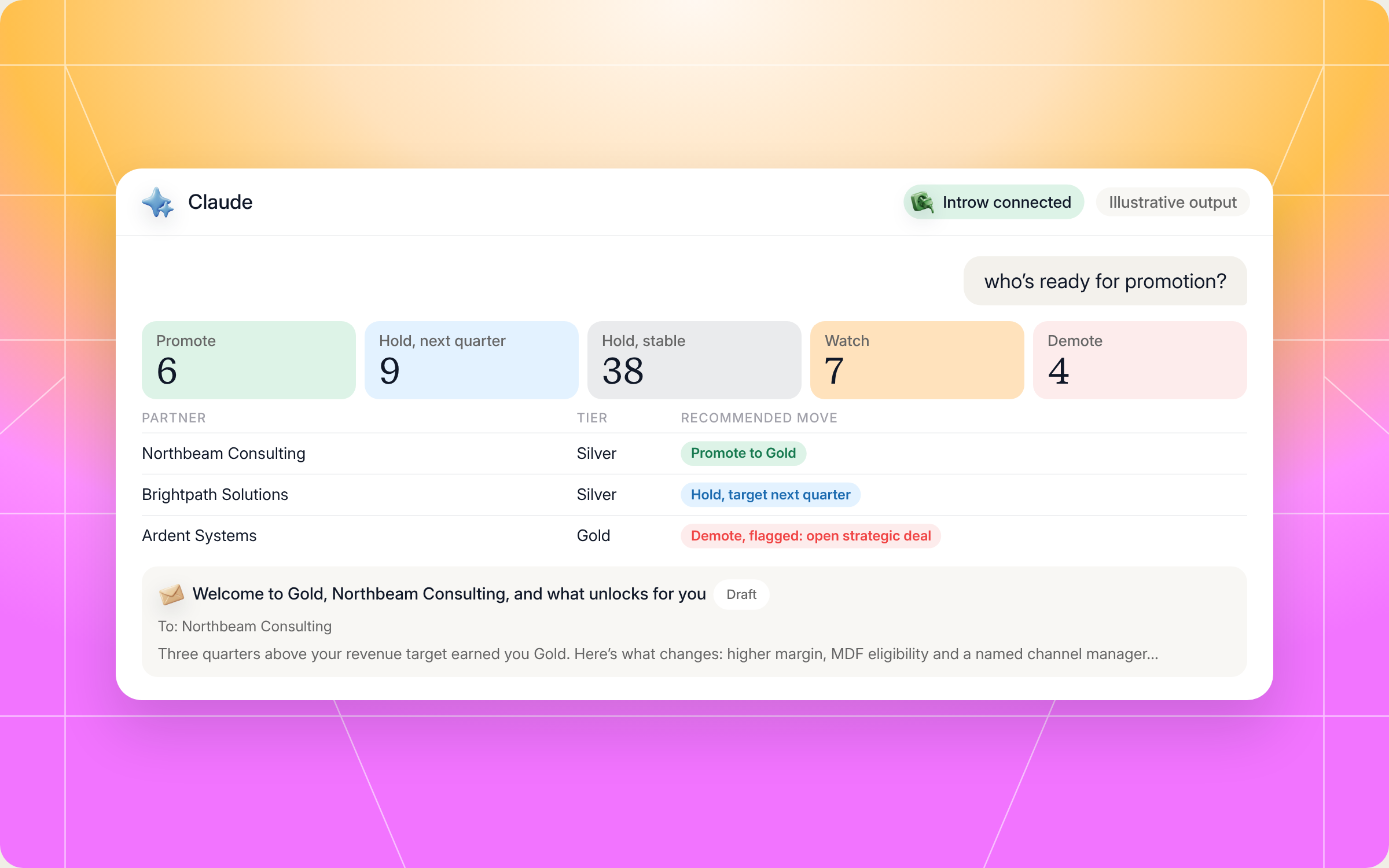
Here's an illustrative slice of the per partner table:
| Partner | Current tier | Revenue | Certifications | Engagement | Goals | Recommended move |
|---|---|---|---|---|---|---|
| Northbeam Consulting | Silver | Exceeds (3 quarters) | Meets | Meets | Exceeds | Promote to Gold |
| Larkfield IT | Gold | Below (1 quarter) | Meets | Approaches | Approaches | Watch, send heads up |
| Brightpath Solutions | Silver | Meets | Below | Meets | Meets | Hold, target next quarter |
| Ardent Systems | Gold | Below (3 quarters) | Meets | Below | Below | Demote to Silver, 90 day notice, flagged: open strategic deal |
And here's how that run looks in Claude, from the prompt to the bucket summary and a drafted promotion email:
Staying in control: what Claude can and can't do
Tier moves change a partner's margin, rewards and access, so control matters. A few things are built in:
- Nothing executes without sign off. The skill surfaces recommendations and drafts. Your channel chief approves before any tier changes or any message goes out.
- It stays inside your access. Claude connects to Introw over OAuth as you, so it can only see and do what you can.
- It won't promote on one big deal. The bar is at least two quarters of sustained performance.
- It won't surprise anyone. Every demotion carries your notice period and a clear path back, and every move gets a message. No silent moves.
- It protects strategic deals. A partner with a major deal in flight gets flagged for a human decision instead of being demoted mid cycle.
- It leaves an audit trail. Every move gets a comment with the criteria and rationale, and every human override is logged with its reason. When a partner disputes a decision, you have the evidence.
Prefer to do this in the Introw app?
Once your review is approved, you can move a whole cohort at once with bulk edit in Introw, and when tier CRM sync is on, the new tier flows straight to HubSpot or Salesforce.
Setting up from scratch? The build a tier program guide covers tiers with requirements, benefits and goal items that show partners their own progress live. See the partner tiering product page and our tiered partner program glossary entry, then tie each tier to partner incentives and commission and SPIFF management.
Pair it with other Claude skills
A tier review tells you who's moving and who's stuck. These skills from the library help with what comes next:
- Activate the Network with Personalized Campaigns: for watch and demotion candidates whose engagement has dropped but is recoverable.
- Micro Courses from Closed Lost Patterns: for promotion candidates who look strong on revenue but lag on certifications or skills.
- QBR Preparation: walks into each partner's next QBR with pipeline, goals and the tier conversation already prepped.
- Ecosystem Anomaly Detector: spots sudden activity drops between reviews, so a demotion never comes as a surprise to you either.
You'll find all of them in Introw's skill library, and our roundup of Claude skills for partner teams explains how they fit together. For the wider view on measuring partners between reviews, read our guide to channel partner performance management.
Run fair tier reviews from Claude with Introw
Introw is a CRM first partner relationship management platform, which means it builds on top of your existing HubSpot or Salesforce setup rather than replacing it. It's also headless by design: the partner portal is one surface, but you can run the same program in plain language from Claude, ChatGPT, Slack or Teams through Introw's MCP server, with every action written back to your CRM.
That's what makes a tier review skill work. Tier rules, revenue, certifications, engagement, goals and commissions live in one place, so every recommendation rests on live data, not last quarter's spreadsheet. With partner performance tracking in the same platform, you can analyze trends between reviews too. Partner led growth needs partners who trust the system, and a fair tier review earns that trust.
Connect Claude to your partner program and run your next tier review in an afternoon. Connect Claude or book a demo.
Still curious? Here are some quick answers to help clear things up
A tier promotion moves a partner up to the next level of your partner program, for example from Silver to Gold, because they've met that tier's criteria. It usually unlocks more benefits like higher margin, MDF, deal protection and priority support. The best programs require sustained performance, often two quarters or more, before a promotion.
Quarterly is the sweet spot for most programs. An annual review is too slow to reward partners who grow fast, win new customers or slip. With the Tier Promotion Batch Review skill, a quarterly review takes minutes of analysis instead of days.
No. Claude Code users can drop the SKILL.md into their skills folder. Everyone else can connect Claude to Introw through the connector directory and run the same review in plain language.
No. It recommends moves and drafts messages, but nothing changes in your CRM and nothing reaches a partner until your channel lead signs off. Even then, comms are scheduled only when you approve them.
Yes. The full file is in this article and in Introw's skill library. You can copy it as is or adapt it to your own tier structure, but it reads live partner data through Introw's MCP server, so you'll need Introw connected to run it.





See AI-Native PRM in Action
Book a demo with one of our partner program experts, or explore Introw on your own time.

