

Most partner influenced pipeline happens by accident. A partner shows up on a deal because someone remembered them, not because your data said they'd change the outcome. Two free Claude skills fix that. Pipeline Partner Influence Scout scans your open CRM pipeline, scores every deal for partner impact, matches the right partner with a one sentence "why", and runs a conflict check before anything gets registered. Its partner side twin, Pipeline Influence Companion, lets your resellers and agencies find the vendor deals where they already have influence and ask to be placed on them. You approve every registration, comment and task before it's written. Both full SKILL.md files are below, free to copy, with install steps, prompts to try and an example of what you'll get back.
Here's a number worth sitting with. Introw's deal registration playbook cites Computer Market Research data putting the partner led revenue lift at around 35% on average, largely because more deals get registered and protected. That lift only shows up on deals partners actually touch.
Now look at your own pipeline. Your account executive in the healthcare team is three weeks into a deal with a hospital group that's gone quiet. Meanwhile, one of your implementation partners has run that hospital's IT stack for three years. Nobody on the deal knows. The partner doesn't know the deal exists. The partner manager finds out after the deal is closed lost, in a Slack thread.
How many of your open deals look like that right now?
This guide covers what partner influenced pipeline really means and how it differs from partner sourced pipeline, which deals benefit most from a partner, the two Claude skills that find those deals from both sides of the partnership, the full SKILL.md files, how to install and run them, and how you stay in control of what they write.
Partner influenced pipeline vs partner sourced pipeline
Before you can grow partner influenced pipeline, you need a shared definition of it. Most partnerships teams track two numbers, and the distinction matters more than it looks.
- Partner sourced pipeline: the partner originated the opportunity. They found the customer, made the introduction or registered the deal before your sales team knew about it. Closed won revenue from these deals is partner sourced revenue.
- Partner influenced pipeline: your team (or marketing) sourced the opportunity, but a partner helped move the deal forward. Think a warm intro to a decision maker, a joint pitch, an implementation plan that derisked the buy, or answering objections about integrations. Closed won revenue from these deals is partner influenced revenue.
Here's how the two compare:
| Question | Partner sourced | Partner influenced |
|---|---|---|
| Who found the deal? | The partner, via a referral, lead share or registration | Your direct sales team or marketing |
| What did the partner do? | Created the opportunity | Helped it close: access, credibility, services, technical fit |
| Typical proof | A registration or referral submitted before the opportunity existed | A logged partner activity on an open opportunity: intro, meeting, comment, joint call |
| What it tells leadership | Partners create net new demand | Partners make direct deals close faster and bigger |
| Common trap | Over crediting, two partners both make a sourcing claim | Under crediting, the influence is real but never recorded |
Both numbers belong in executive reporting. Sourced revenue proves partners generate demand on their own. Influenced revenue proves something just as valuable: that your strongest partnerships make your direct sales process work better. When budget season comes around, that's the data that helps a partnerships team justify continued investment in the program.
The trouble is that partner influenced revenue is the number most programs track worst. Influence happens in hallway conversations and calls nobody logs. If you want the full picture of how teams handle this, Introw's guide to partner attribution and the glossary entries on partner influenced revenue and partner revenue attribution go deeper.
Which attribution models give influence credit
How you count influence depends on the attribution models you use. A quick summary:
- First touch: all credit to whoever started the deal. Good for understanding lead generation and discovery, but it ignores influence entirely.
- Last touch: all credit to the final touch before close. Useful for operational ownership, unfair to partners who did the early work.
- Linear: equal credit to every touch. Simple, but it treats a logo on a slide the same as a partner who rescued the deal.
- Time decay: more weight to touches closer to the close. Rewards partners who help late in the sales cycle.
- Position based models: most credit to the first and last touches, the rest spread across the middle. A fair compromise for complex deals with partner activity at different stages.
No model works without clean data. If partner activity isn't recorded on the opportunity, every model gives the partner zero. That's why the skills below write a context rich comment on the deal every time they place a partner. They create the CRM data your attribution depends on, instead of asking someone to reconstruct it at quarter end.
Which deals actually benefit from a partner
Here's the part most programs skip. Partner influenced pipeline shouldn't just be measured, it should be created on purpose. That means looking at your open pipeline and asking which deals a partner would change, and which ones they'd only slow down.
The deals where partner influence pays off usually show one or more of these signals:
- Existing customer relationship: a partner already serves this customer, in another product line or through services. This is the strongest signal by a wide margin. A warm intro beats a cold direct pursuit almost every time.
- Vertical specialization: a healthcare deal where a healthcare specialist partner speaks the buyer's language and knows the compliance questions before they're asked.
- Geographic proximity: a customer in a region where a local partner has presence, relationships and time zone overlap.
- Implementation complexity: a deal where the buyer's real worry is "who's going to make this work?" and a systems integrator can answer it.
- Stalled momentum: a deal that's been in the same stage too long without a partner, where a fresh voice can restart the conversation.
- Tech stack match: the deal depends on integrations a specific partner already builds.
- Packaging: partner led pricing or bundled services would unlock a budget that direct pricing can't.
Just as important is knowing when not to add a partner. A healthy direct deal that's moving fast doesn't need an overlay. Neither does an account where another partner already has a registration, that's a channel conflict problem, not an opportunity. Clear rules of engagement settle those calls before anyone gets upset.
Where account mapping fits
The existing customer signal is the one you usually can't see from your own CRM. Account mapping fills that gap. When you map your accounts against a partner's, you see overlaps: which of your prospects are already their customers, their open opportunities, or accounts where they have a champion. Introw's guide to partner account mapping explains the basics, and Introw connects to Crossbeam so that overlap data can feed straight into deal decisions.
This is what people mean by ecosystem led growth: using what your partners already know about your customers to sell better. The vendor skill below treats a mapped customer overlap as its top scoring factor, and calls it a "direct deal rescue".
The skills to use: Pipeline Partner Influence Scout and Pipeline Influence Companion
These are two halves of the same play, both from Introw's free Claude skill library. Both run through Introw's MCP server and read live data from your CRM, so every match is based on the pipeline you have today, not last month's export.
Pipeline Partner Influence Scout is the vendor side skill. It's for your team.
| Detail | Pipeline Partner Influence Scout |
|---|---|
| Built for | Partner program managers, channel RevOps, partner development managers and account executives |
| Use it when | You want to know which open deals or direct accounts would close better with a partner, and who that partner should be |
| What it reads | Open pipeline from your CRM (or an Excel or CSV export), partner profiles, prior wins, engagement, tiers, goals, existing registrations, and Crossbeam overlaps if connected |
| What it writes | Partner registrations or co sell flags, a context rich comment on each deal, and tasks for the AE and the partner, after you approve |
| What you get | A pipeline scan summary, a high impact match table, confirmed actions, cases surfaced for review and tracking checkpoints |
| Skill ID | vendor-pipeline-partner-influence-scout |
Trigger phrases include "which deals need a partner", "find partner influence opportunities", "who should we bring into deal X", "match partners to pipeline" and "use Crossbeam overlap to rescue deals".
Pipeline Influence Companion is the partner side skill. It's for your resellers, agencies and SIs.
| Detail | Pipeline Influence Companion |
|---|---|
| Built for | Partner sellers and partnerships leads at your reseller, agency and SI partners |
| Use it when | A partner wants to find the vendor deals and shared accounts where they already have influence |
| What it reads | Only what the partner's portal shows them: shared accounts and deals, their own registrations, engagement, goals and tier |
| What it writes | A registration, a "place me on this deal" request, a context comment or a follow up task, after the partner confirms |
| What you get | A short list of the top candidates, each with a "why you fit" and a suggested action |
| Skill ID | partner-pipeline-influence-companion |
Partners trigger it with prompts like "where can I add value", "which vendor deals fit me", "find deals I should be on" and "register the deals I can influence".
Why both? Because influence works best when it's spotted from both sides. Your team sees the pipeline. Your partners see their own customer relationships. Running the two skills together means you stop relying on a partner manager to notice every overlap by memory.
How the skills work, step by step
Here's what each skill does, in plain language. You don't need to run the steps yourself, but knowing them helps you trust the output.

Step 1: Pull the pipeline (vendor)
The scout starts with your open deals from the CRM, filtered to the stages where a partner can still make a difference, usually after discovery. If your pipeline lives in a spreadsheet, you can hand it an Excel or CSV file instead, and it maps the columns to account, value, stage, close date, product, owner, region and vertical. Before it starts, it confirms how your program defines partner influence (services led, vertical led, geography led or existing customer led) and whether you want it to just surface matches or act on clean ones.
Step 2: Score every deal for partner impact (vendor)
Each deal gets scored on the signals above: vertical, region, implementation complexity, existing customer relationship, time stuck in stage, tech stack and packaging. The result is a priority score that answers one question: how much would a partner improve this deal's close probability, value or speed?
Step 3: Match each high impact deal to one partner (vendor)
For the top deals, the skill picks a specific partner, checking signals in a strict order:
- Customer overlap first: if Crossbeam is connected, a partner with an active customer relationship at the prospect beats everything else. Active customers rank above open opportunities, champions and lapsed prospects, and recent overlaps rank above old ones.
- Prior similar wins next: partners who closed deals with similar customers, size and products.
- Then fit and readiness: region, vertical, certifications, engagement this quarter (so a deal doesn't land on a dormant partner), tier eligibility and goals.
Every match comes with a one sentence reason, like "already serves this customer in a different product line, cross sell is the natural play." No reason, no match.
Step 4: Run the conflict check (vendor)
Before anything gets flagged, the skill checks for existing registrations on the account, named accounts your direct team has claimed, and other partners with open registrations. If there's a conflict, it surfaces it for a human to review and routes it into your channel conflict process. It never resolves conflicts on its own.
Step 5: Register, comment and assign (vendor)
For clean matches, and once you approve, the skill registers the partner on the deal (or flags it for co selling), posts a comment on the CRM record explaining why this partner, the evidence and the suggested co sell motion, and creates a task for the AE to make the intro and one for the partner to confirm. Then it tracks the deal at 14, 30 and 60 days to see whether the placement actually moved it, and logs the outcome for next time.
Step 6: Find where you fit (partner)
On the partner side, the companion first asks which vendor portal to use if the partner works with several. Then it reads only what that portal shows them: shared accounts and deals, their registrations, engagement, goals and tier. For each account, it scores the partner's natural fit on the same kinds of signals: existing customer, vertical, region, prior similar wins, tech stack and services they could attach.
Step 7: Show what's in it for the partner (partner)
For the top three to five candidates, it explains why the partner fits, what registering would unlock (like deal protection margin of 10 to 15 points, MDF eligibility, pre sales support or tier progress), and what the partner would need to do: an intro call, a customer reference or a joint pitch.
Step 8: Act on the partner's choice (partner)
The partner picks the action. The companion can hand off to the deal registration flow, submit a "place me on this deal" request with the influence rationale, add what the partner knows about the customer as a comment, or create a follow up task. It reads every field back for confirmation before it submits anything, and frames the result as "submitted, in review", never as approved.
Get the skills: the full SKILL.md files
Here are both complete skill files. Copy them as is, or adapt the scoring signals and guardrails to match how your program defines partner influence.
Vendor skill: Pipeline Partner Influence Scout
---
name: vendor-pipeline-partner-influence-scout
description: Use when a Channel Chief, RevOps, PDM, or AE wants to scan the vendor's CRM (or Excel pipeline) to identify open deals or direct-sales accounts that would benefit most from partner influence, including direct-deal rescue scenarios where Crossbeam shows a partner already has the customer relationship, then handle the registration / co-sell flagging and post a context-rich comment on the deal. Trigger phrases include "which deals need a partner", "find partner-influence opportunities", "who should we bring into deal X", "scout partner co-sell", "match partners to pipeline", "Excel pipeline + partner match", "Crossbeam direct-deal rescue", "partner has the customer at this account", "use Crossbeam overlap to rescue deals", "find partners that already serve customers in our pipeline".
---

# Pipeline Partner-Influence Scout (Vendor)

**Audience**: Vendor, **claude.ai Introw** MCP + **optional claude.ai Crossbeam** MCP (+ optional Read for Excel exports if pipeline lives in spreadsheets, optional Salesforce/HubSpot MCPs).
**Use case**: 08, Deal Registration (proactive vendor-driven side; complementary to `partner-register-deal` and `vendor-email-deal-registration-watcher`).

## When to use this skill

Use when a Channel Chief, RevOps, PDM, or AE wants to scan the vendor's CRM (or Excel pipeline) to identify open deals or direct-sales accounts that would benefit most from partner influence, including direct-deal rescue scenarios where Crossbeam shows a partner already has the customer relationship, then handle the registration / co-sell flagging and post a context-rich comment on the deal.

**Sample prompts that fire this skill:**
- "which deals need a partner"
- "find partner-influence opportunities"
- "who should we bring into deal X"
- "scout partner co-sell"
- "match partners to pipeline"
- "Excel pipeline + partner match"
- "Crossbeam direct-deal rescue"
- "partner has the customer at this account"
- "use Crossbeam overlap to rescue deals"
- "find partners that already serve customers in our pipeline"

## Why this matters
Most channel programs are reactive on registration, they wait for partners to submit. But ~35% partner-led revenue uplift (Computer Market Research) compounds further when the vendor proactively *places* partners on deals where partner influence improves the outcome: complex implementations, vertical-specific motions, geographic proximity, services attach, existing-customer relationships. This skill scans the pipeline, identifies high-leverage partner-influence opportunities, and handles the registration mechanics, including a context-rich comment that explains *why this partner on this deal*.

**The direct-deal rescue scenario** is the highest-ROI version of this workflow and the primary reason channel teams care about Ecosystem-Led Growth: when a deal is sitting in *direct sales* and Crossbeam shows that one of the vendor's partners already has an active customer relationship at the prospect, registering with that partner converts a cold direct pursuit into a warm-introduction-led motion, typically compressing sales cycle and lifting close rate. Without Crossbeam, this signal is invisible; with it, it becomes the dominant scoring factor for partner placement on direct-sales pipeline.

The complementary partner-side skill is `partner-pipeline-influence-companion`, which lets a partner see the same view from their side. The proactive (target-list-first) variant, given an external account list rather than open pipeline, is `vendor-crossbeam-cosell-finder`.

## Inputs to gather first
- **Pipeline source**: Introw / connected CRM (`search_crm_objects`), or an Excel/CSV the user provides (then Read it).
- **Filter scope**: open deals only? specific stage range? specific products? specific regions?
- **Partner-influence definition for this vendor**: services-led? vertical-led? geography-led? existing-customer-led? Confirm if not on file.
- **Action mode**: surface only, or auto-register / flag co-sell where match is clean?

## Process

### Step 1: Pull the pipeline
- Primary: `Introw:search_crm_objects` for open deals (filter to stages where partner influence has leverage, usually mid-funnel onward, post-discovery).
- If user provides Excel/CSV: Read the file and treat each row as a deal record; map columns to the standard schema (account, value, stage, close-date, product, owner, region, vertical).

### Step 2: Score each deal for partner-influence leverage
Score per deal across multiple dimensions:
- **Vertical specialization**: is this a healthcare deal where a healthcare-specialist partner would close better?
- **Geographic proximity**: is the customer in a region where a local partner has presence?
- **Services / implementation complexity**: is this a deal where SI delivery would derisk close?
- **Existing-customer relationship**: does any partner already serve this customer in another product line?
- **Stalled / needs-momentum**: has the deal been in-stage > X days without a partner?
- **Tech-stack match**: does the deal involve integrations a specific partner already builds for?
- **Margin / packaging**: would partner-led pricing/packaging unlock the deal?

Output a priority score per deal: how much would partner influence improve the close probability, expected value, or close velocity?

### Step 3: Match each high-leverage deal to a specific partner
For each prioritized deal, evaluate signals in this priority order:

1. **Existing customer relationship at the prospect** (Crossbeam, when MCP connected): **the strongest possible signal.** A partner with an active customer relationship at the prospect's account beats every other signal: warmer than vertical fit, warmer than prior similar wins, dramatically warmer than territory match. Use `Crossbeam:*` to find overlaps; weight overlap *type* (active customer > active opportunity > champion > lapsed prospect) and *recency* (last 90 days > older). Without Crossbeam, this signal isn't directly observable, fall back to the other signals below.
2. `Introw:search_crm_objects`: partners with **prior wins on similar customers** (vertical, deal size, products): strongest CRM-only signal.
3. `Introw:search_partners`: filter by region, vertical, partner type, certifications relevant to the deal.
4. `Introw:search_partner_engagement`: partners actively engaged this quarter (avoid putting deals on dormant partners).
5. `Introw:get_tier_information`: tier requirements affecting eligibility.
6. `Introw:get_goals`: partners pacing on goals where this deal would help.

For each candidate match, articulate the **why** in one sentence:
- "Partner X, Crossbeam shows active customer relationship at Globex (3-year, expansion-eligible); located in same region; certified on the relevant product. Direct-deal rescue candidate."
- "Partner Y, has 3 recent closed-won deals in healthcare AI at similar deal sizes; located in same region as customer; certified on the relevant product."
- "Partner Z, already serves this customer in a different product line; cross-sell motion is the natural play."

### Step 4: Conflict check
Before flagging or registering:
- Cross-check existing registrations on the account (`Introw:search_form_submissions`).
- Cross-check direct sales claim (account in named-account list?).
- Cross-check other partners with open registrations.
- If conflict, surface, don't auto-resolve. Hand off to `vendor-detect-channel-conflict`.

### Step 5: Handle the registration / co-sell flag
For clean matches with no conflict:
- Auto-register the partner (or surface for human approval based on confirmed mode):
  - `Introw:share_lead_or_register_deal` with the partner's ID and the deal context.
- Post a context-rich comment on the deal:
  - `Introw:add_comment` on the CRM object with the **why this partner**, the prior-win evidence, the suggested co-sell motion, and the recommended next step (intro call, joint pitch, technical deep-dive).
- Notify both the AE and the partner:
  - `Introw:add_task` for the AE to make the intro.
  - `Introw:add_task` or comment for the partner to confirm engagement.

For conflicted or judgment-call matches:
- Surface to a human reviewer with full context.

### Step 6: Track the placement
- `Introw:search_partner_engagement` and `search_crm_objects` over the next 14/30/60 days to measure whether the placement actually moved the deal.
- Capture outcome via `add_comment` so the next pipeline-scout cycle has training data.

## Output format
- **Pipeline scan summary**: deals scored, distribution by leverage tier.
- **High-leverage match table**: deal, value, stage, recommended partner, why, conflict status, action taken.
- **Confirmed actions**: registrations created, comments posted, tasks assigned.
- **Surfaced for review**: conflict, ambiguous match, or judgment-call cases with full context.
- **Tracking checkpoints**: when to measure placement effectiveness.

## Guardrails & PRM best practice
- **Why beats who.** Every match needs a one-sentence "why this partner" that traces to evidence (prior wins, vertical match, customer relationship). If you can't articulate the why, the match is wrong.
- **Channel conflict before action.** Always run the conflict check before flagging, proactive partner placement that creates conflict is worse than no placement at all.
- **Don't displace working AEs.** When a deal is healthy and progressing, a partner overlay can disrupt, match leverage to deal-state, don't impose partners on deals that don't need them.
- **Tier-aware placement.** Strategic deals to top-tier partners; transactional deals to volume-oriented partners. Mismatching destroys margin and partner energy.
- **No auto-action without confirmation on first run.** First-time use of this skill: surface, don't act. Once the user has validated the matching logic against their judgment, auto-action mode can be enabled.
- **Capture the rationale on the deal record.** The AE who picks up the deal next week needs to see why a partner was placed, don't make them archaeology the comment thread.
- **Goal-relevance.** When two partners are equally well-matched, prefer the one whose `get_goals` shows they're pacing toward a target this deal would help, placement is also an activation lever.
- **Don't poach.** If another partner already has a registration on the account, don't override, that's the conflict path, not the placement path.
- **Excel mode is provisional.** Excel pipelines lack the live attribution Introw has; Excel-based matches surface for human review by default rather than auto-action.
- **Crossbeam data has lag.** Overlap data refreshes typically run nightly or weekly; flag Crossbeam-driven matches where overlap data is > 30 days old and confirm currency before recommending placement.
- **Crossbeam respects data-sharing scope.** Only surface overlaps within authorized population groups / partner-data-sharing agreements. Never surface a partner customer's name outside the vendor-internal scope.
- **Cross-skill handoff.**
  - **Proactive variant** (given an external target account list rather than open pipeline) → `vendor-crossbeam-cosell-finder` (UC02). This skill is the *reactive* version (scan pipeline → match partner); cosell-finder is the *proactive* version (given a list → find partners).
  - Channel conflict detected → `vendor-detect-channel-conflict`.
  - Clean placements that need coaching → `vendor-deal-coach-from-similar-wins`.
  - Dormant partner who'd be a great match but is silent → activation lever via `vendor-activate-network-with-personalized-campaigns` before placing the deal.
Partner skill: Pipeline Influence Companion
---
name: partner-pipeline-influence-companion
description: Use when a partner user wants to scan accessible vendor pipeline / shared accounts to identify deals where they have unique influence (existing customer relationship, vertical fit, geographic proximity, prior similar wins): then surface those deals as candidates to register, share context on, or request to be placed on. Trigger phrases include "where can I add value", "which vendor deals fit me", "find deals I should be on", "my partner-influence opportunities", "register the deals I can influence".
---

# Pipeline Partner-Influence Companion (Partner)

**Audience**: Partner user, **Introw Partner Connect** MCP.
**Use case**: 08, Deal Registration (partner-side companion to `vendor-pipeline-partner-influence-scout`).

## When to use this skill

Use when a partner user wants to scan accessible vendor pipeline / shared accounts to identify deals where they have unique influence (existing customer relationship, vertical fit, geographic proximity, prior similar wins): then surface those deals as candidates to register, share context on, or request to be placed on.

**Sample prompts that fire this skill:**
- "where can I add value"
- "which vendor deals fit me"
- "find deals I should be on"
- "my partner-influence opportunities"
- "register the deals I can influence"

## Why this matters
Partners typically only register deals they sourced themselves, but a meaningful chunk of vendor-direct or co-sell-eligible pipeline is on accounts where the partner already has earned influence: existing customer relationships, vertical specialization, geographic proximity, prior similar wins. Surfacing those opportunities to the partner self-service multiplies the partner-led-revenue lift (~35%, Computer Market Research) without requiring a vendor-side PDM to spot every opportunity manually.

## Process

### Step 1: Resolve the portal
If the user has access to multiple partner portals, call `Introw_Partner_Connect:partners` first and confirm which `roomId` to use.

### Step 2: Pull what the partner can see
Strictly scoped to the partner's accessible data:
- `Introw_Partner_Connect:search_crm_objects`: vendor accounts/deals visible to this partner (per their portal permissions).
- `Introw_Partner_Connect:search_partner_engagement`: their own engagement / asset views.
- `Introw_Partner_Connect:search_form_submissions`: their existing registrations.
- `Introw_Partner_Connect:get_goals`: partner's own goals (pacing context).
- `Introw_Partner_Connect:get_tier_information`: tier eligibility for any product/segment.

### Step 3: Identify partner-influence candidates
For each accessible vendor account/deal, score the partner's natural fit:
- **Existing customer**: partner already serves this customer in another capacity.
- **Vertical specialization**: partner's vertical focus matches the customer's industry.
- **Geographic proximity**: partner's region matches the customer's region.
- **Prior similar wins**: partner has closed similar deals (vertical × deal size × product).
- **Tech-stack match**: partner builds integrations the deal would benefit from.
- **Service attach**: deal would benefit from implementation services the partner offers.

Score each candidate. Surface the top N with the strongest case.

### Step 4: Frame the value to the partner
For each candidate, articulate:
- **Why you fit** (the strongest one or two signals).
- **What registering / placing yourself on this would unlock** (deal-protection 10 to 15 pts margin, MDF eligibility, pre-sales support, tier progression).
- **What the partner would need to do** (intro call, share customer reference, attend joint pitch).

### Step 5: Take the action the partner chooses
- **Register the deal**: hand off to the `partner-register-deal` flow, pre-filled with the captured fields.
- **Submit a "place me on this" request**: use `Introw_Partner_Connect:share_lead_or_register_deal` with the appropriate form type and a comment explaining the influence rationale.
- **Add context to the deal**: `Introw_Partner_Connect:add_comment` to share what the partner knows about the customer (existing relationships, prior conversations, vertical-specific risks).
- **Add a follow-up task**: `Introw_Partner_Connect:add_task` for the partner to track outreach.

## Output format
- **Top-N candidate list** with: account, deal-context-as-visible, why-you-fit, suggested action.
- **Action confirmations** for any submission / comment / task created.
- **Suggested follow-ups**: e.g., when to check back on response.

## Guardrails & PRM best practice
- **Strictly scoped to partner's permissions.** This skill never surfaces vendor-direct or other-partner data the portal doesn't expose to this partner. If the data isn't visible in the partner's portal scope, it doesn't appear here.
- **Influence claim must be evidenced.** Every "why you fit" needs a concrete signal (existing relationship, prior win, vertical match): speculative claims undermine the partner's standing with the vendor.
- **Don't over-register.** If a partner registers everything they "could" influence, the vendor's review queue clogs and trust degrades. Prioritize aggressively, top 3 to 5 candidates, not 50.
- **Conflict awareness.** If the account is already covered by another partner per visible portal data, don't surface it as a registration candidate, surface as a co-sell or referral opportunity instead, or skip.
- **Echo before submit.** For any registration/share, echo the captured fields back for confirmation before calling the write tool.
- **Capture context in the comment.** When the partner has unique knowledge about the customer (decision-maker dynamics, prior product use, regional considerations), capture via `add_comment`: that context is the partner's strongest contribution.
- **Goal-aware suggestions.** Prefer candidates that move the partner toward their `get_goals` targets, pacing matters.
- **Don't promise vendor outcomes.** This skill submits requests; vendor review and conflict logic determine acceptance. Frame next steps as "submitted, in review per SLA," not approval.
- **Cross-skill handoff.** Confirmed registrations → `partner-register-deal` flow. Coaching needs after placement → `partner-coach-my-deal`.
How to install and run the skills
You've got two ways to use them, depending on how your team works.
Option 1: Claude Code
Create a folder called vendor-pipeline-partner-influence-scout inside .claude/skills/ in your repo, and save the vendor file above as SKILL.md inside it. For the partner skill, the folder is .claude/skills/partner-pipeline-influence-companion/SKILL.md. Claude Code picks them up and runs the right one whenever your prompt matches the trigger phrases in its description.
Option 2: Claude (or any MCP client) with the Introw connector
Most channel managers and partner sellers won't touch a repo, and they don't need to. Connect Claude to Introw once, and you can run the same play in plain language from Claude, or from ChatGPT, Slack, Teams or your CRM. Here's how connecting looks:
The Connect Claude guide walks through the vendor setup, and the Claude integration page covers what else you can do once you're connected. Partners connect to their vendor's Introw portal from their own account, the steps are in the partner Connect Claude guide. If a partner works with several vendors on Introw, the companion asks which portal to use.
Prompts to try
Once the skills are installed or Claude is connected, try any of these:
- "Which deals need a partner?" Runs the scout across your open pipeline and returns the high impact match table.
- "Use Crossbeam overlap to rescue our stalled direct deals in healthcare." Focuses on direct deals where a partner already has the customer.
- "Who should we bring into the Globex deal? Don't register anything yet." Gets you a match and the reasoning to review first.
- "Match partners to this pipeline export." Scores an Excel or CSV file, with every match surfaced for review.
- "Where can I add value?" For partners: lists the vendor deals and shared accounts where they already have influence.
What you'll get back
A typical scout run returns:
- Pipeline scan summary: how many deals were scored, and how they split by impact tier.
- High impact match table: deal, value, stage, recommended partner, the why, conflict status and action taken.
- Confirmed actions: registrations created, comments posted and tasks assigned.
- Surfaced for review: conflicts, ambiguous matches and judgment calls, with full context.
- Tracking checkpoints: when to check whether each placement moved the deal.
A companion run gives the partner a short candidate list (account, deal context they can see, why they fit, suggested action), confirmations for anything submitted, and when to check back.
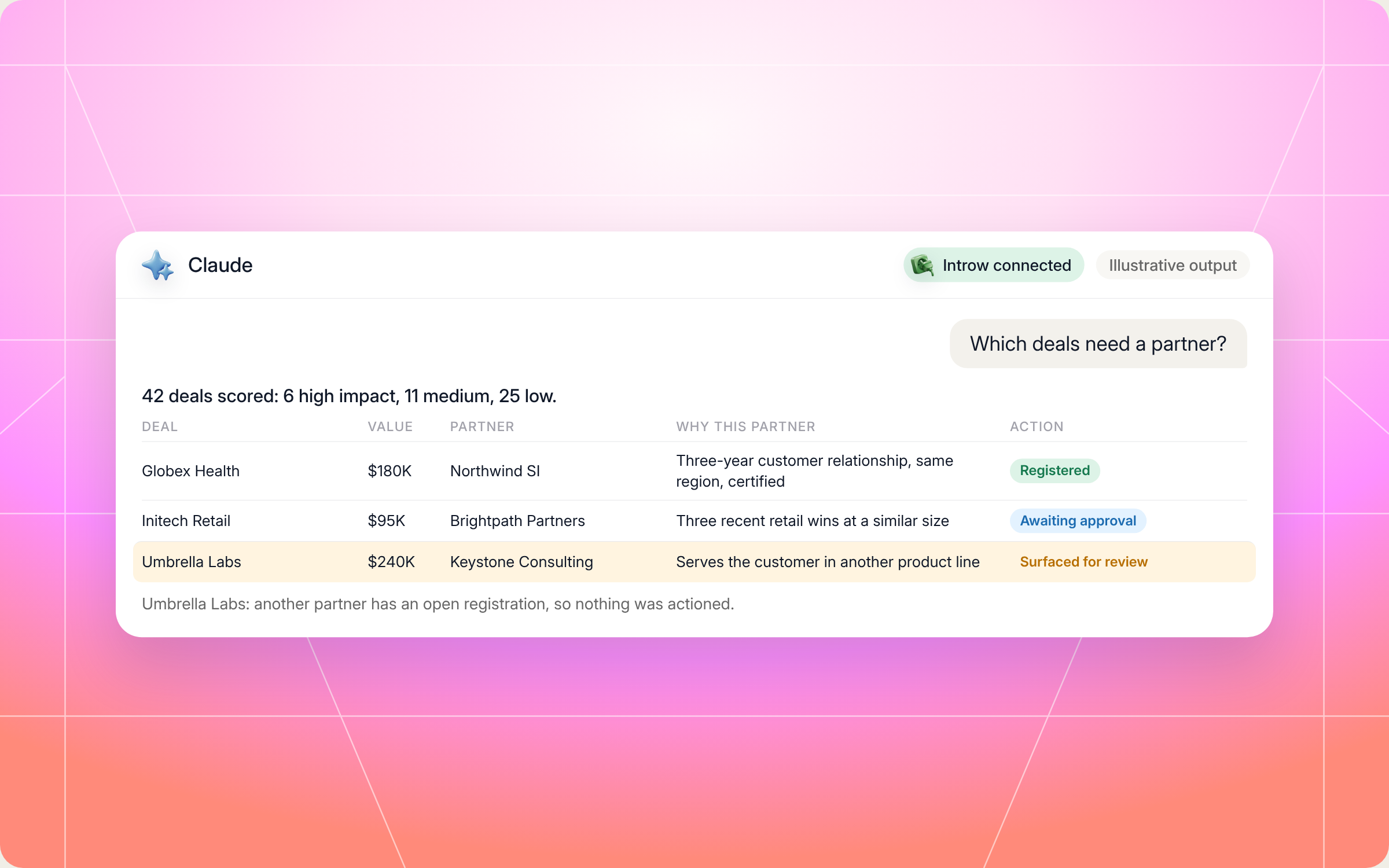
Here's an illustrative example of a high impact match table from a scout run:
| Deal | Value | Stage | Partner | Why this partner | Conflict | Action |
|---|---|---|---|---|---|---|
| Globex Health | $180K | Evaluation, 24 days | Northwind SI | Crossbeam shows a three year customer relationship at Globex, same region, certified on the product | Clear | Registered, AE intro task created |
| Initech Retail | $95K | Proposal | Brightpath Partners | Three recent closed won retail deals at a similar size, builds the POS integration this deal needs | Clear | Comment posted, awaiting your approval to register |
| Umbrella Labs | $240K | Discovery | Keystone Consulting | Serves the customer in another product line | Another partner has an open registration | Surfaced for review as a conflict |
And here's how that scan looks in Claude, from the prompt to the match table:
Staying in control: what Claude can and can't do
Putting partners on deals touches your AEs, your partners and your commission plans. So the skills come with firm limits:
- You approve the writes: registrations, comments and tasks wait for your confirmation. On the scout's first run, it only surfaces matches and takes no action. You switch on action mode once you trust its judgment.
- It works as you: Claude connects to Introw over OAuth with your own account, so it can only see and do what you can.
- Every match needs a reason: each placement traces to evidence, like a prior win, a vertical match or a customer relationship. If the skill can't explain why, it treats the match as wrong.
- Conflict check before action: it checks registrations and direct claims first, never overrides another partner's registration, and sends conflicts to a human.
- It won't crowd healthy deals: deals that are moving fine don't get a partner forced onto them.
- Spreadsheet matches stay provisional: an Excel pipeline lacks live attribution, so those matches always go to you for review.
- Overlap data is checked for age: Crossbeam matches based on data older than 30 days get flagged, and partner customer names never leave your internal scope.
- Partners only see their own scope: the companion never shows a partner vendor direct or other partner data their portal doesn't expose. It keeps them to their top three to five candidates, reads fields back before submitting, and never promises approval.
Prefer to do this in the Introw app?
You can. The skills write registrations and comments, but attribution is what makes them count. In Introw, you link every deal to the partner who sourced or influenced it, so partner sourced and partner influenced pipeline shows correctly in reporting, each partner sees the right deals in their shared pipeline, and commission plans pay on the deals a partner earned. Here's how to set it up:
The full steps are in the configure deal attribution guide. For the bigger picture on running joint deals, read Introw's guide to co selling, and see how partner performance reporting rolls it all up.
Pair it with other Claude skills
Finding the deal is step one. These skills pick up where the scout and the companion leave off:
- Partners register by email: Email Deal Registration Watcher, which turns deal registrations sent by email into clean records, so more partner influence gets captured.
- Clean placement that needs coaching: Deal Coach from Similar Wins, which coaches the partner's live deal using your past wins.
- Great match, quiet partner: Activate the Network with Personalized Campaigns, which reengages a dormant partner before you place a deal with them.
- You have a target list, not open pipeline: Crossbeam Co Sell Partner Finder, the proactive version that finds partners for an external account list.
You'll find all of them in Introw's skill library, and our roundup of Claude skills for partner teams explains how they fit together.
Grow partner influenced pipeline from Claude with Introw
Introw is a CRM first partner relationship management platform, which means it builds on top of your existing HubSpot or Salesforce setup rather than replacing it. It's also headless by design: the partner portal is one surface, but you can run the same program in plain language from Claude, ChatGPT, Slack or Teams through Introw's MCP server, with every action written back to your CRM.
That's what makes these skills work. Pipeline, partner profiles, prior wins, engagement, tiers and goals all live in one place, and deal and lead registration runs through the same system the scout writes to. So when a partner gets placed on a deal, the influence is recorded where your attribution and reporting can see it.
Find the deals where a partner would change the outcome, starting this week. Connect Claude or book a demo.
Still curious? Here are some quick answers to help clear things up
Partner influenced pipeline is open pipeline your own team sourced, where a partner helped move the deal forward with an intro, a joint pitch, implementation support or customer knowledge. It differs from partner sourced pipeline, where the partner originated the opportunity.
Look for open deals with an existing partner relationship at the customer, a vertical or regional fit, implementation complexity or stalled momentum. The Pipeline Partner Influence Scout skill scores every open deal on these signals and matches the best partner with a reason.
No. Claude Code users can drop the SKILL.md files into their skills folder. Everyone else, vendors and partners alike, can connect Claude to Introw and run the same play in plain language.
Not without you. The scout only surfaces matches on its first run, and registrations, comments and tasks wait for your approval after that. The partner companion reads every field back before it submits anything.
Yes. Both files are in this article and in Introw's skill library. You can copy them as is or adapt them, but they read live data through Introw's MCP server, so you'll need Introw connected to run them.





See AI-Native PRM in Action
Book a demo with one of our partner program experts, or explore Introw on your own time.

