
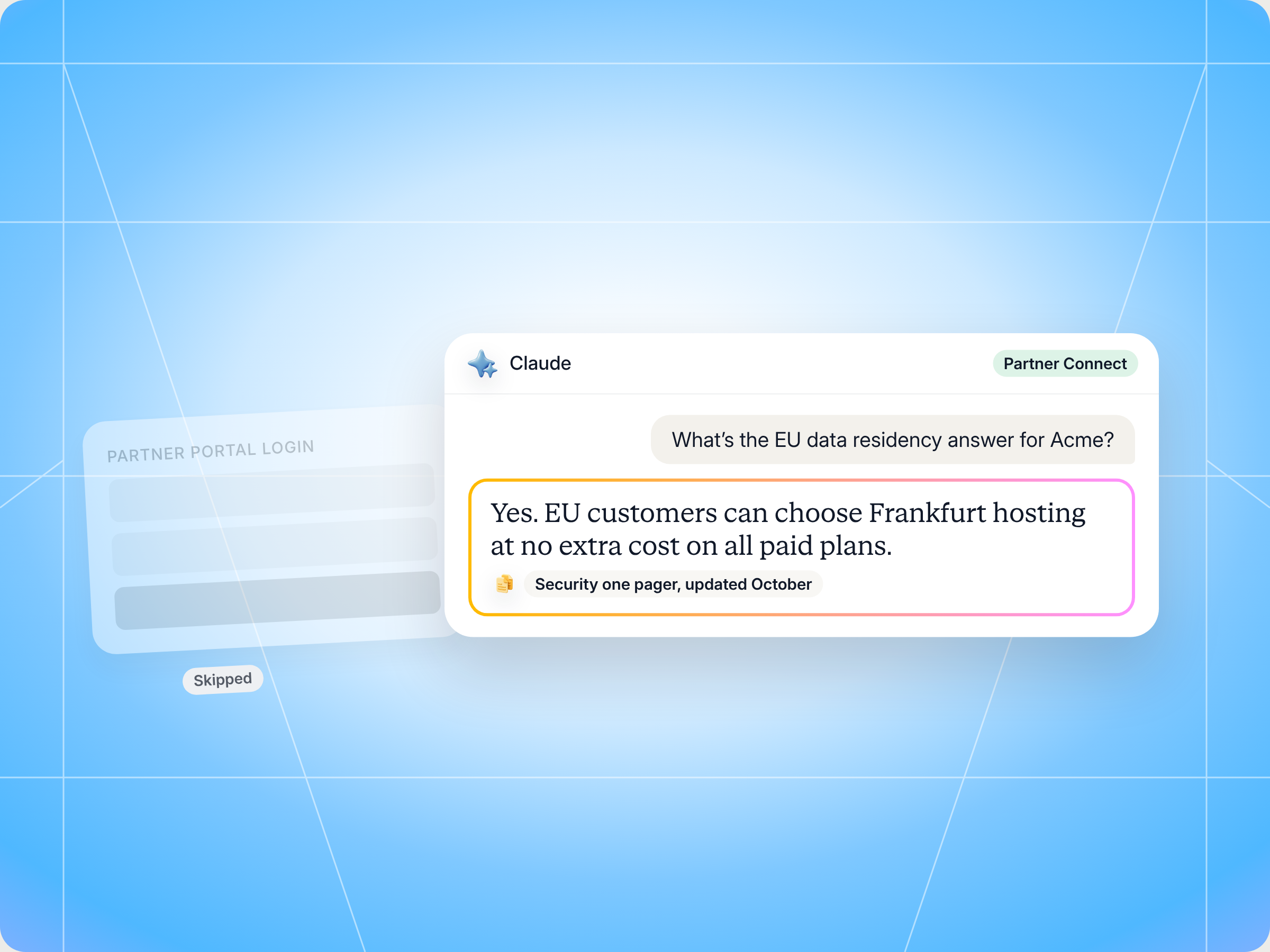
If you sell a vendor's product as a reseller or agency, the Claude skill to use is Partner Helpdesk. It turns Claude into a partner helpdesk for one vendor at a time: ask a product, pricing, configuration or compliance question in plain language and get a cited answer from the vendor's own knowledge base, look up your accounts and tasks, or request a sandbox or quote draft without opening the partner portal. Every write is echoed back for you to confirm, and anything that needs approval goes to your channel manager instead. The full SKILL.md is below, free to copy, with install steps, prompts to try and what you'll get back.
Here's a number every partner seller will recognize. Introw's enablement support playbook notes that traditional partner support often takes 36 hours from question to answer once escalations are involved. AI powered implementations bring first response down to 23 seconds, a 97% reduction, and deflect 40 to 60% of routine partner support tickets (Gartner and Pylon benchmarks). That gap matters, because partners who wait for answers lose deals, and vendors whose partners wait lose revenue. Below, you'll learn what a partner helpdesk is, how the Partner Helpdesk skill brings one into Claude, and how to set it up in minutes.
Now picture the moment it matters, whether you're an agency founder or a partner seller. You're on a call with a prospect. They ask whether the vendor stores data in the EU, what the list price is for the enterprise tier, and whether there's a battle card against the incumbent. You know the answers exist somewhere. In the portal, in a Slack thread, in a deck from last quarter. So you say "let me circle back," message your channel manager, and wait. By tomorrow, the deal is colder.
What if you could just ask Claude, and get the vendor's official answer with a link to the source, in the time it takes to sip your coffee?
This guide covers what a good partner helpdesk looks like, the Claude skill that gives you one inside your AI assistant, how it works step by step, the full SKILL.md you can copy, how to install and run it, and how it keeps you inside the guardrails your vendor set. If you're a vendor, it also shows you what this looks like from your partners' side, and how to offer it to them.
What a partner helpdesk is, and why partners need one
A partner helpdesk is the support desk a vendor runs for its channel partners: resellers, agencies, MSPs, referral partners and affiliates. It answers the questions partners hit while they sell, onboard and service customers. Think pricing, product configuration, deal registration status, compliance, training and where to find the latest assets.
It's different from a customer help desk in a few important ways:
- The person asking is selling, not stuck: a customer support ticket is usually about something broken. A partner support question is usually about a deal in motion, so response time translates straight into win rate.
- The answers are often gated: partners see different pricing, margins and enablement content depending on their tier and region. A good partner helpdesk only shows each partner what they're entitled to see.
- Some requests need a human decision: a pricing exception, an MDF release or a contract change can't be self served. They need to land in front of the right approver with the details already captured.
- Partners work with many vendors: a reseller might carry five or ten vendors at once. Every vendor portal has its own login, its own knowledge base and its own way of asking for help.
That last point is why most channel partner support still runs on Slack messages and email threads. Logging into a portal to find one answer is friction. Pinging your channel manager is easier, so everyone does it, and the channel manager becomes a human help desk.
Traditional partner support vs. an AI helpdesk in your assistant
| Aspect | Traditional partner support | AI partner helpdesk in Claude |
|---|---|---|
| Where you ask | Portal ticket, email or a Slack message to your channel manager | The AI assistant you already use for work |
| First response | Minutes to hours, often 36 hours with escalations | Seconds |
| Hours and language | Business hours, usually English | 24/7, in your language |
| Answer quality | Depends on who picks it up | Pulled from the vendor's knowledge base, with a citation |
| Actions | Separate forms and portal pages | Scoped self service actions, confirmed by you |
| What happens to hard questions | Sit in an inbox | Routed to the right person as a task, with context |
What good partner support looks like in practice
Whether a vendor runs its partner helpdesk with people, an AI agent or both, the best ones share a few practices:
- Answers come with sources: a partner needs to repeat the answer to a customer. "The AI said so" isn't good enough. Every knowledge answer should name the battle card, doc or pricing page it came from.
- Data stays scoped: partners see their own deals, accounts and tasks, never another partner's pipeline or the vendor's internal pricing rules.
- Partner self service has clear limits: routine actions like an account lookup, a quote draft or a sandbox request can happen instantly. Pricing exceptions, MDF releases and contract changes go to a human.
- There's always a next step: if the answer is partial, the partner gets a path forward, like a task for their channel manager, rather than a dead end.
- Gaps get fixed: every unanswered question is a signal. Logging questions and resolutions helps the vendor's enablement team find missing content and improve the knowledge base over time.
- It works where partners work: a portal is one surface, but partners also live in Slack, Teams, their own CRM and AI assistants. Support should meet them there.
For vendors, the payoff is real. Introw's playbook points out that when routine questions get answered automatically, channel account managers stop spending half their week on FAQ duty, and the enablement content your team produced finally gets used because it shows up at the moment of the question. Partner enablement only works when partners can find what you built.
How vendors can scale a partner help desk with AI agents and custom skills
If you run the channel, a partner help desk is a volume problem first. Every new partner who joins your program adds tickets, chat messages and "quick questions" to the same small team. A few practices keep it under control as you scale:
- Track every question: log each ticket and chat, then measure volume, response time and resolution by category. You can't fix issues you can't see.
- Answer the routine stuff with AI agents: pricing, configuration and "where's the deck" questions don't need a person. Let the agent handle them, so your team can focus on complex issues and prioritized deals.
- Set a clear priority for escalations: a deal at risk this week should jump the queue. A partner asking for presentations for next month's event can wait.
- Close the feedback loop: every question the agent can't answer is a signal. Review gaps monthly so you learn what partners need and discover missing resources before the next quarter.
- Use custom skills for your playbook: custom skills let you encode how your organization handles support, from triage rules to escalation paths, so partner assistance is consistent whether it comes from the portal, Slack or a partner's own AI assistant.
The speed and performance gains show up quickly. Partners get answers in seconds, and your channel managers stop acting as the help desk for the whole organization. That's how partner success and partner support start to scale together.
The skill to use: Partner Helpdesk
Partner Helpdesk is a partner side skill from Introw's free Claude skill library. It runs through Introw's MCP server using the partner connector, which means it works on your own scoped data in each vendor portal you have access to. It's part of Introw's enablement support use case, and it's built for partner sellers and partner operations people.
| Detail | Partner Helpdesk |
|---|---|
| Built for | Partner sellers and partner operations at resellers, agencies, MSPs and SIs |
| Use it when | You need a product, pricing, configuration, enablement or compliance answer from a specific vendor, or want a quick self service action |
| What it reads | The vendor's connected knowledge base, your accounts and deals, your tasks and form submissions, all scoped to your permissions |
| What it writes | Deal registrations, sandbox requests or quote drafts the vendor allows, plus tasks and comments to route or log requests, always after you confirm |
| What you get | A cited answer, an action confirmation with a reference ID, or a clear handoff to a human, plus a follow up offer |
| Skill ID | partner-helpdesk |
It fires on phrases like "ask Acme about Y," "what's the price for the enterprise tier," "where's the battle card for this competitor," "spin up a sandbox" and "look up the Northwind account."
One design choice is worth calling out. The skill works on one vendor at a time and never blends answers across vendors, because the last thing you want is a pricing answer from Vendor A attached to a deal with Vendor B.
How the skill works, step by step
The skill follows four steps. You don't need to run them by hand, but knowing them helps you trust the answer you get.
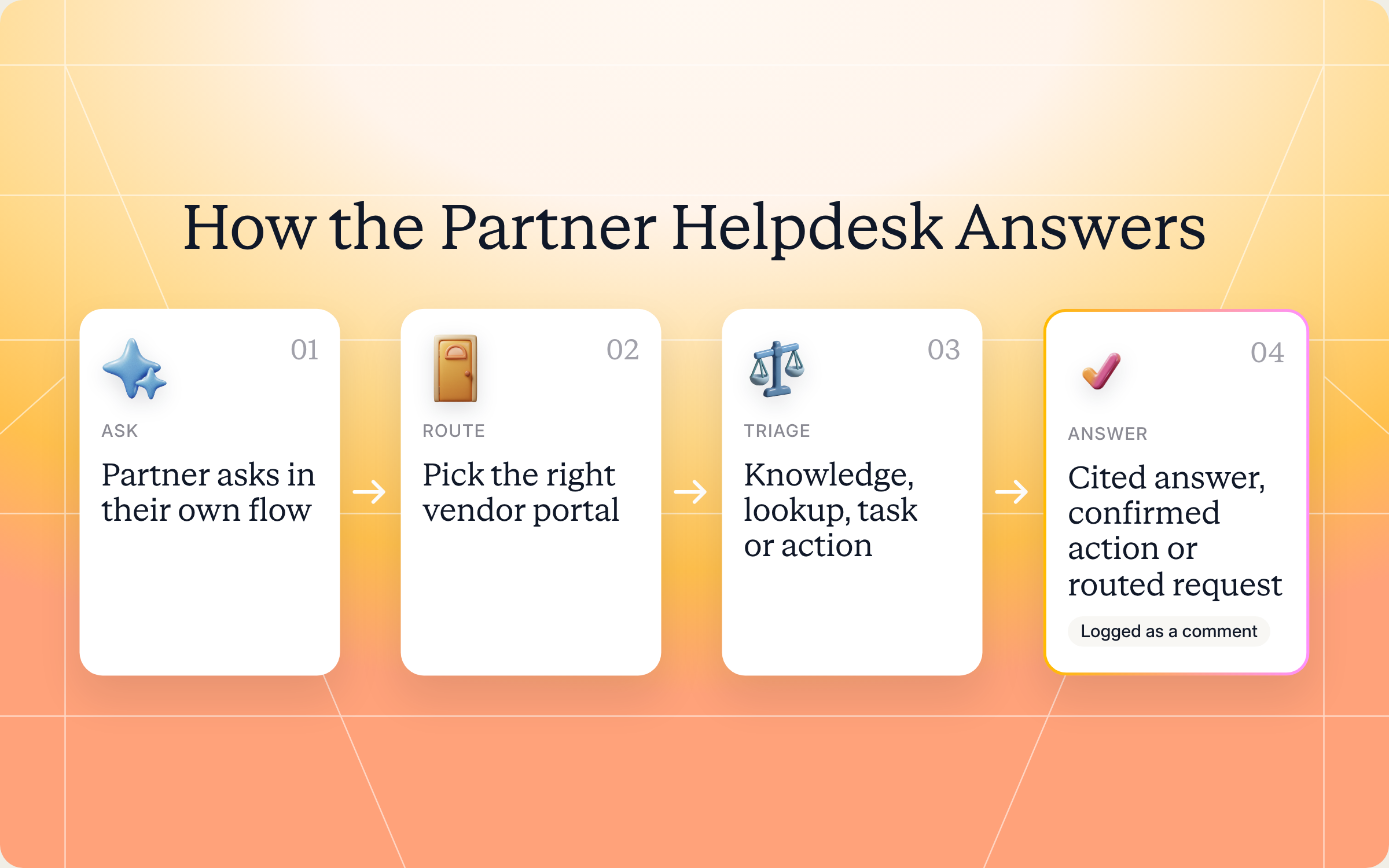
Step 1: Pick the vendor's partner portal
If your account can reach more than one vendor portal, the skill confirms which vendor this question is for. With only one vendor, it skips straight ahead.
Step 2: Sort the question
Next, the skill works out what kind of request it's dealing with:
| Request type | Example | What the skill does |
|---|---|---|
| Knowledge | "What's our official answer on SOC 2?" | Answers from the vendor's connected knowledge sources, with a citation |
| Account or deal lookup | "What stage is the Northwind deal in?" | Searches CRM records scoped to your partner data |
| Task or commitment | "What do I still owe the vendor this month?" | Pulls your open tasks |
| Commission or payment | "When does my Q3 payout land?" | Out of scope here, so it points you to a commissions skill or your channel manager |
| Action | "Request a sandbox for this prospect" | Runs it only if the vendor's capability matrix allows it, otherwise routes it for approval |
Step 3: Answer or act
For knowledge questions, the skill pulls from the vendor's connected knowledge base, which might be product docs, an asset library, Notion or Confluence. It cites the exact doc, battle card or pricing rule. If the answer is partial or looks out of date, it says so instead of papering over the gap.
For lookups, it returns only data you're entitled to see in the portal.
For actions, it splits requests into two groups:
- Allowed self service actions: things the vendor has switched on in its capability matrix, like an account lookup, a quote draft, a sandbox request or a deal registration. The skill echoes the captured fields back to you and waits for your confirmation before it writes anything.
- Approval gated actions: a pricing exception, an MDF release, a contract change or a partner tier change. The skill doesn't execute these. It drafts the request and creates a task for the right channel manager or approver.
If you ask for something outside what the vendor allows, it tells you plainly and suggests the alternative path, like a form or your channel manager. It doesn't improvise.
Step 4: Offer a follow up path
Every answer ends with a way forward. If the answer doesn't fully cover it, the skill offers to route the question to your channel manager, and logs the request with the vendor as a task or comment. For knowledge answers, it also tells you where to find that content in the portal next time. Logging each question also helps the vendor improve its knowledge base over time.
Get the skill: the full SKILL.md
Here's the complete skill file. Copy it as is, or customize the triage rules and handoffs to fit how you work with your vendors.
---
name: partner-helpdesk
description: Use when a partner user needs to ask a product, pricing, configuration, enablement, or compliance question to a specific vendor, or wants to execute a scoped self-service action (sandbox provisioning, account lookup, quote draft): without opening the vendor's portal. Single-vendor scope per invocation. Trigger phrases include "ask vendor X about Y", "what's the price for…", "where's the battle card for…", "spin up a sandbox", "look up account…", general partner-side product Q&A.
---

# Partner Helpdesk (Partner)

**Audience**: Partner user, uses **Introw Partner Connect** MCP. Operates on a **single vendor portal at a time** (the partner picks or the agent confirms).
**Use case**: 06, Enablement Support.

## When to use this skill

Use when a partner user needs to ask a product, pricing, configuration, enablement, or compliance question to a specific vendor, or wants to execute a scoped self-service action (sandbox provisioning, account lookup, quote draft): without opening the vendor's portal. Single-vendor scope per invocation.

**Sample prompts that fire this skill:**
- "ask vendor X about Y"
- "what's the price for…"
- "where's the battle card for…"
- "spin up a sandbox"
- "look up account…"

## Why this matters
Traditional partner-vendor support runs on 15-minute-to-multi-hour first-response times, often **36 hours from question to answer** when escalations are involved. AI partner helpdesks deflect **40 to 60% of routine queries** (Gartner / Pylon benchmarks), with first response collapsing to **23 seconds, a 97% reduction**. For partner sellers who are mid-deal and need an answer right now, this is the difference between closing the deal and losing momentum.

This skill is the partner's in-flow helpdesk: ask anything in natural language, get the answer from the vendor's connected content base, with proper citation and a clear handoff path when the question is out of scope.

## Process

### Step 1: Resolve the vendor portal
- If the partner has access to multiple vendor portals, call `Introw_Partner_Connect:partners` and confirm which vendor this question is about. **One vendor per invocation**: don't blend answers across vendors.
- If only one portal, proceed.

### Step 2: Triage the query type
Classify the question:
- **Knowledge** (product, pricing, how-to, battle card, enablement, compliance) → answer from connected knowledge sources, with citation.
- **Account / deal lookup** → use `Introw_Partner_Connect:search_crm_objects` (scoped to partner's data).
- **Task / commitment** → use `Introw_Partner_Connect:search_tasks`.
- **Commission / payment status** → out of scope for this skill; suggest `partner-my-commissions` (if installed) or escalate to CAM.
- **Action request** (sandbox, quote, registration) → use the appropriate write tool **only if scoped under the vendor's capability matrix**; otherwise route for human approval.

### Step 3: Answer or act
- For **knowledge questions**: pull from the vendor's connected knowledge base (Notion, Confluence, asset library, product docs). Cite which doc / battle card / pricing rule the answer came from. If the answer is partial or stale, say so honestly.
- For **lookups**: query Introw Connect (CRM objects, tasks, form submissions). Return the data scoped to the partner's permissions.
- For **scoped actions**:
  - In-scope auto-actions (per the vendor's capability matrix): account lookup, quote draft, sandbox request submission, deal registration via `share_lead_or_register_deal`. Echo the captured fields back for confirmation before executing any write.
  - Approval-gated actions (pricing exception, MDF release, contract change, partner-tier change): do NOT execute. Draft the request and route via `add_task` to the right CAM / approver.
- For **out-of-capability requests**: say so plainly. Don't improvise outside the matrix.

### Step 4: Always offer a follow-up path
- "If this doesn't fully answer, I can route this to your CAM", and if accepted, use `Introw_Partner_Connect:add_task` or `add_comment` to log the request with the vendor.
- If the answer was knowledge-based, surface where the partner can find it next time (the actual portal location).

## Output format
- **Direct answer** in the partner's preferred language, with source citation when knowledge-backed.
- **Action confirmation** (with reference ID) when an action was executed.
- **Clear handoff message** when the query is approval-gated and routed to a human.
- **Follow-up suggestion**: "want me to set a task for your CAM to follow up?"

## Guardrails & PRM best practice
- **Single-vendor scope per invocation.** This skill never aggregates answers across vendors. Each session targets one portal, confirmed at the start. Multi-vendor questions go to a different skill (or a CAM).
- **Strict data scoping.** Show only the data the partner is entitled to see in their portal. Never expose other partners' deals, vendor-internal pricing rules, or cross-customer data.
- **Capability matrix is the contract.** Anything outside the matrix is routed, not improvised. "Outside the matrix" answers should always include the alternate path (CAM, approval form, etc.).
- **Compliance.** Customer PII, pricing exceptions, and contract terms stay human-approved unless explicitly scoped under SOC 2 / ISO 27001 / GDPR controls.
- **Multilingual.** Answer in the partner's language even if source content is in English. If translation introduces ambiguity, link to the source.
- **Cite sources.** Knowledge answers always reference which battle card / doc / pricing page they came from. Opacity erodes trust faster than not knowing.
- **Honest about gaps.** If the answer isn't in the connected knowledge base, say so, don't fabricate. Surface as a content gap (feeds `vendor-support-content-gap-detector` next cycle).
- **Don't write without confirmation.** Any write action (registration, sandbox request, etc.) echoes the captured fields back for confirmation before calling the write tool.
- **Log for the loop.** Use `add_comment` on the relevant record to capture the question and resolution. Feeds the vendor's deflection audit and improves the knowledge base over time.
- **Cross-skill handoff.** Deal-related coaching question → `partner-deal-war-room`. Cert / training question → `partner-cross-vendor-cert-tracker`. Commission-status → out-of-scope, refer to commission-specific skill or finance contact.
How to install and run the skill
There are two ways to use it, depending on how you work.
Option 1: Claude Code
Create a folder called partner-helpdesk inside .claude/skills/ in your repo, and save the file above as SKILL.md inside it. Claude Code picks it up automatically and runs it whenever your prompt matches the trigger phrases in the description.
Option 2: Claude (or any MCP client) with the Introw connector
Most partner sellers won't touch Claude Code, and they don't need to. As a partner, you connect Claude to your own Introw account at partners.introw.io once, with an OAuth sign in and no API key. That one connection covers every vendor portal your account can reach, so if you already connected for one vendor, you're connected for the rest. Here's what connecting looks like:
The Connect Claude guide walks through the setup, the partner version of the steps lives in the partner Connect Claude guide, and the Claude integration page covers what you can do once you're connected. Prefer other tools? Introw also works with ChatGPT, Slack and Microsoft Teams.
If you're a vendor: there's nothing to implement or switch on. The partner connector is available by default and partners connect it themselves. Your job is to point partners to it, and the give partners their own AI assistant guide has steps you can share as is. What you do control is the capability matrix, which decides which actions partners can run on their own and which need approval.
Prompts to try
Once the skill is installed or Claude is connected, try any of these:
- "Ask Acme what their official answer is on EU data residency, and link the source." Gets a cited knowledge answer from one vendor.
- "Where's the latest battle card against our main competitor for Acme?" Finds the right asset and tells you where it lives in the portal.
- "Look up the Northwind account and tell me where our deal stands." Runs a scoped lookup on your own deal data.
- "Spin up a sandbox for BrightPath, but show me the details first." Captures the fields and waits for your confirmation.
- "I need a 15% discount exception on the Northwind quote." Drafts the request and routes it to your channel manager as a task.
What you'll get back
Depending on the request, a run returns some mix of these:
- Direct answer: in your language, with the source named when it comes from the knowledge base.
- Action confirmation: with a reference ID when an allowed action ran.
- Handoff message: when the request needs approval, telling you who it went to and what was captured.
- Follow up offer: a prompt to set a task for your channel manager if the answer doesn't fully cover it.
- Where to find it next time: the portal location for the content you asked about.
Here's an illustrative example of three questions from a reseller in one session with a single vendor:
| Question | What the skill returned | Source or reference |
|---|---|---|
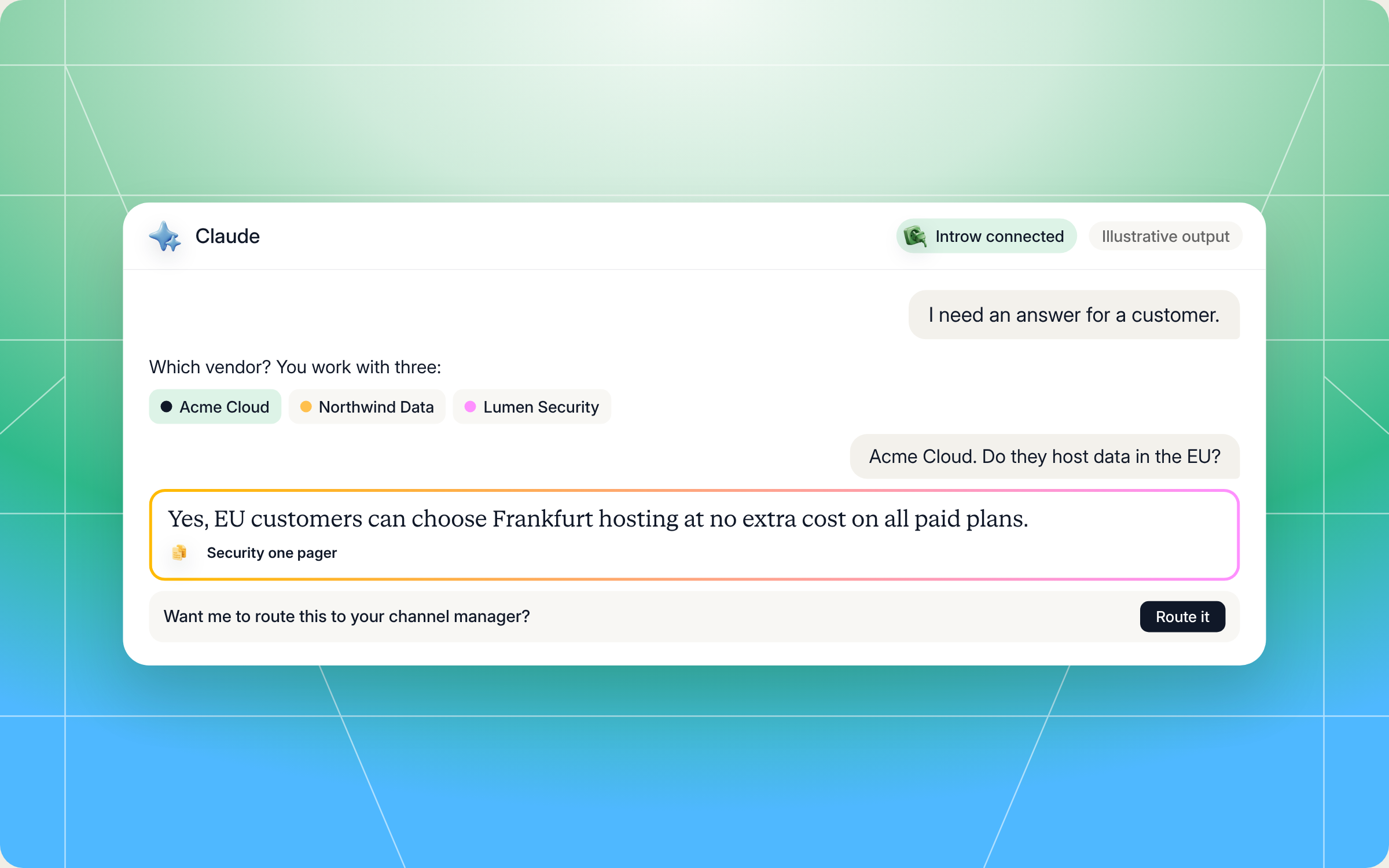
| "Do they host data in the EU?" | Yes, EU customers can choose Frankfurt hosting at no extra cost on all paid plans | Security and compliance one pager, asset library |
| "Spin up a sandbox for BrightPath" | Echoed company name, contact and use case, then submitted after confirmation | Sandbox request reference SBX 4821 |
| "Can I get 15% off for Northwind?" | Not self service. Drafted the exception request with deal details and assigned it to the channel manager | Task created for the channel manager, due in two business days |
And here's how a session looks in Claude, from picking the vendor to a cited answer:
Staying in control: what Claude can and can't do
A helpdesk that can act on your behalf only works if both you and the vendor trust it. A few things are built in:
- You confirm every write. Before it registers a deal, requests a sandbox or drafts a quote, the skill shows you the captured fields and waits for a yes.
- It connects as you. Claude signs in to Introw over OAuth as you, so it only sees and does what your partner account already can. You can disconnect at any time.
- One vendor per session. It never blends answers or data across vendors.
- No peeking at other partners. It won't show other partners' deals, the vendor's internal pricing rules or anyone else's customer data.
- The vendor's rules are the contract. Anything outside the vendor's capability matrix gets routed, not improvised. Pricing exceptions, MDF releases, contract changes and tier changes always go to a human.
- Compliance stays human approved. Customer PII, pricing exceptions and contract terms need approval unless the vendor has explicitly scoped them under SOC 2, ISO 27001 or GDPR controls.
- It's honest about gaps. If the answer isn't in the knowledge base, it says so rather than making something up, and flags the gap so the vendor can fix it.
Prefer to do this in the Introw app?
If you're a vendor, the skill is one surface for your partner helpdesk. The other is Introw's AI agent for partner support, which answers partner questions 24/7 inside the partner portal, grounded in your knowledge base and scoped to what each partner can see. Here's how to launch it:
The written version is in the launch the partner support agent guide. Both surfaces answer from the same content, so it pays to keep your library current with partner enablement tools and to enable partners with content they can actually find. For questions that do need a person, partner support ticket collaboration keeps the conversation and context in one place.
Pair it with other Claude skills
A helpdesk answers the question in front of you. These skills pick up where it hands off:
- Deal War Room: for deal specific coaching and co selling support, with the vendor's playbooks, past wins, battle cards and next moves pulled live from the CRM.
- Cross Vendor Certification Tracker: for training and certification questions across every vendor you work with, including what gates higher margin products.
- Register a Deal from Your AI Assistant: for registering a deal or sharing a lead with any vendor straight from your own CRM, notes or inbox.
- Support Content Gap Detector: a vendor side skill that clusters the questions partners keep asking and shows which content is missing.
You'll find all of them in Introw's skill library, and our blog roundup of Claude skills for partner teams explains how they fit together.
Give your partners answers where they work with Introw
Introw is a CRM first partner relationship management platform, which means it builds on top of your existing HubSpot or Salesforce setup rather than replacing it. It's also headless by design: the partner portal is one surface, but partners and your team can work in plain language from Claude, ChatGPT, Slack or Teams through Introw's MCP server, with every action written back to your CRM.
That's what makes a partner helpdesk in Claude possible. Your knowledge base, deal data, tasks and permissions live in one place, so every answer is grounded in your real content and scoped to what that partner should see. Your channel managers get fewer FAQ pings, and partners keep selling instead of waiting.
Give your partners a helpdesk they'll actually use. Connect Claude or book a demo.
Still curious? Here are some quick answers to help clear things up
A partner helpdesk is the support desk a vendor runs for its resellers, agencies and other channel partners. It answers questions about pricing, products, configuration, compliance and enablement content, and handles requests like deal registration or sandbox access. An AI partner helpdesk does this 24/7, in the partner's language, with cited answers.
No. Claude Code users can drop the SKILL.md into their skills folder. Everyone else can connect Claude to their Introw partner account with a one time OAuth sign in and ask the same questions in plain language.
Not without you. Every write, like a deal registration or sandbox request, is echoed back for your confirmation first. Approval gated requests, like pricing exceptions or MDF releases, are never executed. They're drafted and routed to your channel manager.
No, by design. Each session targets one vendor portal, so answers and data never mix. If you work with several vendors, the skill asks which one your question is about.
Yes. The full file is in this article and in Introw's skill library. You can copy it as is or adapt it, but it reads vendor content and your partner data through Introw's MCP server, so you'll need an Introw partner account connected to run it.





See AI-Native PRM in Action
Book a demo with one of our partner program experts, or explore Introw on your own time.

