
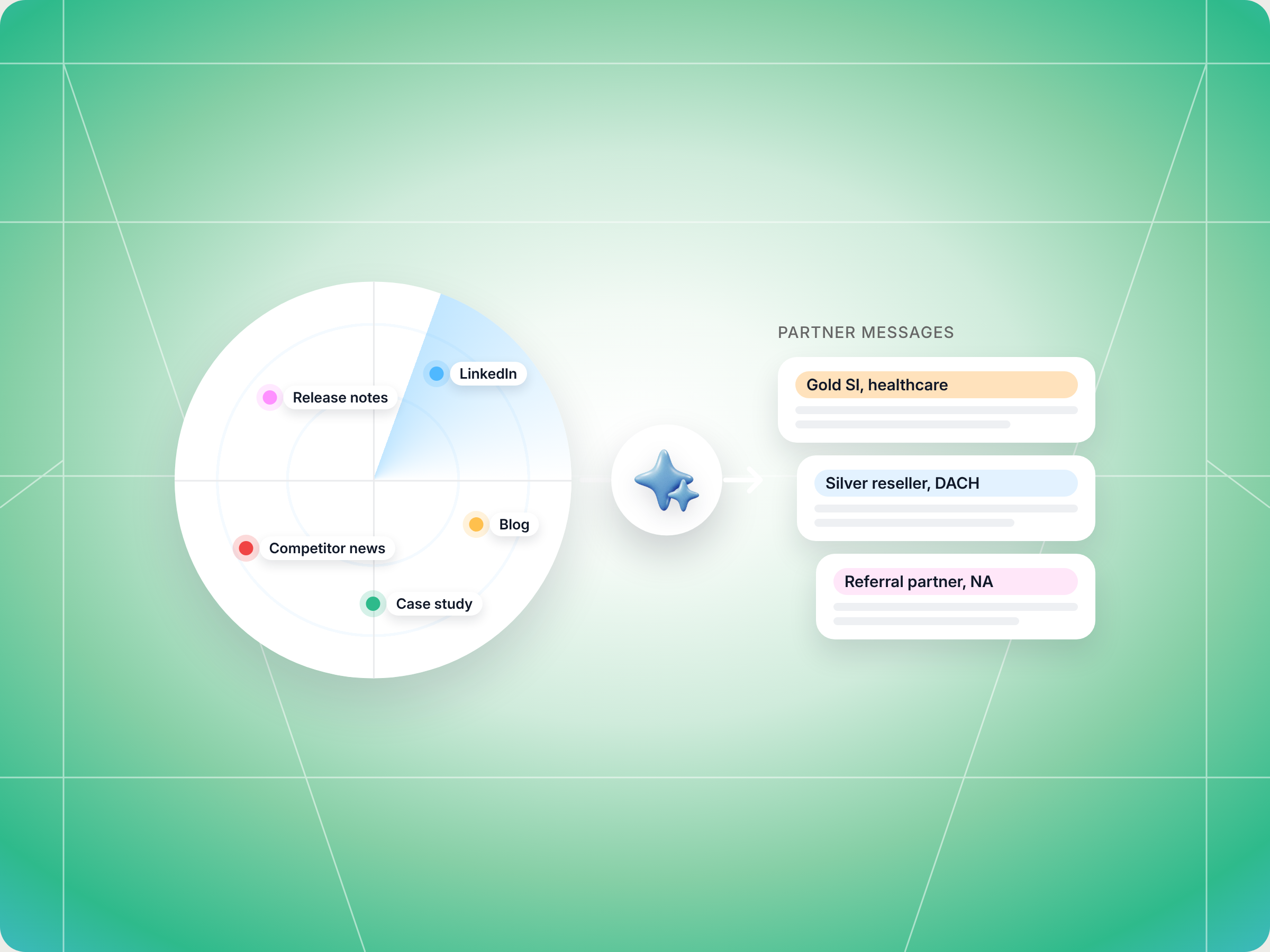
If your partner newsletter goes out once a month and half your best news never makes it in, the Claude skill to use is Content Radar and Distribution. It scans your product release notes, LinkedIn, blog, industry news and competitor moves on a weekly cadence, keeps only what partners need, rewrites each item for every partner segment (tier, region, partner type, vertical) and drafts the alerts, seller talking points and customer ready templates to send through the right channel. You approve launches, pricing news and anything sensitive before it goes out. The full SKILL.md is below, free to copy, along with install steps, prompts to try, and what you'll get back.
Here's a number worth sitting with. Introw's campaigns and announcements playbook cites Demand Gen Report research showing that 96% of B2B marketers expect to increase revenue from channel partners. Most can't, because their partners aren't informed enough to sell. The same page puts a manual partner marketing manager at roughly four partner facing communications a month.
You know the pattern. Your product team ships a feature that closes a gap against your biggest competitor. Your CEO posts a sharp take on LinkedIn. Marketing publishes two new case studies. And your partners hear about all of it three weeks later, in a monthly partner newsletter that tries to cover everything for everyone, if they open it at all.
So what if every piece of partner worthy news reached the right partners within days, already rewritten for how they sell?
This guide covers what a good partner newsletter looks like today, why the monthly model breaks, the Claude skill that runs a weekly content radar for you, how it works step by step, the full SKILL.md you can copy, how to install and run it, and how to stay in control of what goes out.
What a partner newsletter is, and why the monthly model breaks
A partner newsletter is a regular communication that keeps your channel partners, resellers, affiliates and distribution partners informed about what's new: product updates, marketing campaigns, new marketing materials, sales tips, case studies, training, program changes and upcoming events like trade shows. It's the backbone of partner communication for most programs, because it's the one touchpoint every partner gets.
Done well, consistent communication does a lot of quiet work. It keeps partners engaged between deals, helps motivate partners to put your product in front of current customers and new prospects, builds shared goals and keeps your brand top of mind in partner ecosystems where you compete for attention with every other vendor they work with. Over time, that alignment shows up as stronger relationships, better customer success stories and more partner sourced revenue.
Partner newsletters show up across industries. Software companies send them to resellers and SIs, consumer brands send them to retail and distribution partners, and affiliate programs use them to keep affiliates engaged. Whatever the format, the goal is the same: keep your partner community aligned with your company's priorities and enhance each partner's ability to sell your capabilities.
The trouble is the format most companies use. One email, once a month, the same for every partner. That runs into three problems at once:
- It's too slow: a feature that shipped on the 3rd reaches partners on the 30th. By then, the deal where it mattered has already closed, or been lost.
- It's too generic: a healthcare SI, an SMB reseller and a referral partner all get the same copy, so none of them get something that fits how they sell.
- It's too thin: one person can only write so much, so most of your partner content never makes it in. The best release notes, exec posts and customer wins die in the gap between your marketing team and the partner channel.
Introw's playbook calls this the partner marketing impossible triangle: cadence, relevance and headcount. You can usually have two. A monthly blast picks headcount and gives up the other two.
What good partner communication looks like for channel partners
The fix isn't to stop sending a partner newsletter. It's to treat the newsletter as one output of a continuous flow of partner news, not the only one. Strong channel partner marketing strategies share a few traits:
- Relevance first: fewer, sharper items beat a long list. If an item doesn't help a partner sell, support customers or grow, it doesn't go out.
- Segmented by how partners sell: tier, region, partner type and vertical change what a message should say. A Gold partner gets co selling language, a new partner gets an enablement angle.
- Timely: product updates and competitive responses go out in days or hours, not at the end of the month.
- Actionable: every message ends with one clear next step, like using a new battle card, registering a deal or forwarding a template to a customer.
- Sent where partners actually are: email for some, Slack or Teams for others, and the partner portal as the place everything lives.
- Measured on revenue, not opens: the real test is whether targeted segments register more deals afterward.
Here's how that compares with the classic monthly newsletter:
| What matters | Monthly partner newsletter | Weekly content radar |
|---|---|---|
| Cadence | Once a month | Weekly by default, daily during launches |
| Sources | Whatever the team remembers to include | Release notes, LinkedIn, blog, industry news, competitors, case studies, Loom videos |
| Relevance | Same content for everyone | Filtered per item, irrelevant news skipped |
| Segmentation | One version | Variants per tier, region, partner type and vertical |
| Channel | Email, Slack, Teams or portal, per partner preference | |
| Success metric | Open rate | Deal registration uplift in targeted segments |
Release notes deserve a special mention. They're the highest leverage source of partner content, because every shipped feature is something partners need to position with prospects. They're also the source most often missed. Most release entries are bug fixes nobody outside the product team cares about, so partner marketers stop reading them, and the three entries that matter slip through.
Partner newsletter best practices that motivate partners
Whether you send a monthly roundup, weekly alerts or both, a few practices typically separate the partner newsletters that drive sales from the ones that get archived:
- Write for the partner's business, not yours: partners are businesses with their own customers, markets and goals. Lead with what an update means for their pipeline, customer loyalty and revenue, then explain the feature.
- Keep communication consistent: consistent communication builds trust. A predictable rhythm, like weekly alerts plus a monthly roundup, beats bursts of news followed by silence.
- Share resources partners can use right away: link marketing materials, battle cards and case studies from your partner enablement hub, so a partner can act in the same minute they read.
- Use various forms and platforms: some partners read email, others live in Slack, Teams or your portal. One line alerts, short videos and longer insights pieces all have a place.
- Reward collaboration, not just volume: call out partners who closed joint deals, shared leads or cohosted events. Public recognition is one of the cheapest ways to motivate partners and strengthen the partnership.
- Close the loop with your product team and sales team: make it easy for partners to reply with questions or objections, and route those insights back to the people in your organization who manage roadmap and messaging.
- Respect customer ownership: in software, retail and distribution alike, partners own many customer relationships. Give them customer ready templates, not messages that go around them.
- Align on shared goals: tie each update to the shared goals in the partnership, like a joint pipeline target or a new market you're entering together. When partners see how your news supports their success, they stay engaged and aligned with your brand.
- Build repeatable processes, not heroics: a newsletter that depends on one person's memory breaks the first busy week. The strongest programs typically create simple processes and use the right tools, so partner communication keeps flowing even when your team is stretched.
- Measure what matters: track engagement by segment, but focus on whether targeted partners register more deals and leads. That's how you prove partner communication is vital to your channel marketing strategies, not a nice to have.
Doing all of this by hand for every item and every segment is exactly the kind of work that never gets done. That's where partner marketing automation and Claude skills come in.
The skill to use: Content Radar and Distribution
Content Radar and Distribution is a vendor side skill from Introw's free Claude skill library. It runs a recurring sweep of the places your company publishes news, filters for partner relevance, rewrites what's left per segment, and distributes and tracks it through Introw's MCP server, with every action written back to your CRM.
| Detail | Content Radar and Distribution |
|---|---|
| Built for | Partner marketing managers and vendor marketing teams |
| Use it when | You want partners to hear about product releases, exec posts, customer wins and competitor moves while they still matter |
| What it reads | Your release notes or changelog, LinkedIn, blog and press feeds, industry publications, competitor news, plus your partner roster, tiers and engagement history in Introw |
| What it writes | Segmented alerts, seller talking points, customer ready templates, and comments on partner or campaign records, after you approve |
| What you get | A radar digest, a release notes section, variants per segment, recipient counts, a suppression list, a tracking plan and next cycle improvements |
| Skill ID | vendor-content-radar |
It fires on prompts like "content radar", "scan release notes", "update partners on new releases", "what's new for partners this week", "convert blog posts to partner outreach" and "weekly partner content sweep".
The key idea is that this is a radar, not a one shot generator. You configure your sources once, and the skill runs on a weekly cadence so your partner content keeps flowing without someone rebuilding the newsletter from scratch every month.
How the skill works, step by step
The skill follows six steps. You don't need to run them yourself, but knowing what happens under the hood makes the output easier to trust.
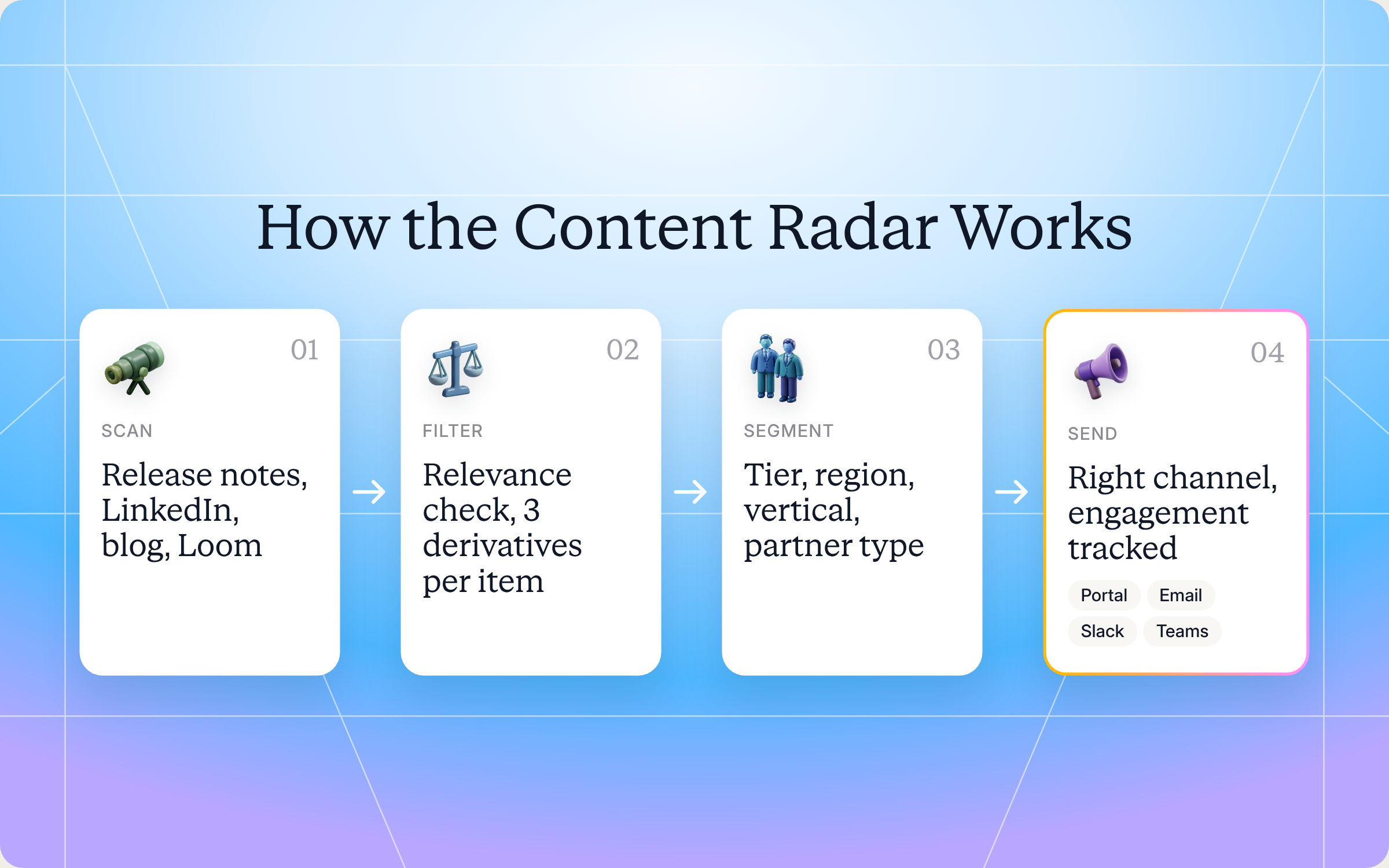
Step 1: Scan your sources
You tell the skill where your news lives: a public changelog URL or a release page in Notion, Confluence, Box or Google Drive, your company LinkedIn page and posts from your executives and employees, your blog and press feeds, a few industry publications, and the competitors you want to watch. It pulls each new item and tags it with source, publish date and raw text. Release notes are captured with version, date, title and any tags your product team applies, like feature, fix, breaking change or pricing.
Step 2: Filter for partner relevance
Every item gets a relevance check. Product and feature updates, competitive responses, customer wins, industry and vertical signals, executive thought leadership and compliance news all count. Hiring posts, culture content and anniversary celebrations get dropped. If an item isn't a good fit for any segment, it doesn't go out. Relevance discipline is the whole point.
Release notes get their own classifier, because most entries don't matter to partners:
| Release type | What the skill does |
|---|---|
| Customer facing feature | Push, high priority |
| Competitive implication | Push, and flag the battle card for an update |
| Pricing or packaging change | Push as urgent, but escalate to channel leadership before anything goes out |
| Integration or API change | Push to SI and ISV partners specifically |
| Compliance or security attestation | Push to vertical specialist partners, like healthcare, financial services or public sector |
| Bug fix or internal change | Skip |
| Breaking change or deprecation | Push as urgent with migration guidance, so partners with affected customers have lead time |
Step 3: Rewrite each item for every segment
For each item that makes the cut, the skill drafts partner ready variants by tier, region, partner type and vertical. A Gold partner gets co selling language, a Bronze partner gets an enablement angle. DACH partners get a compliance forward framing, LATAM partners a use case forward one. An SI gets technical depth, a reseller a transactional call to action, a referral partner a warm intro framing.
Every variant opens with why it matters to that partner, states the takeaway in a sentence or two, links the asset or next step, and ends with a clear call to action.
For release notes, it goes further and drafts three versions of each pushed item:
- A one line "what's new" alert: short enough for Slack or email, saying what shipped, who it helps and where to learn more.
- Talking points for partner sellers: it checks open deals in your CRM and gives partners with relevant pipeline a version that names those deals and the positioning angle.
- A customer ready outreach template: a message partners can lightly edit and forward to customers and prospects, framing the new capability as a reason to reengage.
Step 4: Pull segmentation context from Introw
The skill reads your partner roster with tiers, regions and categories, the entitlements each tier gets, and recent engagement. Partners who already got two or more touches in the last 14 days go on a suppression list, so nobody gets flooded.
Step 5: Distribute partner marketing campaigns through the right channel
Each variant goes to its segment through the partner's preferred channel: email, Slack, Teams or a portal announcement. High priority items like a launch or a competitive response include a deal registration deep link, so reading turns into action. Every send is logged as a comment on the partner or campaign record.
Step 6: Track engagement and improve the next cycle
At 7, 14 and 30 days after sending, the skill checks engagement: asset views, comments and registrations it can attribute to the campaign. If one variant landed in DACH but died in North America, that feeds into the next radar cycle. The goal is to track to revenue, not opens.
Get the skill: the full SKILL.md
Here's the complete skill file. Copy it as is, or adjust the sources, segments and release rules to fit your program.
---
name: vendor-content-radar
description: Use when a Partner Marketing Manager wants a continuous-running content radar, scanning the vendor's release notes, LinkedIn, blogs, industry publications, and competitor news for partner-relevant content, transforming relevant items into partner-ready messaging per segment, and distributing + tracking through Introw. Auto-updates partners on new product releases. Trigger phrases include "scan release notes", "update partners on new releases", "convert release notes to partner outreach", "scan LinkedIn for partner content", "content radar", "what's new for partners this week", "convert blog posts to partner outreach", "weekly partner content sweep", "competitive content distribution".
---

# Content Radar & Distribution (Vendor)

**Audience**: Vendor, **claude.ai Introw** MCP (+ WebFetch / WebSearch, and any installed LinkedIn / RSS / blog MCPs).
**Use case**: 07, Campaigns & Announcements.

## When to use this skill

Use when a Partner Marketing Manager wants a continuous-running content radar, scanning the vendor's release notes, LinkedIn, blogs, industry publications, and competitor news for partner-relevant content, transforming relevant items into partner-ready messaging per segment, and distributing + tracking through Introw. Auto-updates partners on new product releases.

**Sample prompts that fire this skill:**
- "scan release notes"
- "update partners on new releases"
- "convert release notes to partner outreach"
- "scan LinkedIn for partner content"
- "content radar"
- "what's new for partners this week"
- "convert blog posts to partner outreach"
- "weekly partner content sweep"
- "competitive content distribution"

## Why this matters
**96% of B2B marketers expect to grow channel revenue** (Demand Gen Report): but most can't, because their partners aren't sufficiently informed. Communication is the carrier wave for everything else: campaigns, launches, competitive responses, customer wins. Manual production caps the partner marketing manager at ~4 partner-facing communications/month; agentic radar+segment+distribute lifts that to **40 to 80 (10 to 20×)** without hiring, with **2 to 4× engagement** vs. generic blasts. Competitive responses ship in **under one hour** instead of weeks.

This skill is a **continuously-running radar**, not a one-shot generator. It scans, filters, transforms, distributes, and tracks, and is meant to run on a cadence (weekly default) so partner-facing content velocity is sustained.

## Sources to monitor
1. **Release notes / changelog feeds / product update pages**: the **highest-leverage source** for partners. Every shipped feature is something partners need to position with prospects, but most release notes never reach partner-facing comms in time. Sources include Notion / Confluence release pages, public changelog URLs, and vendor docs sites.
2. **Vendor's own LinkedIn**: exec posts, brand posts, employee thought leadership. (Vendor's best content historically dies in the partner channel.)
3. **Vendor blog / press / launch feeds.**
4. **Industry publications**: partner-relevant analyst notes, trend pieces, customer-vertical news.
5. **Competitor moves**: public announcements, pricing changes, leadership changes that change the partner's competitive context.
6. **Customer wins / case studies** as they're published.
7. **Loom / video drops** the executive team shares, extract transcript, treat as a content source.

The user should configure source URLs / handles up front; the skill scans them.

## Process

### Step 1: Scan
- **Release notes**: use installed knowledge-base MCPs (Notion, Confluence, Box, Google Drive) when the changelog lives there; otherwise WebFetch on the public changelog URL or RSS feed. Capture each release entry with version, date, title, body, and any tagging the vendor applies (feature / fix / breaking change / pricing / packaging).
- **LinkedIn**: use installed LinkedIn MCP if available; otherwise WebFetch on profile/company pages or rely on a saved RSS-style feed.
- **Blogs / publications**: WebFetch on the source, or RSS MCP if installed.
- **Competitor news**: WebSearch with site filters.
- Tag each item with source + publish-date + raw text.

### Step 2: Filter to partner-relevant content
For each candidate item, score relevance:
- **Product / feature update** that partners need to know to sell.
- **Competitive response** material, how to position vs. a competitor's move.
- **Customer win**: case study a partner can use in their own outreach.
- **Industry / vertical signal**: context for partners selling into that vertical.
- **Executive thought leadership** that the partner can reshare or quote.
- **Compliance / regulatory** signal that affects partner motion.

Drop low-relevance items (internal HR posts, generic "we're hiring" content, anniversary celebrations): relevance discipline is the whole point.

**Release-notes-specific filtering** (release notes need their own classifier, most release entries are ignorable to partners):
- **Customer-facing feature** (visible to end users / changes the demo / unlocks new use cases) → **push** (high priority).
- **Competitive implications** (closes a gap vs. a named competitor / answers a recurring objection) → **push + flag for battle-card update**.
- **Pricing / packaging change** (new SKU, price move, billing change, tier-eligibility change) → **push urgent** + escalate to channel leadership before broadcast.
- **Integration / API change** that affects partners building on the platform → **push to SI / ISV partners specifically**.
- **Compliance / security attestation update** (new SOC 2, ISO, FedRAMP, regional certs) → **push to vertical-specialist partners** (healthcare, financial services, public sector).
- **Bug fix / internal-only change** → **skip** (no partner value; clutters the channel).
- **Breaking change / deprecation** → **push urgent** with migration guidance, partners with affected customers need lead time.

### Step 3: Segment + transform per audience
For each high-relevance item, generate partner-ready variants segmented by:
- **Tier** (Gold gets co-sell language; Bronze gets enablement-led).
- **Region / language** (DACH = compliance-forward; LATAM = use-case-forward).
- **Partner type** (SI = technical depth; reseller = transactional CTA; referral = warm-intro framing).
- **Vertical specialty** (healthcare partners get HIPAA-flavored framing).

Each variant should:
- Open with relevance to the partner ("As a healthcare-focused SI, here's what changed this week…").
- State the takeaway in 1 to 2 sentences (partners don't read filler).
- Provide the asset / next step (link, asset ID, deal-reg deep link).
- Carry a clear CTA (use the new battle card, register a deal, attend the webinar, share with prospects).

**Release-notes-specific transforms**: for each pushed release item, generate three derivatives, not just one:
- (a) **One-line "what's new" alert** per partner segment, a Slack-or-email-friendly headline that says what shipped, who it benefits, and the link to learn more.
- (b) **Talking points for partner sellers in active deals where the feature matters**: cross-check open deals via `Introw:search_crm_objects` and surface the partners with relevant pipeline; their version of the alert includes named deals and the specific positioning angle.
- (c) **Customer-ready outreach template**: a forward-able message the partner can lightly edit and send to prospects/customers in their pipeline. Frames the new capability as a reason to (re-)engage.

### Step 4: Build segmentation context from Introw
- `Introw:search_partners`: current partner roster with tier/region/categories.
- `Introw:get_tier_information`: tier-specific entitlements that affect message framing.
- `Introw:search_partner_engagement`: last-touch saturation: skip recipients who got 2+ touches in the last 14 days.

### Step 5: Distribute
For each variant × segment:
- Push via the partner's preferred channel (email, Slack, Teams, portal announcement).
- For high-priority items (product launch, competitive response), include a `share_lead_or_register_deal` deep link to convert reading into action.
- Use `Introw:add_comment` on the relevant partner records or campaign record for audit trail.

### Step 6: Track engagement
- Use `Introw:search_partner_engagement` 7 / 14 / 30 days post-send to measure response (asset views, comments, registrations attributable to the campaign).
- Surface engagement asymmetry, if Variant A landed in DACH but Variant B died in NA, feed that back into the next radar cycle.
- Use `Introw:add_comment` to log the campaign performance summary on each campaign event.

## Output format
- **Radar digest**: scanned items with relevance score and disposition (publish / skip / route).
- **Release notes this cycle**: dedicated section listing every release item scanned + its disposition (push / skip / route) + variant set if pushed (alert, seller talking points, customer-ready template). Embargo flags called out.
- **Per-published-item**: segment list × variants drafted, with channel and send window.
- **Recipient counts** per variant.
- **Suppression list** for engagement-saturated partners.
- **Tracking plan**: when and how engagement gets measured.
- **Next-cycle improvements**: what worked, what to drop.

## Guardrails & PRM best practice
- **Relevance discipline.** A radar that publishes generic content trains partners to ignore the channel. Be aggressive about filtering, better 3 high-relevance items per week than 30 mediocre ones.
- **Segment, don't blast.** If a variant's recipient count is > 50% of total partners, the segment is too broad, push back and segment harder.
- **Source attribution.** When sharing competitor or industry content, link the source, partners trust attribution.
- **Localization is not translation.** Adapt tone and emphasis per region, don't just google-translate.
- **Don't auto-send launches or pricing comms.** Skill ends at draft + recipient list for those, human approval before broadcast.
- **Tier-fairness.** Don't strip the long tail; give them a tier-appropriate variant. Exclusion erodes trust.
- **Compliance scope.** Region-specific disclaimers, opt-out language, GDPR consent checks before sends to EU partners.
- **Track to revenue, not opens.** Tie campaigns to deal-registration uplift in targeted segments via `Introw:search_form_submissions` over the trailing 30 days.
- **Run on cadence.** Radar value compounds with frequency. Weekly default; daily for active competitive periods or product launches.
- **Don't pre-announce embargoed releases.** Some release entries are partner-NDA-only until GA, respect embargo and disclosure dates strictly. If the source includes embargo metadata, treat it as authoritative; if not, default to "internal partner-team only" until you confirm GA status.
- **Don't auto-push breaking changes / deprecations** without a coordinated migration plan, partners with affected customers need vendor-side support engagement, not just a notification.
- **Cross-skill handoff.**
  - Recurring objection-related features (a release that addresses a known closed-lost reason) → `vendor-microcourse-from-closed-lost` to author a targeted micro-course.
  - Release alerts feed the partner-side `partner-cross-vendor-content-calendar` view so partners see vendor activity on their own calendar.
  - Strategic content (major launches, exec posts) → `vendor-generate-segmented-campaign` for higher-effort treatment.
How to install and run the skill
You've got two ways to use it, depending on where you work.
Option 1: Claude Code
Create a folder called vendor-content-radar inside .claude/skills/ in your repo, and save the file above as SKILL.md inside it. Claude Code picks it up automatically and runs it whenever your prompt matches the trigger phrases in the description. Make sure web fetch and web search are available, and add any LinkedIn, RSS, Notion or Confluence connectors you use for your sources.
Option 2: Claude (or any MCP client) with the Introw connector
You don't need to be technical for this one. Connect Claude to Introw once, and you can run the same play in plain language from Claude, or from ChatGPT, Slack, Teams or your CRM. Introw is listed in Claude's connector directory, so it's one click plus a sign in, with no server URL to paste. Here's how connecting looks:
The step by step version lives in the Connect Claude guide, and the Claude integration page covers what you can do once you're connected.
Prompts to try
Once the skill is installed or Claude is connected, try any of these:
- "What's new for partners this week?" Runs the full radar across your configured sources and returns the digest.
- "Scan our release notes from the last two weeks and update partners on new releases." Focuses on the changelog and drafts the three derivatives for each pushed item.
- "Convert this blog post into partner outreach for our Gold SIs and Silver resellers." Turns one piece of content into segment variants.
- "Run a competitive content distribution on today's competitor pricing announcement, but don't send anything yet." Drafts a fast competitive response for your review.
- "Run the weekly partner content sweep and show me the suppression list first." Lets you check who's being held back before you approve the sends.
What you'll get back
A typical run returns seven things:
- Radar digest: every scanned item with a relevance score and a decision to publish, skip or route.
- Release notes this cycle: each release entry, its decision and, if pushed, the alert, seller talking points and customer template, with any embargo flags called out.
- Variants per item: which segments get which version, through which channel, in which send window.
- Recipient counts: how many partners each variant reaches.
- Suppression list: partners skipped because they've had enough touches lately.
- Tracking plan: when and how engagement and registrations get measured.
- Next cycle improvements: what worked, and what to drop.
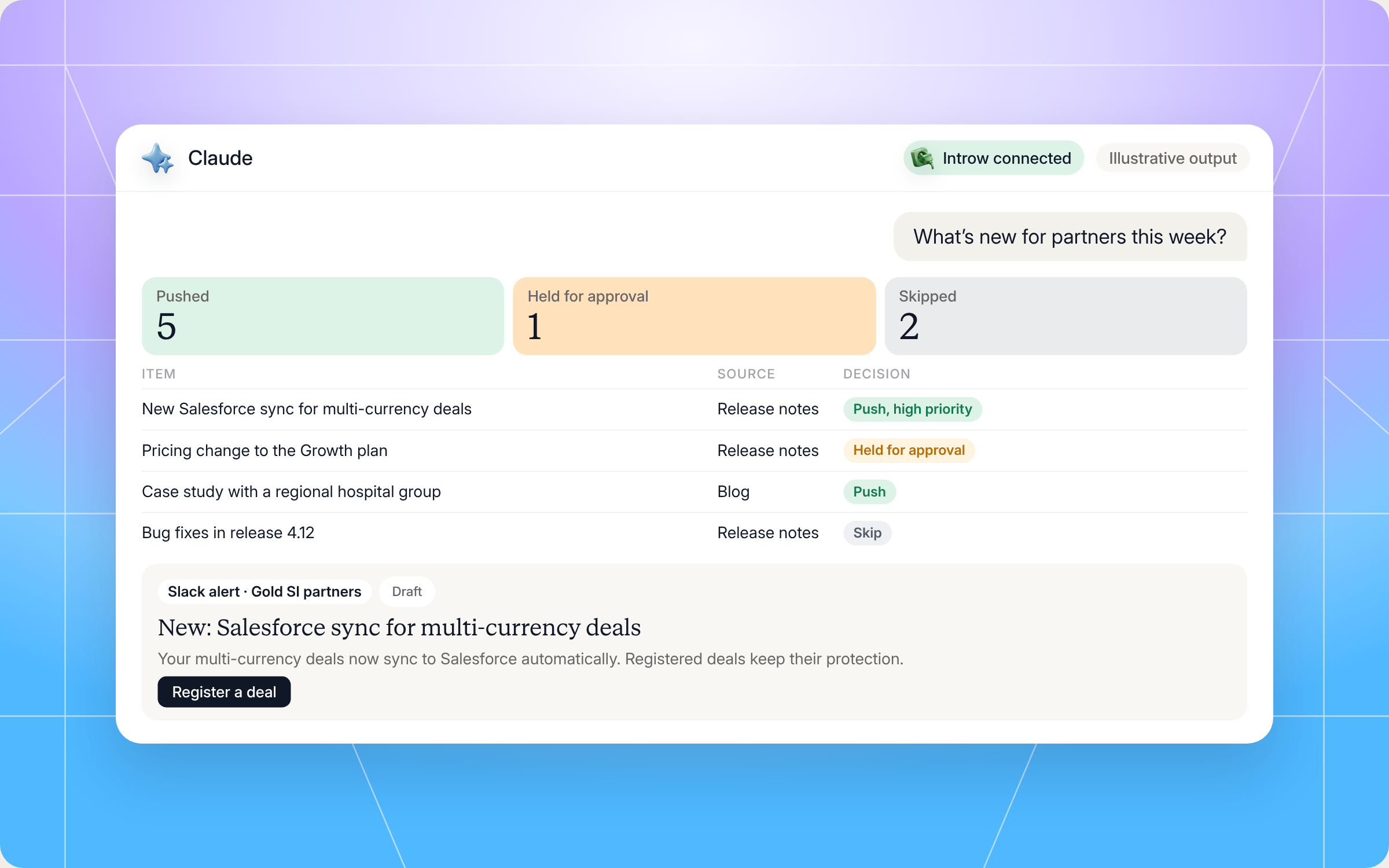
Here's an illustrative example of a radar digest for one week:
| Item | Source | Decision | Segments and variants |
|---|---|---|---|
| New Salesforce sync for multi currency deals | Release notes | Push, high priority | Alert to all tiers, talking points to 14 partners with open multi currency deals, customer template for resellers |
| Pricing change to the Growth plan | Release notes | Held for channel leadership approval | Draft only, no sends |
| CEO post on AI in partner programs | Push | Reshare kit for Gold and Silver partners | |
| Case study with a regional hospital group | Blog | Push | Healthcare specialist partners in NA and DACH |
| Competitor raises prices by 15% | Competitor news | Push, competitive response | Talking points and battle card note for resellers |
| Bug fixes in release 4.12 | Release notes | Skip | None |
| Office opening celebration | Skip | None |
And here's how that run looks in Claude, from the question to the digest and the first segment draft:
Staying in control: what Claude can and can't do
A content radar only works if partners trust what arrives, and if you and your channel operations team trust what the skill sends. A few things are built in:
- You approve the sensitive stuff. Launches and pricing news stop at a draft and a recipient list. Nothing goes out until a human approves it.
- It stays inside your access. Claude connects to Introw over OAuth as you, so it can only see and do what you can.
- It won't blast everyone. If one variant would reach more than half of all partners, the skill pushes back and asks you to segment harder.
- It respects embargoes. Release entries under partner NDA wait until general availability. If there's no embargo data, it treats the item as internal only until you confirm.
- It won't push breaking changes alone. Deprecations need a coordinated migration plan, not just a notification.
- It treats long tail partners fairly. Lower tiers still get a version that fits them, because exclusion erodes trust.
- It checks compliance. Region specific disclaimers, opt out language and GDPR consent checks apply before sends to EU partners.
- It cites sources. When it shares competitor or industry content, it links the original, because partners trust attribution.
Prefer to do this in the Introw app?
Not every team wants to start in Claude, and that's fine. Introw's partner campaigns and announcements give you the same building blocks inside the product. You write an announcement once, target it to partner segments, and send it through the portal feed, email, Slack and Microsoft Teams in one go. Introw can even read your company LinkedIn page every week and suggest partner ready announcement drafts for you to review.
The full walkthrough is in the send an announcement guide. For more on what to put in front of partners, read our best practices for SaaS partner content programs and the primer on enablement content.
Pair it with other Claude skills
A content radar is a starting point. When it finds something bigger, it hands off to other skills in the library:
- Micro Courses from Closed Lost Patterns: when a release fixes a known reason you lose deals, turn it into a short training course for partners.
- Campaign Kit Builder: for major launches that deserve a full through channel marketing kit, not just an alert.
- Cross Vendor Content Calendar: the partner side mirror, where your release alerts show up on your partners' own calendar next to their other vendors.
- Weekly Channel Slack Digest: keeps your internal channel team up to date on wins, registrations and at risk partners in the same weekly rhythm.
You'll find all of them in Introw's skill library, and our roundup of Claude skills for partner teams explains how they fit together.
Keep your partners informed with Introw
Introw is a CRM first partner relationship management platform, which means it builds on top of your existing HubSpot or Salesforce setup rather than replacing it. It's also headless by design: the partner portal is one surface, but you can run the same program in plain language from Claude, ChatGPT, Slack or Teams through Introw's MCP server, with every action written back to your CRM.
That's what makes a skill like this work. The partner roster, tiers, engagement history and open deals it reads all live in one place, so every variant is segmented on real data. And when partners act on what you send, partner engagement and deal registration tools capture the result, so you can see which news actually moved pipeline, and which communication strategies build stronger relationships and real business success with your partners.
Turn your partner newsletter into a weekly radar that never misses partner worthy news. Connect Claude or book a demo.
Still curious? Here are some quick answers to help clear things up
The essentials are product updates, new marketing materials and campaigns, customer wins and case studies, training and certification news, program changes and upcoming events. The best partner newsletters keep it short, segment by tier, region and partner type, and end every item with one clear next step.
No. Claude Code users can drop the SKILL.md into their skills folder. Everyone else can connect Claude to Introw through the connector directory and run the same radar in plain language.
Not without you. Launches, pricing news and breaking changes always stop at a draft and a recipient list for your approval. Embargoed releases wait until general availability, and every send is logged on the partner or campaign record.
Weekly is the default. During product launches or competitive periods, run it daily. The value compounds with frequency, because news reaches partners while it still matters.
Yes. The full file is in this article and in Introw's skill library. You can copy it as is or adapt it to your program, but it reads live partner data through Introw's MCP server, so you'll need Introw connected to run it.





See AI-Native PRM in Action
Book a demo with one of our partner program experts, or explore Introw on your own time.

