

If your partner enablement content lives in someone's Drive instead of your partner portal, the Claude skill to use is Agentic Asset Publisher. You ask for a one pager, battlecard, FAQ or pricing summary, and Claude writes it from your own docs, checks your asset library for duplicates, exports it as a PDF and files it in the right Introw folder with the right categories. Nothing gets published, replaced or archived until you approve it. The full SKILL.md is below, free to copy, along with install steps, prompts to try and what you'll get back.
Here's a number worth sitting with. Introw's enablement support playbook puts AI deflection of routine partner questions at 40 to 60%, with the best programs reaching 70 to 80%. And it says the gap between the two is almost always the same thing: partners ask questions your content doesn't answer cleanly.
You've probably lived the other version. A reseller pings their channel manager on a Friday asking for a battlecard against your biggest rival. The battlecard exists. It's in a product marketer's Drive, last updated two releases ago, and nobody remembers the folder name. By Monday the deal has moved on without it.
So what if writing the asset and filing it were the same step?
This guide covers what good partner enablement content looks like, the Claude skill that writes and publishes it from one prompt, the full SKILL.md you can copy, how to install and run it, and how you stay in control of everything it touches.
Why partner enablement content dies before partners see it
Most partner enablement content fails in one of two places. Either it never gets written, or it gets written and never gets filed where channel partners can find it.
The first problem is capacity. Your partner marketing team is small, and every new release, pricing change or competitor move creates a fresh request. One pager, FAQ, updated deck. The backlog grows faster than anyone can write.
The second problem is retrieval. Even when the asset exists, it's often in the wrong place:
- Scattered sources: the real answer sits across product docs, Notion pages, a pricing sheet and a Slack thread.
- Messy libraries: a portal with folders called "Battlecards", "battle cards" and "Competitive" is a portal nobody browses.
- Stale versions: a new version gets uploaded next to the old one, so partners bookmark the wrong file.
- Internal only leaks: a quick doc written for your internal sales team slips out with roadmap or margin details partners shouldn't see.
When that happens, partner managers turn into human help desks. They spend their week forwarding files instead of doing the deal support and relationship work that moves partner performance. Partner satisfaction drops, sales performance in the channel stalls, and the partner network starts to see your program as hard work. That's an enablement strategy problem, not a content volume problem.
What good partner enablement content looks like
Partner enablement content is any material that helps external partners sell, deliver or support your product to their own customers. That includes sales collateral like one pagers and battlecards, product knowledge like FAQs and integration guides, and training materials for new partners going through the onboarding process.
It's different from sales enablement for your direct sales reps. Your sales teams sit in your sales process every day, hear every product update and get regular sales training. Partners sell many vendors' products, so they need "just enough" to pitch the company's products with confidence. That's why a strong partner enablement program treats content as a product in its own right, and why effective partner enablement depends on giving partners the right asset at the right moment.
A successful partner enablement strategy usually gets these things right:
- Partner facing voice: written for a reseller's seller or a system integrator's consultant talking to their customer, not for your internal teams.
- Grounded in real sources: real product names, real pricing and real integration steps, every claim traceable to your docs.
- Skimmable: a clear headline, short sections, tables for comparisons and an explicit "what to do next".
- One home: filed in a single asset library with consistent folders and categories, so partners and AI agents find the same answer.
- Easy to refresh: when pricing changes, the existing asset gets updated in place, so the link partners bookmarked still works.
Here's how the most common enablement assets compare:
| Asset type | Who uses it | What it must include |
|---|---|---|
| One pager | Partner sellers sending to prospects | Value proposition, who it's for, proof, next step |
| Competitive battlecard | Partner sellers in live deals | Where you win, objection handling, landmines to set |
| Partner FAQ | Partner sellers and support teams | Short answers to the questions partners actually ask |
| Pricing summary | Resellers and managed service providers | List pricing, packaging, what partners can quote |
| Integration guide | System integrators and consultants | Setup steps, requirements, links to docs |
A sales battlecard deserves a special mention, because it's the asset partners ask for most in competitive deals. A good competitive battlecard is short, specific to one competitor and updated whenever that competitor ships something new. That last part is where most enablement efforts break down.
Getting this right pays off well beyond the content team. Partners ramp faster, partner productivity goes up, your brand reaches buyers you couldn't reach alone, and customer satisfaction improves because partners give accurate answers. It also gives you a clean way to measure success, since you can track which assets get viewed alongside partner engagement and your other key performance indicators.
How to build an effective partner enablement strategy for content
A successful partner enablement strategy isn't about producing more marketing materials. It's a repeatable channel partner enablement process that turns real partner questions into assets, files them in one place and keeps them current. Here's what that process looks like in practice:
- Start from partner feedback: look at the questions partners ask your channel team, your support queue and your AI agent. Those gaps tell you which enablement assets to create next.
- Match content to partner types: resellers, managed service providers, system integrators and independent software vendors each need different marketing and sales collateral. A one size fits all deck rarely works for any of them.
- Tie content to partner onboarding: new partners should get product knowledge, sales techniques and the core value proposition in their first weeks, so partner readiness doesn't depend on who their channel manager is.
- Separate training from reference: partner enablement training and training programs belong in courses, while battlecards, one pagers and marketing collateral belong in the asset library.
- Keep partners informed: when an asset changes, update it in place and tell partners, so key partners never pitch from an outdated version.
- Provide ongoing support: partner enablement doesn't end at onboarding. Channel partners need ongoing support as your product, pricing and competitors change.
The right partner enablement tools make this process lighter. A partner relationship management platform gives you one library for every asset, and sales enablement tools connected through AI let you equip partners without a ticket queue. That's where channel partner enablement is heading: consistent partner experiences, better customer outcomes and mutual growth for you and your partner ecosystem.
The skill to use: Agentic Asset Publisher
Agentic Asset Publisher is a vendor side skill from Introw's free Claude skill library. It lets you author partner enablement content in Claude, grounded in your own knowledge sources, and publish it straight into your Introw asset library through Introw's MCP server. Once there, it's searchable by Introw's AI partner support agent and ready to surface in your partner portal.
| Skill detail | Value |
|---|---|
| Built for | Partner enablement managers, partner marketing managers and channel ops |
| Use it when | You need a partner facing document written and filed, or your library needs tidying |
| What it reads | Your connected knowledge sources, existing assets, existing folders |
| What it writes | New assets, replaced files, folder changes, all after you approve |
| What you get | The document, a publish receipt with the asset link, and a note on what's left to do |
| Skill ID | vendor-asset-publisher |
It also handles the housekeeping work that keeps a library usable. It can link an existing page or video as a URL asset, refresh an asset that already exists, and create, rename, move or archive folders.
Trigger phrases include "write a one pager for our partners", "create a battlecard on Competitor X", "publish this PDF to the asset library", "add this YouTube video as an asset", "update the pricing one pager" and "reorganise the asset library".
How the skill works, step by step
The skill runs through eight steps. You won't run them yourself, but knowing what happens under the hood makes the output easier to trust.
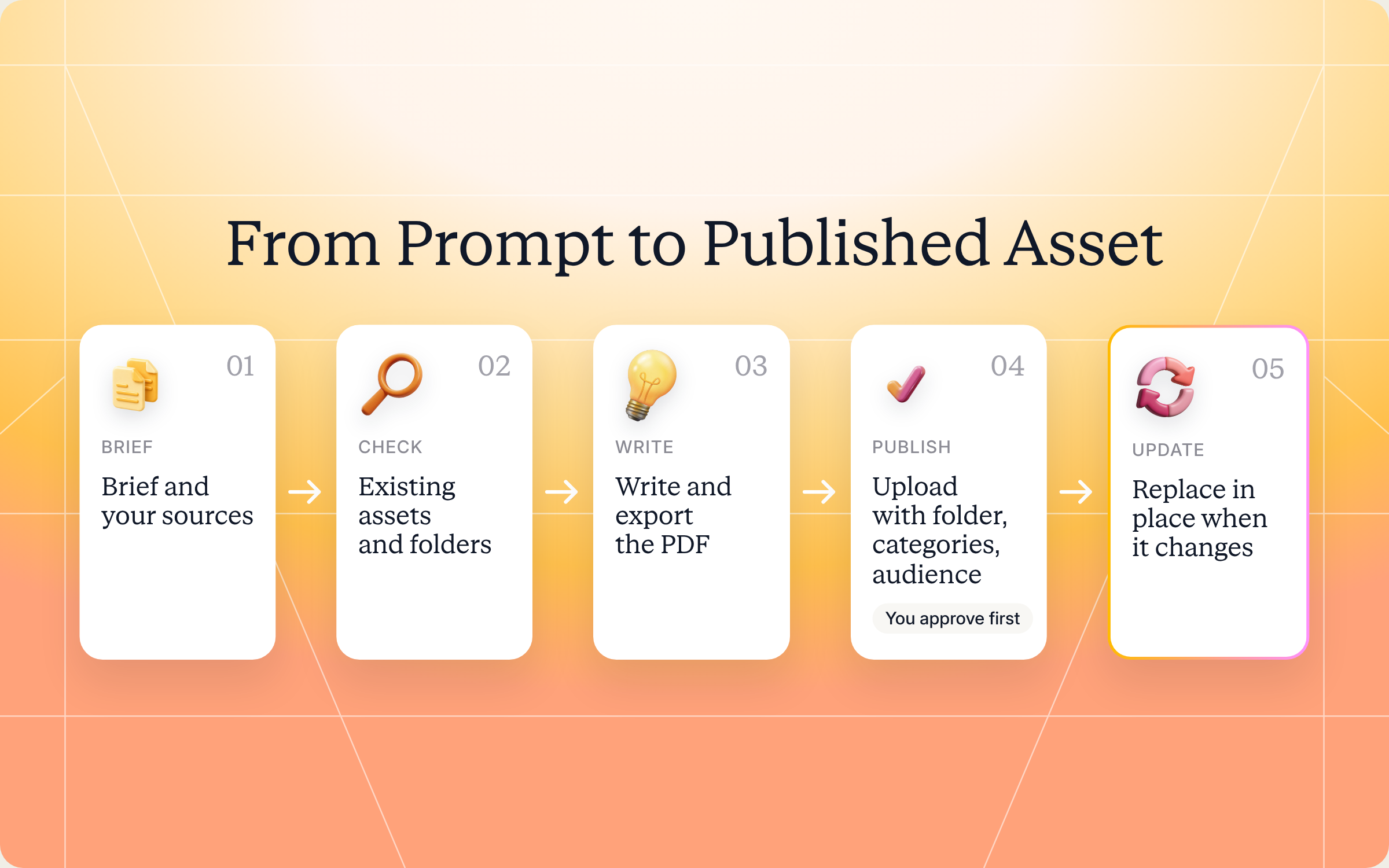
Step 1: Scope the asset
Before writing anything, Claude confirms the basics with you. Who the audience is (a reseller's seller needs a different document than a system integrator's consultant), whether it's for one partner or the whole partner network, which format and length, which sources to draw from, and which folder and categories it belongs in. It defaults to one page unless you ask for more.
Step 2: Check what already exists
Claude searches your existing assets and your knowledge base for the same topic. If a close match exists, it suggests updating that asset instead of adding a near duplicate. It also reads your folder tree, so it reuses the folder and category names you already have.
Step 3: Write the document
Claude writes in a partner facing voice, pulls real product names, pricing and integration steps from your sources, and tells you where each section came from. It keeps the format skimmable, applies your branding where it can, and leaves out anything internal only, like unreleased roadmap, internal margins or customer names you don't have permission to use.
Step 4: Export it
PDF is the default, because it previews inline in the portal and its text gets indexed for the AI agent. Office files, images and video work too.
Step 5: Upload the files
Claude opens one upload slot for the whole batch, up to 15 files. If Claude can't send files itself, you get a single drag and drop page that takes everything in one visit. No firewall or network changes needed either way. Public file links and URL assets like Loom or YouTube videos skip the upload entirely.
Step 6: Publish it
Claude recaps every setting (name, description, folder, categories, partner scope and whether there's a public link) and waits for your explicit approval. Then it publishes and returns the asset link so you can open it in Introw.
Step 7: Keep the library organized
Folder work is part of publishing, not an afterthought. Claude can create nested folders, rename them, move a folder with everything inside it, or archive a section you're retiring. Moves and archives touch everything in the folder, so it confirms first and reports how many assets and subfolders were affected.
Step 8: Iterate in place
When pricing changes, Claude uploads the new file and replaces the old one in place. Same asset, same link, view history kept, and the previous version stays in version history so you can restore it. It always confirms before replacing, since every partner sees the new file right away.
Get the skill: the full SKILL.md
Here's the complete skill file. Copy it as is, or adapt the formats, folders and guardrails to match your program.
---
name: vendor-asset-publisher
description: Use when a Partner Enablement lead, Partner Marketing Manager, or Channel Ops user wants to produce a partner-facing document (one-pager, battlecard, FAQ, pricing summary, integration guide) from the vendor's own knowledge sources and publish it into the Introw asset library over MCP, link an existing page or video as a URL asset, refresh an asset that already exists, or organise the library itself (create, rename, move, or archive folders). Trigger phrases include "write a one-pager for our partners", "create a battlecard on <competitor>", "publish this PDF to the asset library", "add this deck to the partner portal", "add this YouTube video as an asset", "update the pricing one-pager", "replace that file with the new version", "create a folder for X", "reorganise the asset library", "archive that folder".
---

# Agentic Asset Publisher (Vendor)

**Audience**: Vendor, **claude.ai Introw** MCP.
**Use case**: Enablement Support.

## When to use this skill

Use when the user wants partner-facing content to exist in Introw without authoring it inside Introw: write the document here (from their knowledge sources, in their voice), then create or update the asset over MCP so it lives in the asset library, is searchable by the partner-facing AI agent, and can be surfaced in partner experiences.

**Sample prompts that fire this skill:**
- "write a one-pager our resellers can send to prospects"
- "create a battlecard against Competitor X for our partners"
- "turn our pricing page into a partner FAQ and publish it"
- "publish this PDF to the asset library under Sales"
- "add this Loom walkthrough as an asset for Acme only"
- "the pricing changed, update the one-pager"

## Why this matters

Partner content dies in two places: never written, or written and never filed. Partners then ask a CAM for a battlecard that exists in someone's Drive. Authoring here and publishing over MCP closes both gaps in one motion: the document is grounded in the vendor's real docs and data, and it lands in the library the partner portal and the AI partner-support agent both read from, with a category, a folder, and an owner. Iteration is cheap: replace the file in place and the asset keeps its id, link, view history, and version history.

## The five MCP tools

| Tool | Kind | What it does |
| --- | --- | --- |
| `Introw:list_assets` | read-only | Lists assets (assetId, name, description, fileName, mimetype, `type: FILE` or `URL`, folder, categories, isPublic, viewCount, timestamps) and the library's folders. Source of `assetId` for updates and `folderId` for filing. Filter with `query`, `folder`, `partnerId`. |
| `Introw:list_asset_folders` | read-only | The folder tree: folderId, `name`, `path` (readable location such as "Sales/Battlecards"), parentFolderId, partnerId, categories, `assetCount` (assets directly inside), `subfolderCount`, and `archived` + `archiveReason` with `includeArchived`. Filter with `query`, `parentFolder` (that folder's subtree), `partnerId`. |
| `Introw:create_asset_upload` | mutation | Pass `fileNames`, **every file of the job in one call** (up to 15), each **including its extension** (the extension decides the content type). Returns `uploadPageUrl` (one drag-and-drop page covering the whole batch, 30-minute expiry) and `files[]`, each entry carrying that file's `uploadKey`, its own presigned `uploadUrl`, and the `contentType` a PUT must send. Neither delivery path needs any network, firewall, or allowlist change. Nothing appears in the library until `upsert_asset` is called with the key. |
| `Introw:upsert_asset` | mutation | Omit `assetId` = create (requires `name` + exactly one source). Provide `assetId` = update; only the fields you pass change. Sources: `uploadKey` (from `create_asset_upload`), `fileUrl` (public https file, copied into Introw's storage), or `url` (a URL asset: page, video, or hosted doc that stays where it is). Settings: `description`, `folder`, `categories`, `partnerId`, `isPublic`. On update, passing any source REPLACES the file. |
| `Introw:upsert_asset_folder` | mutation | Omit `folderId` = create (requires `name`; `parentFolder` nests it, `partnerId` puts it in a partner's library). Provide `folderId` = update: `name` renames, `parentFolder` MOVES the folder with everything inside it, `categories` replaces its tags, `archived: true`/`false` archives or restores the folder **and its entire contents**. |

Two neighbouring tools are worth knowing: `Introw:find_relevant_content` searches what is already in the knowledge base (use it before writing something that exists), and `Introw:search_partners` resolves a `partnerId` when the asset is for one partner only.

## Process

### Step 1: Scope the asset
Confirm before writing:
- **Audience**: which partner type and role (a reseller's seller and an SI's consultant need different documents). One partner only, or the whole network?
- **Format and length**: one-pager, battlecard, FAQ, guide. Default to one page unless the user asks for more.
- **Sources**: which connected knowledge to draw from, such as docs sites, Notion, Confluence, Drive, the product docs, the website. Never fabricate; every claim traces to a source.
- **Filing**: which folder and categories, and whether it should be publicly shareable.

### Step 2: Check what already exists
Run `Introw:list_assets` with a `query` on the topic, and `Introw:find_relevant_content` for the same question. If a close match exists, propose updating it (Step 8) instead of adding a near-duplicate.

Then run `Introw:list_asset_folders` to see how the library is organised and where this belongs. Reuse the folder and category names already in use; a library with "Battlecards", "battle cards", and "Competitive" is a library nobody browses. `assetCount` and `subfolderCount` show you which folders are actually used and which are empty shells.

### Step 3: Write the document
- **Partner-facing voice**: written for someone selling or delivering the vendor's product to their own customer, not for internal staff.
- **Grounded**: real product names, real pricing, real integration steps, from the sources. Cite where each section came from in your summary to the user.
- **Skimmable**: short sections, a clear headline, tables over paragraphs for comparisons, an explicit "what to do next".
- **On-brand**: pull logo, colors, and typography from the vendor's site or brand assets if the format supports it.
- **No internal-only content**: partners download this. No unreleased roadmap, no internal margins, no customer names without permission.

### Step 4: Export as a PDF (or the format the user asked for)
PDF is the default: it previews inline in the portal and its text is indexed for the AI agent. Office files (DOCX, PPTX, XLSX) also work and get a converted PDF preview. Images and video are fine too. Keep it under 2 GB.

### Step 5: Hand Introw the files
Call `Introw:create_asset_upload` **once for the whole job**, passing every file in `fileNames` (up to 15), each including its extension, for example `['acme-partner-one-pager.pdf', 'acme-q3-deck.pptx']`. One call means one upload page, so the user uploads once instead of once per file. If a batch comes back too long for one link, the error says how many of its first files fit: call again with those, then with the rest.

Then pick a delivery path on **your own** capability. **Never ask anyone to change network, firewall, or allowlist settings: neither path needs one.**

1. **You cannot run shell commands or send an HTTP request with a file body** (every chat assistant, and any case where the files are on the user's machine and not yours): give the user `uploadPageUrl`, and only that. It is one drag-and-drop page taking the whole batch in a single visit, and it requires them to be signed in to Introw in this organisation (they are redirected to log in if needed). The page skips a file it already received and any file that is not part of this upload, and says so, and if some files fail it asks for just those again, so a second drop never duplicates what landed. Ask them to tell you when it is done.
2. **You can**: for each entry of `files[]`, HTTP PUT that file's raw bytes to its own `uploadUrl` with its `contentType` as the `Content-Type` header, for example `curl --fail -T one-pager.pdf -H "Content-Type: application/pdf" "<uploadUrl>"`. The header must match exactly or the signature is rejected.

Either way, finish with one `upsert_asset` call per file, passing that file's `uploadKey`. Links expire after 30 minutes; if they lapse, request a new slot. If `upsert_asset` reports that no file has landed yet, wait and retry.

Two shortcuts skip the upload entirely:
- **`fileUrl`**: a publicly downloadable https file. Introw copies it into its own storage, so the source only needs to live until the call.
- **`url`**: a page, video, or hosted doc that should stay at its own location (YouTube, Loom, Vimeo, Vidyard, Google Docs / Slides / Sheets, Calendly, or any https page). Introw stores the link and embeds it, and nothing is copied, so that URL must stay live and publicly reachable.

Never pass local file paths or base64 to `upsert_asset`.

### Step 6: Publish it
1. Recap every setting (name, description, folder, categories, partner scope, public link) and get explicit approval. This is a write.
2. `Introw:upsert_asset` with no `assetId`, passing the source and settings:
   - **`folder`**: a `folderId` from `list_assets`, or a path such as `Sales/Battlecards` (missing folders are created, existing ones reused). `/` means the library root. The response lists any folders it created, so you can report them.
   - **`partnerId`**: only when the asset is for one partner's private library. Omit it for the shared library every partner can see.
   - **`categories`**: reuse the org's existing category names.
   - **`isPublic`**: only when the user explicitly wants a link that works without signing in. Default off.
3. Report the `assetId` and the `assetUrl` from the response so the user can open it in Introw. `status: "created"` means it is live in the library; previews and AI-search indexing finish in the background, so a preview can take a moment.

If the response comes back `status: "already_exists"`, that exact file or link is already an asset. Do not retry with a new upload; use the returned `assetId` to update it instead. For a URL asset this is checked per folder, so filing the same link in a second folder on purpose still works: pass the other `folder`.

### Step 7: Keep the library organised
Folder work is a first-class part of publishing, not an afterthought. `Introw:upsert_asset_folder` covers it:
- **New section**: create a folder, optionally nested (`parentFolder` takes a folderId or a path such as `Sales/Battlecards`, creating missing levels). A folder that already exists in that place is reused, not duplicated.
- **Rename or re-tag**: `folderId` + `name` or `categories`.
- **Reorganise**: `folderId` + `parentFolder` moves the folder **with every subfolder and asset inside it**. Pass `/` to move it to the top level. A folder adopts its new parent's library, so moving between the shared library and a partner's changes who can see the content. Say that out loud before doing it.
- **Retire a section**: `archived: true` archives the folder and everything inside (with an optional `archiveReason`). Partners lose access immediately and the AI agent stops answering from those documents. `archived: false` restores it; if the name was taken again in the meantime, Introw suffixes the restored folder and tells you.

Confirm any move or archive with the user first and report the counts the tool returns (`archivedAssetCount`, `archivedFolderCount`), so they know how much content it touched. Prefer archiving over asking someone to delete: it is reversible.

### Step 8: Iterate, update settings or replace the file
- **Settings-only change** (rename, description, categories, folder, public link): `upsert_asset` with `assetId` and just those fields. The response lists what actually changed, and returns `status: "unchanged"` when nothing differed.
- **Content change**: upload the new file (`create_asset_upload` → deliver it by the path Step 5 picks → new `uploadKey`), then `upsert_asset` with `assetId` + that `uploadKey`. This replaces the file **in place**: same asset, same link, view history kept, and the previous version stays in the asset's version history so it can be restored in Introw. In-portal previews and AI-search content regenerate in the background. **Always confirm with the user before replacing**, since every partner sees the new file immediately.
- **Swapping types is allowed**: passing `url` to an asset that was a file turns it into a URL asset, and vice versa.
- Omitting `folder` or `partnerId` on an update leaves the asset where it is. Moving an asset out of a partner's library back into the shared one is done in Introw.

## Output format
- **Brief recap** (pre-write, for sign-off): audience, format, sources, filing plan.
- **The document itself** plus a short content summary and where each section came from.
- **Publish receipt**: `assetId`, `assetUrl`, folder (and any folders created), categories, audience (shared library or which partner), public link on or off.
- **Reorganisation receipt** (when folders changed): what moved or was archived, and how many assets and subfolders it affected.
- **Distribution note**: what still has to happen for partners to see it in the portal (see the guardrail below), and the phrasing to use to update it later.

## Guardrails & PRM best practice
- **Knowledge-sourced, never fabricated.** Every claim traces to the vendor's real docs or data; cite the source. Partner-facing collateral is one forward away from being customer-facing.
- **Confirm before every write.** Settings recap before creating; explicit confirmation before replacing a file, because partners see the new version immediately.
- **The library is not the portal.** Publishing puts the asset in the asset library and makes it searchable for the AI partner-support agent, but it does not add it to a specific portal tab or partner experience. Placing it in an asset hub component, or linking a partner-specific asset into a partner experience, is done in Introw. Say so in the receipt rather than implying partners will see it in their portal navigation right away.
- **Check for duplicates first.** `list_assets` plus `find_relevant_content` before writing. Updating the asset partners already bookmarked beats publishing a second one.
- **Reuse the existing taxonomy.** Existing folder names and categories over new ones, checked with `list_asset_folders`. Do not invent a parallel structure, and do not create a folder per asset.
- **Moving and archiving folders is bulk work.** Both act on everything inside the folder: a move relocates every asset in it (and can switch which library, so which partners, they belong to), and archiving hides them all and removes them from the AI agent's knowledge base. Confirm first, then report the counts the tool returns.
- **Archive, never ask for deletion.** Archiving is reversible (`archived: false`) and keeps the audit trail; there is no delete in this skill by design.
- **`isPublic` is a real decision.** It creates a link that works without signing in. Default off; only enable when the user asks, and never for pricing or anything partner-confidential.
- **Partner-specific means partner-specific.** With `partnerId` set, only that partner sees it. Use it for negotiated pricing or one partner's plan, not as a filing shortcut.
- **URL assets depend on the source staying up.** A link that dies is a broken asset. Prefer uploading a file for anything the vendor controls and wants to keep.
- **Permissions.** Anything that touches the shared library requires the connected Introw user's `assets_write` permission: publishing there, and also editing or moving an asset or folder that lives there, even when the call names a partner. If the tool reports it is missing, surface that plainly (an admin grants it) instead of retrying, or scope the work to a partner's own library if that is what the user actually wanted.
- **Cross-skill handoff.** What to write should come from real gaps: `vendor-support-content-gap-detector` (recurring partner questions) or `vendor-content-radar` (market and release signals). Per-partner branded variants of a published asset: `vendor-cobranded-collateral-generator`. If the content is training rather than reference, build a course instead with `vendor-scorm-course-builder`. To nudge partners toward the new asset, use `Introw:create_partner_task` or an announcement.
How to install and run the skill
You've got two ways to use it, depending on where you work.
Option 1: Claude Code
Create a folder called vendor-asset-publisher inside .claude/skills/ in your repo, and save the file above as SKILL.md inside it. Claude Code picks it up automatically and runs it whenever your prompt matches the trigger phrases in the description.
Option 2: Claude (or any MCP client) with the Introw connector
You don't need to be technical for this one. Connect Claude to Introw once, and you can run the same play in plain language from Claude, or from ChatGPT, Slack, Teams or your CRM. Introw is listed in Claude's connector directory, so it's one click plus a sign in, with no server URL to paste. Here's how connecting looks:
The step by step version lives in the Connect Claude guide, and the Claude integration page covers what you can do once you're connected.
Prompts to try
Once the skill is installed or Claude is connected, try any of these:
- "Write a one pager our resellers can send to prospects, using our product docs and pricing page." Drafts the document, checks for an existing version, and proposes where to file it.
- "Create a competitive battlecard against Competitor X for our partners and file it under Sales/Battlecards." Builds a sales battlecard from your sources and publishes it after you approve.
- "Turn our pricing page into a partner FAQ and publish it." Converts existing content into partner ready answers.
- "Add this Loom walkthrough as an asset for Acme only." Creates a URL asset in one partner's private library.
- "The pricing changed, update the one pager." Replaces the file in place, keeping the same link and view history.
What you'll get back
A typical run returns five things:
- Brief recap: audience, format, sources and filing plan, for you to sign off before Claude writes.
- The document: the finished asset, plus a summary of where each section came from.
- Publish receipt: asset ID, asset link, folder, categories, audience and whether a public link is on.
- Reorganization receipt: when folders changed, what moved or was archived and how many assets it touched.
- Distribution note: what's still needed for partners to see it in the portal, and the phrasing to use when you update it later.
Here's an illustrative publish receipt for a new battlecard:
| Field | Value |
|---|---|
| Asset | Partner battlecard: Acme vs Competitor X (PDF, 1 page) |
| Folder | Sales/Battlecards (existing folder reused) |
| Categories | Competitive, Sales |
| Audience | Shared library, visible to all partners |
| Public link | Off |
| Sources cited | Product docs, pricing page, Q3 release notes |
| Next step | Add it to the Sales asset hub in Introw, then send a partner announcement |
And here's how that run looks in Claude, from the brief recap to the publish receipt:

Staying in control: what Claude can and can't do
Handing your content library to an AI assistant only works if you trust it. A few things are built in:
- You approve every write: Claude recaps the settings before creating an asset and asks again before replacing a file, because partners see the new version immediately.
- It works as you: Claude connects to Introw over OAuth with your account, so it can only see and do what you can. Publishing to the shared library needs your assets_write permission.
- It doesn't make things up: every claim must trace to your real docs or data, and Claude cites the source. Partner collateral is one forward away from a customer.
- It never deletes: there's no delete in the skill. Retiring content means archiving, which you can reverse.
- Public links stay off: a link that works without signing in is only created when you ask, and never for pricing or anything confidential.
- Library isn't portal: publishing makes the asset searchable for the AI agent, but placing it in a portal tab or asset hub still happens in Introw. The receipt says so, so nobody assumes partners can already see it.
Prefer to do this in the Introw app?
You can build and manage the same library inside Introw. Upload content, organize it into folders and categories, set access per asset or segment, and give the AI agent the context it needs to answer partner questions from your content.
The full walkthrough is in the build the asset library guide, and the asset library overview covers sharing, versions and engagement tracking. For a broader look at running a content program for partners, read our best practices for SaaS partner content programs.
Pair it with other Claude skills
Publishing works best when you know what to write and what to do with it next. These skills from the library pair well:
- Support Content Gap Detector: clusters the questions partners keep asking and tells you which assets to write next.
- Content Radar: watches market and release signals so your battlecards and one pagers don't go stale.
- Cobranded Collateral Generator: turns a published asset into branded versions for each partner.
- SCORM Course Builder: when the content is partner training rather than reference, builds a course instead.
You'll find all of them in Introw's skill library, and our roundup of Claude skills for partner teams explains how they fit together.
Run partner enablement from Claude with Introw
Introw is a CRM first partner relationship management platform, which means it builds on top of your existing HubSpot or Salesforce setup rather than replacing it. It's also headless by design: the partner portal is one surface, but you can run the same program in plain language from Claude, ChatGPT, Slack or Teams through Introw's MCP server, with every action written back to your CRM.
That's what makes this skill work. Your partner enablement assets, folders and AI agent knowledge live in one place, so a battlecard you publish from Claude is the same one partners find in the portal and the same one the AI agent answers from. Pair it with content enablement tools and partner onboarding journeys, and new partners get the right assets from day one.
Connect Claude to your partner program and publish your first asset today. Connect Claude or book a demo.
Still curious? Here are some quick answers to help clear things up
Partner enablement content is the material that helps channel partners sell, deliver and support your product, like one pagers, battlecards, FAQs, pricing summaries, integration guides and training materials. See our enablement content glossary entry for more.
No. Claude Code users can drop the SKILL.md into their skills folder. Everyone else can connect Claude to Introw through the connector directory and run the same play in plain language.
Not without you. Claude recaps every setting and waits for your approval before creating an asset, replacing a file, moving a folder or archiving anything. It never deletes.
Yes. Ask for a battlecard against a named competitor and Claude drafts it from your own sources, checks whether one already exists, and files it in your battlecards folder after you approve. See our partner battlecard glossary entry for what to include.
Yes. The full file is in this article and in Introw's skill library. You can copy it as is or adapt it, but it publishes through Introw's MCP server, so you'll need Introw connected to run it.





See AI-Native PRM in Action
Book a demo with one of our partner program experts, or explore Introw on your own time.

