
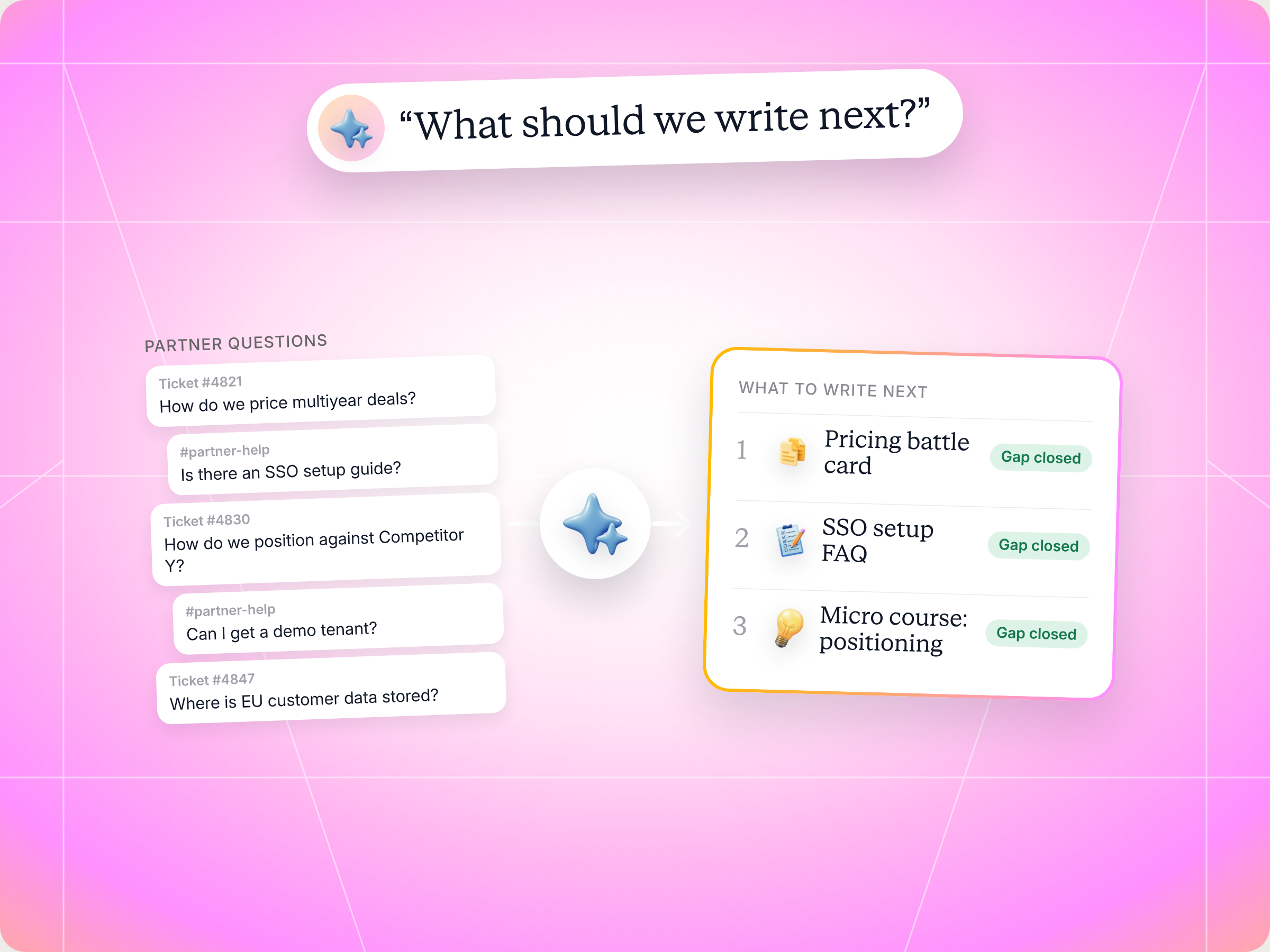
If your partners keep asking the same questions, the Claude skill to use is Support Content Gap Detector. It pulls 90 days of partner support tickets, comments and form questions, clusters them by intent, checks each cluster against your knowledge base, and ranks the three to five pieces of partner enablement content that would remove the most support load. You review the roadmap and decide what gets written, and nothing is published or changed without your approval. The full SKILL.md is below, free to copy, along with install steps, prompts to try, and what you'll get back.
Here's a number worth sitting with. Introw's enablement support playbook cites benchmarks showing AI can deflect 40 to 60% of routine partner support tickets, with best in class programs reaching 70 to 80%. The gap between those two numbers is almost never the AI. It's the content behind it.
You've probably lived this. A reseller pings their channel manager on Slack: "What's the price for 50 seats on annual billing?" Two days later, another partner asks the same thing. Then a third asks how to set up SSO with Okta, and nobody can find the doc. Your team answers each one by hand, and the knowledge base never gets the answer.
So how do you know which content to write next? A survey? A gut feeling from your last partner advisory board?
There's a better way, and it starts with the questions partners already ask you. This guide covers what good partner support looks like, how to spot gaps in your partner enablement content, the Claude skill that finds them for you, the full SKILL.md you can copy, how to install and run it, and how to stay in control of what it recommends. It's written for partner enablement managers, channel ops leads and anyone who owns partner support at a B2B software vendor. By the end, you'll have a repeatable way to turn partner questions into a ranked content roadmap.
What good partner support looks like (and why content is the bottleneck)
Partner support is everything you do to help channel partners answer their own questions and keep selling: product knowledge, pricing help, technical support, deal support and the ongoing support that keeps a reseller confident in front of a buyer. It sits right next to partner enablement. Enablement gives partners the knowledge up front. Support catches whatever enablement missed.
In most programs, that safety net is a person. The channel account manager becomes a help desk. Questions arrive in Slack, email and the partner portal, and every answer lives in someone's inbox instead of somewhere partners can find it next time.
That's expensive in three ways:
- Slow answers cost deals: a partner waiting a day for a pricing answer is a partner whose prospect is talking to someone else.
- Your team's time disappears: every repeated question pulls a channel manager, a solutions engineer or legal away from strategic work.
- Ticket deflection stalls: an AI agent or a self serve portal can only answer what your partner knowledge base already covers. When the content isn't there, the agent guesses or hands off to a human.
Here's the uncomfortable part. Most teams write enablement content based on what they think partners need. Product launches, a new battle card because sales asked for one, a refreshed pitch deck. Meanwhile, the questions partners actually ask go unanswered in any reusable way.
Good partner support flips that. It treats every support question as a signal. If ten partners asked it this quarter, it's not a support problem. It's a content gap.
Partner support vs. partner enablement: how they fit together
| Area | Partner enablement | Partner support |
|---|---|---|
| Goal | Equip partners to sell before they need help | Unblock partners when they're stuck |
| Timing | Partner onboarding, ongoing training, launches | Any time, usually mid deal |
| Typical assets | Training programs, sales collateral, battle cards, certification programs | Answers, FAQs, how to docs, escalations |
| Who owns it | Partner enablement team, partner marketing | Channel managers, channel ops, support |
| Signal it produces | Course completion, content views | Questions, tickets, time to resolve |
The best programs connect the two. Support questions tell you what enablement missed, and enablement content reduces support volume. That feedback loop is the core of a successful partner enablement strategy.
How to find gaps in your partner enablement content
Finding gaps isn't about auditing everything you've published. It's about matching demand (what partners ask) against supply (what you can point them to). Here's what a solid content gap review looks like, whether you run it by hand or with Claude.
- Collect every question, not just tickets: formal tickets are only part of it. Slack threads, comments on partner records and "ask my channel manager" form submissions often hold most of the volume.
- Group by intent, not by wording: "What's the price for 50 seats?" and "Can you quote annual billing?" are the same need. Cluster them so you see the real demand.
- Score your coverage honestly: for each cluster, is there a clean, current, easy to find answer? Or is it buried in a 40 slide deck from last year?
- Weigh volume against effort: a question asked 60 times that takes a minute to answer may matter less than one asked 15 times that needs a solutions engineer for an hour.
- Flag what needs legal or security review: compliance answers, pricing exceptions and contract terms shouldn't be drafted casually.
- Pick the right format: short repeated questions become FAQs, competitive objections become battle cards, multistep workflows become micro courses.
Common partner support clusters and the content that fixes them
| Question cluster | Example partner question | Content that usually fixes it |
|---|---|---|
| Pricing and quoting | "What's the price for 50 seats on annual billing?" | Battle card or pricing FAQ |
| Product how to | "How do I set up SSO with Okta?" | Step by step how to doc |
| Sandbox and provisioning | "Can I get a 14 day demo tenant?" | A self serve portal action |
| Marketing assets | "Where's the latest healthcare battle card?" | An asset library entry |
| Compliance | "Are we HIPAA compliant for this prospect?" | Reviewed answer, flagged for legal |
| Competitive positioning | "How do I respond when they mention Competitor Y?" | Battle card |
| Escalations and bugs | "The integration is down for my customer" | Nothing: route to a human |
That last row matters. Some partner support should stay human by design. A good content gap review knows the difference.
Building a successful partner enablement strategy on partner support data
Most partner enablement advice starts with the same key components: set goals, run partner onboarding, build training programs, create marketing and sales collateral, and provide ongoing support. That's all right. What's often missing is a way to decide which content to create next. Partner support data fills that hole.
Here's how support questions strengthen each part of an effective partner enablement strategy:
- Partner onboarding: if new partners ask the same setup questions in their first 30 days, your onboarding process is missing a step. Fix it there, not in a Slack thread.
- Partner training: repeated product how to questions show where your partner enablement training didn't stick. Ongoing training should target those gaps, not repeat what partners already know.
- Sales collateral: pricing and competitive questions tell you which battle cards and one pagers your sales teams and channel partners actually need. Finalized messaging from the start beats five versions of the same deck.
- Brand consistency: when partners improvise answers, they improvise your value proposition too. A clean answer in your partner knowledge base keeps the story consistent across external partners, from resellers to system integrators and managed service providers.
- Partner feedback: support questions are partner feedback you don't have to survey for. They tell you what partners need in their own words.
- Collateral library: keep a centralized repository for marketing collateral, like case studies, presentations, one pagers and cobranded materials, and make it easy for partners to find and customize. Then update it regularly so nothing goes stale.
- Content usage: evaluate which assets partners actually open. Low usage next to high question volume usually means the asset exists but can't be found, or doesn't answer the real question.
- Measurement: track support volume, time to resolve and ticket deflection rate per cluster alongside your usual key performance indicators, like partner engagement, partner performance, sales performance and partner revenue growth.
Treat it this way and your enablement program becomes a loop. Partners ask, you spot the gap, you ship the content, and support volume drops. That's the difference between a content library partners ignore and a strong partner enablement program that improves partner satisfaction, customer satisfaction and revenue outcomes for both sides.
Investing in partner support this way pays back in faster revenue growth, better partner retention and more trust, because partners learn that a question gets a real answer. It also helps to define roles clearly: who owns the answer, who writes the content, and who reviews anything sensitive, so nothing falls between enablement, support and legal. A partner relationship management (PRM) platform helps here, because it centralizes onboarding, communications and content in one place. It also takes pressure off your internal teams, so channel leaders can spend time on strategic priorities instead of answering the same question for the tenth time.
Why partner enablement is important for partner readiness
Partner readiness is simple to define: can a partner explain your company's products, handle the common objections and move a deal through your sales process without calling you? Partner enablement is important because it's what gets partners there, and partner support is how you find out when they're not.
A few habits make the difference:
- Provide partners with answers where they work: in the partner portal, in Slack or Teams, and inside the tools they already use. That's what keeps partners informed without another login.
- Match training materials to real questions: sales training and sales techniques stick when they're built around the objections your channel partners actually hear.
- Treat enablement assets as products: give every asset an owner, a review date and a usage number, so you can measure success instead of guessing.
- Watch market trends: new competitors and pricing changes create new questions fast, and key partners will feel them first.
The payoff is mutual growth. When content enables partners to answer buyers on the spot, the customer journey gets shorter and customer success improves on both sides. Sales enablement tools help with distribution, but they can't tell you what's missing. Your partner support history can.
It's the same logic behind good sales enablement content for your own reps. The difference with partner enablement is distance: you can't tap a partner on the shoulder, so the content has to do the work. If you want a primer, our glossary entries on partner enablement, partner battle cards and the partner knowledge base cover the basics.
Why finding content gaps by hand doesn't scale
Doing this by hand is slow. Pulling three months of tickets, comments and form questions from different systems, reading them, clustering them and checking each against your content library is a week of work for a partner enablement manager. So it happens once a year, if at all.
It gets harder as your partner network grows. Expanding into new markets adds languages, new partner types and new questions. A partner ecosystem with 300 resellers produces far more signal than any one person can read, which is why channel partner enablement teams often fall back on guesswork. That's exactly the kind of job a Claude skill is good at.
The skill to use: Support Content Gap Detector
Support Content Gap Detector is a vendor side skill from Introw's free Claude skill library. It reads your partner support history through Introw's MCP server, clusters what partners are asking, checks your knowledge base for each cluster, and returns a ranked content roadmap grounded in real demand.
| Detail | What it covers |
|---|---|
| Built for | Partner enablement managers, channel ops managers and vendor IT |
| Use it when | You want to know what partner enablement content to write next, or why your ticket deflection rate has stalled |
| What it reads | Support tickets, comments on partner records, tasks and form submissions, plus your knowledge base through whatever knowledge connector you use |
| What it produces | A cluster table, three to five ranked content recommendations, quick wins, compliance flags and a recommendation on what your support agent should answer alone |
| What it writes | Nothing by default. It's an analysis skill, so you decide what gets created |
| Skill ID | vendor-support-content-gap-detector |
The big idea is a simple inversion. Instead of asking "what content do we have?", it asks "what are partners actually asking that we don't answer well?" That keeps your enablement efforts tied to demand, not assumptions.
Prompts that trigger it include "support content gaps", "what should we write next", "knowledge base gaps", "partners keep asking the same thing", "where's the content missing" and "support deflection roadmap".
How the skill works, step by step
The skill follows seven steps. You don't have to run them yourself, but knowing what happens under the hood helps you trust the roadmap.

Step 1: Set the analysis window
By default, the skill looks back 90 days. That's long enough to see patterns and recent enough to matter. You can narrow it by partner type, region, product line or tier, which is useful because Bronze partners often ask different questions than Gold partners.
Step 2: Pull every partner support event
The skill gathers questions from everywhere they show up: formal support tickets with category and resolution time, comments and conversations on partner records, support style tasks, and questions raised through forms. For each one, it captures the question (anonymized), the product area, who resolved it, how long it took, and the partner's tier and type.
Step 3: Cluster questions by intent
Next, it groups questions into intent clusters like pricing and quoting, product how to, provisioning, account lookups, deal status and commissions, marketing assets, compliance, integrations and APIs, competitive positioning, and escalations. For each cluster you see the count, sample questions, how many partners asked, average time to resolve and who usually answers.
Step 4: Check each cluster against your knowledge base
This is where the gaps show up. The skill scores your coverage for each cluster:
- Strong: a clean, current, easy to find answer exists.
- Partial: an answer exists, but it's buried, outdated or too generic.
- Weak: only fragments exist, so whoever answers is improvising.
- Missing: there's no usable content at all.
To do this, it uses whatever knowledge connector you have installed, like Notion, Confluence, Google Drive or Box. If none is connected, it asks you to estimate coverage per cluster instead.
Step 5: Score the priority of each gap
Not every gap is worth closing first. The skill weighs volume, time to resolve, and who's resolving it (a channel manager's time costs less than an engineer's or a lawyer's), then factors in how big the coverage gap is and how compliance sensitive the topic is. High volume, slow, expensive, uncovered questions rise to the top.
Step 6: Recommend the right content for each top cluster
For each priority cluster, the skill prescribes a specific asset: a battle card for competitive and pricing objections, a step by step doc for product and integration questions, an FAQ entry for short repeated questions, a micro course for multistep workflows, an asset library entry for marketing materials, or a self serve portal action for things that should be a button rather than a question. Each recommendation comes with a rough scope, the partner tiers it helps most, the estimated deflection impact, and the source material you can draft from.
Step 7: Output the roadmap
Finally, you get the top three to five recommendations ranked by priority, an estimate of how much support load you could deflect if they all shipped, and a separate list of quick wins: high volume questions that are cheap to answer.
Get the skill: the full SKILL.md
Here's the complete skill file. Copy it as is, or adapt the clusters, scoring and content types to match your partner program.
---
name: vendor-support-content-gap-detector
description: Use when a Partner Enablement lead, Channel Ops, or Vendor IT user wants to analyze recurring partner support questions over a window, clustering by intent and cross-checking against the existing knowledge base, to identify the gaps where partners repeatedly ask but no clean answer exists. Outputs ranked content recommendations (battle cards, FAQs, micro-courses) with scope and target partners. Trigger phrases include "support content gaps", "what should we write next", "knowledge base gaps", "partners keep asking the same thing", "where's the content missing", "support deflection roadmap".
---

# Support Content Gap Detector (Vendor)

**Audience**: Vendor, uses **claude.ai Introw** MCP.
**Use case**: 06, Enablement Support.

## When to use this skill

Use when a Partner Enablement lead, Channel Ops, or Vendor IT user wants to analyze recurring partner support questions over a window, clustering by intent and cross-checking against the existing knowledge base, to identify the gaps where partners repeatedly ask but no clean answer exists. Outputs ranked content recommendations (battle cards, FAQs, micro-courses) with scope and target partners.

**Sample prompts that fire this skill:**
- "support content gaps"
- "what should we write next"
- "knowledge base gaps"
- "partners keep asking the same thing"
- "where's the content missing"
- "support deflection roadmap"

## Why this matters
AI deflects **40 to 60% of routine partner support tickets** (Gartner / Pylon benchmarks); best-in-class hits 70 to 80%. The gap between current and best-in-class is almost always the same shape: **partners are asking specific questions the knowledge base doesn't have a clean answer to.** The agent then either improvises (risky) or routes to humans (slow). Either way, the deflection rate stalls.

This skill closes that gap by inverting the analysis: instead of asking "what content do we have?", it asks "**what are partners actually asking that we don't answer well?**", then prescribes the next 3 to 5 content investments. The output is a content roadmap that's grounded in actual demand, not assumptions.

## Process

### Step 1: Define the analysis window
- Default: trailing 90 days. Long enough for pattern detection, recent enough for relevance.
- Optional scoping: by partner type, region, product line, or tier (Bronze partners often have different questions than Gold).

### Step 2: Pull partner support events
- `Introw:search_crm_objects` (object type = ticket): formal support tickets in window, with category, status, resolution time.
- `Introw:search_partner_engagement`: comments and conversational support events on partner records.
- `Introw:search_tasks`: task-style support items if program uses them.
- `Introw:search_form_submissions`: questions raised through forms (e.g., "ask my CAM" intake).
- Capture: question text (anonymized), product/category, resolver, time-to-resolve, partner tier, partner type.

### Step 3: Cluster by intent
Group questions into intent clusters. Common partner-support clusters:

- **Pricing / quoting / config** ("what's the price for 50 seats with annual billing?")
- **Product / feature how-to** ("how do I set up SSO with Okta?")
- **Provisioning / sandbox** ("can I get a 14-day demo tenant?")
- **Account / license lookup** ("is account X already a customer?")
- **Deal status / commission** (often deflectable to `partner-my-commissions`)
- **Marketing assets** ("where's the latest healthcare battle card?")
- **Compliance** ("are we SOC 2 / HIPAA / GDPR compliant for prospect X?")
- **Integration / API** ("does the API support batch operations?")
- **Competitive positioning** ("how do I respond when prospect mentions Competitor Y?")
- **Bug / outage / escalation** (rarely deflectable; route to engineering).

For each cluster: count, top sample questions, partners affected, average time-to-resolve, top resolvers.

### Step 4: Cross-check against existing knowledge base
For each cluster, score knowledge-base coverage:
- **Strong**: clean, current, easily findable answer exists.
- **Partial**: answer exists but is buried, outdated, or too generic.
- **Weak**: only fragments exist; the support agent is improvising.
- **Missing**: no usable content at all.

Score requires connecting to the vendor's content systems. Use whatever knowledge MCP is installed (Notion, Confluence, Google Drive, Box, etc.). If no knowledge MCP is connected, fall back to user input on coverage estimate per cluster.

### Step 5: Score gap priority
For each cluster:
- **Volume**: how many tickets/comments?
- **MTTR**: how long does resolution take currently?
- **Resolver cost**: who's resolving (CAM time? Engineering? Legal review?)
- **Coverage gap** (Step 4 score)
- **Compliance sensitivity**: does the cluster touch SOC 2 / GDPR / pricing exceptions? (Higher sensitivity = more careful content authoring required.)

Priority score = (volume × MTTR × resolver-cost) ÷ compliance-risk × coverage-gap-severity.

### Step 6: Recommend content per top cluster
For each top-priority cluster, prescribe a specific content asset:
- **Battle card** for competitive / pricing-objection clusters.
- **Step-by-step how-to doc** for product/feature/integration clusters.
- **FAQ entry** for short, repeated questions.
- **Micro-course** for clusters that involve a workflow with multiple steps (hand-off to `vendor-microcourse-from-closed-lost`).
- **Asset library entry** for marketing / collateral clusters.
- **Self-service portal action** for clusters that should be a button rather than a question (e.g., sandbox provisioning).

Each recommendation includes:
- Asset type and rough scope.
- Target audience (which partner types/tiers benefit most).
- Estimated deflection impact (volume reclaimed × time saved).
- Source material the agent can use to draft a first version (existing fragments, similar past tickets, internal docs).

### Step 7: Output the roadmap
- Top 3 to 5 content recommendations, ranked by priority score.
- Aggregate summary: how much support load could be deflected if all top recommendations shipped.
- "Quick wins" (high volume × low authoring effort) called out separately.

## Output format
- **Cluster table**: cluster name, volume, MTTR, current coverage, gap severity, priority score, sample questions.
- **Top content recommendations**: type, scope, target audience, est. deflection impact, source material.
- **Quick wins** flagged.
- **Compliance flags** for clusters needing legal/security review.
- **Capability-matrix recommendation**: which clusters should the support agent execute autonomously vs. route for approval (compliance-sensitive clusters stay human-approved).

## Guardrails & PRM best practice
- **Demand-driven, not catalog-driven.** Don't recommend content because there's a gap *in theory*; recommend because partners are *actually asking*. The volume column is the discipline.
- **Authoring cost matters.** A high-priority cluster that requires legal review on every word is not a quick win. Surface effort estimates honestly.
- **Anonymize before clustering.** Sample questions surfaced in the output should not contain partner-confidential data (account names, deal sizes). Replace specifics with placeholders.
- **Compliance-sensitive content** (SOC 2 attestations, pricing exceptions, contract terms) requires legal/security review before shipping. Flag, don't draft.
- **Don't deflect what should be human.** Some clusters (escalations, dispute handling, strategic-account discussions) shouldn't be deflected, humans handle them by design. Don't recommend content for those.
- **Pair with measurement.** When a content asset ships, measure the cluster's volume + MTTR over the following 60 days. If the asset doesn't move the metric, it's wrong content (not a deflection failure). Iterate.
- **Tier-aware content.** Bronze partners often ask different questions than Gold (Bronze: how to use the product; Gold: how to position against Competitor Z). Tier the content recommendations.
- **Multilingual scope.** If partners span regions, the content needs language coverage. Flag clusters where the volume is concentrated in non-English markets, translation needs to be in scope.
- **Cross-skill handoff.** Workflow-style clusters → `vendor-microcourse-from-closed-lost` to author. Compliance clusters → flag for legal. Sales-positioning clusters → battle card authoring (often handed off to product marketing). Once content ships, `vendor-support-deflection-audit` (if installed) measures the impact.
How to install and run the skill
You've got two ways to use it, depending on where you work.
Option 1: Claude Code
Create a folder called vendor-support-content-gap-detector inside .claude/skills/ in your repo, and save the file above as SKILL.md inside it. Claude Code picks it up automatically and runs it whenever your prompt matches the trigger phrases in the description.
Option 2: Claude (or any MCP client) with the Introw connector
You don't need to be technical for this one. Connect Claude to Introw once, and you can run the same analysis in plain language from Claude, or from ChatGPT, Slack, Teams or your CRM. Introw is listed in Claude's connector directory, so it's one click plus a sign in, with no server URL to paste. Here's how connecting looks:
The step by step version lives in the Connect Claude guide, and the Claude integration page covers what you can do once you're connected. For the coverage scoring in Step 4, also connect the tool where your partner enablement content lives, like Google Drive, Notion or Confluence.
Prompts to try
Once the skill is installed or Claude is connected, try any of these:
- "Partners keep asking the same thing. Find our support content gaps." Runs the full 90 day analysis across every partner.
- "What should we write next for our Gold partners in EMEA?" Scopes the analysis to one tier and region.
- "Show me knowledge base gaps for pricing and compliance questions only." Focuses on the clusters you care about most.
- "Build a support deflection roadmap for Q1 and call out the quick wins." Gets you a ranked plan you can take to your team.
- "Which partner questions should our support agent answer on its own, and which should go to a human?" Returns the capability recommendation per cluster.
What you'll get back
A typical run returns five things:
- Cluster table: each cluster with its volume, time to resolve, current coverage, gap severity, priority score and anonymized sample questions.
- Top content recommendations: three to five ranked assets with type, scope, target partners, estimated deflection impact and source material to draft from.
- Quick wins: high volume questions you can close with little authoring effort.
- Compliance flags: clusters that need legal or security review before anyone writes a word.
- Agent recommendation: which clusters your AI support agent can answer on its own and which should stay human approved.
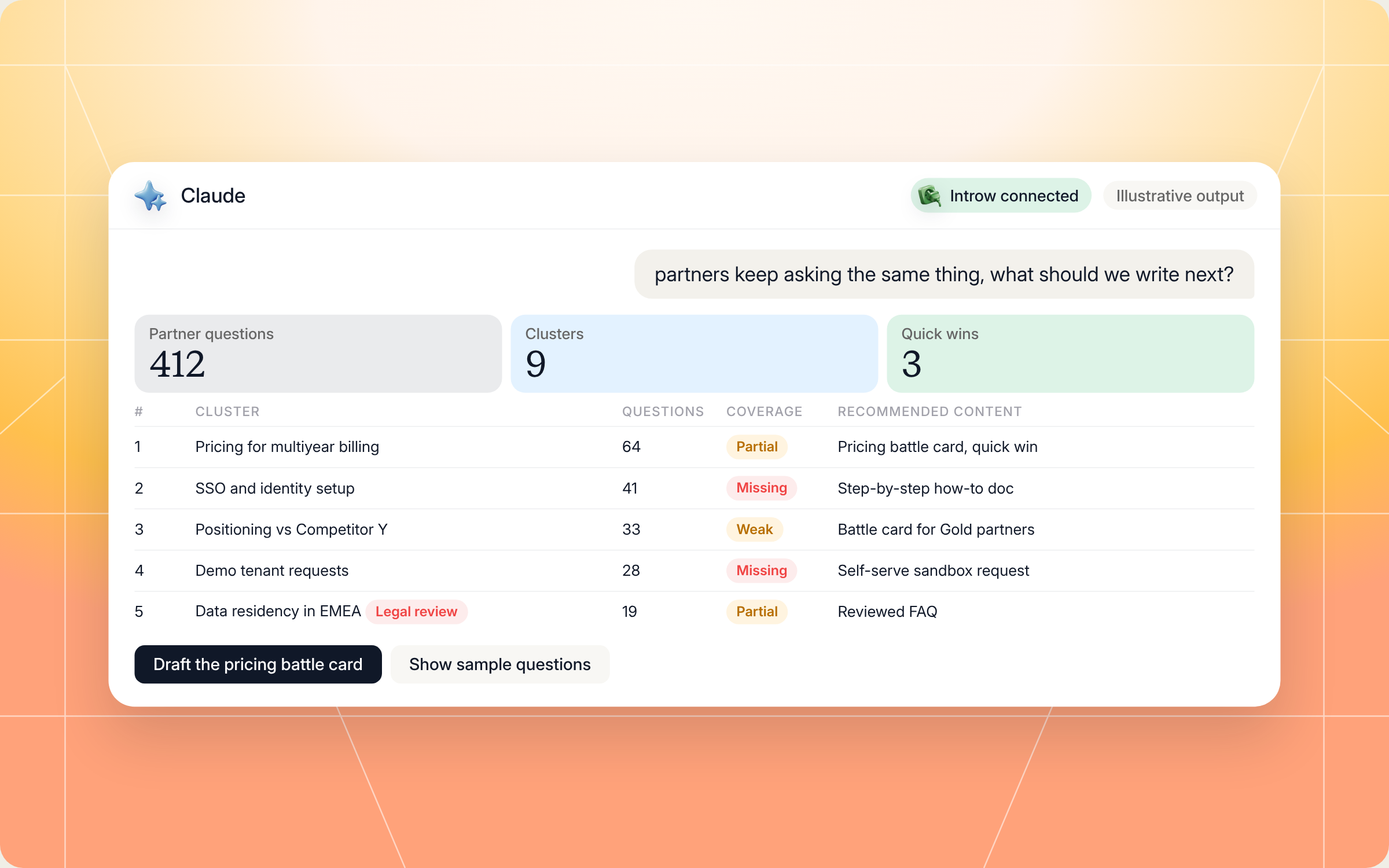
Here's an illustrative example of a roadmap for a midsize SaaS partner program:
| Rank | Cluster | Questions (90 days) | Coverage | Recommended content |
|---|---|---|---|---|
| 1 | Pricing for multiyear and annual billing | 64 | Partial | Pricing battle card for resellers, quick win |
| 2 | SSO and identity setup | 41 | Missing | Step by step how to doc with screenshots |
| 3 | Positioning against Competitor Y | 33 | Weak | Battle card, tiered for Gold partners |
| 4 | Demo tenant requests | 28 | Missing | Self serve sandbox request in the portal |
| 5 | Data residency in EMEA | 19 | Partial | Reviewed FAQ, flagged for legal |
And here's how that run looks in Claude, from the question to the summary and the ranked roadmap:
Staying in control: what Claude can and can't do
Handing content planning to an AI assistant only works if you trust the output. A few things are built in:
- You decide what gets created. The skill recommends a roadmap. It doesn't publish, edit or delete anything in your knowledge base, and any write through Introw needs your approval.
- It stays inside your access. Claude connects to Introw over OAuth as you, so it can only see the tickets, comments and partner records you can already see.
- It anonymizes first. Sample questions are stripped of account names and deal sizes before they show up in the output.
- It flags compliance instead of drafting it. SOC 2 attestations, pricing exceptions and contract terms are flagged for legal or security review, not written by Claude.
- It won't deflect what should be human. Escalations, disputes and strategic account conversations stay with people by design.
- It's honest about effort. A cluster that needs legal review on every word won't be called a quick win.
- It expects measurement. When an asset ships, the skill tells you to watch that cluster's volume and time to resolve for 60 days. If nothing moves, the content was wrong, so iterate.
Prefer to do this in the Introw app?
Not every team wants to start in Claude. Inside Introw, the Partner Support Agent answers partner questions around the clock in the portal, Slack, Teams and email, and its Conversations view shows you which questions it missed. The train and improve guide walks through fixing those answers with snippets and instructions, backed by the shared knowledge base.
Once you know what to write, the content needs a home partners can find. This walkthrough shows how to build a structured asset library with folders, permissions and AI context:
For the bigger picture, see how Introw helps you enable partners with content, and read our best practices for SaaS partner content programs.
Pair it with other Claude skills
A content roadmap is only useful if the content gets built. These skills from the library pick up where the gap detector leaves off:
- Agentic Asset Publisher: drafts partner one pagers, battle cards and FAQs from your own sources, then publishes them to your asset library.
- Micro Courses from Closed Lost Patterns: turns workflow style gaps into short, targeted partner training.
- Agentic SCORM Course Builder: builds a full partner course when a gap is too big for a single FAQ.
- Content Radar and Distribution: keeps your partner messaging current as products and competitors change, so new gaps don't open up.
You'll find all of them in Introw's skill library, and our roundup of Claude skills for partner teams explains how they fit together.
Run partner support and enablement from Claude with Introw
Introw is a CRM first partner relationship management platform, which means it builds on top of your existing HubSpot or Salesforce setup rather than replacing it. It's also headless by design: the partner portal is one surface, but you can run the same program in plain language from Claude, ChatGPT, Slack or Teams through Introw's MCP server, with every action written back to your CRM.
That's what makes a skill like this work. Tickets, partner comments, form questions and tiers all live in one place, so the gap analysis runs on real partner support data. And when you're ready to act, partner enablement tools, an AI agent for partner questions, and ticket collaboration are right there to close the loop.
Connect Claude to your partner program and find your first content gaps today. Connect Claude or book a demo.
Still curious? Here are some quick answers to help clear things up
Partner support is how you help channel partners get answers on products, pricing, compliance and positioning so they can keep selling. The strongest programs treat repeated questions as signals and turn them into reusable enablement content, which lowers support volume over time.
No. Claude Code users can drop the SKILL.md into their skills folder. Everyone else can connect Claude to Introw through the connector directory and run the same analysis in plain language.
No. It analyzes your partner support history and recommends a roadmap. You decide what gets written, and anything that writes through Introw needs your approval. Compliance sensitive topics are flagged for review, not drafted.
The skill still works. It clusters partner questions from Introw and asks you to estimate coverage for each cluster. Connecting Google Drive, Notion, Confluence or Box makes the coverage scoring more accurate.
Yes. The full file is in this article and in Introw's skill library. You can copy it as is or adapt it to your program, but it reads partner support data through Introw's MCP server, so you'll need Introw connected to run it.






See AI-Native PRM in Action
Book a demo with one of our partner program experts, or explore Introw on your own time.

