

Partners still email deals to your AEs and channel ops team instead of using the portal, and someone ends up retyping them. The Email Deal Registration Watcher is a free Claude skill that scans your Gmail or Outlook inbox for those partner emails, pulls out the deal details, checks for duplicates, channel conflict and eligibility, and submits clean registrations through Introw with the right partner attribution. You review and approve before anything is submitted or any reply goes back to a partner. The full SKILL.md is below, free to copy, with install steps, prompts to try and an example of what you'll get back.
Here's a number every channel leader should know. Introw's deal registration playbook cites Computer Market Research data showing that forms with more than 7 fields see a 34% drop in completion, and partner portal adoption falls below 30% when a submission takes more than two minutes or approval takes longer than 24 hours.
So partners email instead. A reseller writes to the AE they know: "Can you flag Globex for us? About 120 seats, moving by end of Q1." The AE forwards it to channel ops, who retypes it into the CRM and forgets to attach the partner. Two weeks later another partner registers the same account through the portal, and you've got a conflict nobody saw coming.
Sound familiar? What if those emails registered themselves?
This guide covers what a healthy deal registration process looks like, why off portal emails break it, the Claude skill that turns partner emails into clean registrations, the full SKILL.md you can copy, how to install and run it, and how to stay in control of what it submits and sends.
What is deal registration, and why does the process break?
Deal registration is how a channel partner tells you they're actively working a specific opportunity. Once you approve it, the partner gets a window of exclusivity, usually 30 to 90 days, during which other partners and your direct sales team don't compete for that deal. In return for registering, partners typically earn 10 to 15 points of extra margin through deal protection, plus access to MDF and pre sales support.
In practice, partner deal registration is the most important transaction in your channel program and often the one with the worst user experience. Faced with a 14 field form, partners give up and email their AE instead.
Every one of those off portal emails creates three problems:
- Lost attribution: the deal lands without the partner attached, or not at all, so it's missing from your partner revenue attribution.
- Hidden channel conflict: nobody checks whether another partner or your sales team already owns the account, which is how channel conflict starts.
- A cleanup project: channel ops spends hours retyping, chasing missing fields and fixing duplicates.
The instinct is to push partners back into the portal. But partners send emails because emails are easy, and the more friction you add, the more they drift to vendors who make registering painless. The better answer is to accept the emails and process them properly.
What a good deal registration process looks like
Whether partners register through a portal, a form link or an email, the same deal registration best practices apply. A healthy channel deal registration process does six things well:
- Fast submission: partners can register in under two minutes, from wherever they're working.
- Complete data: account, contact, value, close date and product are captured every time, without a 20 field form.
- Correct attribution: every registration is tied to the right partner and contact, never to "unknown".
- Conflict checks at intake: duplicates and overlapping claims are caught before a deal is submitted.
- Quick approval: partners hear back within 24 hours, so deal approval time stays short.
- A visible audit trail: anyone can see where a deal came from and who sent it.
Here's how the email habit compares with a process built around it:
| Step | Partner emails the AE (today) | Email registration with a Claude skill |
|---|---|---|
| Submission | Free text email, often forwarded twice | Same free text email, read automatically |
| Data entry | Channel ops retypes into the CRM | Fields extracted and mapped to your form |
| Missing details | Noticed weeks later, if at all | Follow up drafted to the partner right away |
| Duplicates | Found during a quarterly cleanup | Checked against submissions and CRM before submitting |
| Channel conflict | Discovered when two partners collide | Flagged for human review at intake |
| Partner reply | Often none | Confirmation with captured fields and a reference |
| Audit trail | Buried in someone's inbox | Email source logged on the deal record |
This is where deal registration automation earns its keep. The goal isn't to replace your registration form or your approval workflow. It's to make sure every deal that arrives by email ends up in the same clean, attributed, conflict checked pipeline as a portal submission.
The skill to use: Email Deal Registration Watcher
The Email Deal Registration Watcher is a vendor side skill from Introw's free Claude skill library. It connects to your mailbox through a Gmail or Outlook connector, reads partner emails that look like deal or lead registrations, and processes them through Introw's MCP server, so every registration is written back to your CRM with the right partner attached.
| Detail | What it means |
|---|---|
| Built for | Channel ops managers, channel RevOps and partner development managers |
| Use it when | Partners email deals to your AEs, a shared channel inbox or a dealreg@ alias instead of using the portal |
| What it reads | Partner emails, threads and attachments in your Gmail or Outlook inbox, plus partner records, existing submissions and CRM pipeline in Introw |
| What it writes | Deal or lead registrations, comments on the deal and partner records, and replies to partners, after you approve |
| What you get | An inbox sweep summary, a list of processed registrations, an exceptions list with drafted follow ups, and suggested next actions |
| Skill ID | vendor-email-deal-registration-watcher |
Its trigger phrases include "scan inbox for deal regs", "process partner emails", "find off portal deal regs" and "convert email registrations". The big shift is in mindset: instead of forcing partners back into a portal, the skill harvests the emails they already send and runs them through the same checks a portal submission gets.
How the skill works, step by step
The skill follows nine steps. You don't need to run them yourself, but knowing what happens under the hood makes it easier to trust the output.

Step 1: Scope the inbox scan
First, the skill confirms where to look: your channel ops shared inbox, your AEs' inboxes or a dedicated dealreg@ alias. The default window is the last seven days, and you can filter to partner senders only.
Step 2: Pull candidate emails
Through your Gmail or Outlook connector, the skill searches for registration language like "please register", "lead share" or "can you flag" from partner email domains, and pulls the bodies, threads and attachments. Auto replies are skipped, and internal forwards are only kept when they wrap a partner's submission.
Step 3: Classify each email
Every candidate gets a verdict: yes, maybe or no. A yes moves on with a note of which fields are present, a maybe goes to you for review with the reason, and a no is skipped.
Step 4: Identify the partner
The skill matches the sender's email domain against your partner records in Introw and identifies the specific contact who sent it. If the domain isn't recognized, it doesn't guess. The email goes to human review instead of being attributed to an "unknown partner".
Step 5: Extract the deal details
Next, it pulls the deal details out of the email body: account and domain, the customer contact, estimated value and currency, close date, product or segment, a line or two on the use case, and the stage (just identified, in conversations, evaluating or ready to buy). It also fills any custom fields you've configured in your registration form.
Step 6: Run the pre flight checks
This is the step that protects your program. Before anything is submitted, the skill checks four things:
| Check | What the skill does |
|---|---|
| Completeness | If a required field is missing, it drafts a follow up to the partner asking for it, and doesn't submit an incomplete registration |
| Duplicates | It searches existing submissions and CRM records by account name and domain, and if the same partner already registered it, replies with the existing reference |
| Channel conflict | It cross checks the account against your direct pipeline and other partners' registrations, and flags any conflict for human review |
| Eligibility | It confirms the partner's tier or certification covers that product or segment, and routes it for review if not |
Step 7: Submit the registration
Only clean, complete, conflict free and eligible registrations get submitted, with the right partner attribution. The skill then comments on the new deal record with the email subject, sender, timestamp and the partner's own words, so reviewers have full context.
Step 8: Notify the partner
The partner gets a reply, sent or drafted for you, confirming receipt with a reference number and your approval SLA. It echoes back the captured fields so they can fix mistakes, reminds them of the deal protection margin, and links to the status in their portal.
Step 9: Keep an audit trail
Finally, the skill comments on the partner record, labels the email as processed so the next sweep won't submit it twice, and builds a digest of every exception.
Get the skill: the full SKILL.md
Here's the complete skill file. Copy it as is, or adapt the intent keywords, checks and reply wording to match your program.
---
name: vendor-email-deal-registration-watcher
description: Use when a Channel Ops, RevOps, or PDM user wants to scan the vendor's Gmail or Outlook inbox for partner emails containing deal or lead registrations, auto-extract fields, validate, deduplicate against the CRM, and process the registration through Introw. Trigger phrases include "scan inbox for deal regs", "process partner emails", "watch inbox for registrations", "auto-process deal regs from email", "find off-portal deal regs", "convert email registrations".
---

# Email Deal Registration Watcher (Vendor)

**Audience**: Vendor, **claude.ai Introw** MCP + Gmail / Outlook MCP (whichever is installed for the vendor's mailbox).
**Use case**: 08, Deal Registration.

## When to use this skill

Use when a Channel Ops, RevOps, or PDM user wants to scan the vendor's Gmail or Outlook inbox for partner emails containing deal or lead registrations, auto-extract fields, validate, deduplicate against the CRM, and process the registration through Introw.

**Sample prompts that fire this skill:**
- "scan inbox for deal regs"
- "process partner emails"
- "watch inbox for registrations"
- "auto-process deal regs from email"
- "find off-portal deal regs"
- "convert email registrations"

## Why this matters
Deal registration is the foundational transaction of every channel program, but **forms with 7+ fields drop completion 34%** (Computer Market Research), and partner portal adoption falls below 30% when submission takes >2 minutes or approval exceeds 24h. The result: partners email AEs and channel ops directly with deal registrations, creating off-portal submissions that become Salesforce data hygiene projects, attribution gaps, and channel conflict. This skill flips that pattern, instead of forcing partners back into a portal, it **harvests the email submissions they already send** and processes them cleanly through Introw with proper attribution.

Every captured registration carries **10 to 15 points of additional margin** through deal protection plus access to MDF and pre-sales support.

## Process

### Step 1: Scope the inbox scan
Confirm with the user:
- Which mailbox(es)? Channel-ops shared inbox, AE inboxes, dedicated dealreg@ alias?
- Which time window? Default trailing 7 days, configurable.
- Which sender filters? E.g., only partners (skip internal threads, customer-direct).

### Step 2: Pull candidate emails
Via Gmail / Outlook MCP:
- Search trailing window with intent keywords (deal reg, register, opportunity, lead, prospect, account, lead share, please register, can you flag) plus partner-domain filters.
- Pull email bodies + threads + attachments.
- Skip auto-replies, internal forwards (unless they wrap a partner submission).

### Step 3: Classify per email
For each candidate:
- **Is this a deal/lead registration?** Yes / No / Maybe.
- If Yes: **what fields are present?** (account, contact, value, close date, product, qualification context).
- If Maybe: flag for human review with rationale.
- If No: skip.

### Step 4: Identify the partner
- Match sender domain against `Introw:search_partners` to identify the partner record.
- If domain isn't recognized, surface for human review, don't attribute to "unknown partner".
- Identify the specific contact at the partner (sender name + email).

### Step 5: Extract structured fields
Pull from the email body:
- **Account** (company name, domain).
- **Primary customer contact** (name, role, email, phone).
- **Estimated deal value** + currency.
- **Estimated close date**.
- **Product / segment**.
- **Use case / pain** (1 to 2 lines from email body).
- **Stage / signal** (just identified, in conversations, evaluating, ready to buy).
- Any vendor-specific custom fields configured in the form schema.

### Step 6: Pre-flight checks
- **Required-field completeness.** If a required field is missing, draft a follow-up reply to the partner asking for it (don't submit incomplete).
- **Duplicate detection.** `Introw:search_form_submissions` and `Introw:search_crm_objects` against account name + domain. If already registered (same partner) → reply with the existing reference rather than creating a duplicate.
- **Channel conflict check.** Cross-check the account against direct pipeline + other partner registrations. If conflict, flag for human review with conflict context (don't auto-submit a contested registration).
- **Tier / eligibility.** Confirm submitting partner's tier/cert covers the product/segment per vendor rules; if not, route for human review.

### Step 7: Submit
For clean, complete, conflict-free, eligible submissions:
- `Introw:share_lead_or_register_deal`: submit with all extracted fields and partner attribution.
- `Introw:add_comment` on the resulting deal record, capture the email source (subject, sender, timestamp) and the qualifying language from the email body so reviewers have full context.

### Step 8: Notify the partner
- Auto-reply (or draft for human send) to the partner email confirming:
  - "Received and processed. Reference: #XYZ. Vendor SLA: 24h."
  - Deal-protection benefit reminder (10 to 15 pts margin).
  - Link to track status in their portal.
- For incomplete submissions, draft the targeted follow-up question.

### Step 9: Audit trail
- `Introw:add_comment` on the partner record summarizing the processed registration.
- Mark the email read / labeled "processed" so the next sweep doesn't reprocess.
- Track exceptions (incomplete, duplicate, conflict, ineligible) in a digest for the user.

## Output format
- **Inbox sweep summary**: emails scanned, classified counts, processed counts, exceptions.
- **Per-processed**: email source, partner, account, value, submission ID, comment ID.
- **Exceptions list**: incomplete (with drafted follow-up), duplicates (with existing ref), conflicts (with context), ineligibles (with reason).
- **Suggested next actions**: e.g., human review queue.

## Guardrails & PRM best practice
- **Never silent-submit.** Echo the captured fields back in the partner-facing confirmation reply so they can correct mistakes immediately.
- **Confirm the partner identity** by domain match, never guess attribution. "Unknown partner" goes to human review.
- **Channel conflict at intake is non-negotiable.** Don't auto-submit contested registrations, that's exactly the trust-eroding miss the registration process is supposed to prevent.
- **Don't auto-approve.** This skill submits; vendor rules and `vendor-process-approval-queue` decide approval. Frame partner-facing confirmation as "received, in review per SLA," not "approved."
- **Capture the source.** Every submission's audit trail includes the email subject, sender, and timestamp via `add_comment`: auditors will ask.
- **No silent rejections.** If a submission can't be processed (duplicate, ineligible), reply to the partner with reason, silence destroys trust faster than rejection.
- **Don't reply with sensitive context.** Auto-replies confirm receipt; they don't disclose other partners' or vendor-internal data.
- **Idempotency.** Mark processed emails so a second sweep doesn't double-submit. If the inbox lacks labeling, maintain an internal seen-list.
- **Cross-skill handoff.** Conflicts feed `vendor-detect-channel-conflict`; clean submissions feed `vendor-review-deal-registrations` and `vendor-process-approval-queue`.
- **Privacy.** Customer PII in emails is processed for registration only; don't surface it in summaries that travel outside the channel ops scope.
- **Margin reminder in the confirmation reply.** Partners forget what registration earns them; the 10 to 15 pts deal-protection margin is the lever that drives them to register again next time.
How to install and run the skill
You've got two ways to use it, depending on where you work. Either way, the skill needs two connections: Introw, and a Gmail or Outlook connector for the mailbox you want to scan.
Option 1: Claude Code
Create a folder called vendor-email-deal-registration-watcher inside .claude/skills/ in your repo, and save the file above as SKILL.md inside it. Claude Code picks it up automatically and runs it whenever your prompt matches the trigger phrases in the description. Make sure your Gmail or Outlook MCP server is connected too, so the skill can read the inbox.
Option 2: Claude (or any MCP client) with the Introw connector
You don't need to be technical for this one. Connect Claude to Introw once, add the Gmail or Outlook connector for your mailbox, and you can run the same play in plain language from Claude, or from ChatGPT, Slack, Teams or your CRM. Introw is listed in Claude's connector directory, so it's one click plus a sign in, with no server URL to paste. Here's how connecting looks:
The step by step version lives in the Connect Claude guide, and the Claude integration page covers what you can do once you're connected.
Prompts to try
Once the skill is installed or Claude is connected, try any of these:
- "Scan inbox for deal regs." Runs a full sweep of the last seven days and returns the summary and exceptions.
- "Find off portal deal regs in the channel ops shared inbox from the last 30 days." Widens the window and points it at one mailbox.
- "Process partner emails, but draft every reply for me instead of sending it." Keeps every partner facing message in draft for your review.
- "Convert email registrations from our EMEA resellers only." Scopes the sweep to one group of partner domains.
- "Watch inbox for registrations and show me anything that looks like a conflict first." Puts the riskiest emails at the top of the list.
What you'll get back
A typical sweep returns four things:
- Inbox sweep summary: emails scanned, registrations found, processed and exceptions.
- Processed registrations: email source, partner, account, value, submission ID and comment for each.
- Exceptions list: incomplete emails with a drafted follow up, duplicates with the existing reference, conflicts with context, and ineligible submissions with the reason.
- Suggested next actions: usually a short human review queue.
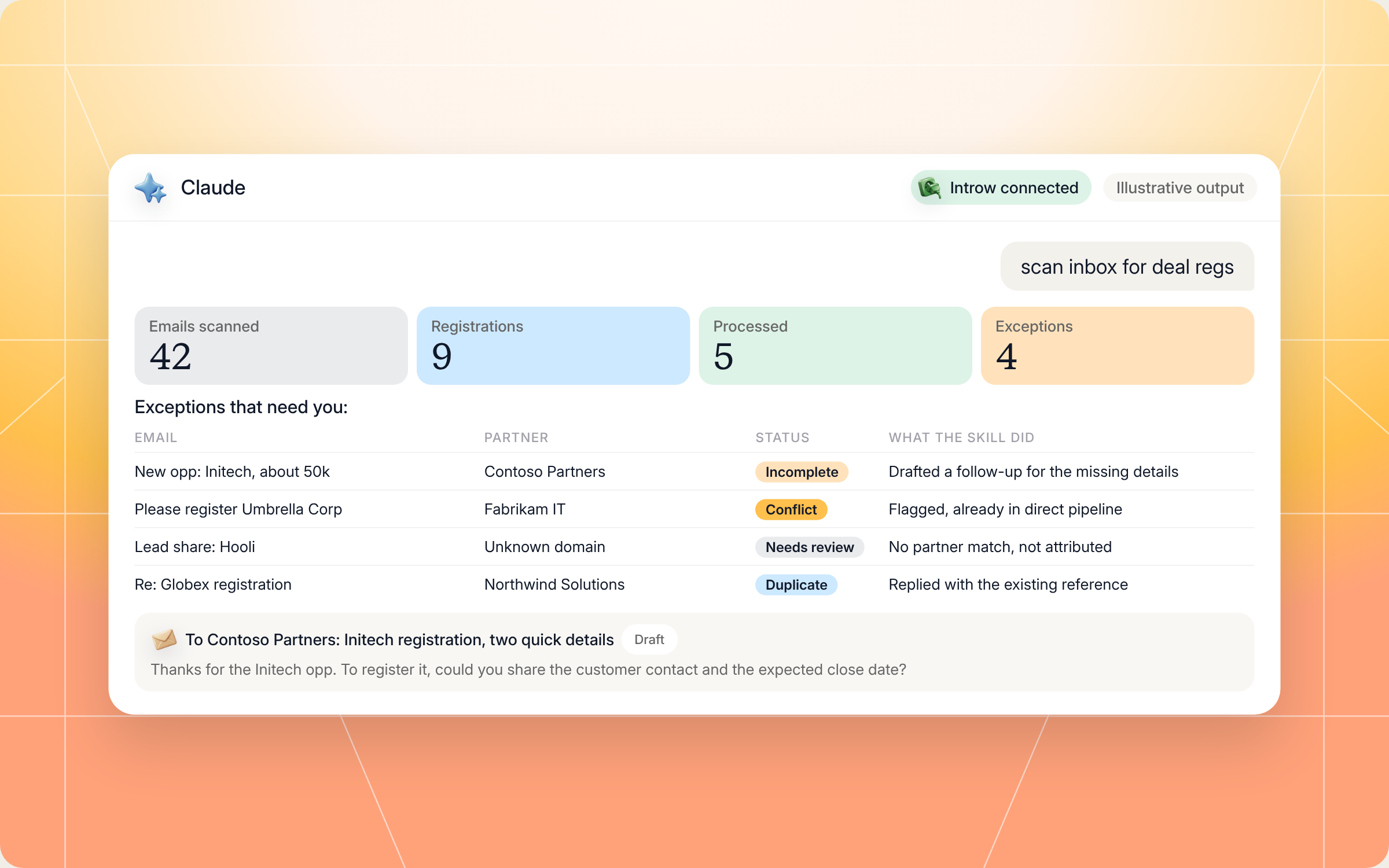
Here's an illustrative example of an exceptions list from one sweep:
| Partner | Account | Status | What the skill did | |
|---|---|---|---|---|
| "Can you flag Globex for us?" | Northwind Solutions | Globex | Processed | Submitted, reference sent, deal protection reminder included |
| "New opp: Initech, about 50k" | Contoso Partners | Initech | Incomplete | Drafted a follow up asking for the customer contact and close date |
| "Please register Umbrella Corp" | Fabrikam IT | Umbrella Corp | Conflict | Flagged for review, account already in direct pipeline |
| "Lead share: Hooli" | Unknown domain | Hooli | Needs review | Sender domain didn't match a partner, so no attribution |
| "Re: Globex registration" | Northwind Solutions | Globex | Duplicate | Replied with the existing reference instead of resubmitting |
And here's how a sweep like that looks in Claude, from the prompt to the drafted follow up:
Staying in control: what Claude can and can't do
Letting an AI read your inbox and submit deals only works if you trust it. These controls are built in:
- You approve the writes. Claude asks before it submits a registration, adds a comment or sends a reply to a partner, so nothing reaches your CRM or a partner without your say so.
- It stays inside your access. Claude connects to Introw over OAuth as you, so it can only see and do what you can.
- It never guesses who sent a deal. Attribution comes from a domain match against your partner records. Anything it can't match goes to human review.
- It won't submit contested deals. Channel conflict is checked at intake, and any overlap with direct pipeline or another partner's registration is flagged instead of submitted.
- It submits, it doesn't approve. Your approval rules still decide. Partner replies say "received, in review per SLA", never "approved".
- It keeps sensitive data in scope. Replies never reveal other partners' deals or internal data, and if an email can't be processed, the partner still gets a reason instead of silence.
- It won't double submit. Processed emails are labeled, or tracked in a seen list, so a second sweep skips them.
Prefer to do this in the Introw app?
If you'd rather not run a sweep at all, Introw can turn email into registrations at the source. Every form, including your deal registration form, can get its own email address. Partners send or BCC that address on the email they were already writing to your AE, Introw fills in and submits the form, and replies in the same thread with what it registered. If a required field is missing, nothing is submitted, and the reply asks for exactly what's needed.
The submit a form by email guide walks through setup, and ways to register a deal covers every other channel. The two approaches work together: the form address catches new emails, and the skill sweeps inboxes where partners still write to people. For the full feature set, see Introw's deal and lead registration software.
Pair it with other Claude skills
Getting deals registered is the start. These skills from the library pick up where the watcher leaves off:
- Pipeline Partner Influence Scout: scans your CRM pipeline for deals that would benefit most from a partner and handles the registration, so you bring partners in proactively, not only when they email.
- Deal Coach from Similar Wins: coaches a partner's newly registered deal using your past wins, so protected deals actually close.
- Register a Deal from Your AI Assistant: the partner side counterpart. Share it with your resellers so they can register with you straight from Claude or ChatGPT, through your own form.
- Cross Vendor Registration Status Tracker: another partner side skill that gives resellers one queue of pending, approved and expiring registrations across every vendor they work with.
You'll find all of them in Introw's skill library, and our roundup of Claude skills for partner teams explains how they fit together. If conflicts are a recurring issue, our guide to channel conflict is a good next read.
Run your deal registration process from Claude with Introw
Introw is a CRM first partner relationship management platform, which means it builds on top of your existing HubSpot or Salesforce setup rather than replacing it. It's also headless by design: the partner portal is one surface, but you can run the same program in plain language from Claude, ChatGPT, Slack, Teams or email through Introw's MCP server, with every action written back to your CRM.
That's what makes a skill like this work. Partner records, forms, submissions and pipeline live in one place, so the duplicate, conflict and eligibility checks run against real data. And because every registration lands in the same form with the same approval steps, a deal that came in by email is as clean as one from the portal.
Turn the partner emails sitting in your inbox into protected, attributed deals. Connect Claude or book a demo.
Still curious? Here are some quick answers to help clear things up
The deal registration process is how a partner tells a vendor about an opportunity they're working, and how the vendor checks, approves and protects it. A good process captures complete details, attributes the deal to the right partner, checks for duplicates and channel conflict, and gives the partner an answer within 24 hours.
No. Claude Code users can drop the SKILL.md into their skills folder. Everyone else can connect Claude to Introw through the connector directory, add a Gmail or Outlook connector, and run the same play in plain language.
Not without you. Claude asks before it submits a registration, writes to your CRM or replies to a partner. Contested, incomplete and unrecognized emails always go to human review, and the skill never approves a deal on its own.
Yes. The skill uses whichever mailbox connector you've installed, Gmail or Outlook, and can scan a shared channel ops inbox, individual AE inboxes or a dedicated deal registration alias.
Yes. The full file is in this article and in Introw's skill library. You can copy it as is or adapt it to your own program, but it registers deals through Introw's MCP server, so you'll need Introw connected to run it.





See AI-Native PRM in Action
Book a demo with one of our partner program experts, or explore Introw on your own time.

